
The purpose of this article is not to explain the Cxense Display product per se, but to give a newbie the necessary context and term knowledge to better understand the relationships among the various GUI options and components. If you are not only new to Cxense Display, but to the ad industry as such, then we recommend first reading On-line Advertisement Lingo for Dummies.
All terms with a special meaning wihtin Cxense Display are in italic.
For each standalone Cxense Display customer, we open a customer account, or as it is called in Cxense Display, an egroup (yes, go figure...)
The figure to the right gives a graphical presentation of the relationships among the different concepts in Cxense Display. The larger box to the right is Cxense Display and inside it we see the advertiser side to the right and the publisher side to the left.
The publisher side have one or more Site Networks. A Site Network is a misnomer for just simply a site. A section refers to the collection of pages that is to display a particular ad or a set of ads. Examples of sections are the front page, the sport section, the politics section, etc.
A section can have one or more ad spaces which in Cxense Display are being referred to as Content Units. A Content Unit is the physical space that an ad is to be placed within. It has a height, a width and the type of ad that it can hold (banner ad, text link, video, etc).
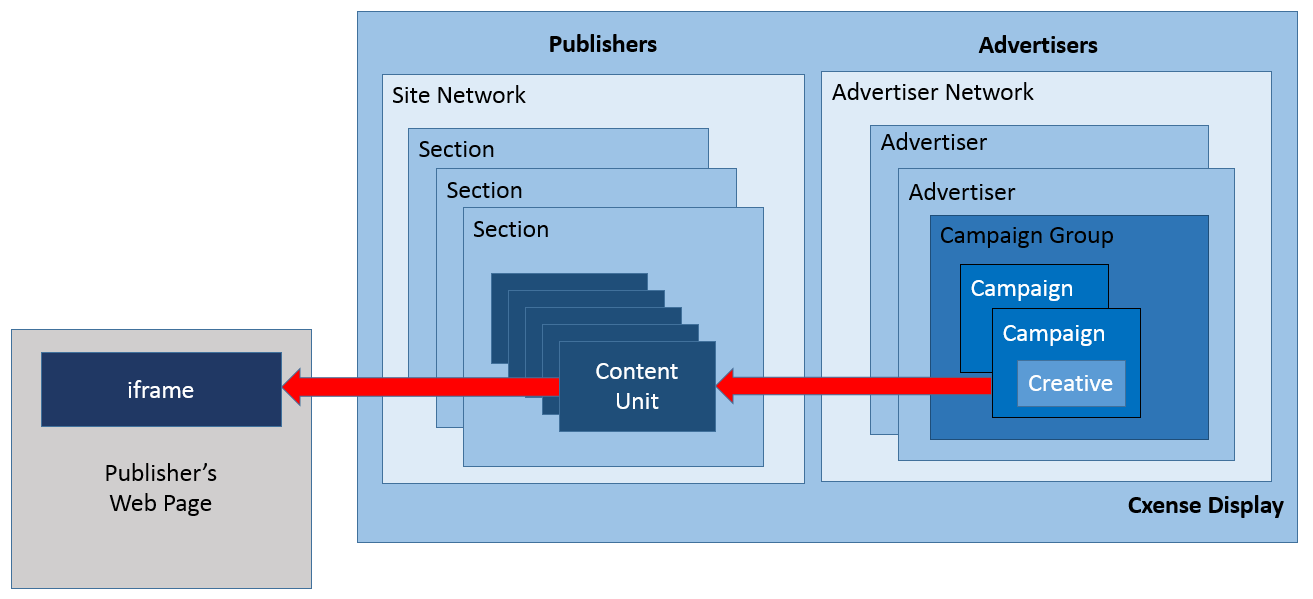
The advertiser side has one or more Advertiser Networks. An Advertiser Network normally maps to an ad agency. An agency normally has several advertiser clients. These are referred to, and appear in the graphic, as Advertisers. In the special case of a stand alone Advertiser, the Ad Network and the Advertiser would be the same real world entity and the mandatory use of a Advertiser Network in Cxense Display would just be for formal reasons.
Campaings can be organized into Campaign Groups to facilitate easier administration of them, however this is not mandatory.
Advertisers create ad Campaigns. An ad Campaign contains one or more Creatives. A Creative is the visual ad to be shown to the end user, it be an image, a video or simply some text. Campaigns are connected to one or more Content Units as shown by the right most red arrow in the graphic above. The Creatives of a Campaign are displayed on a publisher web page by having the Content Unit's javascript tags included in the web page code. This is illustrated by the left most red arrow above.
Cxense Display has two additional concepts not shown in the graphic. It can look back at the past and look into the future. The former is called Reporting and the latter is called Forecasting or Availability. Reporting will tell how many ad impressions and clicks there have been whereas Forecasting will let you know if you have ad inventory enough for the expected number of impressions going forward. It is possible to group Content Units into Unit Packages and do reporting for the whole package.