
See also:
Introduction
The reason to start with the Piano Insight API is mostly driven:
a) by a predefined goal ("how many users highly interested in sports, did we have the last week coming from Facebook?")
b) data analysis to figure out latent patterns of traffic and user groups
In both cases you need to know your tools and the data available for request and response to achieve your goals.
This overview tries to introduce you into data side (not the tools) and the general pattern available through the Piano Insight API /traffic family.
Understanding of this Piano Insight API is helpful for (and for an expert mandatory to master) the Piano Insight UI: Custom Workspaces too.
This wiki is not about the tools, which you need to test or implement a Piano Insight API request.
A graphical overview
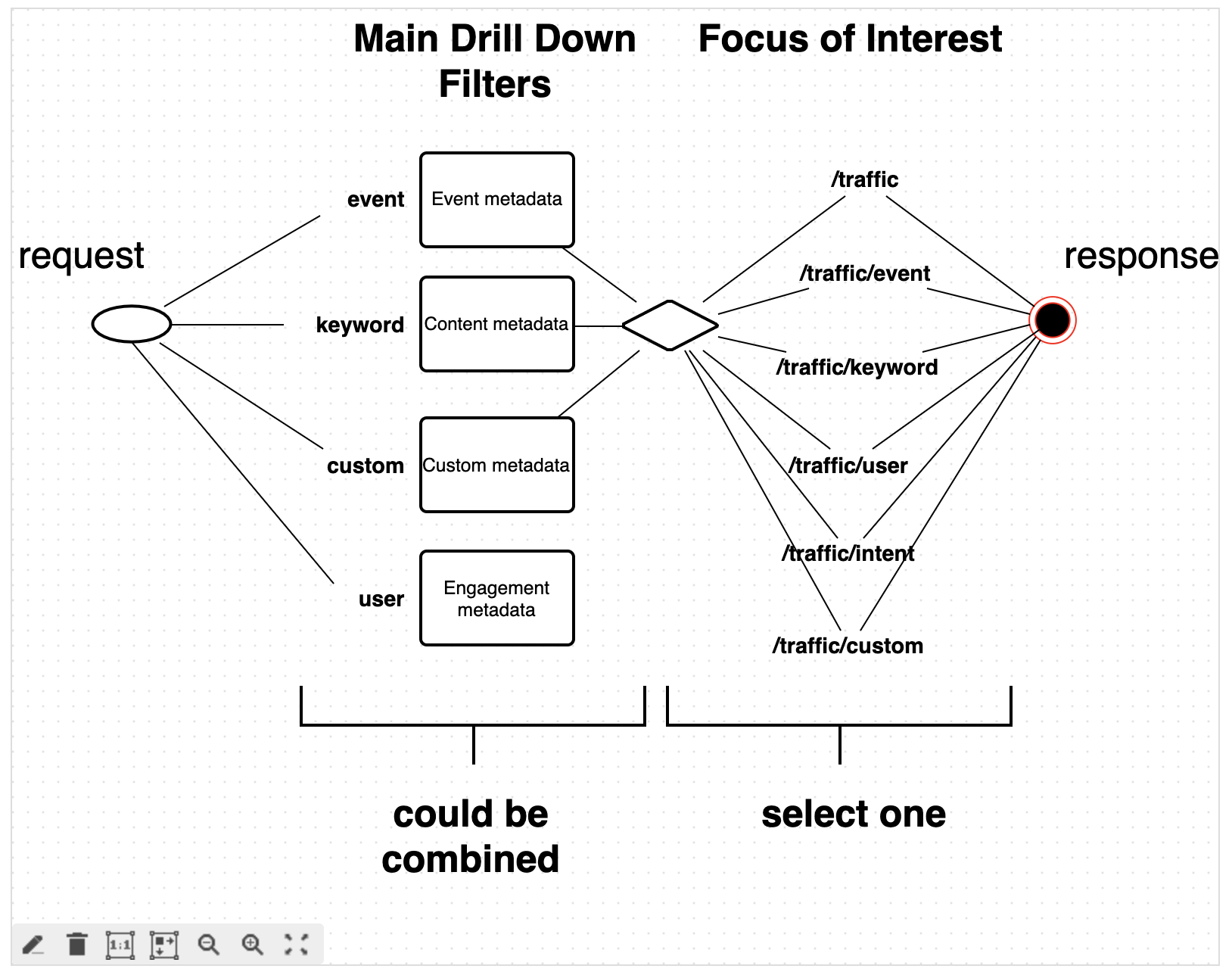
Request side: Drill Down Filters
We have a list of traffic filters; the most important ones are:
-
event
-
keyword
-
custom
-
user
All filters available are documented on our Traffic filters wiki.
The textual explanation
Each of them could be addressed by name as a “type” in a filter.
|
Now the question is, which items a group contains?
Event
Metadata stored for each event which was tracked through our tracking script. The different groups available are explained in:
-
Event groups
Keyword
Content centric metadata stored for each page (URL) which was crawled or fed. The different groups available are documented in:
-
Content profiles chapter "Group Names"
-
The following wiki pages will explain in more detail how you can add additional metadata to your content:
-
Document parsing, which explains the annotation of your content, and
-
Custom taxonomies, which explains our Processing approach for concept tagging of your content
-
/profile/content/external/update which offers an API to add 3rd party structured data to your content profiles
-
Custom
Metadata stored for each event, which could be sent along programmatically through setCustomParameters() along with the sendPageViewEvent() call as part of the Piano Insight tracking script:
-
Custom parameters
User
Because a user equals the events and content they consume, this filter measures user engagement with one of the groups above.
The "engagement" filter, also called the "frequency" filter, defines a metric-based min/max of any related events for a given time period.
Example: users who traveled in the last 30 days to between 2 and 6 countries
"filters":[{"type":"time", "start":"-30d", "filter":

{"type":"user", "having":{ "type":"event", "group":"country", "min":2, "max":6 } }
}]
For now, we focused on the filter types. Let's move on to your focus of interest.
Response side: Output Formats (Focus of Interest)
You may have seen that we have single wiki pages for:
-
/traffic
-
most basic and aggregated response (PV, UU, ActiveTime, ...)
-
-
/traffic/event
-
Same event metrics as above, but on the level of one or multiple event groups
-
-
/traffic/keyword
-
Same event metrics as above, but on the level of one or multiple content groups
-
-
/traffic/custom
-
Same event metrics as above, but on the level of one or multiple custom groups
-
-
/traffic/user
-
Same event metrics as above, but on the level of one or multiple user groups (each represented by a customer-prefix, so the responses are user identifiers)
-
-
/traffic/user/interest
-
Same event metrics as above, but on the level of one or multiple user-interest groups (each represented by a customer-prefix, so the responses are long-term user interests)
-
-
/traffic/intent
-
Same event metrics as above, but on the level of one or multiple user-intent groups (each represented by a customer-prefix, so the responses are short-term user-intents)
-
These calls are to control the response format, or in other terms, your "Focus of Interest".
Each of the different /traffic APIs is able to represent a different set of dimensions and metrics, which are organized similarly to the filter types.
Examples of requests and responses are given for each documented API documented within the Piano Insight API pages.