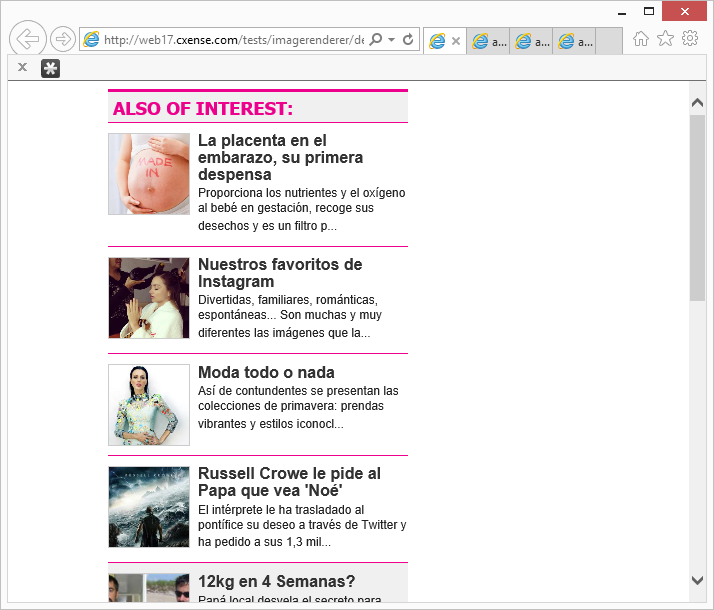
For recommended content widgets, the article thumbnails are often of varying size and have varying aspect ratios. If rendered as is, then the output doesn't look as good as if the images had been unified in the presentation.
That is the goal of this helper function renderContainedImage(): Unify the presentation of a diverse set of images.
Typical usage:
cX.renderContainedImage({
    container: { width: 80, height: 80, cssClass: 'recsImageContainer' },
    image: { src: imageSrc, dimensions: imageDimensions }
});
Presents source images (e.g. square, wide and tall) in a unified manner.
Which gives an output like this:
You can see a sample live test page here:
Full code example:
<style type="text/css" media="all">
    .recsImageContainer { float: left; margin: 0px 5px 5px 0px; border: 1px solid #ccc; background-color: #f0f0f0; }
</style>

<script type="text/javascript">
    if (item.dominantthumbnaildimensions && item.dominantthumbnail) {
        imageSrc = item.dominantthumbnail;
        imageDimensions = item.dominantthumbnaildimensions;
    } else {
        imageSrc = item.thumbnail;
        imageDimensions = '200x150';
    }

    cX.renderContainedImage({
        container: { width: 80, height: 80, cssClass: 'recsImageContainer' },
        image: { src: imageSrc, dimensions: imageDimensions }
    });
</script>
All supported parameters:
cX.renderContainedImage({
    // horizontalAlign: 'left',            // 'left', 'center', 'right'
    // verticalAlign: 'top',               // 'top', 'middle', 'bottom'
    // tooWideStrategy: 'zoom',            // 'zoom', 'fit'
    // tooTallStrategy: 'zoom',            // 'zoom', 'fit'
    // tooWideFocusPoint: 0.5,             // left: 0.0, center: 0.5, right: 1.0
    // tooTallFocusPoint: 0.0,             // top: 0.0, middle: 0.5, bottom: 1.0
    // scaleFactorMax: 1.0,                // 1.0: Don't scale up over original size
    // scaleFactorMin: 0.001,              // 1.0: Don't scale down below original size
    container: {
        width: 80, height: 80              // Required
        // cssClass: 'recsImageContainer'  // Optional
    },
    image: {
        src: imageSrc,                     // Required
        dimensions: imageDimensions        // Required or given as "width:" and "height:", format <width>x<height>, e.g. "80x80"
        // width: 80, height: 80,          // Required or given as "dimensions:"
        // cssClass: 'recsImage',          // Optional
        // id: 'image1',                   // Optional
        // alt: 'Ad',                      // Optional
        // title: 'A nice car'             // Optional
    }
});
Last updated: February 02, 2022