
Budgets ensure advertising costs do not exceed a predetermined amount for a specific time frame. Budgets can be set against Advertising Accounts, Folders, Campaigns, and Advertisements. It is also possible to set multiple budgets within the same hierarchy, such as;
$5000 budget Advertising Account per month
$500 budget per week for all campaigns
$50 budget per day for all advertisements
This way, the entire account expenditure will never go over $5000 per month, no one campaign will spend more than $500 per week, and no one Advertisement will spend more than $50 per day.
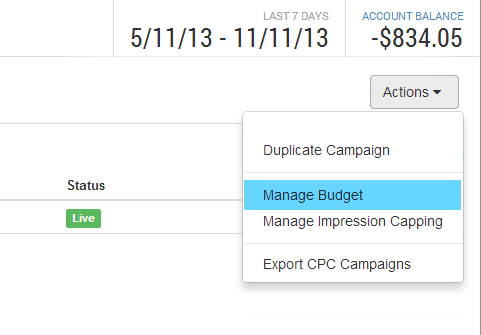
Budgets can be updated at any stage as required. Currently budgets are only available on CPC Campaigns, CPC Ads, Advertising Accounts, and Advertising Folders. Simply select 'Manage Budget' from the actions widget as shown below.
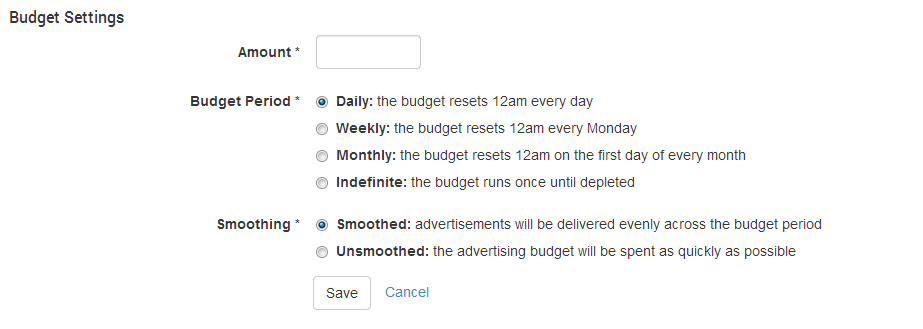
Once added, a budget provides the following settings:
Once saved, a budget visualization widget is shown providing a quick view of the budget's status. Below is an example budget visualization.

The example above shows the budget has been set at $175/week, and has $113.04 left to spend, and 4 days left to spend it. As the money is spent, and the time frame counts down, the isobars will shrink. Once either the time frame of budgeted amount reaches 0, the budget will disable the object from showing until the next time frame. The isobars change colors to help present the major points reference:
|
Color |
Percentage remaining |
|---|---|
|
Green |
100% <> 66% |
|
Orange |
65% <> 33% |
|
Red |
0% <> 33% |
Start Date
The Start date enables configuration of the budget to coincide with external events such as automated payments. By default the budget is set to the current day.
Timeframe
Budgets are created with one of the following timeframes or periods:
-
Daily - starting at midnight each day
-
Weekly - starting midnight Monday each week
-
Monthly - starting midnight on the first of each month
-
Indefinite - starts when the budget is created and will end when the amount is spent.
User created Currency budgets can use any of the above period types.
If the user wishes to change the timeframe of a budget, the budget must be deleted, then created using the required timeframe. When setting a budget the amount of time remaining is based on the time of day and day of week/ month. For example if the advertisers creates a daily budget at midday, the budget would have 12 hours remaining before it reset. Similarly, a monthly budget created on the 15th of the month will have around 15 days remaining.
Budget Delivery Smoothing
To ensure that the Advertisers Budget is not blown out too early in the Budget period (eg $50 per day for advertising), Select the 'Smoothing on' function. If the rate at which the Budget is being consumed is to fast early in the day, the 'Smoothing tool' will bring it under control, so that the remaining money in the Budget will be distributed more evenly throughout the day.
By choosing 'Smoothing Off', this will allow a more free flow of the Money being spent. So if the demand is there early on, then more people will have access to your Ad sooner, however your Daily Budget may be spent sooner.
Budgets with an Indefinite period type can not have smoothing enabled as they have no timeframe to work with.
Pro rate Budgets
New budgets are created in a pro rated state (except Indefinite budgets), so in the first period (day, week or month) only a proportional amount of budget is allocated.
For example, if a $175 budget is created on a Wednesday, then the proportion of the week remaining includes Thursday through Sunday plus whatever time is left on the Wednesday that the budget is created. That means the proportion of money to be spent in the first week is 4/7 (or 0.57) plus whatever time is left in the Wednesday. $175 multiplied by 4/7 gives $100, and in the case that's illustrated below, another $13.04 is added for the remainder of the current day.
In subsequent months the budget will allow the complete $100 spend.

Indefinite Period Budgets
Budgets with an Indefinite period are useful when working with other budgets in a hierarchy. For example a campaign could be created with an Indefinite budget of $1000 and a number of ads each with their own daily budgets. This would mean that the total campaign expenditure would never exceed $1000 and the ad budgets can be used to further control the daily expenditure.
Note that Smoothing cannot be enabled for Indefinite budgets as they have no period end to "smooth" against.
Managing Budgets
Creating Budgets
A Budget can be created against Advertising Accounts, Folders, Campaigns, and Advertisements. During the creation, the budget amount, period (Daily, Weekly, Monthly, Indefinite) and the smoothing must be specified. The new budget will be created in a pro rated state.
Editing Budgets
Budgets can be modified if required and the amount and smoothing can be edited. Note that if the amount changes then any amount already spent for the period will still be counted as "spent" against the new amount.
Examples: A smoothed monthly budget exists with a $500 amount. This budget is edited partway through the month after $200 was spent against the budget:
-
If the budget amount is changed to $1000 then there will be $800 remaining for the month. As the budget increased, the system will try to spend the remaining amount faster to ensure it is all spent if possible before the month ends.
-
If the budget amount is changed to $100 then the budget will now be exceeded. The system will stop serving all ads that are related to this budget.
Deleting Budgets
Budgets can be deleted if required. Once deleted, the budget will stop having any effect on the system and all amounts it has been counting will have been lost. Please use with care.
Note that if a budget is deleted partway through a period and another budget is created to replace it, then any amount spend against the old budget will not be included against the new budget. The new budget will be created in a pro rated state as normal.
Examples: A smoothed monthly budget exists with a $500 amount for a campaign. This budget is deleted partway through the month after $200 was spent against the budget:
-
If no new budget is created, then spending and the rate at which the ad is served will no longer be influenced by the campaigns budget.
-
If a new smoothed monthly budget is created with a $100 amount to replace this deleted budget, then the new budget will not be influenced by the $200 already spend against the old budget. The new budget will have a pro rate amount for the remained of the period.