
Examples and how to
-
cx.js simple HTML templating
-
Example 1 - Simple image ad
-
Example 2a - Simple image ad with collapsing (unit resizing)
-
Example 2b - Resizing to content size (pixel resizing)
-
Example 2c - Resizing to content size (100%-wide ad)
-
Example 3 - Simple combo ad (image + text)
-
Example 4a - Rendering without an IFrame - Inline template
-
Example 4b - Rendering without an IFrame - AJAX-loaded template
-
Example 4c - Rendering without an IFrame - JSONP-loaded template
-
Example 5 - Expanding image ad
-
Example 6 - Combined Cxense Content (recs) and Ads widget
-
Example 7 - Adding a logo
-
Example 8a - Using the default renderer
-
Example 8b - Custom rendering for one ad type and default rendering for all other ad types
-
Example 9 - Adding a timeout
-
Using the render template editor
Rationale
-
The default rendering engine in cX::ad provides one look for rendering ads. It is possible to do some CSS styling, but not much, and nothing on HTML layout
-
Rendering templates provide an easy layout and rendering option for combo creatives and third-party creatives.
Benefits
-
Can accommodate any kind of HTML rendered output, unlimited control of CSS, HTML and JavaScript
-
Handles all the aspects of user tracking and passing unique user identifiers
-
Does not need a proxy at the publisher site.
-
We can provide the ad search results as data to the client to allow for any kind of custom client rendering.
Implementation
Overview
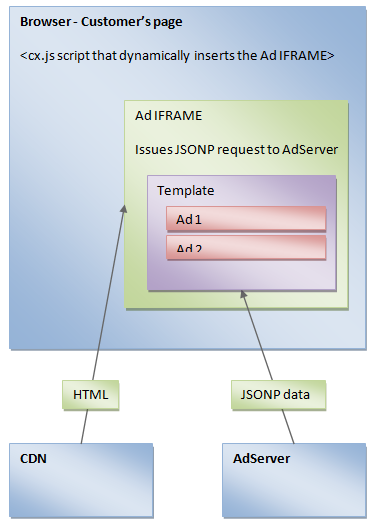
How it works
-
The end-user's browser loads our customer's page
-
That page includes our ad script that loads cx.js and adds a call to the method "insertAdSpace" (as before)
-
The call to insertAdSpace also has a new parameter " renderTemplateUrl: 'http://cdn.cxpublic.com/customerX/templateY.html' "
-
cx.js sees this parameter, and instead of creating an IFRAME and sourcing it directly from the AdServer, cx.js creates the IFRAME and sources it from the renderTemplateUrl
-
To optimize caching from the CDN, cx.js modifies any random or unique URL parameter to be sent as an URL fragment instead, e.g.:
-
Instead of http://adserver.cxad.cxense.com/adserver/search?asId=123&rnd=1231231231231&pn=0
-
we send: http://cdn.cxpublic.com/customerX/templateY.html#asId=123&rnd=1231231231231&pn=0
-
-
The browser loads the HTML from the CDN into the IFRAME
-
The browser executes JavaScript in the IFRAME
-
The JavaScript in the IFRAME issues a JSONP call to the AdServer by dynamically inserting a <script> tag with source like:
-
http://adserver.cxad.cxense.com/adserver/search?asId=123&rnd=1231231231231&media= javascript&callback=myCallback
-
-
The AdServer processes the request as normal
-
The AdServer formats the result as JSON (e.g. "ads: {}" (no ads))
-
The AdServer sees that there is a "callback" parameter, and wraps the JSON in a callback: "myCallback({ads: {} }); "
-
The browser loads the script respnse and executes the callback
-
The IFRAME HTML receives the callback, iterates over the returned ads and instantiates the templates
You must control pagination manually (e.g. the pn=0 parameter above) as the adserver is unable to determine whether creatives will fit in your allocated space.
Performance
The performance is as good or better than the "media=html" responses, because the template is cached hard (thus removing the one extra HTTP request) and the transferred data is less than for HTML, which must include the layout. If the template is cached very hard, it will almost never be loaded by the browser, and the actual data transferred is less then the "media=html" version, hence the performance is even better.
Behavioural ads / user tracking / cookies
None of these are modified in with this approach:
-
cx.js still sets / reads the site-specific cookies on the publisher's page
-
The template page does not modify any cookies
-
The JSONP requset to the adserver is done on the "http://cxense.com " domain, so the gckp and gcks cookies are added to the request by the browser automatically
Contextual ads
For the JSONP request, the HTTP referrer header cannot be used, as it will be pointing to the template CDN URL. The cx.js script therefore always pass on the URL of the publishers page in the ctx parameter to the adserver.
Considerations for external Publishers
Some Brokers will not have direct access to a website to embed or update an Ad Tag(s).
In these cases, you should include only the bare minimum specification in the tags themselves to reduce the maintenance of the tag(s). For example do not include Ad Dimensions (e.g. auw, auh), Required amount of Ads (e.g. ps values), nor Pagination options (pn values). You can read about these settings further in the Search REST and JavaScript API page. The User Interface should be the 'control' for these settings, as it is always accessible without bothering your Publisher.
Security
Script domains
JavaScript code in the template is run in a separate domain.
The URL of the CDN that serves the static HTML is therefore be something else than http://cxense.com . Currently it is "cxpublic.com".
Templating and cross-site scripting
The templating mechanisms has code that prevents the browser evaluating advertiser-provided data.
Read more about this in cx.js simple HTML templating
Sample code
Sample publisher page
|
Sample template HTML from CDN
|
Sample ad server JSONP response
|