This tutorial makes use of the following functions from the Cxense Insight API:
/document/search
/processing/dictionary/search
/reports/search
/reports/search/usage
This tutorial deals with the search aspect only. A tutorial on how to upload and index data is found at Cxense Search Index Side Tutorial.
The examples given in this tutorial assume that you have authenticated read access to a live site with the Cxense analytic script already deployed and that the site has been whitelisted. It further assumes that there are pages with more than 3 page views (the minimum for the crawler to start retriving a page).
All scripts in this tutorial are Python 3.x. For running them you will need the following:
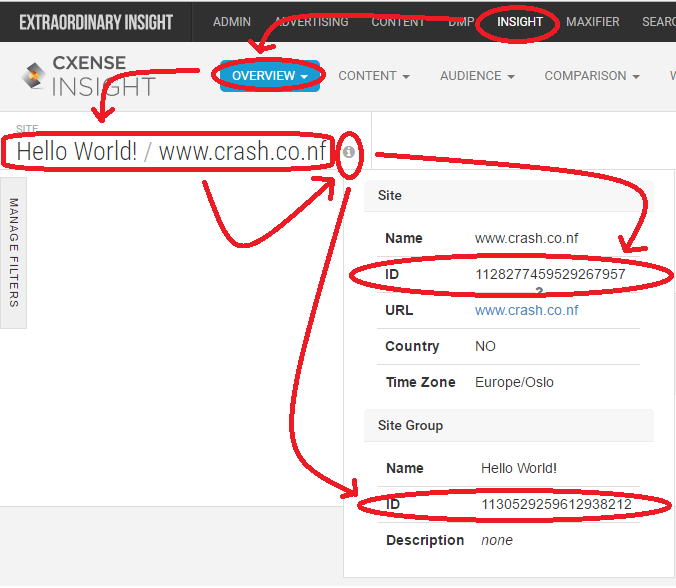
The site id
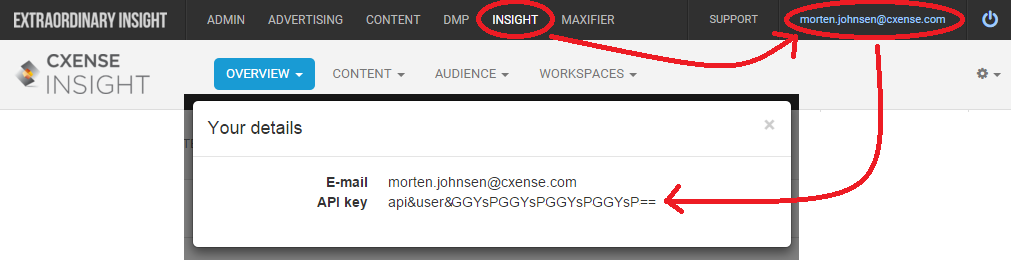
Your Cxense user id (the one you use for logging in to Cxense Insight)
Your secret Cxense API Key
The Simplest Search Program Possible
We will start out simple with this minimalistic search command (the unix/Mac version on the first line, the Windows version on the second):
$ python cx.py /document/search '{"siteIds":["<YOUR SITE ID>"]}'
> python cx.py /document/search "{\"siteIds\":[\"<YOUR SITE ID>\"]}"
How to install and use cx.py is described here. Below we see a Python search program using the same command. The output from the command line above and the script below will be the same.
The two functions cxApi() and errorHandling() are part of all scripts in this tutorial. To avoid long and repetitious code examples, their presence is simply assumed for the rest of this tutorial.
Beyond the plumbing, all what the script does is to execute the following API call:
/document/search { "siteIds":['some site id'] }
and then dump the whole result to the terminal window. The retured search result is in the shape and form of a dictionary. After replacing each of the 10 returned results with empty dictionaries, the result structure will look like this:
Notice that the only thing we are providing in the call above is the site id. We have still to provide any query terms. Without a query Cxense Search will give hits for all indexed documents. The totalCount of 6707 documents is thus the total size of the index in this case.
Dissecting a Search Result Hit
print(result['matches'][0])
Below we see the result of executing the previous line for then afterwards manually truncatiing some of the lines and adding space for readability. The data structure shown is the very first match in the returned search result.
{
	'id': '74251d7b4d8ee736359a0f62c097f9eb2f5f38ef',
	'score': 1.0,
	'fields': [
		{'field': 'body',                        'value': ['Desejo de praticamente toda mulher, perder aquela gordurinha .....]},
		{'field': 'category0',                   'value': 'sua-pele'},
		{'field': 'category1',                   'value': 'sua-pele|novidades'},
		{'field': 'contenthash',                 'value': 'ab464f79c708b60616a7c91e62f76850552c35c8ff9171c7d6c1a49febd4b281'},
		{'field': 'createtime',                  'value': '2015-08-05T20:34:52.000Z'},
		{'field': 'description',                 'value': 'Desejo de praticamente toda mulher, perder aquela gordurinha .....'},
		{'field': 'dominantimage',               'value': 'http://p2.trrsf.com/image/fget/cf/600/600/images.terra.com/.....'},
		{'field': 'dominantimagedimensions',     'value': '600x600', },
		{'field': 'dominantthumbnail',           'value': 'http://content-thumbnail.cxpublic.com/content/dominantthumbnail.....'},
		{'field': 'dominantthumbnaildimensions', 'value': '300x300', },
		{'field': 'heading',                     'value': 'Drenagem Lipossônica Ativa reduz gordura da barriga em uma s'},
		{'field': 'id',                          'value': 'd0e85cb9001e3f929fedcc8c2f2d64454f089239'},
		{'field': 'kw-category',                 'value': ['novidades', 'sua-pele']},
		{'field': 'kw-concept',                  'value': ['barriga', 'drenagem', 'gordura', 'gordura localizada', 'sessão']},
		{'field': 'kw-entity',                   'value': ['drenagem lipossônica ativa', 'stesis']},
		{'field': 'kw-location'.                 'value': 'são paulo'},
		{'field': 'kw-pageclass',                'value': 'article'},
		{'field': 'kw-person',                   'value': 'dino volpa', },
		{'field': 'kw-taxonomy',                 'value': ['sua-pele', 'sua-pele/novidades']},
		{'field': 'link-canonical',              'value': 'http://beleza.terra.com.br/sua-pele/novidades/novo-tipo-de--horas,.....'},
		{'field': 'og-image',                    'value': 'http://p2.trrsf.com/image/fget/cf/600/600/images.terra.com/2014.....'},
		{'field': 'og-site-name',                'value': 'Terra'},
		{'field': 'og-title',                    'value': 'Novo tipo de drenagem diminui 8 cm de barriga em duas horas'},
		{'field': 'og-type',                     'value': 'article'},
		{'field': 'og-url',                      'value': 'http://beleza.terra.com.br/sua-pele/novidades/novo-tipo-de-hora.....'},
		{'field': 'publishtime'                  'value': '2014-06-02T00:00:00.000Z'},
		{'field': 'recs-category-type'           'value': 'taxonomy'},
		{'field': 'recs-category0',              'value': 'taxonomy|sua-pele'},
		{'field': 'recs-category1',              'value': 'taxonomy|sua-pele|novidades'},
		{'field': 'recs-publishtime',            'value': '2014-06-02T00:00:00.000Z'},
		{'field': 'recs-rawtitle',               'value': 'Sua Pele: Drenagem Lipossônica Ativa reduz gordura da barriga em uma s'},
		{'field': 'siteid',                      'value': '1133920500627333062'},
		{'field': 'teaser',                      'value': 'Desejo de praticamente toda mulher, perder aquela gordurinha .....},
		{'field': 'thumbnail',                   'value': 'http://content-thumbnail.cxpublic.com/content/thumbnail200x1.....'},
		{'field': 'timestamp',                   'value': '2015-08-05T20:34:52.000Z'},
		{'field': 'title',                       'value': 'Novo tipo de drenagem diminui 8 cm de barriga em duas horas'},
		{'field': 'url',                         'value': 'http://beleza.terra.com.br/sua-pele/novidades/novo-tipo-de.....'},
		{'field': 'urlhash',                     'value': 'd0e85cb9001e3f929fedcc8c2f2d64454f089239'}
	]
}
Paging and Field Filtering
As we see above, a lot of data is being returned. Even the full document body is included in the search result. It is possible reduce the amount of data returned by specifying which result fields one wants to have returned. This is done with the resultFields parameter.
When we present the search result to an end user, the user may want to look beyond the first 10 results returned by default. By using the start and count parameters one can do result paging. Here we see how to ask for the og-title and og-url for search result number 11 through 20:
$ python cx.py /document/search '{"siteIds":["<YOUR SITE ID>"], "start":11, "count":10, "resultFields":["og-title","og-url"]}'
> python cx.py /document/search "{\"siteIds\":[\"<YOUR SITE ID>\"], \"start\":11, \"count\":10, \"resultFields\":[\"og-title\",\"og-url\"]}"
Above we have requested to only have two documents returned (count=2) and we only want the og-title and the og-url returned (resultFields=['og-title', 'og-url']) for each document. In additon we start by skipping the first 6 documents (#0 to #5) and have result #6 be the first one (start=6). Below we see the output after running the code above.
{
	'totalCount': 6317,
	'matches': [
		{
			'id': '38492b274883f91f0be6d0ac27d4e9208fc06b9e',
			'siteId': '1133920500627333062',
			'fields': [
				{'field': 'og-title', 'value': 'Veja seis dicas para afastar o tédio do relacionamento'},
				{'field': 'og-url', 'value': 'http://noticias.terra.com.br/......'}
			],
			'score': 1.0
		},
		{
			'id': '9f7a76cfc98d1550c43c6f31ad1219fa32d91059',
			'siteId': '1133920500627333062',
			'fields': [
				{'field': 'og-title', 'value': 'De R$ 11 a R$ 6 mil: confira os salários mínimos pelo mundo'},
				{'field': 'og-url', 'value': 'http://noticias.terra.com.br/......'}
			],
			'score': 1.0
		}
	]
}
Search Query
So far we have done all our searching without providing a query. A query is kind of a filter. Hence, without a query, all indexed documents will give a hit.
Below we see the output from the script above. For readability we specified that we only wanted the first hit returned (start=0, count=1). We are also using json for pritty printing the result.
Notice the query. It has a particular syntax that we will get back to. What is important for now is that we see that the returned result has the query term 'Rio de Janeiro' in its title.
{
    "matches": [
        {
            "fields": [
                {
                    "field": "og-title",
                    "value": "A um ano dos Jogos, veja como está obras no Rio de Janeiro"
                }
            ],
            "id": "119768d074c5984f6f6489f9d9ce5505e34d31c5",
            "score": 0.836741,
            "siteId": "1133920500627333062"
        }
    ],
    "totalCount": 572
}
Query Operators and Syntax
With Cxense legacy search the query used to be expressed as part of an URL, This explains its particular syntax as the query syntax is unchanged with new API.
This is the significance of each of the query syntax components:
field - refers to the document fields such as title, url, body etc. as shown above when we dissected one of the hits and listed all the fields. The default value is _all which is a special field name representing all fields.
boost - the importance we want to give to the fact that the query term appears in a particular field. It is for instance common to give a higher boost to the title than to the body field. The boost value is part of the rank formula and will impact the rank given to a particular document. The default boost value is 1.
token operator - Boolean operator that determines how to treat a multi term query. The three options are and, or and phrase. In case of the multi term query 'Rio de Janeiro', and will requires all terms to be present, or that at least one of them are, and phrase that all of them are present and appear in the exact given order. The default is and.
In the next script we have introduced a seperate function for constructing the query
Below we are outputing both the query and the search result. Notice how are giving 5 times more importance to a query term that appears in the title than in the body and how we are disregard all other occurrences of the query terms in any other field than the two listed.
query(title^5,body^1:"Rio de Janeiro", token-op=and)
{
    "matches": [
        {
            "fields": [
                {
                    "field": "og-title",
                    "value": "Miss Rio de Janeiro - Rayanne Morais"
                }
            ],
            "id": "af85c72a80ea97f6bbd7835ce919ce392332f257",
            "score": 3.5711548,
            "siteId": "1133920500627333062"
        }
    ],
    "totalCount": 6604
}
Multi-Ouery Queries
It is possible to combine several queries into one single query using boolean operators. Let's say you want to search for documents with either the exact word sequence 'Rio de Janeiro' or the exact word sequence 'São Paulo'. The only way to achieve that is to create two queries with tokenOp set to phrase and then or the two as shown below:
def genQuery(queryTerms, tokenOp='or', fieldBoosts={'_all':1}):
    fieldBoosting = (','.join(["%s^%s" % (k, str(v)) for k, v in fieldBoosts.items()]))
    return 'query(%s:"%s", token-op=%s)' % (fieldBoosting, queryTerms, tokenOp)

query = genQuery("Rio de Janeiro", tokenOp='phrase') + ' or ' + genQuery("São Paulo", tokenOp='phrase')
print(query)

OUTPUT:
query(_all^1:"Rio de Janeiro", token-op=phrase) or query(_all^1:"São Paulo", token-op=phrase)
Ranking and Sorting
By default the search result is sorted by relevance. It is however possible to sort the result alphabetically, numerically, by time or geo-distance.
def search(siteId, query=None, sort=None, start=0, count=10, resultFields=None):
    requestObj = {"siteIds":[siteId], 'query':query, 'sort':sort, "start":start, "count":count, "resultFields":resultFields}
    status, response = cxApi('/document/search', requestObj)
    errorHandling(status, response, "Unable to retrieve search result")
    return response

def genQuery(queryTerms, tokenOp='or', fieldBoosts={'_all':1}):
    fieldBoosting = (','.join(["%s^%s" % (k, str(v)) for k, v in fieldBoosts.items()]))
    return 'query(%s:"%s", token-op=%s)' % (fieldBoosting, queryTerms, tokenOp)

def genSortConfig(type, order, field=None, longitude=None, latitude=None):
    sortConfig = {'type':type, 'order':order, 'field':field, 'longitude':longitude, 'latitude':latitude}
    return [{k:v for k,v in sortConfig.items() if v != None}]

query = genQuery('Rio de Janeiro', tokenOp='phrase')
sort = genSortConfig('time', 'descending', 'publishtime')
print(sort)

result = search(_siteId, query=query, sort=sort, count=1, resultFields=['og-title'])
print(json.dumps(result, indent=4, sort_keys=True))
Below we see the output from the script above in which we set the sorting to be done by publishing time.
[{'type': 'time', 'order': 'descending', 'field': 'publishtime'}]
{
    "matches": [
        {
            "fields": [
                {
                    "field": "og-title",
                    "value": "Reis do vexame? Vasco e Palmeiras têm 26 vergonhas no no século"
                }
            ],
            "id": "2589db29e9b3603db75b7f5b5e97552eb7186898",
            "siteId": "1133920500627333062"
        }
    ],
    "totalCount": 2344
}
Highlights
It is possible to highlight the search term(s) in the returned result. This is normally done by using a different typeface such as bold or italic. In the example below we surround the search term with the markup <em> and </em>.
Below we see the output from highlighting the search terms in the field og-title and body.
[{'field': 'og-title', 'start': '<em>', 'stop': '</em>'}, {'field': 'body', 'start': '<em>', 'stop': '</em>'}]
{
    "matches": [
        {
            "fields": [
                {
                    "field": "og-title",
                    "value": "Musical 'Hairspray' estreia no Rio de Janeiro"
                }
            ],
            "highlights": [
                {
                    "field": "body",
                    "highlight": " (10), no  <em>Rio</em> <em>de</em> <em>Janeiro</em>, a vesão tupiniquim do trabalho. E quem assina a direção é Miguel Falabella."
                },
                {
                    "field": "body",
                    "highlight": "Quem quiser conferir o trabalho, deverá ir ao Oi Casa Grande, no Leblon,  <em>Rio</em> <em>de</em> <em>Janeiro</em>, às quintas"
                },
                {
                    "field": "og-title",
                    "highlight": "Musical 'Hairspray' estreia no <em>Rio</em> <em>de</em> <em>Janeiro</em>"
                }
            ],
            "id": "568eae0bd491fa13e32dea3e5442375e3fee6585",
            "score": 5.396971,
            "siteId": "1133920500627333062"
        }
    ],
    "totalCount": 48
}
Facets
Facets are used to drill down into the search result. In the example below we are searching for the word Formula-1 and requesting facets made for the 3 persons (presumably formula-1 drivers, team owners etc) that are mentioned in most documents (field 'kw-person').
If a user after having been presented with the factes chose to navigate into one, then the same query is used in a new search, but this time with the selected location in an added filter expression. Filters are described in the next section.
Filters
A filter and a query do the same function, but differ in three ways. What you put into the filter...
...will not have any effect on the ranking/ordering of the search result
...will not be processed linguistically
...can only be searched in its entirty (as if the search expression were the regular expression ^term$ when searching for term)
When queries and filters are applied together, whatever they contain are AND'ed as shown here:
(query) AND (filter)
The primary use of filters is in combination with facets. Imagine that you have a location facet and the previous search result returned a facet wth the 3 cities Rio de janeiro, São Paulo and Brasilia. The user now wants to drill down into the search result by only pursuing the Sâo Paulo hits. For this one would do the following:
(the same query) AND (filter with São Paulo)
If the user later chooses to drill down further using the results from other facets, then these facets would just be added to the filter:
(the same query) AND (filter with location:São Paulo AND filter with category shopping AND .......)
The example below builds on the Formula-1 example from the previous section. We first searched for the term 'Formula-1' and we now want to drill down into the result by adding one of the person facet as a filter term. We will be using the Brazilian driver Felipe Massa with 133 pages credited to him. Here is the code:
Not all fields can be used for filtering. All new fields added to the schema will be filter enabled, but most old ones are not. The easiest way to find out if a field is filter enabled or not is to try it and see if it returns an error. Below we see the error message "The field body is not filter enabled" after having tried to filter on the body field.
filter(body:"Sâo Paulo")
Traceback (most recent call last):
  File "C:/Users/Morten/Desktop/search3.py", line 58, in <module>
    result = search(_siteId, query, filter, sort, highlights, facets, start, count, resultFields)
  File "C:/Users/Morten/Desktop/search3.py", line 26, in search
    errorHandling(status, response, "Unable to retrieve search result")
  File "C:/Users/Morten/Desktop/search3.py", line 21, in errorHandling
    raise Exception("%s (http status = %s, error details: '%s')" % (message, status, response['error']))
Exception: Unable to retrieve search result (http status = 400, error details: 'Invalid request: Member filter failed: The field body is not filter enabled')
Obtaining Query Statistics
One can use the reporting functionality provided by /reports/search and /reports/search/usage to verify that the search solution is performing well or as an indicator on what there is to improve The command provides statistics on successful queries (queries that gives one or more hits) as well as on queries that fails (result in 0 hits). Based on the provided statistics one can take the appropiate actions to improve the performance. Here are a few examples:
The term vehicle gives 0 hits, but the term car gives many hits ==> add a vehicle -> car mapping to the synonym expansion dictionary
Various misspelled variants of the term jewelry gives 0 hits ==> add the term jewelry to the spell checking dictionary
Add all query terms that gives one or more hits to the query completion dictionary
The script below shows how to obtain the query report for a given date. Notice in particular the use of the parameter logQuery. The counting will be based on whatever one inserts into that parameter. In the example below we are searching for the Hello World document introduced at the beginning of this tutorial.
def search(siteId, query=None, logQuery=None, filter=None, sort=None, highlights=None, facets=None, start=0, count=10, resultFields=None):
    requestObj = {"siteIds":[siteId], 'query':query, 'logQuery':logQuery, 'filter':filter, 'sort':sort, 'highlights':highlights, 'facets':facets, 'start':start, 'count':count, 'resultFields':resultFields}
    status, response = cxApi('/document/search', requestObj)
    errorHandling(status, response, "Unable to retrieve search result")
    return response

def genQuery(queryTerms, tokenOp='or', fieldBoosts={'_all':1}):
    fieldBoosting = (','.join(["%s^%s" % (k, str(v)) for k, v in fieldBoosts.items()]))
    return 'query(%s:"%s", token-op=%s)' % (fieldBoosting, queryTerms, tokenOp)

def searchReportByDate(siteId, date):
    status, response = cxApi('/reports/search', {"siteId":siteId, "date":date})
    errorHandling(status, response, "Unable to retrieve search report")
    return response

def searchUsageByDate(siteId, date):
    status, response = cxApi('/reports/search/usage', {"siteId":siteId, "date":date})
    errorHandling(status, response, "Unable to retrieve search usage statistics")
    return response

# First we make a query
logQuery = 'Hello World'
query = genQuery(logQuery)
result = search(_siteId, query=query, logQuery=logQuery, count=1, resultFields=['og-title'])
print(json.dumps(result, indent=4, sort_keys=True))

# And then we check to see if it gets reported (replace date with today's date)
date = "2015-10-21"
print(searchReportByDate(_siteId, date))
print(searchUsageByDate(_siteId, date))
And below we see how the Hello World search terms appear as a successful query (counted as a matching query). If we had searched for something that were not in the index, we would instead have ended up with a failed query (counted as a zero hit query).
Cxense Search is accompanied by a set of dictionary based features external to the search feature itself. These services are either called before the query is sent (synonym expansion and query completion) or after the search result is returned (spell correction).
Dictionary creation and management is described in detail in the Dictionary Management Tutorial. Cxense support the following types of search related dictionaries:
Spell Correction (did you mean?)
Synonym Expansion
Query Completion (implemented using 2 dictionaries)
Suggest-Whitelist
Suggest-Blacklist
All the dictonaries work the same way. You enter in a lookup term, and back you receive a list of matches.
def dictionaryLookup(dictionaryId, input):
    status, response = cxApi('/processing/dictionary/search', {"dictionaryId":dictionaryId, "input":input})
    errorHandling(status, response, "Unable to do dictionary lookup")
    return response

print(dictionaryLookup(_dictionaryId, 'tv'))
Depending on what type of dictionary, you will now use the return value to enhance your query in one way or another. The output shown below is from querying the synonym dictionary further below.