
Piano Insight and Facebook Instant Articles Implementation
Facebook has announced the availability of Facebook Instant Articles ("FIA" for short) to all global publishers in April 2016. Their aim is to make a better, faster mobile reading experience for all Facebook users. If you are making use of FIA, with a simple implementation, you can now also enable the tracking and analysis of engagement of all your FIA content from right within Piano Insight.
The Implementation
Based on the FIA documentation "Analytics for Instant Articles", what would be required is to place the below Piano Insight script snippet as per instructed on the Facebook documentation.
As part of our script, you would need to specify a custom parameter in order to be able to differentiate traffic within Piano Insight Dashboards/Workspaces that it is for Facebook Instant Articles (FIA) content.
We recommend this parameter and value:
-
cX.callQueue.push(['setCustomParameters', { 'cx_channel': 'fia' }]);
|
|
You will need to use the appropriate siteID of your website ('site123' in the above code snippet). The URL for the sendPageViewEvent ('http://yourwebsite.com/XXX.html' in the above code snippet) should also be the actual corresponding article URL on your website so that any 'views' on Instant Article can be attributed back to the story. To differentiate the traffic from your pages the custom parameter |
Inside the Piano Insight Dashboard
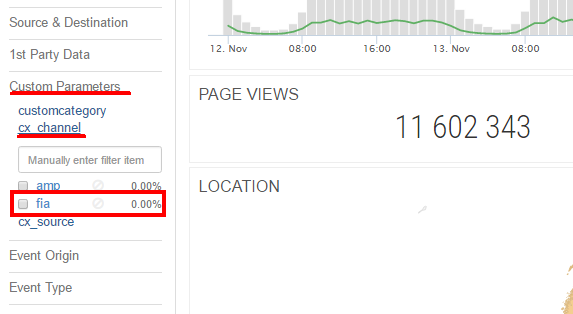
Within the Piano Insight dashboard, you can now analyse the traffic and user engagement of your FIA-specific content simply by doing a filter for the Custom Parameter 'cx_channel'. This new Custom Parameter will be available once the above code implementation is carried out. By selecting this cx_channel => 'fia' custom parameter filter, you'll be filtering the various Dashboards to only show you the stats/information of who are engaging with your FIA content.
If you have any further questions on this integration, please reach out to Piano Support.