
Introduction
Data Sharing gives you direct SQL access to your raw Piano Analytics event data in Snowflake, so you can build custom analyses and data models that go beyond what the Piano Analytics interface offers. Every event your visitors generate is available at the most granular level, with all of its properties. You can query it where it lives, or copy it into your own data warehouse or data lake.
For example, you can combine Piano Analytics events with your CRM data to measure the lifetime value of your subscribers, or feed a machine learning model with complete visitor journeys.
Data Flow is an alternative to Data Sharing if you prefer to receive granular data extracts. Read the Data Flow documentation for more information.
Data Schema
A data schema is the blueprint of an analytics solution: it defines which tables exist and how the data inside them is organized. With Data Sharing, you get a ready-made schema built around one event table, designed to stay flexible however much data you collect.
Events & Properties
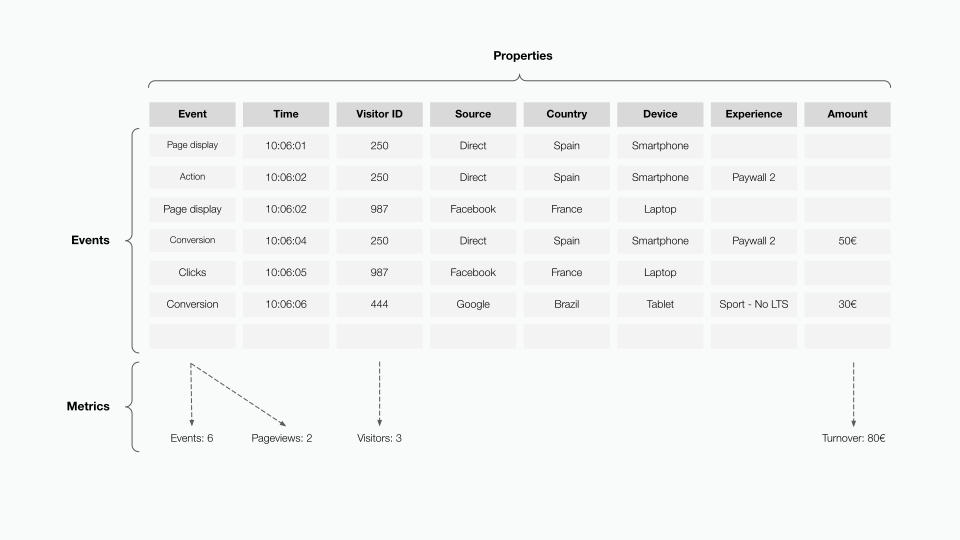
The event table is populated with your end users' actions on your website or online platform. Each line is an event that occurred during the customer journey, for example, a pageview, a subscription, a video start, or a chat start. These events quickly add up to millions or billions of lines, and Piano can store an unlimited number of event types.
Each event has properties that characterize it, such as page name, device type, traffic source, or subscription term. Piano provides over 1,400 columns for event properties (400 standard and 1,000 custom), shared across the whole event table. Each custom property appears as a column named after its technical key, and each event shows its value in the matching row.
Because every event and property sits in one table, you get raw, granular, and comprehensive data on the customer journey, from the macro level down to a single visit. The number of use cases is endless, and you can build a data model tailored to your business and objectives.
Schemas and tables
The event table is delivered in your Snowflake database through the following schemas:
|
Schema |
What it contains |
|---|---|
|
STREAM |
Real-time data for the current day. New events are available within minutes of being collected. |
|
DATA |
Processed all historical data, up to D-1. |
|
REF |
Reference data, such as the table that maps your site IDs to site labels. |
Snowflake also adds its own INFORMATION_SCHEMA, which describes the other schemas.
The two event tables are:
-
stream.events: today's events. -
data.events: historical events, up to D-1.
Your site labels are in ref.sites, which is refreshed hourly.
Real-time and historical data
Some calculations run overnight and can't be applied to real-time data. Examples include assigning a user ID to every event of a visit, or recalculating marketing sources. A query on stream.events and a query on data.events can therefore return different values for the same period.
Use stream.events when you need today's data as it arrives, and data.events for any complete day in the past.
Data retention
By default, data.events keeps 25 months of data, and older data is deleted automatically. This is the standard configuration, unless it was modified for your organization.
Access
You can access your Piano Analytics raw data in two ways, both based on Snowflake's data sharing technology: through a reader account, or through secure data sharing between Snowflake accounts.
Reader Account access
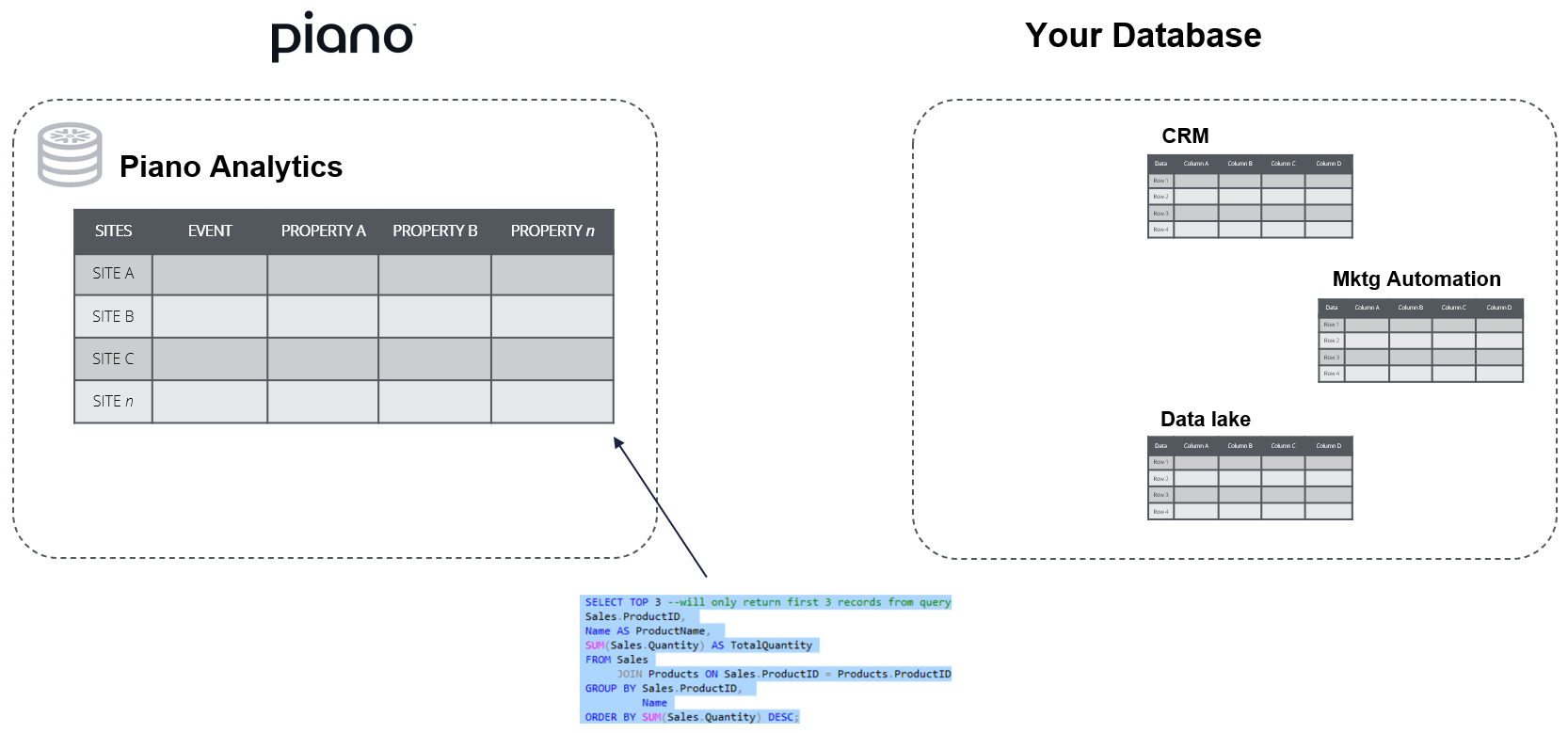
With the Piano Analytics product option "Data Sharing - Pay Per Use", you access your raw data directly through a reader account. This method has two main characteristics:
-
No Snowflake subscription needed: you query your data in Piano Analytics' Snowflake database without being a Snowflake customer.
-
Read-only structure: the event table and its infrastructure are designed and optimized to power Piano Analytics' tools, so you can query the data but not change the structure or schema of the database. You can still copy the data through the reader account to your own database or data lake for further processing.
Data shared directly to your Snowflake account
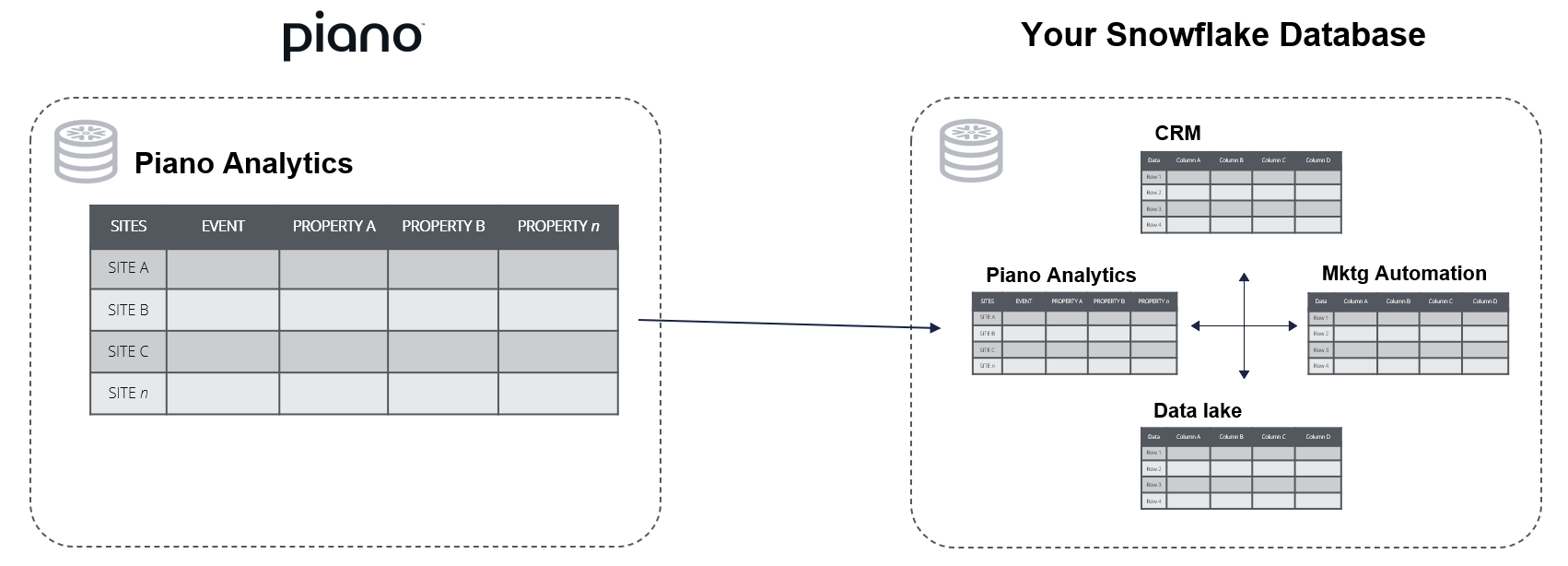
As an alternative, you can access a shared version of your Piano Analytics data through Snowflake's secure data sharing feature, which works between two Snowflake accounts. To use it, you must subscribe to the Piano Analytics product option "Data Sharing - delivered to your databse" and be a Snowflake customer.
Data availability
DATA schema
The data of a site becomes available in data.events once that site's day has ended and we have completed the consolidated data routine, so the timing depends on the site's time zone. This is expected behavior, not a processing delay.
Overnight delivery usually takes place between approximately 2:00 and 6:00 AM in the site's time zone; this is an indication, not a commitment.
If your organization has sites in several time zones, your data arrives in stages. Some sites' data appears earlier than others, so part of your data can look delayed compared to the rest.
Schedule your jobs
Don't trigger your jobs at a fixed time of day. We recommend one of these approaches:
-
Snowflake Streams: let Snowflake detect when new data arrives and start your processing then (see Snowflake’s documentation).
-
A retry mechanism: build retries into your jobs, so that a job that starts before the data is ready tries again later.
Day boundaries
The event_time_utc column is in UTC, so a day in this column ends at 23:59:59.999 UTC. If your site is in UTC+1, a UTC day includes events until 1:00 AM local time the next day. Query by the site's day if you need your results to match the reports in the Piano Analytics interface.
SQL queries
Working with Data Sharing implies writing SQL: every dataset you will want to work with starts with a query. That can get complex quickly, especially when you're juggling a wide schema or stacking several conditions.
To make this easier, the new version of Data Query lets you retrieve the SQL behind any dataset you've already built in the interface. Configure your dataset visually, open the Extract request panel, and select Copy SQL Query. Paste the result into your Data Sharing workflow and tweak it from there; you never start from a blank editor anymore.
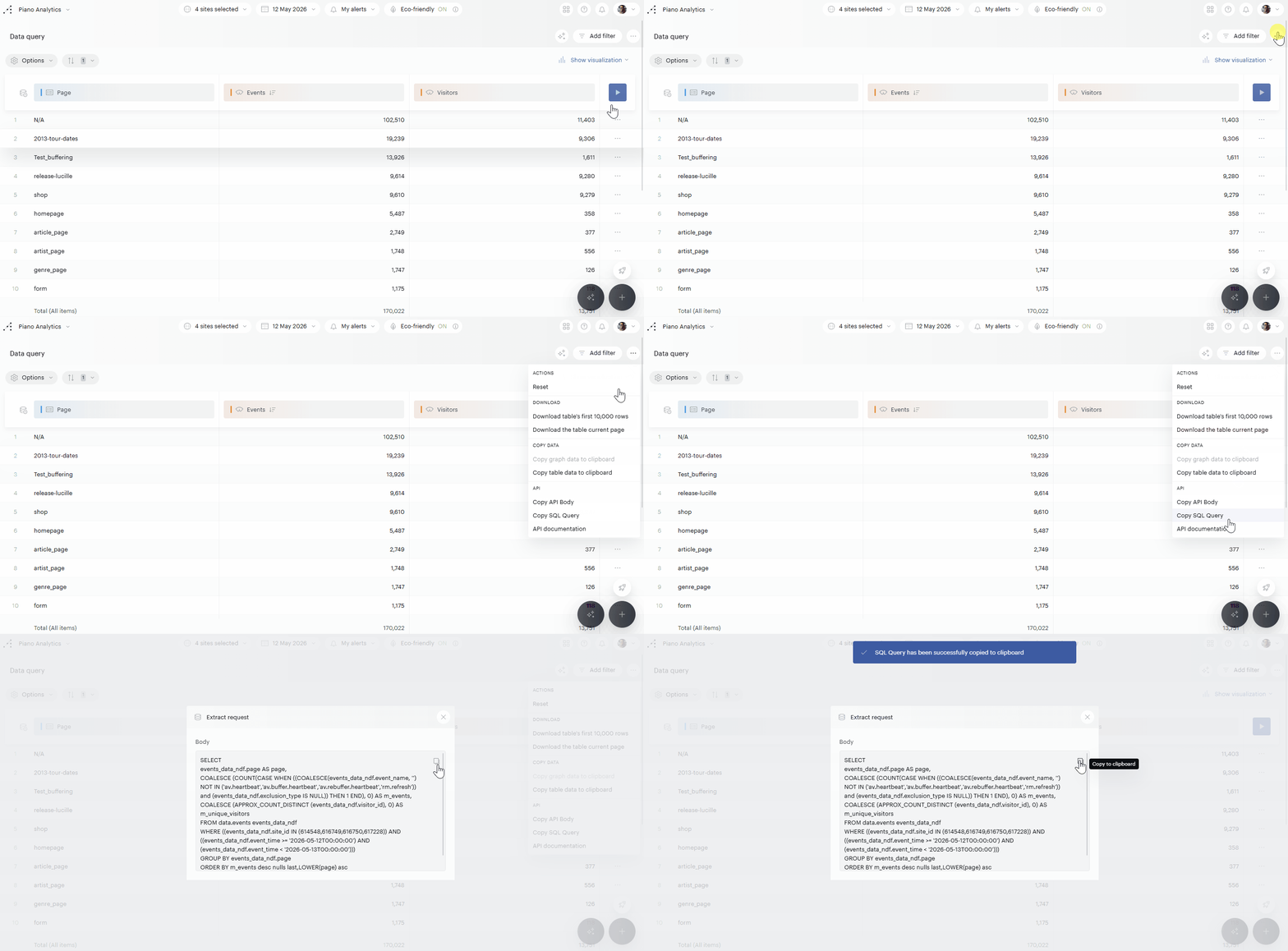
This option is available only to organizations with the Data Sharing module enabled.