
Keywords allow an advertiser to target specific terms in a number of different ways. Matches can be based on page content, or user entry for searches performed. Keywords can have varied matching types that allow for specific or general matching.
Downloading Campaign Keywords as CSV
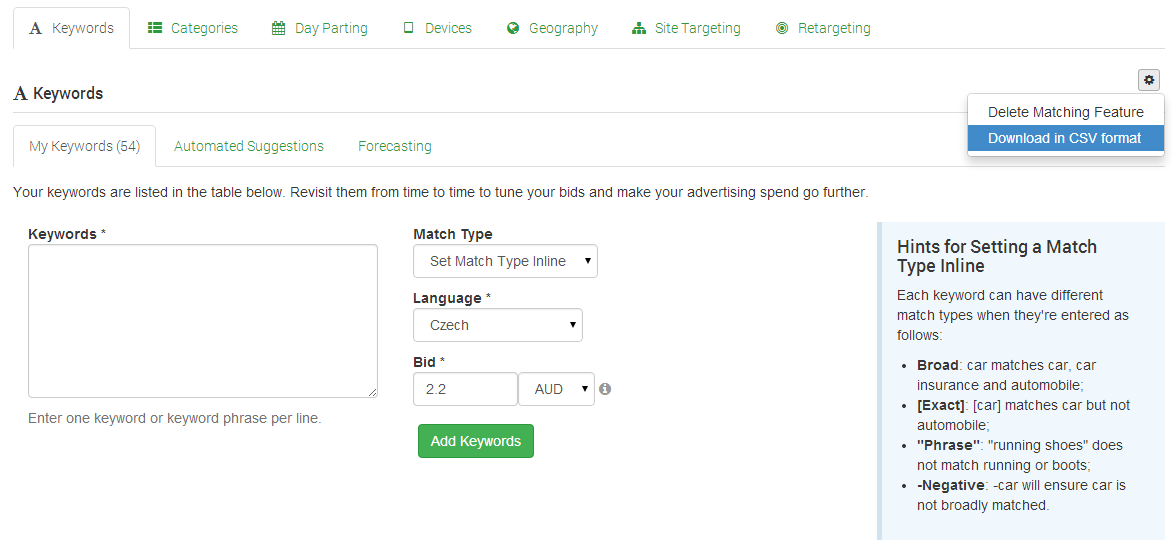
Campaign Keywords can be downloaded for offline review via an option within the Keywords 'Edit Cog' as shown below:
Keyword Targeting Functionality
For more specific details about the keyword targeting functionality in Cxense Advertising, please read through the pages listed below.
-
Automated Suggestions — Not sure which keywords you should purchase for your advertisement? Automated Suggestions can help. We can suggest potential keywords based on either a URL, or on the pages where your ad is likely to be displayed.
-
Forecasting — Keyword Forecasting provides insight into the effects of changes to keyword bids without having to do a live test.
-
Managing Keyword Bids in Bulk — Keywords can be managed in bulk so that multiple keywords can be updated at the same time.
-
Managing Keywords in Bulk — We offer the following management operations for updating keywords in bulk:
-
Match Types — Keyword match types allow you to control how relevant and accurate your purchased keywords are to the user's query. The rules are essentially the same as Google's match types with the key difference that broad match in Cxense Advertising requires all words to be present in the query string (i.e. an AND match instead of Google's OR). This dramatically improves relevance and is essentially the same as placing the broad match modifier in front of each word.