
Cxense Advertising provides the ability to target Audiences in many varied ways. Each Advertising Product is configured to enable none, some, or all the available options. When used in combination, Advertisers can target the audience even more specifically. For example:
"Show my Ads when: the user searches for the exact phrase 'quick coffee' in Melbourne CBD, between 7am and 10am, and 2pm to 4pm".
and
"Show my Ads when: The User views anything to do with florists, within a 10 kilometer radius of my shop front, on Monday to Saturday."
This specific targeting of audiences generally provides the best return on the Advertising Investment costs. It is not uncommon to vary the spend for more general audiences, as opposed to specific audiences. Using budgets can ensure the advertising costs are managed accordingly.
Getting there
Targeting can be set at either a Campaign or Advertisement level depending on the configuration for the associated product. When targeting is available at a Campaign level the left menu on any campaign page has a "Targeting" link. Clicking on that will allow addition of targeting criteria. For advertisements this is done within the Advertisement page.
Targeting Features & Capabilities
As you can create complex combinations of Audience targeting criteria, it is important to note the following:
Targeting Types (Keywords, Categories, etc.) are ANDed, whilst Specific Targeting details (e.g. Keyword 1, Keyword 2, etc. for Keyword targeting) are OR'd together
Visual reference for Targeting Type and Specific targeting data blending
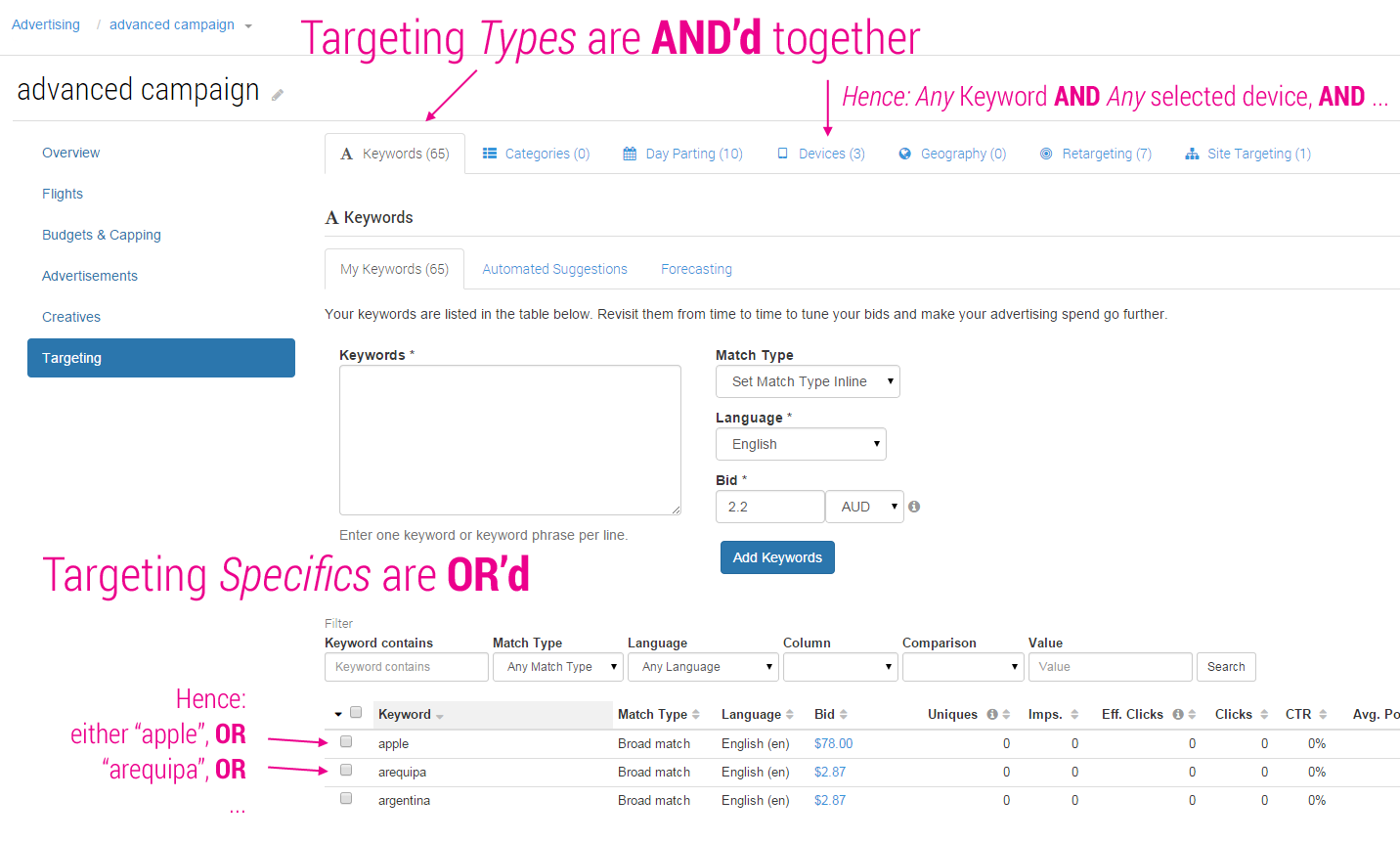
For specific information regarding each targeting type, please refer to the individual pages:
-
Ad Space Targeting — Ad Space targeting allows an advertiser to select the specific Ad Spaces, by name, on which they would like their Ads to be shown, or blocked from showing on.
-
Categories — Category Targeting provides a simple way to target large groups of end users.
-
Day Parting — Target your audience by setting active days of week, or specific times of day.
-
Device Targeting — Device targeting allows Ads to be targeted to users based on the device they are using to access the content page on which an AdSpace appears.
-
DMP Audience Segments
-
Geography — Target your audience using geographic locations.
-
Geospatial Targeting — Specify geographical regions by which you wish to target your advertising.
-
Keywords — Keywords allow an advertiser to target specific terms in a number of different ways. Matches can be based on page content, or user entry for searches performed. Keywords can have varied matching types that allow for specific or general matching.
-
Automated Suggestions — Not sure which keywords you should purchase for your advertisement? Automated Suggestions can help. We can suggest potential keywords based on either a URL, or on the pages where your ad is likely to be displayed.
-
Forecasting — Keyword Forecasting provides insight into the effects of changes to keyword bids without having to do a live test.
-
Managing Keyword Bids in Bulk — Keywords can be managed in bulk so that multiple keywords can be updated at the same time.
-
Managing Keywords in Bulk — We offer the following management operations for updating keywords in bulk:
-
Match Types — Keyword match types allow you to control how relevant and accurate your purchased keywords are to the user's query. The rules are essentially the same as Google's match types with the key difference that broad match in Cxense Advertising requires all words to be present in the query string (i.e. an AND match instead of Google's OR). This dramatically improves relevance and is essentially the same as placing the broad match modifier in front of each word.
-
-
Re-targeting
-
Site Targeting — The Site Targeting feature allows advertisers to control what sites their campaigns and ads are shown on. This feature is available on any product (CPM, CPC or Tenancy) that has the "Site Targeting" matching template enabled.
Local Competitor Labels
Campaigns for products with de-duping by competitor label enabled have a Local Competitor Labels field.

This feature allows you to define the competitor segments available across all your campaigns and assign them to each one for de-duping.
Please note that these labels apply at the advertiser container level and will not de-duplicate across multiple advertisers' containers.
Simply type in an existing label to get auto-completion on the required label, or type a new label to create one.
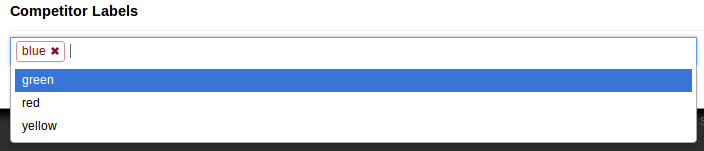
Once created, all new competitor labels will then be available to all other campaigns in your system.
Administrative Competitor Labels
This feature allows Business Owners to define competitor segments to be used to de-duplicate across all campaigns in your system via the Administrative Competitor Labels field.
The functionality and setup is similar to Local Competitor Labels, but differs in that these labels de-duplicate across multiple advertisers' containers.
Administrative competitor labels can be used in combination with local labels to de-duplicate using both system-wide and advertiser-wide competitor segments.
When moving between home containers, use the 'masquerade' functionality (where the user you originally logged in as has the Business Owner role). If you log directly into a different home container with a different user account you won't be able to see tags you created in the original home container - you need to masquerade (manage - > manage users - > click on the folder icon of the user who's home folder you want to access.)
Enabling Forensiq click fraud detection for Campaigns
Advertisers whose system administrators have added configuration for accessing the Forensiq fraud detection service will have the option to enable click scoring on their Campaigns.
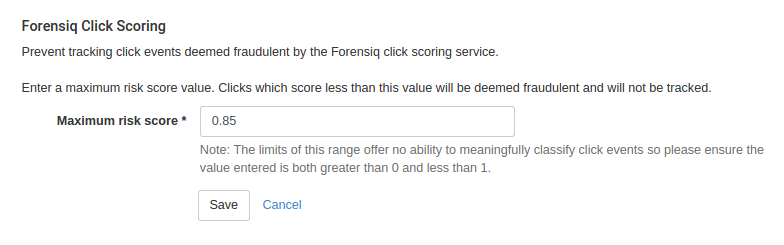
In order to enable the service for a Campaign the Advertiser must enter a Maximum risk click score which is a value between 0 and 1.
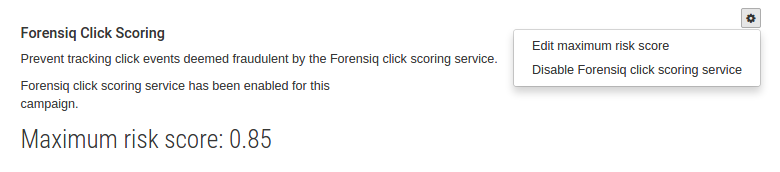
For Campaigns for which click scoring has been enabled Cxense Advertising will automatically send a request to Forensiq, at the time the click event occurs, for analysis. Forensiq will then return a score indicating their confidence in the authenticity of the click. Any clicks that are scored below the maximum risk score value set against the Campaign will be filtered out by Cxense Advertising and not counted against the Campaign.