
Why User Identification Matters
When a person interacts with your brand, they may visit multiple websites, use different browsers, or switch between a phone and a laptop. Each of these touchpoints can generate a separate, anonymous identifier. Without identity resolution, the data about that single person remains scattered across disconnected profiles, making it difficult to understand their preferences, behavior, or lifetime value.
Piano Audience solves this by linking identities together, so that browsing history, purchase behavior, CRM data, and ad interactions can all be combined into one unified user profile.
How Identity Resolution Works
Piano Audience uses a multi-layered approach to identify users. Each layer builds on the previous one to progressively resolve anonymous visitors into known individuals.
Layer 1: Anonymous Site-Level Identification (Cookies)
When a user first visits your website, Piano's JavaScript (cx.js) sets first-party cookies under your domain. These cookies generate an anonymous, site-specific identifier for the visitor. This is the most basic level of identification: it tells you that the same browser returned to the same website.
Key characteristics:
-
Automatically generated; no setup required beyond the standard Piano script.
-
Scoped to a single site and browser.
-
A different browser or device used by the same person will produce a separate identifier.
Layer 2: Cross-Site Identification (Global ID)
To recognize the same user across multiple websites (e.g., siteA.com and siteB.com), Piano Audience combines first-party and third-party cookie signals to derive a global user ID (also referred to as the "cross-site ID" or "Piano user ID").
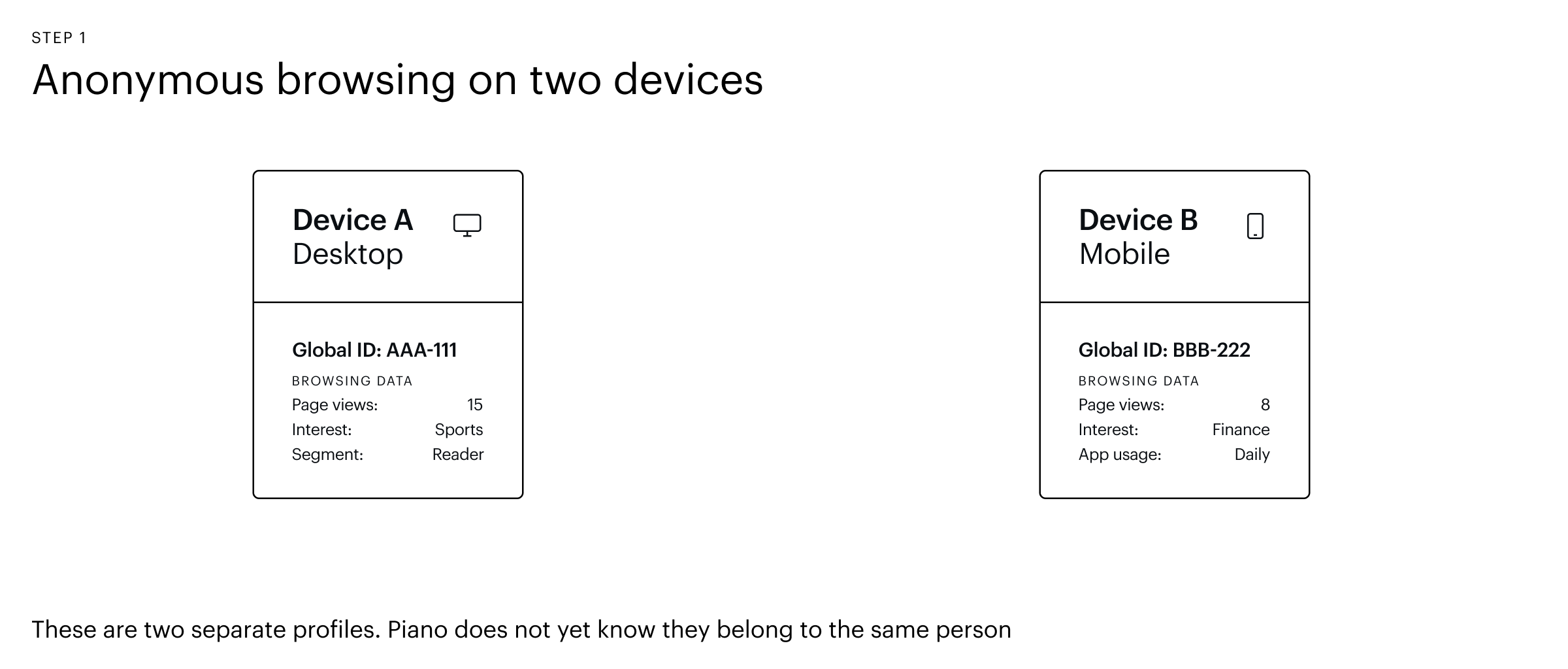
This cross-site ID allows you to understand that a visitor on one of your domains is the same visitor on another. However, it is still tied to a specific browser and device. A user on a mobile phone and the same user on a desktop PC will have two different global IDs unless further identity linking is applied.
Because this mechanism relies on third-party cookies, it is only fully functional on browsers that still support them (primarily Chromium-based browsers such as Google Chrome and Microsoft Edge). On browsers that block third-party cookies by default (Safari, Firefox), this layer alone cannot establish a cross-site identity, which is why Layer 3 (Edge ID) exists as a complementary solution.
Important: The uniqueUsers metric in Piano Audience reports counts distinct cross-site identifiers, not distinct physical people. If one person uses two browsers, they will be counted as two unique users at this level.
Layer 3: Edge ID – Cross-Site Identification Without Third-Party Cookies
With browsers like Safari and Firefox blocking third-party cookies, traditional cross-site identification can break down. Piano Audience offers Edge ID, a solution that uses first-party cookies and server-side ID resolution to maintain a consistent global identifier across your domains, even when third-party cookies are unavailable.
When Edge ID is enabled, Piano ensures that a user visiting multiple domains within your network is recognized as the same visitor, regardless of the browser's cookie policy. If third-party cookies are available (e.g., on Chrome), the standard cross-site identification method is used instead. Edge ID is currently supported on Safari and Firefox.
Edge ID is enabled on a per-site basis. Contact your Piano account team for activation details.
Layer 4: Cross-Device Identification (External / Customer-Supplied IDs)
Cross-site IDs still cannot connect a user's mobile phone to their laptop. To track users across devices, you can supply your own identifiers, such as a hashed email address, a CRM ID, or a login-based identifier, and link them to the Piano global ID.
This creates a mapping where multiple global IDs (one per browser/device) are associated with a single external identifier, enabling a cross-device view of the user.
How to link external identities:
-
Client-side (JavaScript): Use
cX.addExternalId()incx.js. -
Client-side (Mobile SDKs): Use the sync methods provided in the iOS and Android SDKs.
-
Server-side (API): Use the
/profile/user/external/link/updateendpoint.
All identity mappings are processed in real time. This means the moment a user authenticates or an identifier is linked, every historical and future interaction associated with that user is immediately available in a unified profile.
This real-time resolution makes Piano Audience especially powerful for personalization, retargeting, and audience activation, as there is no delay between the identity link being established and the enriched profile being actionable.
Identity Linking Limits
-
A maximum of 12 browser/cookie IDs can be linked to a single external ID within a given prefix. This means one known user can have up to 12 different devices or browsers associated with their profile.
-
There is no limitation on the number of external IDs that can be linked to a single browser/cookie ID. This is common when shared prefixes from identity vendors are active (e.g., a single browser cookie linked to both an ID5 identifier and a FirstID identifier alongside your customer-specific external ID).
Identity Types at a Glance
|
Identity Type |
Scope |
How It's Created |
Example |
|---|---|---|---|
|
Site-specific cookie ID |
Single site, single browser |
Automatically by |
|
|
Global (cross-site) ID |
Multiple sites, single browser/device |
Automatically via cookie matching or Edge ID |
Piano global user ID |
|
External (cross-device) ID |
Multiple devices, multiple browsers |
Supplied by you (the client) |
Hashed email, CRM ID, login ID |
|
Third-party vendor ID |
Cross-site (shared) |
Via integrations with identity vendors |
ID5, FirstID |
Identity Linking and Unified Profiles
An Identity Link connects different pieces of information about a person across platforms, devices, or data sources to create a unified view of that individual. For example, it can link a person's hashed email, their mobile device advertising ID (e.g., Apple IFA), and their website browsing cookie to show that they all belong to the same user.
How Identity Linking Works in Practice
-
A user visits your website → Piano assigns an anonymous global ID.
-
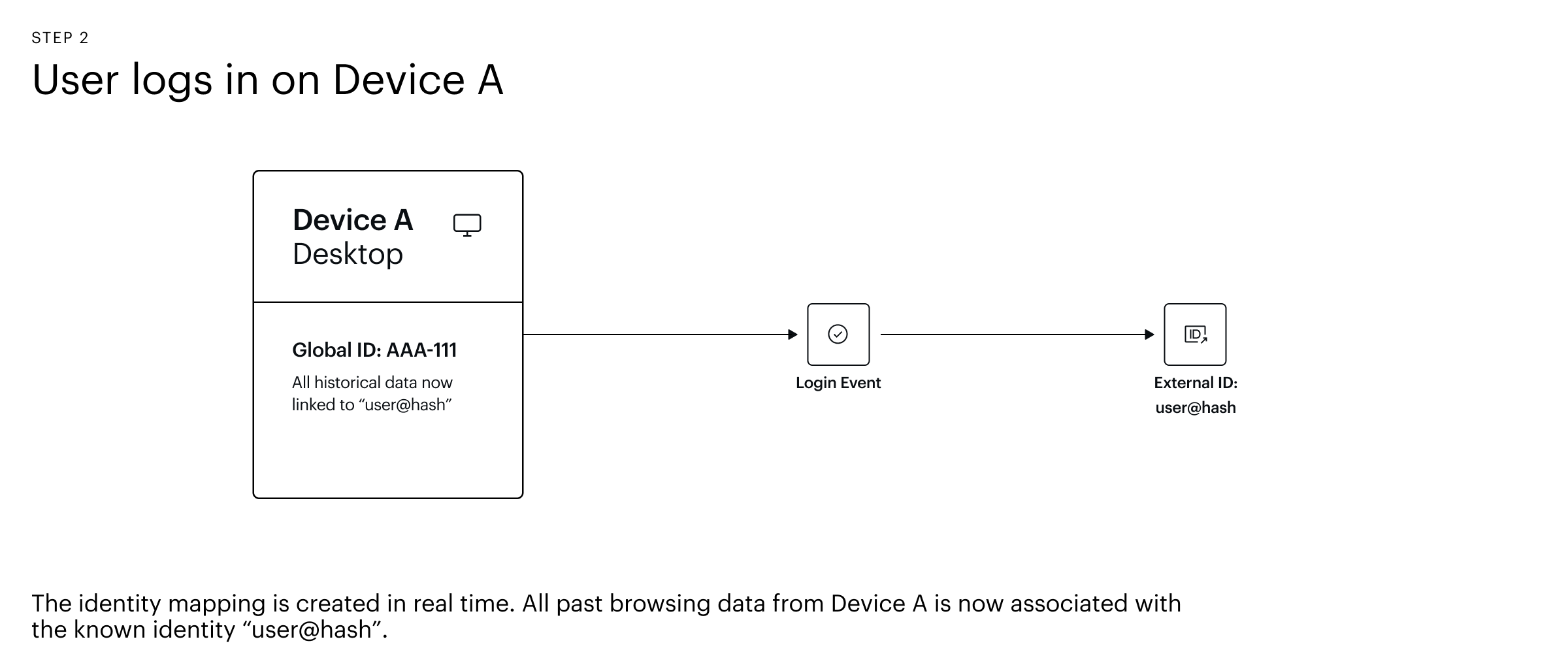
The user logs in → Your system shares a known identifier (e.g., hashed email) with Piano Audience via the JavaScript SDK or API. This creates a link between the anonymous global ID and the known identifier. At this point, all historical browsing data collected under the anonymous global ID is retroactively associated with the known identity, instantly enriching that user's profile with their full behavioral history.
-
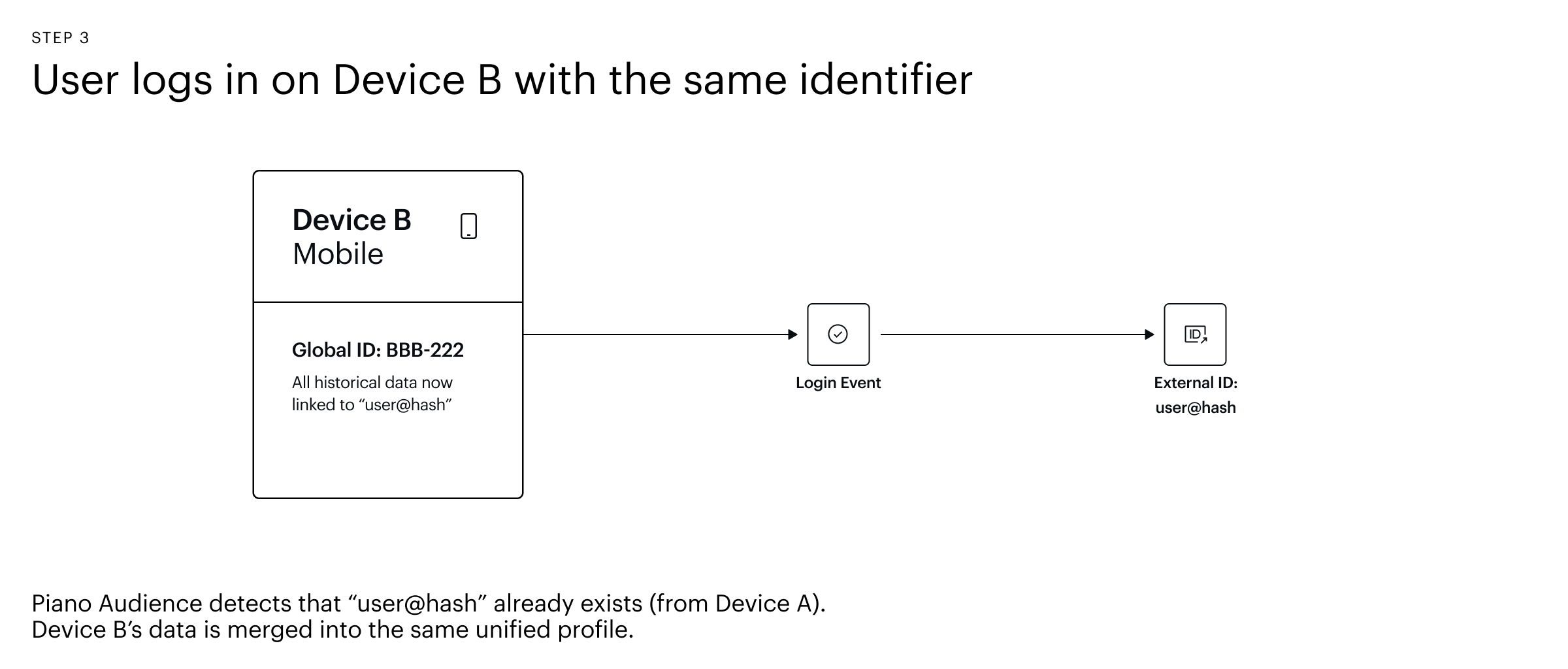
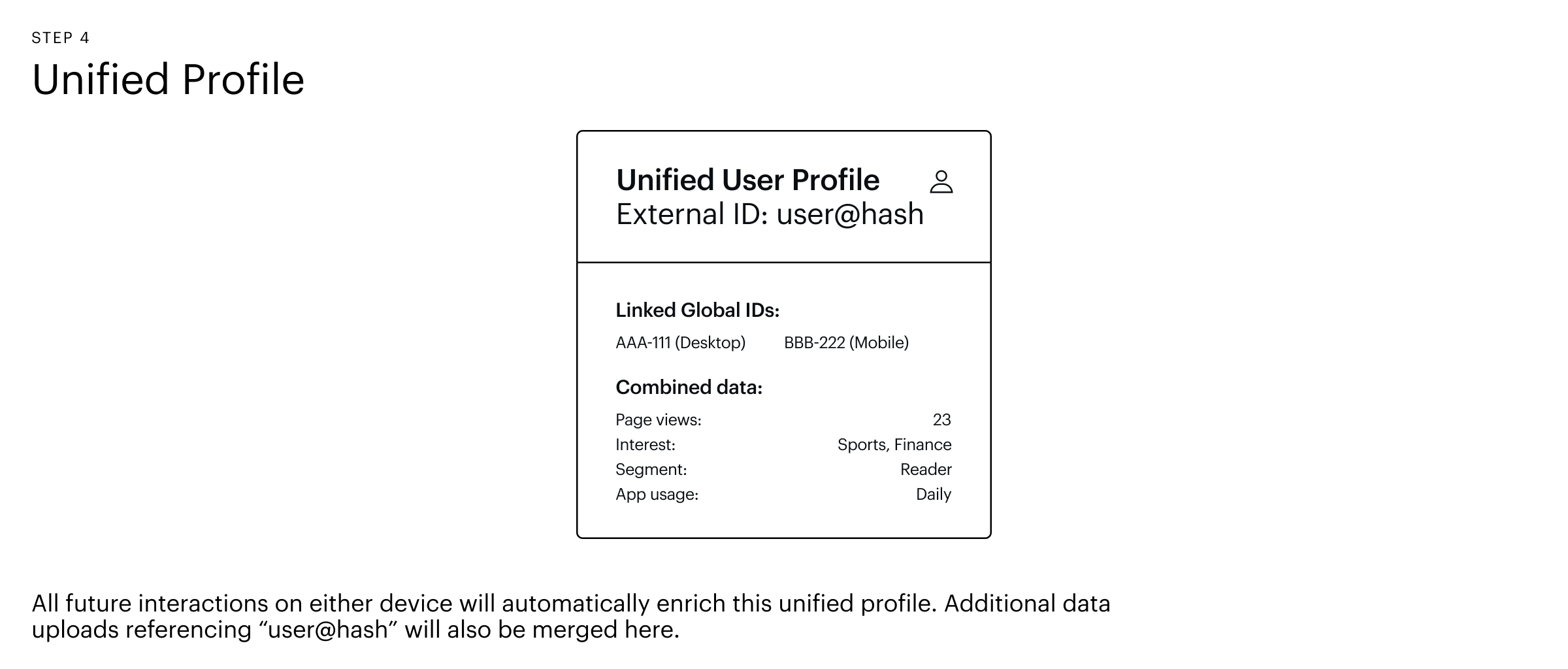
The user visits from a different device → A new global ID is assigned. When they log in again, the same known identifier is shared, linking this new global ID to the same external identity. Again, all browsing data from the new device is merged into the unified profile.
-
You upload CRM or offline data → By including the known identifier as a reference column in your data file, Piano Audience automatically stitches the uploaded data to the correct user profile.
Cross-Device Identity Resolution: A Visual Example
The diagram below illustrates how two separate devices are unified into a single profile once a common identifier is established.
Example data upload file:
|
IFA (Device ID) |
App Installed? |
User ID |
|---|---|---|
|
|
true |
|
In this example, the mobile device identifier (IFA) is linked to the existing user (user123) during ingestion, without requiring an additional prefix.
Managing Identities: Prefixes and Identities
Recommended Approach: One Customer Prefix with Multiple Identities
The recommended setup in Piano Audience is to use one customer prefix that contains the primary user identifier your organization uses (e.g., a CRM ID or internal user ID). When uploading additional data from other sources, you reference this user ID to ensure all data is linked to the correct profile.
This is achieved by defining identities within Piano Audience. An identity is a field type that can be used as a reference key when importing data, allowing you to match and enrich existing user profiles with new attributes. You can add multiple identity keys to a single prefix, and all of them are included in the unified profile.
Example: Your primary prefix contains a CRM user ID. You later want to import mobile app data that references those same user IDs. By setting the CRM user ID as an identity, the import process automatically matches incoming records to existing profiles.
How to Upload User Data
Piano Audience offers multiple ways to ingest user profile data against your identities:
-
User Profile Data Import (file-based): Upload CSV or other supported file formats through the UI-based import connector. This is suitable for batch updates such as CRM syncs or periodic data refreshes. For details, see User Profile Data Import.
-
API (programmatic): For real-time or automated ingestion, you can push user profile data directly via the Piano Audience API. This approach is ideal for integrations with your backend systems, marketing automation platforms, or any workflow that requires on-demand data updates. For full technical details, see API Documentation.
Both methods rely on the same identity resolution logic: if the incoming data includes a known identity key (e.g., your CRM user ID), Piano Audience will automatically match the data to the correct user profile.
When to Use Additional Prefixes
In most cases, a single customer prefix is sufficient. Additional prefixes should only be considered in specific scenarios:
-
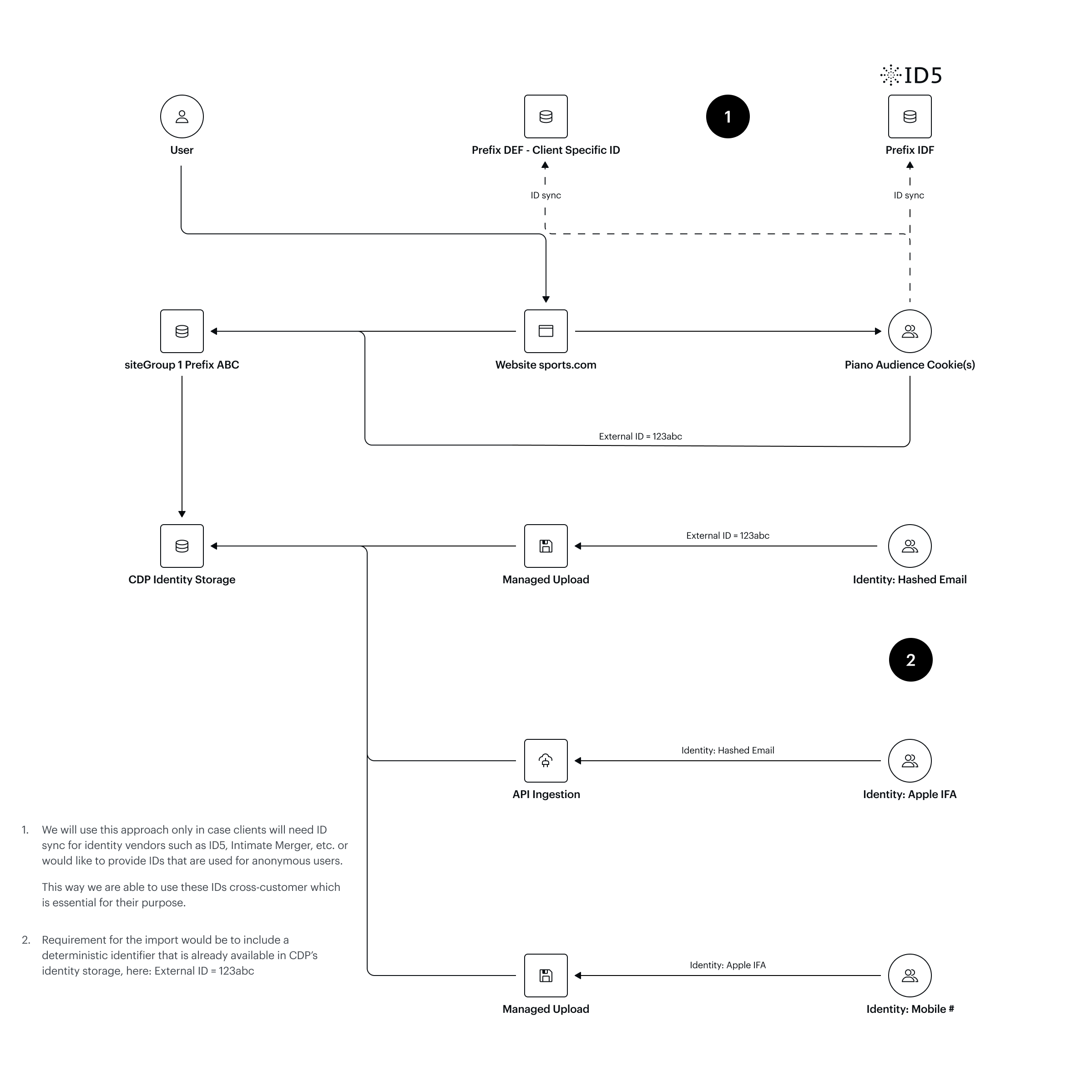
Client-side-only identifiers: When you need to ingest an ID that can only be collected via browser-side JavaScript (i.e., no server-side upload connector is available for that data source).
-
Anonymous user deduplication: When you want to provide a custom ID specifically for deduplicating anonymous users (e.g., a proprietary device fingerprint or a custom session identifier).
Shared Prefixes
Piano Audience also uses shared prefixes for anonymous IDs and identifiers from third-party identity vendors (e.g., ID5, FirstID). These are managed at a system level by Piano and are automatically available when the corresponding vendor integration is active on your account. They cannot be edited or configured by clients.
Only prefixes that are assigned to your account can be managed. For details on managing your own prefixes, see Prefix Management.
Architecture Overview: Prefixes, Identities, and Data Ingestion
The diagram below illustrates how prefixes and identities work together in Piano Audience for client-side ID syncing and server-side data ingestion.
Understanding User Counts and Metrics
Because identity resolution is layered, it is important to understand what the reported metrics represent:
-
uniqueUsersin traffic and DMP reports reflects the count of distinct cross-site (global) IDs, not distinct physical people. One person using two browsers will appear as two unique users. -
External ID counts may be lower than
uniqueUsers, because multiple global IDs can map to a single external identity. This is expected and indicates that cross-device linking is working correctly.
Best Practices
-
Enable Edge ID on your sites to maintain accurate cross-site identification on browsers that block third-party cookies.
-
Share external identifiers as early as possible, ideally at login, to maximize the window for cross-device identity linking and ensure the broadest possible behavioral history is captured.
-
Use hashed values for personally identifiable information (e.g., email addresses) when ingesting identifiers client-side (via JavaScript or mobile SDKs) to maintain user privacy. When using server-side identity ingestion (e.g., the User Profile Data Import), PII can be uploaded directly as it is not exposed in the browser.
-
Use one customer prefix and leverage identity keys for data uploads. This keeps your setup simple and ensures all data sources are linked to the same user profiles.
Summary
Piano Audience's identity resolution framework works across four progressive layers:
-
Site-level cookies for anonymous, single-site recognition.
-
Cross-site global IDs for recognizing users across your domains.
-
Edge ID for maintaining cross-site identity when third-party cookies are blocked.
-
External (customer-supplied) IDs for cross-device and cross-browser identification, managed through prefixes and identities within Piano Audience.
By combining these layers and linking identities through your CRM data, login events, and data uploads, you can build a comprehensive, unified view of each user across all their interactions with your brand.