
Ad Space targeting allows an advertiser to select the specific Ad Spaces, by name, on which they would like their Ads to be shown, or blocked from showing on.
The product manager must enable this feature on the Product before it will be made available to advertisers in Cxense Advertising. Please see the Ad Space Targeting Template page for more details.
Advertisers who have purchased this product will then be offered a dropdown containing each of the Ad Spaces associated (via their Feed associations) with the Product purchased for the Campaign, from which they can make their selection.
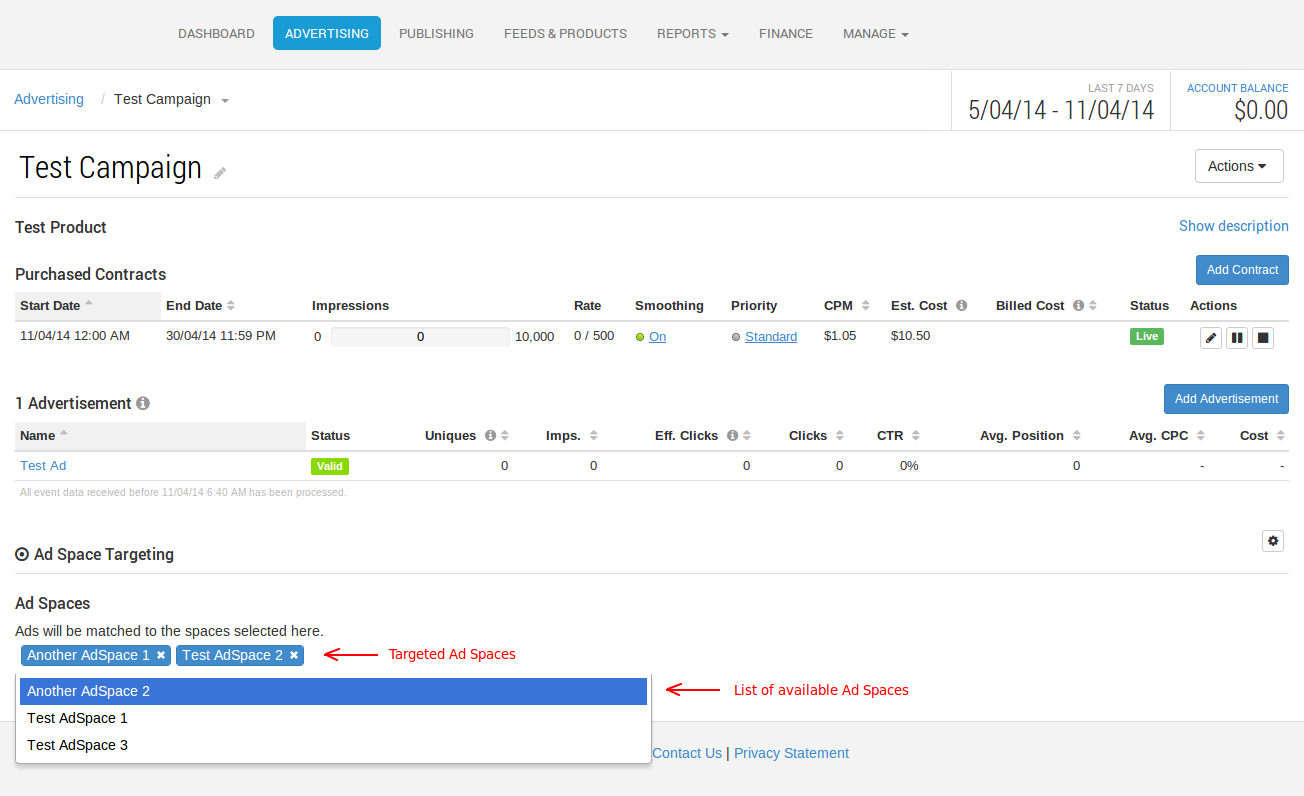
Making no selection will mean the Campaign will behave as normal, with its Ads showing on all Ad Spaces associated with the Product. Once one or more Ad Spaces are targeted, delivery of the Campaign's Ads will be limited to those chosen Ad Spaces only. When one or more Ad Spaces are blocked, delivery of the Campaign's ads will never be shown on those Ad Spaces.
REST API
This feature has a corresponding REST API for programmatic management of Ad Space Targeting features on Campaigns and Ads. Please see the Ad Space Targeting REST API documentation for details.