
Scope
The function provides:
-
Caching of response values.
-
Adding the current user ID to the request.
-
Fallback to cached values upon a server response error.
-
Giving immediate responses to synchronous ad tags while keeping the cached values updated in the background.
Syntax
var segments = cX.getUserSegmentIds(<arguments>, [<options>]);
where arguments can have the following properties:
-
(required) persistedQueryId: The ID of the persisted query to execute.
-
(optional) callback: A function that will be called back with an array of segment IDs as the first argument.
-
(optional) synchronous: true or false (default): Forced synchronous execution (will block page rendering).
The options argument (not required) is an object that will be forwarded to the persisted query, e.g., to override certain fields in the query like siteGroupIds or identities. See the last chapter for examples.
The return value is always an array of strings. A cached value or an empty array is returned if no cached value exists and the server request failed. e.g.:
['12345', '6789']
Procedure
Create a persisted query
Create a persisted query that executes the wanted <a href="https://docs.piano.io/dmp-api-profile-user-segment/" rel="noopener" target="_blank">/profile/user/segment</a> API request.
You can do this either in the UI or from the command line.
In the examples below, replace the "10431" siteGroupId with your actual site group ID!
Admin UI
-
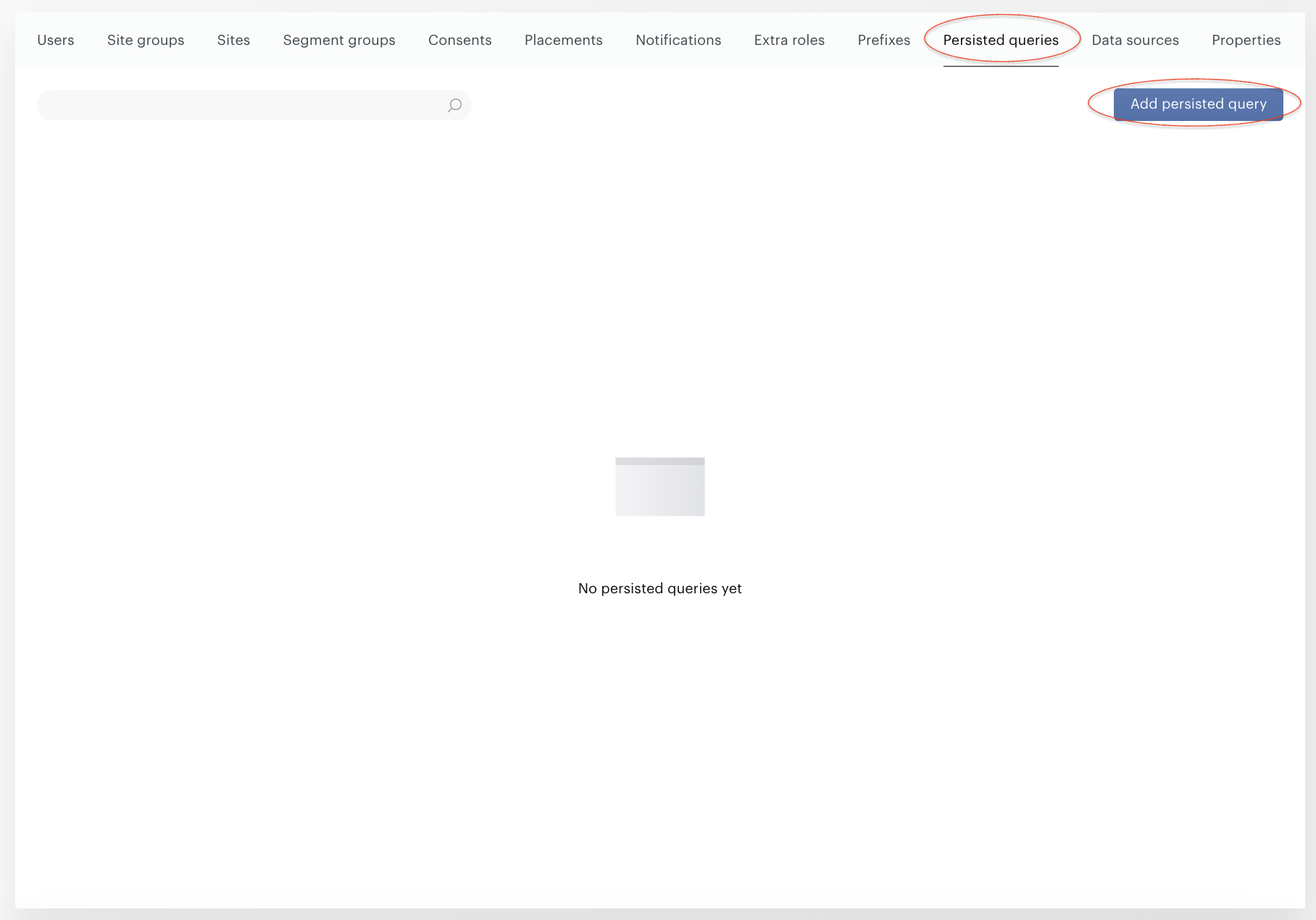
Go to Accounts management→Persisted Queries and press the Add persisted query botton.
-
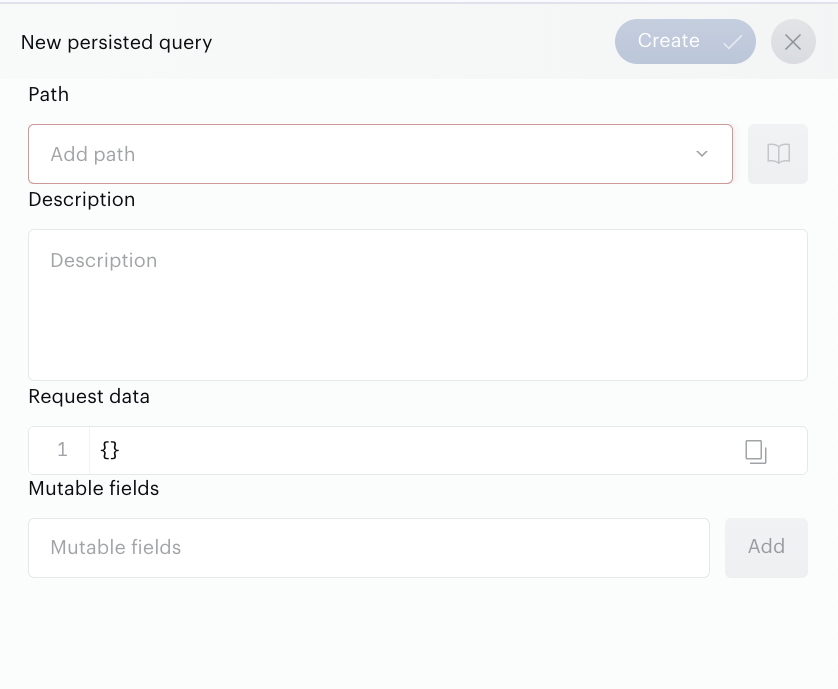
Configure the persisted query and press the Create button.
-
Copy the ID from the overview table after persisted query creation.
Command line
(Formatted JSON for better readability)

python cx.py /persisted/create '{
    "path": "/profile/user/segment",
    "request": {
        "identities": [{
            "id": "0",
            "type": "cx"
        }],
        "siteGroupIds": ["10431"]
    },
    "mutable": {
        "identities": true
    }
}'
If you have defined segments in two different site groups, e.g. 10431 and 12332, the line "siteGroupIds" becomes:
"siteGroupIds": [ "10431", "12332" ]
To keep the siteGroupIds as a dynamic parameter, add it to the mutable section (see also Overriding siteGroupIds below).
"mutable": {
    "identities": true,
    "siteGroupIds": true
}
This command returns the identity of the newly created persisted query, something like this:
927c1bd9548fb2879079c3837d6169a3892b21af
Copy the persisted query ID to a usage example
Copy the persisted query ID to one of the usage examples below.
Asynchronous loading of cx.js (recommended)
Use this approach in all normal cases, except when a synchronous ad tag requires segment IDs immediately.
<!-- Get user segments, normal use, with async load of cx.js -->
<script type="text/javascript">
    var cX = cX || {}; cX.callQueue = cX.callQueue || [];

    cX.callQueue.push(['invoke', function() {
        var segments = cX.getUserSegmentIds({ persistedQueryId: 'YOURCONFIGUREDPERSISTEDID' });
        // TODO: Do something with the segment ids:
        alert('Segments11: ' + JSON.stringify(segments));
    }]);
    // Async load of cx.js
    (function(d,s,e,t){e=d.createElement(s);e.type='text/java'+s;e.async='async';
    e.src='http'+('https:'===location.protocol?'s://s':'://')+'cdn.cxense.com/cx.js';
    t=d.getElementsByTagName(s)[0];t.parentNode.insertBefore(e,t);})(document,'script');
</script>
Synchronous loading of cx.js (alternative)
Use this approach when the segment IDs are needed immediately by a synchronous ad tag.
<!-- Get user segments, normal use, with sync load of cx.js -->
<script type="text/javascript">
    document.write('<scr'+'ipt type="text/javascript" src="http'+(location.protocol==='https:'?'s://s':'://')+'cdn.cxense.com/cx.js"></scr'+'ipt>');
</script>
<script type="text/javascript">
    var segments = cX.getUserSegmentIds({ persistedQueryId: 'YOURCONFIGUREDPERSISTEDID' });
    // TODO: Do something with the segment ids: alert('Segments: ' + JSON.stringify(segments));
</script>
Advanced configuration options
The advanced configuration options are used for debugging of special cases. The getUserSegmentIds() request can be tested in the JavaScript console. The following examples demonstrate the usage of the additional parameter options.
Testing with explicit user IDs (identities)
Piano user identifiers are added automatically to the request, so you don't have to provide them. But you can add an explicit one:
-
existing Piano identifier (
cX_P / cX.getUserId()) withtype:'cx', or -
external identifier with the customer prefix as a
type.
To reproduce a customer's problem, asking their cxid is useful:
cX.getUserSegmentIds({persistedQueryId:'YOURCONFIGUREDPERSISTEDID'}, {identities:[{id:'hxzu1rd52h314159', type:'cx'}]});
Testing with fixed parameters
You can set a fixed return value (defaultValue) and controlled cache time (maxAge) for the getUserSegmentIds() call, to test it with a fixed segmentId.
The minimum and default maxAge value is 5 minutes (expressed in seconds: 5 * 60). It will ignore caching if the output from /profile/user/segment is empty but cache the result when there are segment matches. The cache is stored in a local storage under the "_cX_segmentInfo" key.
cX.getUserSegmentIds({persistedQueryId:'YOURCONFIGUREDPERSISTEDID', defaultValue:'FIXEDSEGMENTID', maxAge:600});
//Cache for 10 minutes or 600 seconds.
Overriding siteGroupIds
If your persisted query was set up to allow siteGroupIds field as a dynamic parameter (technical term: mutable), then you can override it like this:
cX.getUserSegmentIds({ persistedQueryId: 'YOURCONFIGUREDPERSISTEDID' }, { siteGroupIds: ['10431'] });
If you have segments created in more than one site group, you add all siteGroupIds to the bracket parenthesis. Example: with two site groups, the last curly bracket would look like:
{ siteGroupIds: ['10431','12332']}
If you have segments created in more than one site group, you add all siteGroupIds to the bracket parenthesis. E.g., with two sitegroups, the last curly bracket would look like:
{siteGroupIds: ['10431','12332']}
Waiting for server response upon cache expiration (asynchronous version)
Use this approach to ensure that a non-expired cache value is used for the segment IDs.
The time before the callback may be longer (e.g. > 100ms) since the code waits for a server response to issue a callback regarding the cached value has expired.
<!-- Get user segments, waiting for server if cache has expired - asynchronous -->
<script type="text/javascript">
    var cX = cX || {}; cX.callQueue = cX.callQueue || [];

    cX.callQueue.push(['getUserSegmentIds', {
        persistedQueryId: 'YOURCONFIGUREDPERSISTEDID',
        callback: function(segments) {
            // TODO: alert('Async segments: ' + JSON.stringify(segments));
        }
    }]);

    // Async load of cx.js
    (function(d,s,e,t){e=d.createElement(s);e.type='text/java'+s;e.async='async';
    e.src='http'+('https:'===location.protocol?'s://s':'://')+'cdn.cxense.com/cx.js';
    t=d.getElementsByTagName(s)[0];t.parentNode.insertBefore(e,t);})(document,'script');
</script>
Waiting for server response upon cache expiration (synchronous version)
Use this approach to ensure that a non-expired cache value is used for segment IDs. The time before the callback may be much longer (e.g. > 100ms) since the code waits for a server response to issue a callback regarding the cached value has expired.
Please note that this synchronous version also blocks page rendering while waiting for a server response, so this approach should only be used if it is the only alternative.
<!-- Get user segments, waiting for server if cache has expired - asynchronous -->
<script type="text/javascript">
    document.write('<scr'+'ipt type="text/javascript" src="http'+(location.protocol==='https:'?'s://s':'://')+'cdn.cxense.com/cx.js"></scr'+'ipt>');
</script>
<script type="text/javascript">
    cX.getUserSegmentIds({
        persistedQueryId: 'YOURCONFIGUREDPERSISTEDID',
        synchronous: true,
        callback: function(segments) {
            // TODO: alert('Sync segments: ' + JSON.stringify(segments));
        }
    });
</script>