
Account self-deletion lets your end users delete their own account from the My Account section, so a deletion request doesn't have to go through your support team. How a user confirms the deletion depends on their account. Users with a password enter it. Users without a password confirm with a 6-digit code or a magic link sent to their email address, and don't need to create a password first.
It utilizes the endpoint described in more detail here.
Before you start, enable account self-deletion for your application:
-
Go to the Piano dashboard.
-
From the homepage, go to Edit Business → User provider → Piano ID and click the pencil icon.
-
Locate the "User account deletion" setting.
-
Toggle it to ON.
-
Save your changes.
Once activated, you can configure the following items.
Emails
Two email templates are involved. Enable both under Manage → Email Manager.
-
Piano ID account deletion email: sent after the account has been deleted, confirming the removal is permanent.

-
Customer confirms account deletion: sent when a user without a password starts the deletion. It carries the 6-digit code or the magic link they use to confirm. Without this template enabled, a passwordless user cannot complete the deletion.

Templates
The Piano ID profile in My account template needs to be modified under the Manage → Templates → Piano ID section to display the Delete Account option. There are two options available:
-
Revert the template to default, which is the safer route if you have not customized it.
-
Insert the code blocks below into your current template.
Below is the HTML code snippet for the Piano ID profile in My account template:
<div *showIfDeleteAccountPasswordless class="delete-account">
<div *hideIfDeleteAccountInitiated>
<a actionDeleteAccountInitiated actionDeleteAccount class="delete-account-button" role="button">
<t>Delete account</t>
</a>
</div>
<div *showIfDeleteAccountInitiated class="delete-account-container">
<div class="delete-account-confirmation-close">
<button class="delete-account-confirmation-close-btn" actionCloseDeleteAccount></button>
</div>
<div class="delete-account-content">
<div *showIfDeleteAccountCodeSent>
<p class="delete-account-hint">
<t>Open the link or enter the code sent to your email to permanently delete your account.</t>
</p>
<p *showIfDeleteAccountWrongCode class="delete-account-failed">
<t>The code is wrong or has expired. Please try again or resend the code.</t>
</p>
<div class="delete-account-code">
<delete-account-code-input></delete-account-code-input>
</div>
<a actionResendDeleteAccountCode class="delete-account-resend" role="button">
<t>Resend</t>
</a>
</div>
</div>
</div>
</div>
<div *showIfDeleteAccountComplete class="delete-account-complete">
<div class="delete-account-complete-icon" aria-hidden="true">✓</div>
<p class="delete-account-complete-title"><t>Your account has been deleted.</t></p>
<p class="delete-account-complete-hint">
<t>Changed your mind? You can</t>
<a actionCreateNewAccount class="delete-account-create-link" role="button"><t>create</t></a>
<t>a new account at any time.</t>
</p>
</div>
This is a code snippet for the CSS tab of the Piano ID profile in My account template:
.delete-account {
  margin: 24px 0;
}

.delete-account-container,
.remove-password-container,
.email-change-password-container {
  margin-top: 20px;
  border: 1px solid rgba(0, 0, 0, .1);
  padding: 20px;
  min-height: 170px;
}

.email-change-confirmation {
  padding: 20px;
  border: 1px solid rgba(0, 0, 0, .1);
  margin-top: 20px;
}

.delete-account-content,
.remove-password-content,
.email-change-password-content {
  min-height: 130px;
  display: flex;
  flex-direction: column;
  align-items: center;
  justify-content: center;
}

.delete-account-controls,
.remove-password-controls-confirm,
.email-change-password-controls {
  display: grid;
  grid-template-columns: 1fr auto;
  gap: 10px;
}

.delete-account-password-icon-wrapper,
.remove-password-password-icon-wrapper,
.email-change-password-icon-wrapper {
  position: absolute;
}

.delete-account-password-icon,
.remove-password-password-icon,
.email-change-password-icon {
  position: relative;
  width: 20px;
  height: 20px;
  top: 10px;
  left: 10px;
  display: block;
  background-repeat: no-repeat;
  background-size: contain;
  vertical-align: middle;
  background-image: url("data:image/svg+xml;base64,PHN2ZyB3aWR0aD0iMjAiIGhlaWdodD0iMjAiIHZpZXdCb3g9IjAgMCAyMCAyMCIgZmlsbD0ibm9uZSIgeG1sbnM9Imh0dHA6Ly93d3cudzMub3JnLzIwMDAvc3ZnIj4KPHBhdGggZmlsbC1ydWxlPSJldmVub2RkIiBjbGlwLXJ1bGU9ImV2ZW5vZGQiIGQ9Ik0xMiA2VjdIOFY2QzggNC44OTU0MyA4Ljg5NTQzIDQgMTAgNEMxMS4xMDQ2IDQgMTIgNC44OTU0MyAxMiA2Wk02IDZDNiAzLjc5MDg2IDcuNzkwODYgMiAxMCAyQzEyLjIwOTEgMiAxNCAzLjc5MDg2IDE0IDZWN1Y3LjAwMDI1TDE2IDcuMDAwM1YxOEg0VjdMNiA3LjAwMDA1VjdWNlpNMTQgOUgxMkg4SDZWMTZIMTRWOVoiIGZpbGw9ImJsYWNrIi8+Cjwvc3ZnPgo=");
}

.delete-account-container input,
.remove-password-container input,
.email-change-password-container input {
  height: 40px;
  min-width: 307px;
  padding: 0 40px;
}

.delete-account-button {
  color: #f86a6a;
  padding: 0;
}

.delete-account-button:hover, .delete-account-button:active, .delete-account-button:focus {
  color: #da5353;
}

.delete-account-hint,
.remove-password-hint,
.email-change-password-hint {
  color: #878787;
  text-align: center;
  max-width: 400px;
}

.delete-account-failed,
.remove-password-failed,
.email-change-password-failed {
  color: #f86a6a;
  text-align: center;
  max-width: 400px;
}

.delete-account-code {
  margin: 16px 0;
}

/* The generic ".delete-account-container input" rule above (min-width: 307px, for the
   password field) also matches the six digital-code boxes and blows them up past the
   iframe width; restore the standard code-box sizing from ".digital-code-input input". */
.delete-account-container .digital-code-input input {
  min-width: 0;
  width: 35px;
  height: 48px;
  padding: 11px 8px;
}

/* The link sits in normal flow inside the code block, so it needs to center itself
   under the flex-centered code boxes; "display: table" shrink-wraps it so the click
   target stays on the text instead of spanning the whole block. */
.delete-account-resend {
  cursor: pointer;
  font-size: 13px;
  color: #3b67b2;
  display: table;
  margin: 0 auto;
}

.delete-account-complete {
  text-align: center;
  padding: 32px 16px;
}

.delete-account-complete-icon {
  width: 34px;
  height: 34px;
  line-height: 34px;
  margin: 0 auto 16px;
  border: 1px solid #d9d9d9;
  border-radius: 50%;
  color: #51a351;
  font-size: 18px;
}

.delete-account-create-link {
  cursor: pointer;
  color: #3b67b2;
}

.delete-account-complete-title {
  font-size: 18px;
  font-weight: bold;
  margin-bottom: 8px;
}

.delete-account-complete-hint {
  font-size: 14px;
  color: #666;
}
End User Experience
When an end user starts the account deletion process, the confirmation flow depends on whether the account has a password.
User with a password
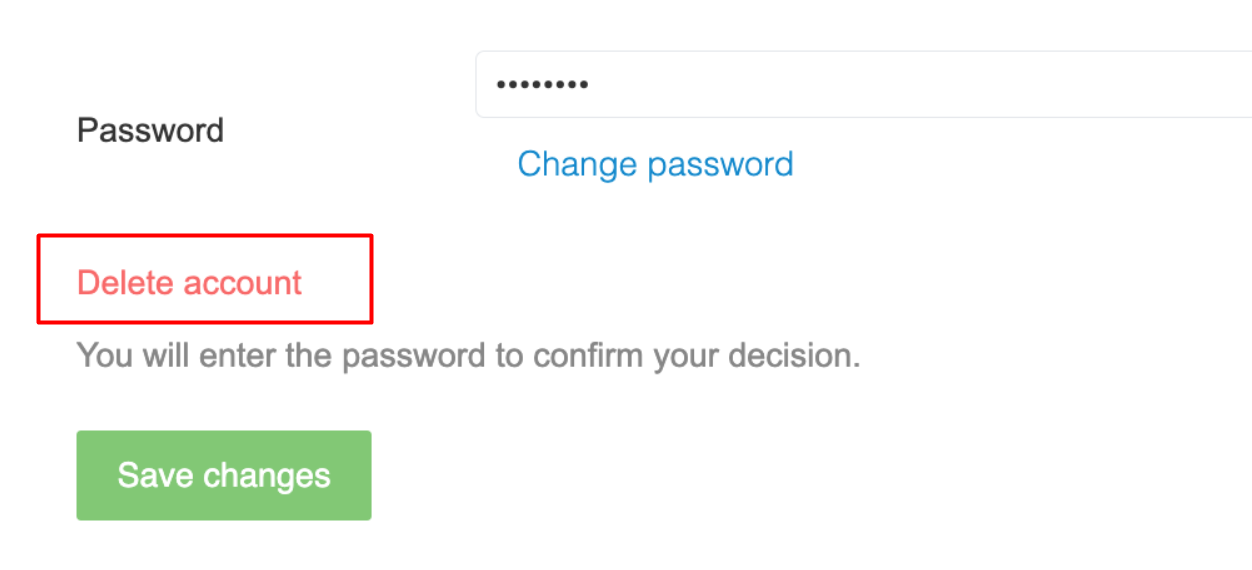
For users with a password, My Account prompts the user to confirm the action by entering their password. After confirmation, the account is permanently deleted, the user is automatically logged out of the website, and the Piano ID account deletion email is sent to the user.
Passwordless user
Important: If your application already has User account deletion and Passwordless registration enabled, update your My Account template to include the Passwordless Deletion and Deletion Confirmation sections.
Without this update, Passwordless Account Deletion will not work as intended, and users will still be prompted to create a password before deleting their account.
If an account has no password and passwordless login is enabled for your application, Delete account starts passwordless confirmation instead of asking the user to create a password.
-
The user selects Delete account in the Profile tab of My Account.
-
Piano sends the Account deletion confirmation email. It contains a 6-digit code or a magic link, depending on the verification method configured in Passwordless verification.
-
With a code, the user enters the 6 digits in My Account and confirms. With a magic link, opening the link deletes the account immediately, with no further confirmation step. If the user is no longer signed in when they open the link, they log in first, and the deletion continues on its own.
If the code doesn't arrive, the user can request a new one. Resending is rate-limited, and while the limit applies, the user sees a message asking them to wait.
The user will be permanently removed from the system. If they register again later, we will treat them as a new user with no link to the deleted account.
Users with an active subscription may delete their accounts. When they do, we cancel any active subscriptions so no further renewals or billing occur.
In case a user deletes their account, a user_disabled webhook is triggered.