
Category Targeting provides a simple way to target large groups of end users.
The product manager must enable this feature on the Product before it will be made available to advertisers and publishers in Cxense Advertising. Please see the Category Template page for more details.
Browsing, adding and reporting on categories
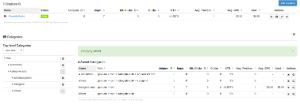
To add Categories, simply navigate the category tree and click the addition icon on the right.
The drop-down for top-level categories is only displayed in the case that the Cxense Insight Integration has been configured with more than one top-level category.
Once your categories have been selected, they will appear in a table with statistical information alongside them. The statistical numbers will increase once ads have been served that match the categories you've selected.
Other than the statistical information relating to how many ads were served that match a category, the columns present the following:
-
Name: The name of the category that has been saved
-
Path: The path through the category hierarchy needed to locate the category.
-
Actions:
-
The Cross icon: allows removal of the category.
-
The Magnifying class: clicking this will display the search string for adserving or AdSpace Diagnostics.
-
Using categories for Ad Space labelling
Cxense Advertising offers the ability to target groups of ad spaces by way of their categorization against one or more taxonomy items.
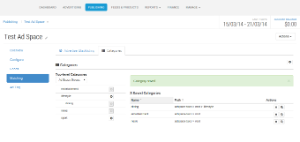
Specifically, once the steps to configure categories for use as ad space labels have been completed, publishers can choose categories from this taxonomy for their adspaces,
|
|
|
03. Adding labels to an Ad Space |
and advertisers can choose categories from this taxonomy in order to target their ads to particular classifications of ad spaces.
|
|
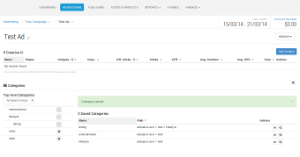
04. Targeting by Ad Space labels |
Categories and Ad serving
Information on how Ads are served when Categories are enabled.
-
If a campaign specifies a category and an ad space doesn't (ie. not categories are added to the space, and no Categories are sent/included on a request), the campaign's ads won't be shown on that ad space, as the request does not match the Advertiser's specified category targeting. Other (non-categorised) ads can still be shown on the ad space.
-
If a campaign specifies a sub-category and the ad space specifies the parent category, the campaign's ads won't be shown on that ad space. The categories need to match exactly.
-
Ads from a campaign with no categories can be shown on an ad space that defines categories.
-
If a campaign specifies many categories, and an ad space only specifies one of those categories, ads from that campaign will still be shown on the ad space as they matched one of the categories specified on the campaign.