
Advertising prevents the display of duplicate ads from the same source by Campaign, Finance Account, Display URL, and/or Competitor Label.
Whenever De duplication occurs, the 'higher ranking ad' will be selected and displayed. The platform determines the higher ranking ad based on settings configured on the Ad Product(s), Feed(s), and AdSpace such as Ranking Models, Feeds priority, AdSpace Configuration. Duplicate removal is configured on the product. Click Edit product to get to this screen:
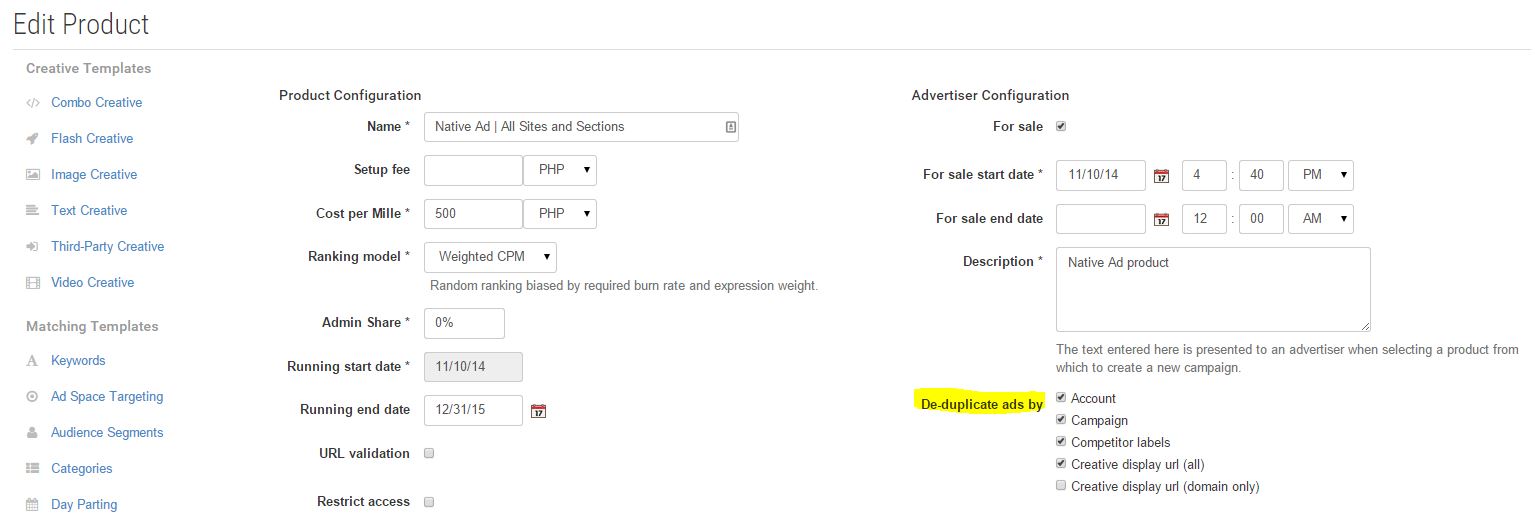
De-duplication by (finance) ACCOUNT
Only one advertisement for All campaigns within an Advertising folder that uses a specific finance Account will be shown in the same AdSpace.
Example:
A Single Advertiser has the following Folders, Campaigns, and Ads
-
Folder 1 Finance Account A
-
Campaign 1
-
Ad1
-
Ad 2
-
-
Campaign 2
-
Ad1
-
Ad 2
-
-
-
Folder 2 Finance Account A
-
Campaign 1
-
Ad1
-
Ad 2
-
-
Campaign 2
-
Ad1
-
Ad 2
-
-
-
Folder 3 Finance Account B
-
Campaign 1
-
Ad1
-
Ad 2
-
-
Campaign 2
-
Ad1
-
Ad 2
-
-
Result: A single Ad can be shown from Folders 1 & 2, as they share the same (finance) Account. 1 Ad will also be shown from Folder 3, as it uses a different (Finance) Account
De-duplication by CAMPAIGN
Ads are de-duped by campaign when an AdSpace requests more than one advertisement. Two advertisements from the same campaign will not be shown to the same AdSpace or AdSite (when the Impression Request API call is for an AdSite) for CPC, CPM and Tenancy products.
Example:
A Single Advertiser has the following Folders, Campaigns, and Ads
-
Folder 1 Finance Account A
-
Campaign 1
-
Ad1
-
Ad 2
-
-
Campaign 2
-
Ad1
-
Ad 2
-
-
-
Folder 2 Finance Account A
-
Campaign 1
-
Ad1
-
Ad 2
-
-
Campaign 2
-
Ad1
-
Ad 2
-
-
-
Folder 3 Finance Account B
-
Campaign 1
-
Ad1
-
Ad 2
-
-
Campaign 2
-
Ad1
-
Ad 2
-
-
Result: A single Ad can be shown from each Campaign.
De-duplication by COMPETITOR LABELS
Local Competitor Labels
Only a single ad is shown from a particular competitor segment. This de-duplication applies within an advertiser's home container.
Example:
A Single Advertiser has the following Folders, Campaigns, and Ads
Folder 1 Finance Account A
-
Campaign 1 (competitor label "sports")
-
Ad 1
-
Ad 2
-
-
Campaign 2 (competitor label "sports")
-
Ad 1
-
Ad 2
-
-
Folder 2 Finance Account A
-
Campaign 1 (competitor label "food")
-
Ad 1
-
Ad 2
-
-
Campaign 2 (competitor label "sports")
-
Ad 1
-
Ad 2
-
-
-
Folder 3 Finance Account B
-
Campaign 1 (competitor label "food")
-
Ad 1
-
Ad 2
-
-
Campaign 2 (competitor label "entertainment")
-
Ad 1
-
Ad 2
-
-
Result: A single Ad can be shown for each label, so only one ad will be shown for each of the competitor labels listed ( sports, food, entertainment).
Administrative Competitor Labels
Similarly to local labels, only a single ad is shown from a particular competitor segment. However, this de-duplication can apply across multiple advertisers' home containers.
Administrative labels can be configured by a Business Owner and can be used in combination with local labels.
-
When moving between home containers to add administrative competitor labels, use the 'masquerade' functionality (where the user you originally logged in as has the Business Owner role). If you log directly into a different home container with a different user account you won't be able to see tags you created in the original home container - you need to masquerade (manage - > manage users - > click on the folder icon of the user who's home folder you want to access.)
Example:
An Advertiser has the following Campaigns and Ads
Campaign 1 (local label "football", admin label "sports")
-
Ad
-
Campaign 2 (local label "football")
-
Ad
-
Another Advertiser has the following Campaigns, and Ads
Campaign 3 (admin label "sports")
-
Ad
-
Campaign 4 (admin label "sports")
-
Ad
-
Result: A single Ad can be shown for each label. Campaign 2 will compete and de-duplicate against Campaign 1 using local labels. Campaign 1 will additionally compete and de-duplicate against Campaigns 3 and 4 using administrative labels.
De-duplication by DISPLAY URL (All / Domain only)
(Only applicable to Text Creatives)
De Duplication by 'ALL': If multiple ads share the same domain + path portion of the Display URL, only one of the Advertisements will be shown.
De Duplication by 'DOMAIN ONLY': If multiple ads share the same domain of the Display URL, only one of the Advertisements will be shown.
Example:
De Duplication by 'ALL' Example
For two ads with the following display URLs:
Only one ad will be displayed because of the shared {{example.com/landing}} domain and path.
De Duplication by 'DOMAIN ONLY' Example
For two ads with the following display URLs:
only one ad will be displayed because of the shared {{http://example.com }} domain.
Further Info
For two ads with the following display URLs:
Both ads will be displayed since their domain portion differs (note they use a sub domain).
Do not confuse Display URL with Destination URL !
Display URL is the indicative URL on a text creative when shown to End Users (e.g. www.fruitbox.com/SpecialOffer).
Destination URL is the actual Click URL, i.e. the destination the End Users will be taken if they click on the Advertisement. (e.g. http://www.fruitbox.com/specialoffer/2014-1-1/thespecialoffer.html)
No De-duplication
If no de duplication is configured on a product, there will be no de duplication performed at all.
Example:
A Single Advertiser has the following Folders, Campaigns, and Ads
-
Folder 1 Finance Account A
-
Campaign 1
-
Ad1
-
Ad 2
-
-
Campaign 2
-
Ad1
-
Ad 2
-
-
-
Folder 2 Finance Account A
-
Campaign 1
-
Ad1
-
Ad 2
-
-
Campaign 2
-
Ad1
-
Ad 2
-
-
-
Folder 3 Finance Account B
-
Campaign 1
-
Ad1
-
Ad 2
-
-
Campaign 2
-
Ad1
-
Ad 2
-
-
Result: All Ads can show at once.