
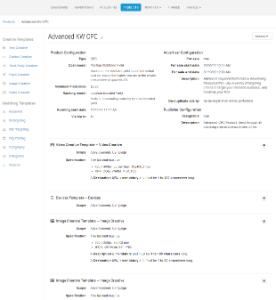
Cxense Advertising Products (or Advertising Product') may be likened to many Cxense Advertising competitor's entire Advertisement Platform. Advertisers can book a campaign based on an Advertising Product.
Products are then aggregated into Feeds to simplify mapping of multiple Products to an AdSpace i.e. Campaigns >> Product >> Feeds >> AdSpaces.
The following tables capture a brief description for the Product-specific configuration shown in the above graphic. (Note the configuration of matching and creative criteria is not covered here, please reference Matching Templates and Creative Templates as required.)
Product configuration
|
Field name |
Product type |
Description |
|---|---|---|
|
Name |
All |
The name of the product - Be as descriptive as possible (possibly including a network of sites, or reference to the ad product terminology used within a site or sites) |
|
Setup fee |
All |
Fee applied when the product is purchased. May be applied again if the product is re-started after it has been stopped |
|
Unit cost |
Tenancy |
Periodic fee applied for each time unit specified by the Period value |
|
Ongoing cost |
CPC |
Periodic fee applied for each time unit specified by the Period value |
|
Period |
CPC, Tenancy |
Frequency of unit or ongoing cost |
|
Cost/000 |
CPM |
Cost per thousand impressions of an ad |
|
Slots |
Tenancy |
Number of 'Tenant Slots' available at any one time. These Tenants will split the share of voice between them. If the maximum 8 Slots is selected, each Advertiser who buys a slot for that time period will receive 1/8th of the traffic (impressions). |
|
Cost model |
All |
Cost model applied to the product - ie. how the ads will be costed and charged |
|
Ranking model |
All |
Ranking model applied to the product - how the ads will be selected and ranked within an adspace |
|
Admin Fee |
All |
The admin fee to be collected through Revenue Share for the Product Owner |
|
Minimum floorprice |
CPC |
The minimum price for any advertiser charges using the product (*different to a bid, the price is the actual charge for an ad to be shown, can vary from bid when using some costing models) |
|
Time zone |
Tenancy |
The time zone in which the product is available for use - all advertising slot purchases and presentations will be managed in this time zone (i.e. daily slots start at midnight in the selected time zone). Timing is necessary with Tenancy due to the time-based purchase requirement of Daily, Weekly of Monthly bookings. |
|
Running start date |
All |
The date on which the product will be able to display ads - as opposed to the window of time that an advertiser can actually purchase campaign contracts (see 'For sale date' within advertiser table below) |
|
Running end date |
All |
The date on which the product will cease to display ads - as opposed to the window of time that an advertiser can actually purchase campaign contracts (see 'For sale date' within advertiser table below) |
|
URL Validation |
All |
URL Validation provides the ability to 'hardcode' all destination URLs to only be valid when using a specific prefix. If added to a product, with the setting of 'http://example.com', all Creatives for that product must start with 'http://example/com' to be valid and saved (such as http://example/com/my-destination-url.html). Without this domain prefix, the creatives cannot be saved. |
|
Restrict Access |
All |
This option specifies which Advertising roles can see & use the product. When using Access Restriction, if a User's role is not selected, they cannot see the product, and therefore cannot select it. Set appropriate visibility on your range of products from simple to advanced, based on the roles and/or skill level of the Advertisers consuming them (choose self service <> Adv. Account Managers accordingly). This option also provides a way to test products without exposing them to other Advertisers (select Business owner role only). |
Advertiser configuration
|
Field name |
Description |
|---|---|
|
For sale |
The Product is made available for purchase by Advertisers - left unchecked, Advertisers will not see the product in the available product listings on campaign creation. |
|
For sale start date |
Date and time on which product will be available for purchase - note this config could be future dated to sell out an 'exclusive christmas listing' product for example |
|
For sale end date |
Date and time on which product will cease to be available for purchase - use this setting to prompt advertisers to saturate a future-dated product before it goes live |
|
Description |
The explanatory text the advertiser will see when purchasing the product - be sure to explain the key differentiating features of the product - where ads will be shown, expected impression rates, audience demographics |
Further reading on Product management is captured in the child pages of this page, such as Matching Templates and Creative Templates.