
Terminology and concepts relating to revenue share functionality within CxAd.
Brokers within CxAd have the ability to configure their ad network to determine how much revenue goes to a publisher the broker and the product owner.
Revenue Share Basics
The following graphic provides a high level review of Revenue Share in the CxAd Platform.
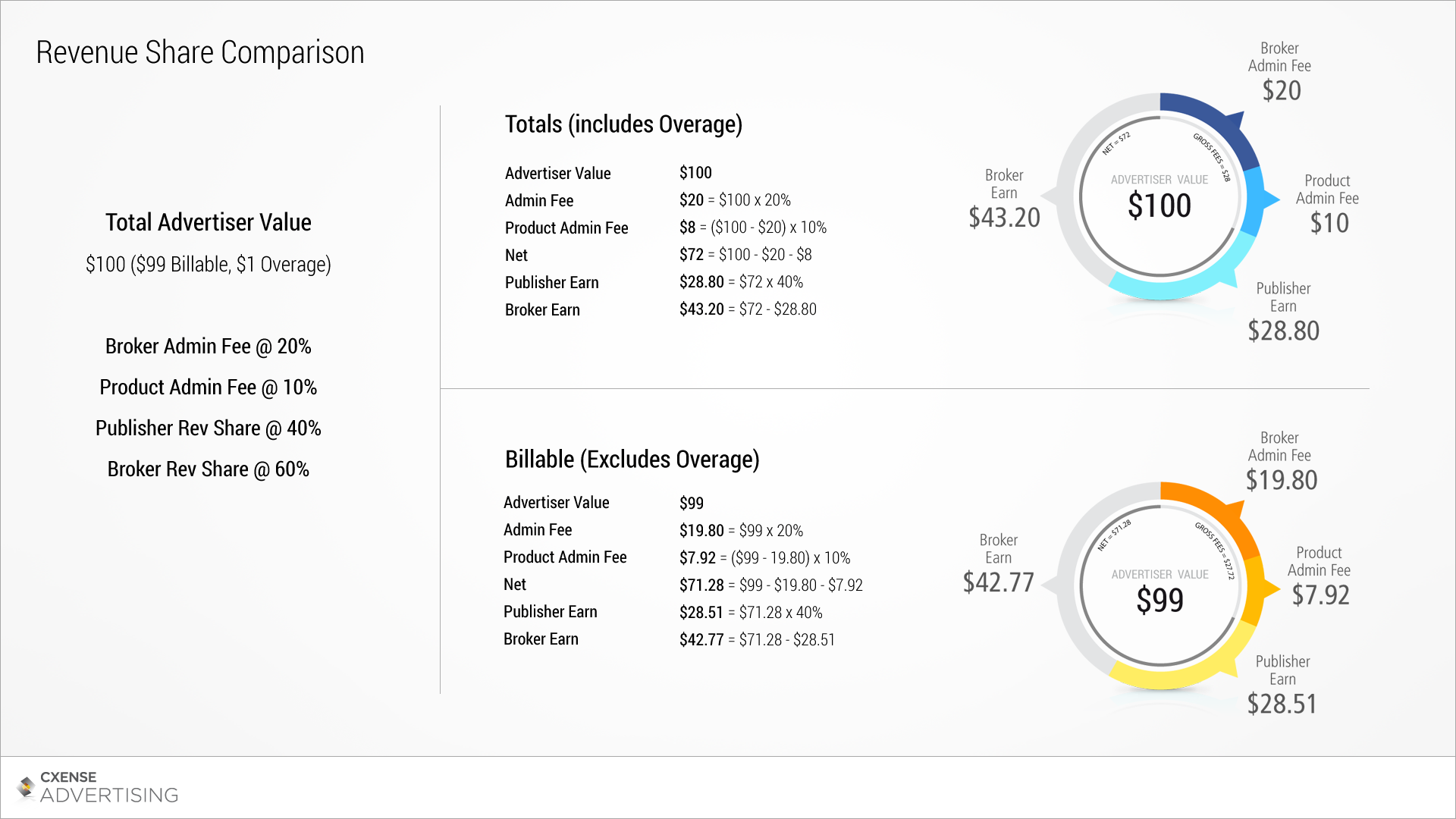
Revenue Share Terminology
The following terms are important in understanding how CxAd represents revenue share:
|
Name |
Description |
Calculation |
Format |
|---|---|---|---|
|
Advertiser Value |
The amount of value derived by an advertiser for a CxAd event (eg: impression or click). |
- |
Amount |
|
Billable Advertiser Value |
Advertiser value that excludes overage. |
- |
Amount |
|
Total Advertiser Value |
Advertiser value that includes overage. |
- |
Amount |
|
Admin Share |
A percentage of Advertiser Value that is collected by the Broker/System. This percentage is fixed across one Ad Network. |
- |
% |
|
Admin Fee |
A currency Amount for Administering the System. |
Advertiser Value x Admin Share |
Amount |
|
Product Admin Share |
A percentage of Advertiser Value - Admin Fee that is collected by the Product owner. This percentage is set per product. |
- |
% |
|
Product Admin Fee |
A currency Amount for Administering the Product. |
(Advertiser Value - Admin Fee) x Product Admin Share |
Amount |
|
Net Value |
The Net Value. |
Advertiser Value - Admin Fee - Product Admin Fee |
Amount |
|
Publisher Revenue Share |
A percentage of Net Value that will be distributed to the publisher. |
- |
% |
|
Publisher Earn |
The amount Earned by a Publisher. |
Net Value x Publisher Revenue Share |
Amount |
|
Broker Earn |
The remaining value of Net Value after Publisher Earn has been removed. |
Net Value - Publisher Earn |
Amount |
Overage
Overage occurs in CxAd when an advertiser has exhausted their budget, but CxAd then receives additional clicks or serves additional ads outside of the agreed budget. CxAd strives to use up all of an advertiser's budget, as this is better than leaving the budget unused. Aggressively trying to consume all of an advertiser's budget can sometimes lead to overage - currently in CxAd it only accounts for around 0.01% of Advertiser Value. Overage represents advertising that is not billable to the advertiser, or free advertising.
To handle the reporting of overage we capture two versions of revenue share statistics in the system:
-
Total: includes overage
-
Billable: excludes overage
Brokers are able to configure which values they see in reports, and more importantly, which values are seen by their publishers. For example, brokers can choose to show the Total Publisher Earn column to publishers, or the Billable Publisher Earn column. CxAd allows both columns to be visible at the same time, but this is not recommended. It is up to the broker to correctly determine which set of revenue share columns to display per role. Please see Column Visibility for information on how to use this feature.
Report Column Headings
The labels that are displayed on the report column headings can also be configured through CxAd - see Manage Translation Resources. The default value for the Total Publisher Earn column and Billable Publisher Earn column is 'Earn'. It's important to note that the same label is displayed to all roles when viewing reports, so if the Billable Publisher Earn column header was changed to 'Billable Earn' then publishers will see this as the column heading. The column names in the Column Visibility feature are configured separately to enable brokers to correctly choose which columns to show.
Further Information
Please see:
Revenue Share, System Revenue Share Defaults and Products for information on how to configure revenue share within CxAd.
Column Visibility for managing column visibility.
Product Sharing for details on revenue sharing when shared products are involved.