
We’ve migrated our documentation to a new site, which means some URLs have changed.
Audience

Using "context" as a dynamic parameter for content-configurations

Scope

You want to have a trending/behavioral widget on all of your frontpages.

Your site is structured by a main "home frontpage" and six different "section frontpages", like "technology", "strategy", "recruitment", "entertainment" and so on…


On each frontpage you want to have the same widget. The only difference should be, that the articles recommended should stick to the section, or all articles for the "home frontpage".

Challenge

  • Is there a way to avoid the setup of seven different widgets and content-configurations?!

  • Is there a way to make a content-configuration dependent on the context of the site it will be presented on?


The general challenge is, if content-configurations support dynamic parameters or in other words, could be made "context aware"?

Cxense Content solution approach

There is an explicit "context" feature available, which could be used to define "conditional" branches within one content-configuration.

Pseudo algorithm:

  • If section is "technology", then recommend only "technology" articles

  • If section is "finance", then recommend only "finance" articles

  • If section is "home", then recommend all articles available


This feature could be seen as a function with a "context" parameter and an logic to process this "context".

In Cxense Content terminology

  • The /public/widget/data request has the option to set a "context" object for following fields:

pageclass, sentiment, recommending and categories

All of this fields could exist in the content-profile of a page, as a result of the document parsing process.

Setting this fields and values explicit in a request, could be useful to:

  • Specify pairs of "context" objects and values, in the case the content-profile doesn’t have this fields

    • Override, in the case you need dynamic and explicit control of this fields, independent from the document-parsing and the existing content-profile

The /public/widget/data request will typically be used as part of the "insertWidget" script, how to set the "context" through the "insertWidget" will be shown in the example.

Example how to take explicit control of the "context" object

A typical script to insert a widget into your webpage could look like this:

<script type="text/javascript">
    var cX = cX || {}; cX.callQueue = cX.callQueue || [];
    cX.callQueue.push(['insertWidget', {
        widgetId: '3141592653589793',
        insertBeforeElementId: 'cx_3141592653589793',
        width: 600, height: 400, renderTemplateUrl: 'auto'
    }]);


    // Async load of cx.js
    (function(d,s,e,t){e=d.createElement(s);e.type='text/java'+s;e.async='async';
    e.src='http'+('https:'===location.protocol?'s://s':'://')+'cdn.cxense.com/cx.js';
    t=d.getElementsByTagName(s)[0];t.parentNode.insertBefore(e,t);})(document,'script');
</script>


To inject an explicit "context" object, the request needs to be extended:

<script type="text/javascript">
    var cX = cX || {}; cX.callQueue = cX.callQueue || [];
    cX.callQueue.push(['insertWidget', {
        widgetId: '3141592653589793',
        insertBeforeElementId: 'cx_3141592653589793',
        width: 600, height: 400, renderTemplateUrl: 'auto'
    },
    { context: { pageclass: 'frontpage', categories: { taxonomy :'strategy', source:'external', subscriber: 'no' } } }
    ]);


    // Async load of cx.js
    (function(d,s,e,t){e=d.createElement(s);e.type='text/java'+s;e.async='async';
    e.src='http'+('https:'===location.protocol?'s://s':'://')+'cdn.cxense.com/cx.js';
    t=d.getElementsByTagName(s)[0];t.parentNode.insertBefore(e,t);})(document,'script');
</script>


A "conditional" content-configuration, to make the "query" parameter dependent on the "context >> categories >> taxonomy" value.

In our case all articles, which belongs to a section like "technology", can be filtered by the "kw-category" index-field.

This field in the sitesearch index reflects the "categories" field in the content-profile.


Using "comment",  "tag" and "itemDefault" are best practices:

  • to have filter options for the Cxense Content reporting (based on the "tag") and

  • Cxense Analytic filters for articles clicked by a recommendation widget (based on the "itemDefault", a best-practice is available here)


To access "categories" other then "taxonomy" requires an additional "categoryType" parameter in the "condition" statement, like though:

        "condition": {
          "type": "context",
          "categoryType": "source",
          "categories": [ "external" ]
        },

All common parameters can be grouped together by the "defaults" block.

{
  "type": "defaults",
  "comment": "A 50/50 trending and behavioral recommendation, with a section-aware article selection",
  "siteIds": [ "99314159265358979399" ],
  "matchingMode": {
    "trend": { "weight": 50 },
    "behavioral": { "weight": 50 }
  },
  "resultFields": [
    "title",
    "url",
    "dominantthumbnail",
    "dominantthumbnaildimensions"
  ],
  "maxAge": null,
 
  "innerSettings": {
    "type": "conditional",
    "comment": "Switch the query for each category",
 
    "branches": [
      {
        "type": "recs",
        "comment": "branch for the recruitment section (tag named 'recruit' due to 10 character limit)",
        "condition": {
          "type": "context",
          "categories": [ "recruitment" ]
        },
        "tag": "recruit",
        "itemDefaults": { "tag": "recruit" },
        "query": "query(kw-category:\"recruitment\")"
      },
      {
        "type": "recs",
        "comment": "branch for the technology section",
        "condition": {
          "type": "context",
          "categories": [ "technology" ]
        },
        "tag": "technology",
        "itemDefaults": { "tag": "technology" },
        "query": "query(kw-category:\"technology\")"
      },
      {
        "type": "recs",
        "comment": "branch for the strategy section",
        "condition": {
          "type": "context",
          "categories": [ "strategy" ]
        },
        "tag": "strategy",
        "itemDefaults": { "tag": "strategy" },
        "query": "query(kw-category:\"strategy\")"
      },
      {
        "type": "recs",
        "comment": "Else-branch for the main homepage",
        "tag": "home",
        "itemDefaults": { "tag": "home" },
        "query": "query(\"*\")"
      }
    ]
  }
}

Testing the configuration

The content-configuration preview option doesn't support the explicit setting of "context" objects other than the "url".

image-20220202-115107.png


So a test could be done with a minimal HTML page, editing the context manually and reloading the page:

<html>
<head><title>150114 test of a dynamic context configuration for Cxense Content widgets</title></head>
<body>
 
<!-- Cxense content widget -->
<script type="text/javascript">
    var cX = cX || {}; cX.callQueue = cX.callQueue || [];
    cX.callQueue.push(['insertWidget', {
        widgetId: '3141592653589793',
        insertBeforeElementId: 'cx_3141592653589793',
        width: 600, height: 400, renderTemplateUrl: 'auto'
    },
    { context: { categories: { taxonomy :'strategy' } } }
    ]);
 
    // Async load of cx.js
    (function(d,s,e,t){e=d.createElement(s);e.type='text/java'+s;e.async='async';
    e.src='http'+('https:'===location.protocol?'s://s':'://')+'cdn.cxense.com/cx.js';
    t=d.getElementsByTagName(s)[0];t.parentNode.insertBefore(e,t);})(document,'script');
</script>
<!-- End of Cxense content widget -->
</body>
</html>


Fetching the response of the /public/widget/data request and making it readable with a beautifier like http://jsbeautifier.org/ , should reflect based on the value of the "{ taxonomy :'strategy' }" setting, in the "response" > "items" > "tag" value, like this:
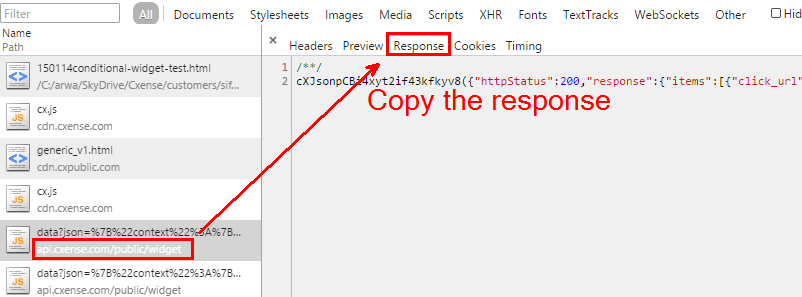
image-20220202-115121.png


cXJsonpCBi4wxowek6otre5vq({
    "httpStatus": 200,
    "response": {
        "items": [{
            "click_url": "http://api.cxense.com/public/widget/click/sZ6....",
            "dominantthumbnail": "http://content-thumbnail.cxpublic.com/content/dominantthumbnail/86705d8d72f766229a7f09d910d320f85f318dc5.jpg?54b3f75b",
            "title": "Talking Point: How professionalised are we in HR?",
            "dominantthumbnaildimensions": "300x194",
            "tag": "strategy",
            "url": "http://www.ourdomain.com/strategy/how-professional-are-we-in-HR/121027"
        }, {
            "click_url": "http://api.cxense.com/public/widget/click/sZ6....",
            "dominantthumbnail": "http://content-thumbnail.cxpublic.com/content/dominantthumbnail/930d08e0849bf8598aef54e3092726b7de0641f0.jpg?54b08389",
            "title": "Interview: John Doe the Second, General Manager, London Python Clinic, on employee engagement",
            "dominantthumbnaildimensions": "300x194",
            "tag": "strategy",
            "url": "http://www.ourdomain.com/strategy/interview-john-doe-the-second-general-manager-london-python-clinic/139663"
        }, {
        ...


Last updated: