Using Piano Content with a template but without an IFRAME
If the target page already includes CSS you want applied to Piano Content recommendations, use the "Template" option without an iframe. The parent page's CSS will apply to the content items.
This approach suits responsive layouts where the widget must adapt to size and orientation changes.
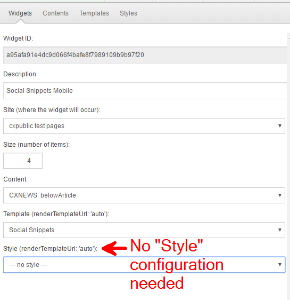
The Piano Content widget configuration needs only a "Content" and a "Template" for this setup:
Asynchronous version
Loading the Piano library "cx.js" is needed only for standalone testing in an HTML file.
In production, the page must be tracked by Piano Content, which already loads the "cx.js" library. In that case, you don’t need this part.
<!-- Async load cx.js -->
    <!-- Piano Content naming scheme

        YOU NEED TO REPLACE *ALL* Widget ID occurrences with your Piano Content Widget ID!
        widget id :                            bd92baba25e188fbfc12a600de282d558e67cf
        target id : "cx_<widget id>"         : cx_bd92baba25e188fbfc12a600de282d558e67cf
         template : "cx_temp_<widget id>"    : cx_temp_bd92baba25e188fbfc12a600de282d558e67cf
    -->

    <!-- The recs items are rendered into this div -->
    <div id="cx_bd92baba25e188fbfc12a600de282d558e67cf"></div>

    <!-- The invisible template -->
    <div id="cx_temp_bd92baba25e188fbfc12a600de282d558e67cf" style="display: none;"></div>

    <script type="text/javascript">
        var cX = cX || {}; cX.callQueue = cX.callQueue || [];
	    var cxwid = 'bd92baba25e188fbfc12a600de282d558e67cf';
        // asynchronous cX function call
   		cX.callQueue.push(['insertWidget',{
       		widgetId: cxwid,
            renderFunction: function(data, context) {
	            document.getElementById('cx_temp_'+context.widgetId).innerHTML = data.response.template;
				cX.renderTemplate('cx_temp_'+context.widgetId, 'cx_'+context.widgetId, data, context);
			}
        }]);
    </script>

    <!-- Async load cx.js -->
    <!-- ONLY needed if not loaded already! -->
    <script type="text/javascript">
        (function(d,s,e,t){e=d.createElement(s);e.type='text/java'+s;e.async='async';
        e.src='http'+('https:'===location.protocol?'s://s':'://')+'cdn.cxense.com/cx.js';
        t=d.getElementsByTagName(s)[0];t.parentNode.insertBefore(e,t);})(document,'script');
    </script>
Synchronous version
The asynchronous version is recommended.
Only use a synchronous approach if you are aware of all side effects with regard to your page loading!
    <!-- Piano Content naming scheme

        YOU NEED TO REPLACE *ALL* Widget ID occurrences with your Piano Content Widget ID!

        widget id :                            bd92baba25e188fbfc12a600de282d558e67cf
        target id : "cx_<widget id>"         : cx_bd92baba25e188fbfc12a600de282d558e67cf
         template : "cx_temp_<widget id>"    : cx_temp_bd92baba25e188fbfc12a600de282d558e67cf

    -->

    <!-- ONLY needed if not loaded synchronous already! -->
    <script type="text/javascript" src="http://cdn.cxense.com/cx.js"></script>

    <!-- The recs items are rendered into this div -->
    <div id="cx_bd92baba25e188fbfc12a600de282d558e67cf"></div>

    <!-- The invisible template -->
    <div id="cx_temp_bd92baba25e188fbfc12a600de282d558e67cf" style="display: none;"></div>
    <script type="text/javascript">
  	    var cxwid = 'bd92baba25e188fbfc12a600de282d558e67cf';
        // synchronous cX function call
        cX.insertWidget({
           widgetId: cxwid,
           synchronous: true,
           renderFunction: function(data, context) {
	            document.getElementById('cx_temp_'+context.widgetId).innerHTML = data.response.template;
				cX.renderTemplate('cx_temp_'+context.widgetId, 'cx_'+context.widgetId, data, context);
		   }
        });
        </script>
    </div>