
Propensity segments are no longer supported as a separate segment type. These segments are now created as User segments. If you previously created such segments, their type will be automatically changed to User during the process of saving any changes, without any loss of functionality.
Piano's data science team generates propensity events every time they score users, for example, with the Likelihood to Subscribe model for Composer. The list of models that generate such events is expanding. These events are saved in the cubes and can be used in traffic filters and segments.
New segment type - Propensity segment - may be interesting for both Composer and Audience customers. This segment type is available only for those customers who have a Composer feature flag. This means that Audience only shows this segment type to eligible customers - determined using customer feature flags.
The main use case for Propensity segments supposes targeting users that had a low / medium / high LtS score in the last 48 hours / 7 days / 30 days. For example, a "High LtS score in the last 30 days" segment will include all users that had at least one high LtS score in the last 30 days, regardless of what their current score is right now.
Propensity segments can be expanded with more advanced filters to implement logic like, for example, "the most recent score in the last 30 days was a high LtS score", "users that never had a high LtS score in the last 30 days" etc.
The creation of segments based on propensity events is possible not only through API but also through the Audience Segment Builder.
To create Propensity Segments, navigate: Audience → Segments → User → Create.
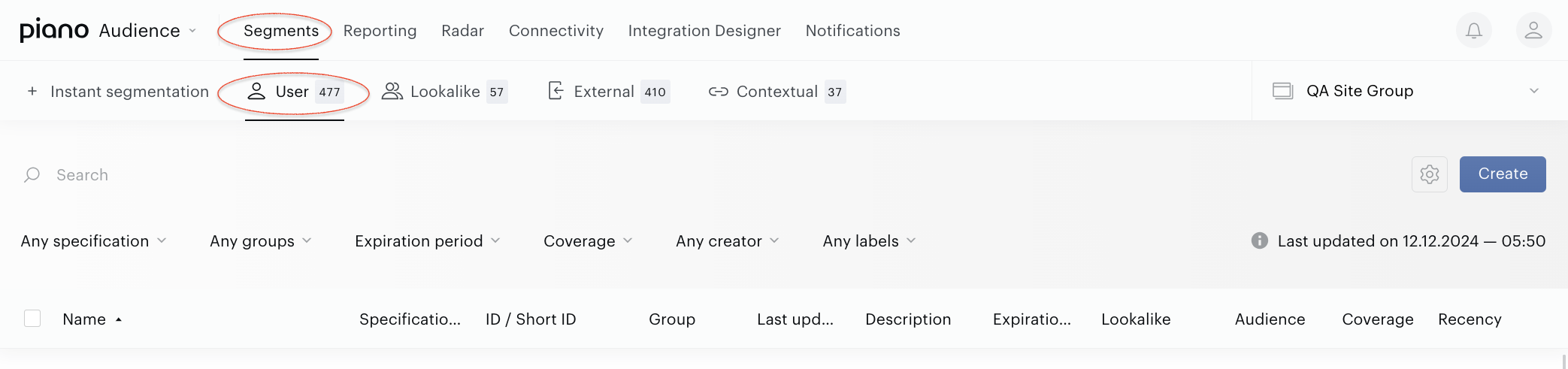
After that, the segment builder form will be shown, so that you are able to select desired filters:
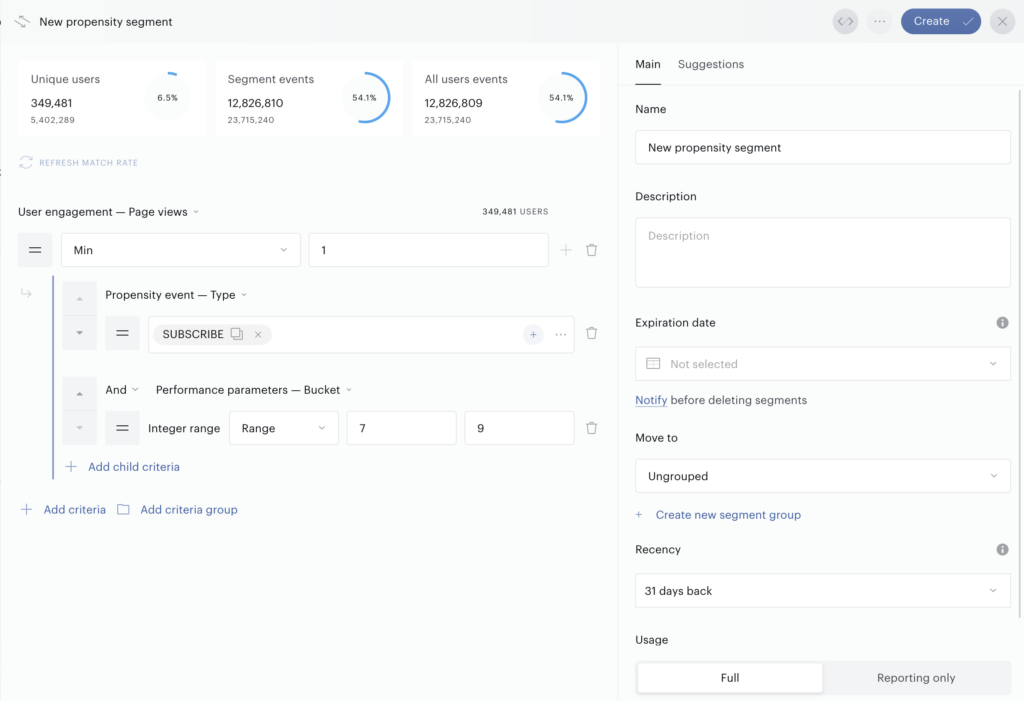
To get started, select an Engagement Attribute from the dropdown menu - options include Page Views, Sessions, or Visit Days. Next, add a Propensity filter by clicking the small plus button next to the Engagement filter. In this example, we're targeting users who are highly likely to subscribe. To do this, choose "Propensity Event - Type" from the filter options to specify the type of propensity. Then, pair it with a performance score by adding the "Performance Parameters - Bucket" filter. Switch this filter to the 'Range' option, and enter a range of 7 to 9 in the input fields to focus on the top buckets. If you'd like, you can refresh the match rate to see real-time estimates for your current setup.
It is also recommended to add some meaningful description in the Description field.
Note, that you need to create a monitoring Experience targeting LtS segments in Composer to be able to create propensity segments since these are powered by the scoring of users that Composer is triggering.
If a Propensity segment is used in Composer, then the same restrictions apply as for other Composer-used segments.