
The Subscribe with Google implementation with Identity Linking requires various tasks from both client and Piano.
Configuration in the Google Play billing platform
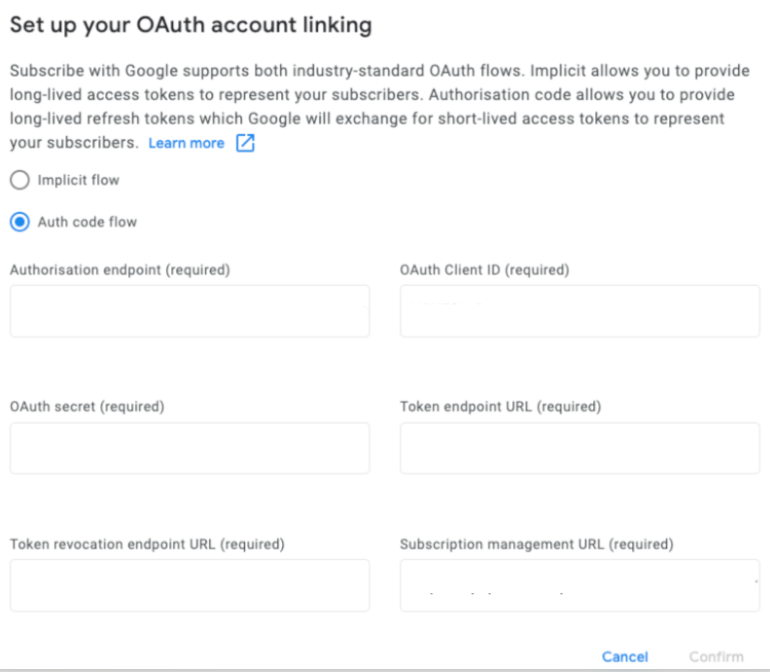
How to configure Subscribe with Google is described in the linked article and Identity Linking-specific configuration points are listed below (the other items should be configured the same way as for Identity Management):
-
Authorization endpoint
Enter the authorization endpoint URL from the client's user management system -
OAuth Client ID
Our doc says "Your Piano Application ID (AID)", but in Identity Linking cases, it should be the client ID of the user management system -
Token endpoint URL
Enter the token endpoint URL from the client's user management system -
Token revocation endpoint URL
Enter the token revocation endpoint URL from the client's user management system -
Entitlement verification URL (NOT "Subscription management URL")
Enter one of the following values based on your Piano application's environment:https://api.piano.io/api/v3/swg/sync/external?aid=<AID>(Americas)
https://api-au.piano.io/api/v3/swg/sync/external?aid=<AID>(Australia)
https://api-ap.piano.io/api/v3/swg/sync/external?aid=<AID>(Asia-Pacific)
https://api-eu.piano.io/api/v3/swg/sync/external?aid=<AID>(Europe)
This Entitlement API of ours takes a JWT token. Thus, the "access token" the publisher's user management system generates must be a JWT token that Piano can ingest (= must be the same JWT token they set via setExternalJwt).
Google does not care about the content of the access token; it just passes it from the publisher system to Piano. More information about the flow is available here.
Identity Linking configuration
Identity Linking configuration should be updated to use the "External UID connector API" strategy:
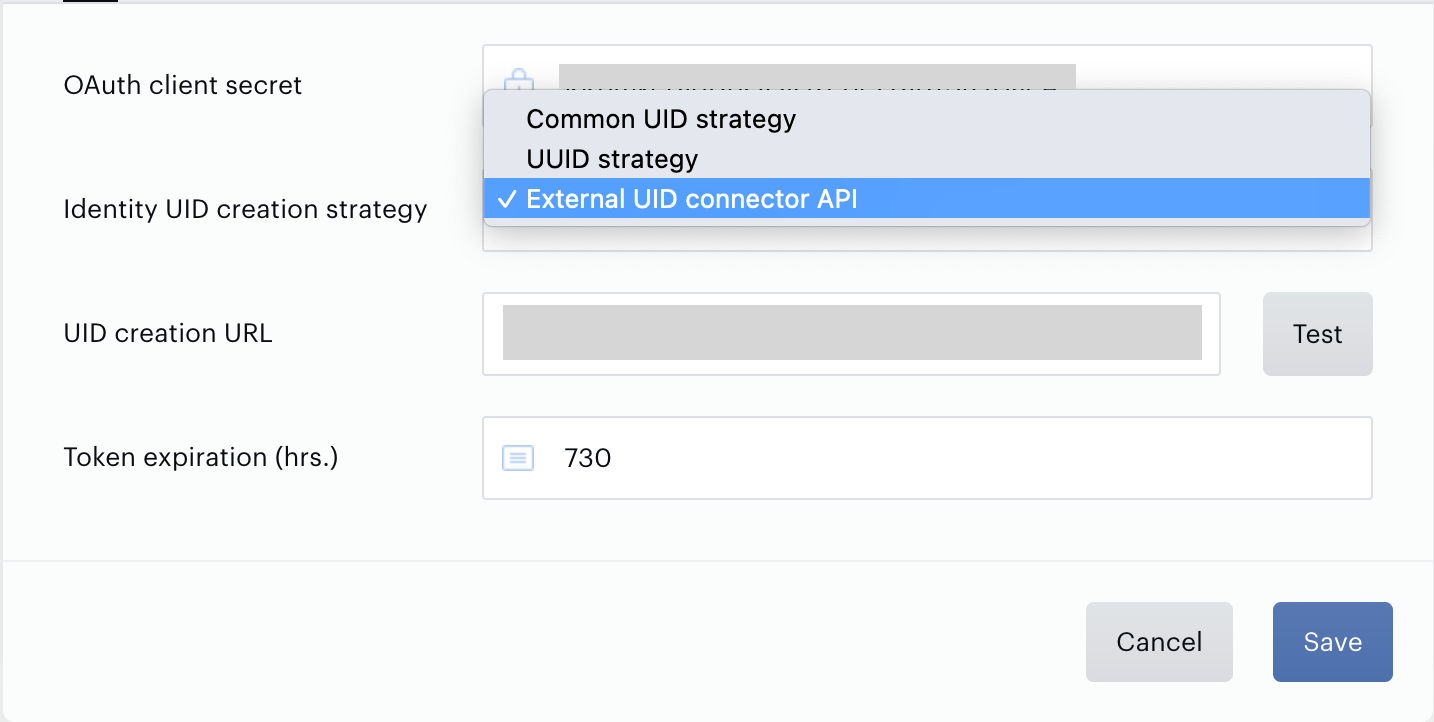
The client must implement a UID creation API endpoint in accordance with the specification here: User Management Integration. The payload is encrypted with the app's private key. The same method to decrypt webhooks as described in this article can be applied: How to decrypt Webhooks.
The API endpoint is called during the Purchase flow and the Deferred Account Creation flow - referred to as the "API call to create user" in the flow charts.
Identity Management configuration
Google social login still needs to be configured, even though Identity Management is not in use per se. This can only be done by Piano since the publisher does not have access to the Identity Management configuration screen if Identity Linking is configured as the app's user provider.
Please provide Piano with the Google app ID and Google app secret.
Provisional token verification
Implement the provisional token verification for implicit login according to this documentation.
This corresponds to "Set provisional token as __utp cookie" in the Purchase flow and the Deferred Account Creation flow.
For the Verification secret, please reach out to our Piano support team at support@piano.io.