
What is attribution?
Attribution is an analysis method that measures the contribution of different actions or sources in a visitor's journey before they complete a conversion (a transaction, a sign-up, and so on). In practice, it answers questions such as: which sources drove my conversions? How much weight should the first touchpoint carry compared with the last?
It relies on attribution models (first-touch, last-touch, linear, and so on) that distribute the credit for a conversion across the different steps of the journey.
In Data Query, attribution goes further than classic marketing attribution, which is usually limited to sources alone: you choose the metric to attribute and the property across which to distribute that attribution yourself (a source, but also an article, a banner, or any other property in your tagging plan). This flexibility comes with a few rules to be aware of, detailed below.
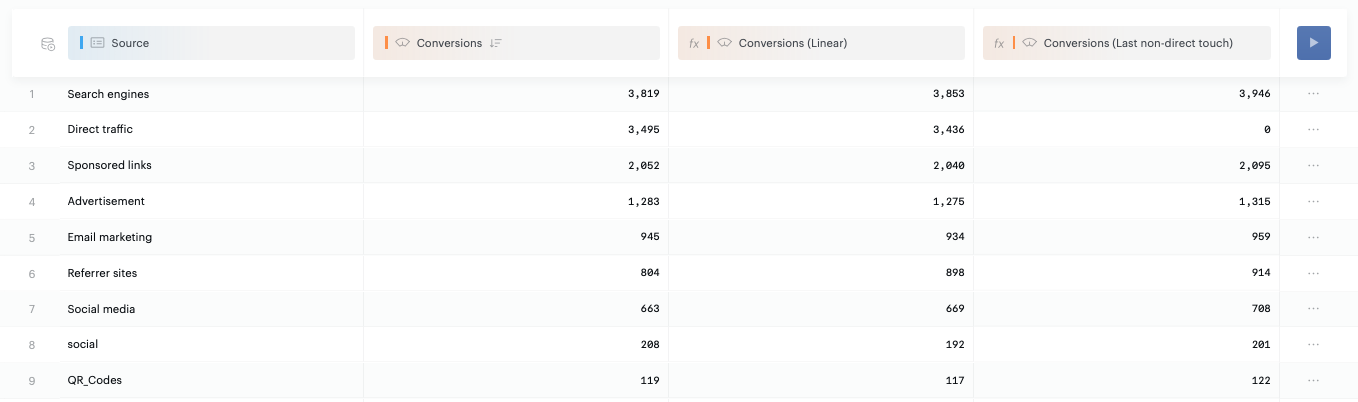
Which metrics can be attributed?
Not all metrics are compatible with attribution. Two conditions must be met:
-
The metric must be a sum (for example, a sum of revenue, or a number of transactions). A distinct count metric (for example, the number of visits, which relies on counting unique identifiers) or a rate metric (for example, a bounce rate) is not compatible.
-
The metric must be tied to an event in your tagging plan (for example, a video-play event, a click, a transaction). A metric that does not rely on an identifiable event cannot be attributed.
Good to know: if you try to apply attribution to an incompatible metric, the report will not return a usable result. First check that your metric is a sum tied to an event.
Click left on a compatible metric to enable attribution:
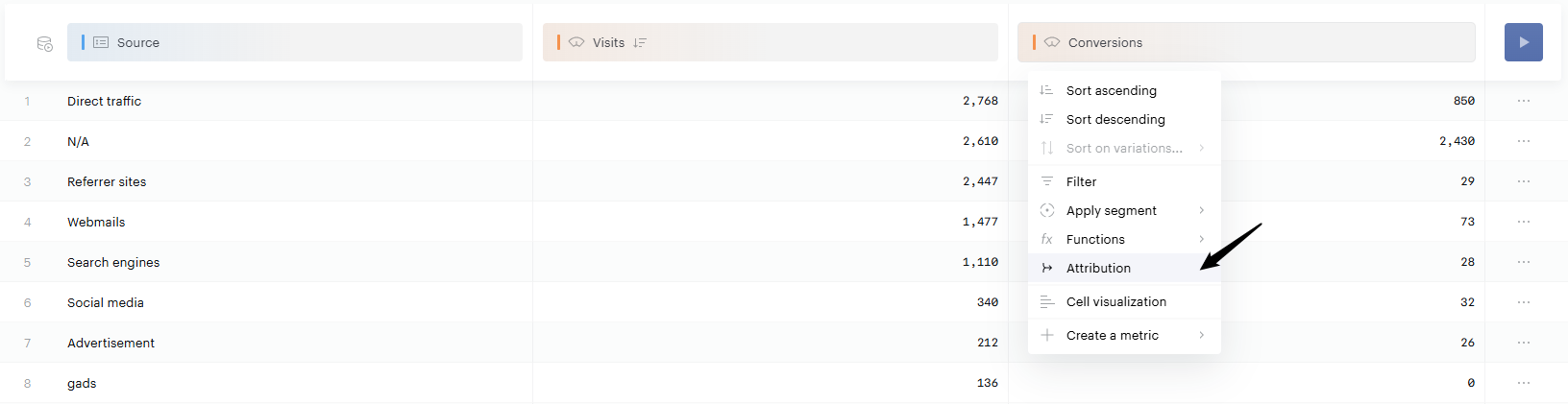
Configure attribution
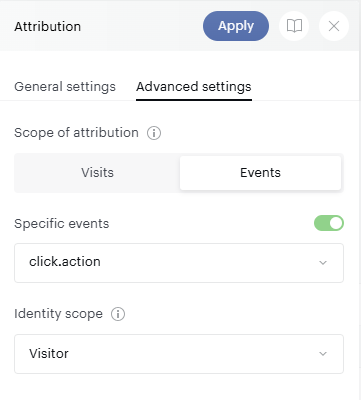
Attribution scope: visit or event
In the advanced settings of the attribution panel, you choose a scope:
-
Visit (default option): covers the large majority of use cases, in particular analyzing the impact of sources on your conversions (first-touch, last-touch, and so on). It is the most performant option for needs tied to visit-level properties (Sources, Countries, Devices; see your Data Management for the full list).
-
Event: required as soon as you want to attribute your conversion to something other than a source, for example a viewed article, a seen banner, or any other property carried by an event.
Good to know: the scope you choose determines which properties are available for attribution. A visit scope is compatible only with visit-level properties, whereas an event scope is compatible with all properties.
Select the events (Event scope)
When you use the event scope, you must select precisely which events to include in the calculation. This step serves two purposes:
-
Performance: on a high-traffic site, calculating attribution across all events can make the report too heavy, or even return no result at all.
-
Reliability of the result: it lets you exclude events that should not influence your attribution. For example, if you are analyzing how your articles contribute to conversion, you probably do not want a promotional insert on your homepage to be counted as having "contributed" if it does not correspond to an actual content view.
Tip: keep only the events relevant to your analysis. This improves both the performance and the quality of your results.
Identity scope: visitor or user
This setting determines whether attribution is calculated at the visitor level (anonymous identifier) or the user level (identified account):
-
Visitor: relevant in particular for source analysis, especially if part of your audience is not logged in at the time of their visit. It is based on the Cookie or mobile identifier.
-
User: relevant if you have logged-in or identified users. It is based on the
User ID.
Don't use a default User ID for unidentified users
Setting a default value such as "guest" or "anonymous" for all unidentified users is a very bad tagging practice. Because the attribution algorithm relies on the User ID to stitch user paths, passing the same value for many users will cause them to be treated as a single user — producing one large, artificial user path made up of millions of touchpoints.
The result will be inaccurate attribution data that doesn't reflect actual user behavior, and downgraded performance.
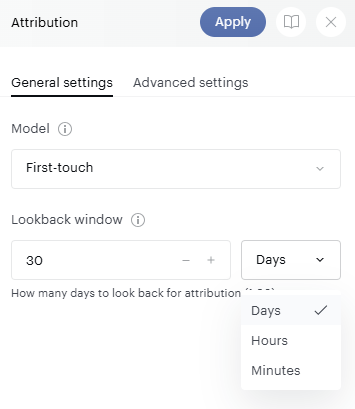
Attribution models
The available attribution models work according to the standard logic of marketing attribution. Data Query offers the following models:
-
First-touch: assigns all the credit to the first touchpoint in the journey.
-
Last-touch: assigns all the credit to the last touchpoint before the conversion.
-
Last non-direct touch: each conversion is attributed to the last non-direct traffic interaction preceding a conversion. If the consumer journey consists solely of direct traffic interactions, the conversion is attributed to direct traffic.
-
Linear: shares the credit equally across every touchpoint in the journey.
-
Time decay: gives more credit to touchpoints closer in time to the conversion, and less to earlier ones.
-
U-shaped: the credit is shared between all touchpoints in the following way:
-
40% for the first touchpoint
-
40% for the last touchpoint
-
20% shared amongst all other touchpoints
-
-
Shapley value: a data-driven model based on game theory that distributes credit according to each touchpoint's marginal contribution across the possible combinations of touchpoints. The Shapley Value model is well suited to understanding which touchpoints are genuinely driving conversions, beyond their position in the journey.
Look-back window
The look-back window (attribution window) defines how far back before the conversion the analysis should reach. It is specific to each use case:
-
Source analysis is generally done over a fairly wide window (around 30 days).
-
Analyzing content with a short life cycle (an article, for example) generally requires a shorter window.
You can configure this window not only in days, but also in hours or minutes, for use cases that require very fine granularity (for example: which banner did a visitor see in the 5 minutes before a specific action?).
Good to know: the look-back window must be between 1 and 90 days (or the equivalent in hours or minutes).
How filters behave with attribution
An important point to understand: when attribution is enabled, a filter applied to your report applies only to the visits preceding the conversion, not to the conversion visit itself.
Example: if you filter your transactions on "source = Google", the report filters on all visits whose source was Google before the conversion. If you want to filter exclusively on conversions whose last source was Google, you can apply that segment to your metric before applying attribution to it.
Example use cases
|
Use case |
Scope |
Look-back window |
|---|---|---|
|
Measure the impact of my sources on my conversions |
Visit |
Around 30 days |
|
Measure the contribution of my articles to my conversions |
Event (with event selection) |
Short, specific to the content life cycle |
|
Identify the last banner seen before a specific action |
Event |
A few minutes |
Good to know:
-
You can create several attribution metrics in a single report, with different models, to compare multiple configurations side by side.
-
An attribution metric you create is currently only available in the report in which you configured it.
-
Attribution is a free-configuration feature: there is not yet a dedicated pre-built analysis. You configure your report to your needs, as described above.