
If you'd like to have a Content recommendations widget, where one of the positions would be selected by editors, instead of the recommendations algorithm, below you can find instructions on how to achieve this.
Basically, you would set a module to dynamically pull in overrides when specific metadata is present, and the individual has not consumed that high-priority content.
Ongoing override management is performed within the Content Management System (CMS), adding the pre-defined metadata key:value.
Steps to implement:
-
- Create an override collection
- Allocate the override collection to specific slot(s) as appropriate
-
Set metadata on override articles
Use existing in-house CMS workflow to update article metadata, e.g.:
<meta name="cXenseParse:xyz-collection" content="breaking-news"/>Please refer to Custom Markup Documentation for specific nomenclature requirements.
Configuring module overrides
Create override collection
Select the metadata key and/or values as required e.g. xyz-editorial-override:true or xyz-override-section:politics, etc.
If this is done prior to publishing some override content, add the key/value(s) via the +Add value option.
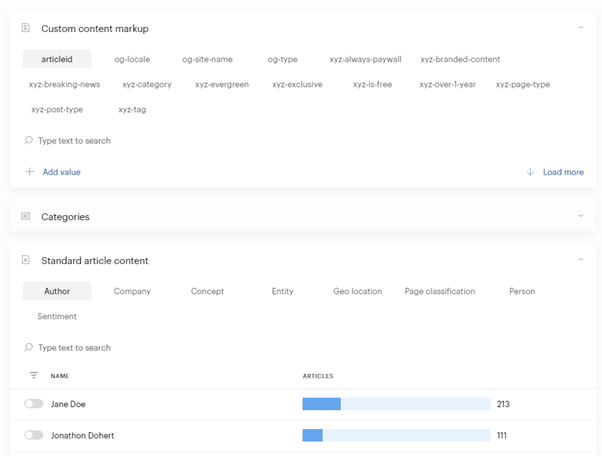
Allocate the collection to specific slots
Select which slots should deliver the override content when it is available. The module reverts to individualized content when no override content is present; hence, you can configure the module for overrides prior to the override content being present. Note: at least one slot must be allocated to the "non-override" collection to indicate to the module that the default collection is appropriate/valid to deliver (a module can contain WIP collections not appropriate for launch).

In the above example, Slots 1 and 2 will include override content when available.
Slots 3-6 do not include override content; instead, they present generally engaging "Opinion Boost" content.
Set metadata on override articles
Define a new metadata key (or use any of the existing keys if appropriate) within the Content Management System.
Incorporate either a true/false value (for site-wide, or combined sections):
xyz-override:true
Alternatively, use specific section/topic/theme values:
xyz-override-collection:politics
And/OR:
<span style="font-weight: 400;">Xyz-editorial-politics:true</span><span style="font-weight: 300;"> | </span><span style="font-weight: 400;">xyz-editorial-sports:true</span>
Note, that dynamic values will require minor content configuration of modules to select specific values if required.