
Model Details
The LtR (Likelihood to Register) model developed by Piano uses machine learning to identify patterns in the behavior of registered users and applies this knowledge to generate propensity scores for non-registered users. These scores represent the probability of a visitor to register, ranging from 0 to 100, with higher scores indicating a greater likelihood of registration. The model effectively segments the audience based on their registration conversion rates, which can vary greatly from one end of the spectrum to the other.
To learn, the LtR model collects data from both registered and non-registered visitors and computes various behavioral characteristics over different time periods. These characteristics include contextual data such as the device and referrer, behavioral data such as time of day, active days, and article consumption, and preference data such as the content categories of articles consumed.
The model considers around 100 features and selects the most important ones during the training run, avoiding highly correlated features to enhance the model's robustness. Whenever an experience involving the propensity model targets a visitor, the model computes the visitor's score in real-time based on the latest trained model.
While some predictors may be particularly powerful for some sites, such as time of day, device, and referrer, others may be more important for other sites, such as active days, visit frequency, and visit intensity. Regardless of the dynamics, the model automatically determines and applies them to enhance its predictive capability for your visitors.
Model Requirements
Registration propensity is enabled by default for Piano customers if the below requirements are met.
Before real-time registration propensity is available, there are also a few technical prerequisites. The website must have Composer 1X implementation and at least 31 days of page view events sent to Piano. Additionally, there must be at least 100 registration conversion events tracked within the last 31 days.
For clients using Management + Billing registration terms, registration conversion events are tracked automatically for LtR. However, clients not using Management + Billing will need to send conversion events using JavaScript by creating one or more registration products with the /conversion/product/create API (Note that the examples on that documentation page contain "type": "subscription", while the registration conversion events should be of "type": "registration"). Once this is done, you will need to deploy the conversion event script tag. The product conversion event should be implemented per product on the final "transaction complete" step for your product funnel. Send the order event along with the confirmation to the user. Whenever the user converts on your product, the conversion event must be sent using a special script tag found here in the Examples section.
Sample code:
<!-- Product Conversion Start -->
<script>
cX.CCE.callQueue.push(['sendConversionEvent', {
 'productId': '<product ID created using the API>',
 'funnelStep': 'convertProduct'
}, {
 'callback': function(result) {
 console.log(result.httpStatus); // 200
 console.log(result.response); // {}
 }
}]);
</script>
<!-- Product Conversion End -->
If you need help with implementing these steps, please reach out to your Piano representative.
If you want to monitor conversions for Piano LtR, the methods described here for subscription propensity can also be applied for registration propensity.
Propensity Score Ranges
After Piano's Likelihood to Register (LtR) model creates scores for visitors on a 0 to 100 scale, those scores are then broken into 10 segments that can be targeted using Composer 1x. The names of those ten segments:
-
0-9
-
10-19
-
20-29
-
30-39
-
40-49
-
50-59
-
60-69
-
70-79
-
80-89
-
90-100
-
No score
Visitors in the 0-9 range have the lowest likelihood to register. Visitors in the 90-100 range have the highest likelihood to register. The distribution of visitors between the groups isn't equal — there are generally more visitors in the low and moderately likely to register segments of the distribution than at the very high end of registration likelihood. The exact distribution varies from site to site, which is why Piano has a model based on each website's traffic and conversion data.
The No score segment shows users which we do not expect to score (those with fewer than 2 pageviews in the last 30 days).
Composer Setup
Once LtR is enabled on your site, and there is sufficient conversion data, you will be able to select LtR segments using the Composer 1x segmentation engine in the user segmentation card:
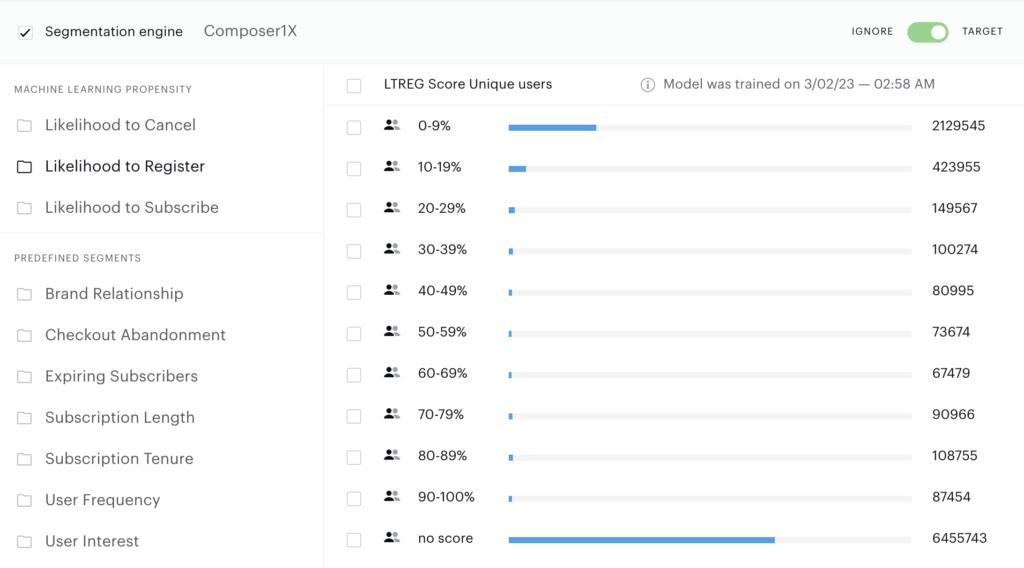
You can then select which segments you want to target individually, or as groups of segments. You can also target visitors who don't have propensity scores by selecting all registration propensity segments and moving the toggle to "ignore" rather than "target". Or alternatively by selecting only the No score segment and choosing the option "target".
When setting up experiences, Composer 1x reporting will show you an estimation of the number of visitors expected on each segment to help you decide which segments are best to select for each campaign. If there is not enough conversion data, no visitors will be shown within the segments.
ℹ️ Activating Propensity Scoring
Propensity scores are generated only when a model's segments are used in a live Composer experience. If the model isn't actively referenced, no scores will be produced.
To activate scoring without affecting users, create a monitoring experience using a Non-site action card (only if the model isn't already used in a live experience).
→ See Setting Up Monitoring Experiences for Propensity Model Scoring for step-by-step instructions.