
Table of Contents
Management + Billing and Audience LtC Models
Piano offers two Likelihood to Cancel (LtC) models, one for clients licensing Management + Billing and another for clients licensing Audience. While both models predict the same action — the likelihood of a given subscriber canceling — and both models use the same underlying machine learning methods, there are important differences with regard to the implementation and data used by the models. Explicit details about the machine learning model used can be found here.
Implementation Differences
The implementation of LtC depends on whether a client is using Management + Billing or Piano Audience. For clients with Management + Billing, the setup is streamlined and requires no additional development work from the client's team. This is because Management + Billing already has direct access to key data sources such as conversions, cancellations, subscription terms, transaction history, and behavioral data. Once enabled, Piano's data science team handles the configuration and activates prediction scoring. However, Composer 1X (C1X) is a prerequisite for Management + Billing LtC. If a client has not yet adopted C1X, some implementation work may still be necessary to support the model.
In contrast, for clients without Management + Billing who are using Piano Audience, the LtC model requires more involvement. The client is responsible for providing the necessary input data (outlined below) to fuel the algorithm. Since extracting customer data from external subscription commerce systems can be complex, the technical effort required to send this data into Audience can be significant. Once the data is in place, Piano's data science team will tailor the LtC algorithm based on the available inputs.
So to summarize, the LtC model can be implemented via either Management + Billing or Audience, but not both. The Audience-based LtC is designed for clients who do not have Management + Billing. Implementing both methods is not recommended, as it introduces overlapping functionality and may cause confusion about which score to rely on. Regardless of which method is used, the LtC score will appear in the interface (e.g., Composer) simply as Likelihood to Cancel.
Data Differences
Both the Management + Billing and Audience versions of the LtC model use a comprehensive set of data points and include key predictors, such as how long a user has been a paying subscriber or whether they are currently in a trial. The primary difference lies in data accessibility.
The Management + Billing LtC model automatically draws from the full subscriber profile within Management + Billing, allowing it to incorporate rich attributes such as the type of payment card used or the total amount a subscriber has paid. These advanced features are available by default for Management + Billing clients.
Meanwhile, the Audience LtC model can also support these data points — but only if they are explicitly sent into Piano Audience. This means the model's depth and accuracy depend heavily on the completeness and quality of the data provided. For a deeper breakdown of model-specific data inputs, refer to the sections below, specifically the Management + Billing LtC Model and Audience LtC Model.
Using Piano LtC Models With Composer
The differences between Management + Billing LtC and Audience LtC have no bearing on how they are used within Composer. Both versions of LtC will appear as 10 targetable segments within Composer's user segment card:
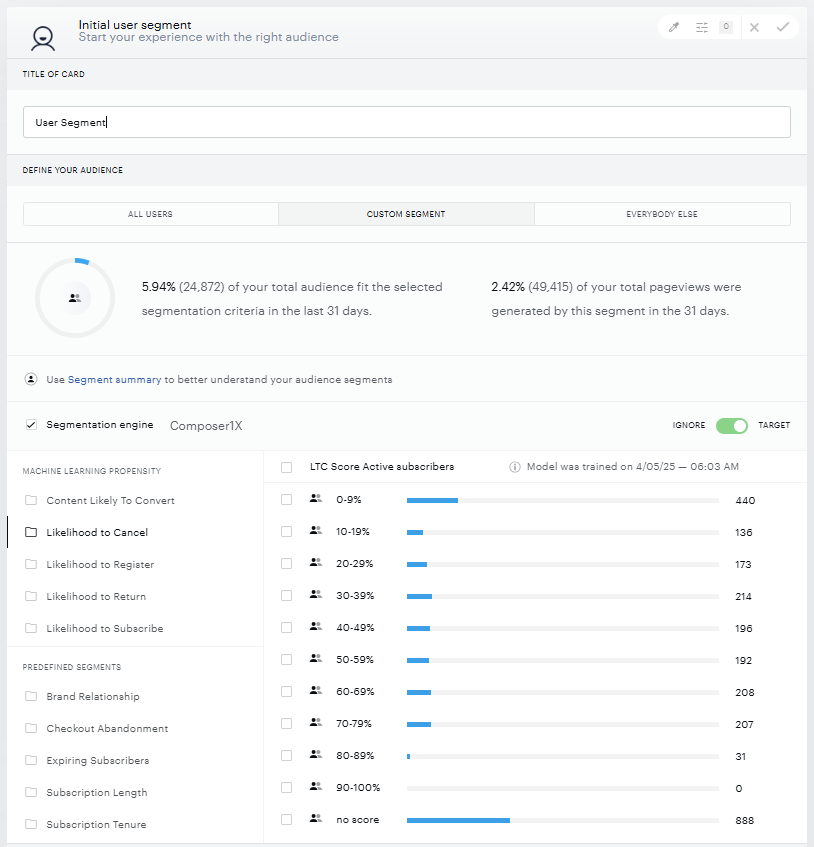
Both models output a probability score between 0 to 100 for each subscriber based on their likelihood to cancel. Subscribers are then broken into 10 segments that can be targeted using Composer, with 0-9 as least likely to cancel and 90-100 as the most likely to cancel:
-
0-9
-
10-19
-
20-29
-
30-39
-
40-49
-
50-59
-
60-69
-
70-79
-
80-89
-
90-100
Management + Billing LtC Model
Management + Billing LtC Overview
Management + Billing LtC predicts the likelihood of cancelation within the next 30 days, with the model retrained and scores updated daily. Management + Billing LtC scores are assigned to all active subscribers that visited the site in the past month. When setting up Management + Billing LtC, all Management + Billing subscription data is transformed to create the data points that the model needs for predictions. This data includes data about the subscription, term, payment providers, transaction history, and behavioral data.
Management + Billing LtC Features
Management + Billing LtC currently includes hundreds of features that the model automatically determines the significance of. Certain features tend to be important for subscription products of all types. For example, there can be a 700% or 800% difference in cancelation rate based on whether a subscriber is above or below the median number of billing periods. Geographic location can relate to a 3X or 4X difference. And the total a subscriber has paid to date may result in as much as a 600% difference — with more money spent connected to lower churn.
Other metrics are more variable. For example, there can be a relationship between the number of articles read prior to conversion and cancelation — with more articles linked to lower cancelation — but this is not universal. There are instances where there is little difference in cancelation between subscribers who were highly active prior to conversion and those who were not. Management + Billing LtC automatically finds these relationships, based upon the cancelation behaviors of your subscriber base, and sorts subscribers into the appropriate cancelation segments.
Management + Billing LtC Setup
For clients using Management + Billing, LtC can be activated by Piano as a Composer 1x segment and requires existing Composer clients to upgrade to Composer 1x. If you are not an existing Piano Insight, Audience, or C1x client, Management + Billing LtC will require adding cx.js in addition to the standard Composer script. However, aside from some data preparation by Piano's data science team, there is no development work necessary for Management + Billing LtC specifically, outside of C1x implementation.
When working with linked terms, LtC requires that, after the termination of a linked term subscription, the type of churn (active or passive) be specified among the parameters of the subscription_terminate event (path: event/subscription/churn/type).
Audience LtC Model
Audience LtC Overview
Audience LtC predicts subscribers most at risk of cancelation (those most likely to hit the cancel button) within the next 24 hours. Audience LtC predicts for all subscribers irrespective of the renewal date. New cancelation scores are generated for all subscribers every day to catch the subscribers most likely to cancel. The scores are stored in Audience' user profiles, with key values for each subscriber (example: xxx-sub-ltc). The training of the model is updated every week with the latest data points from subscribers (number of cancelations, which features of the model are most predictive, and so on), and visitors are scored in real-time utilizing the latest training model.
Audience LtC Features
The Piano Audience LtC model also predicts the likelihood to cancel based on a large feature set. Those features include many that Piano is able to track directly through cx.js, such as the split between weekday and weekend visits, scroll depth on articles, and active time. Other example features include content data, such as the number of freely accessible and premium articles read and the types of content that readers are consuming (share of consumption on sports or news or other content categories automatically classified using Piano Audience' natural language processing).
The model also includes a variety of features based on data sent by the client, which are discussed in the next section on implementation.
Audience LtC Implementation
There are two types of data that need to be passed to Piano Audience in order for Audience LtC to function, event data and user profile data. Event data includes actions, such as cancelation or subscription conversion. User profile data includes subscriber characteristics, such as which plan the subscriber pays for.
External User Profile Data
User profiles connect an external user ID to a Piano global ID. In relation to Audience LtC, this linking of IDs provides Piano with historical subscriber information in order to produce cancelation propensity scores for subscribers once they visit the site.
It is a requirement that the client's own user identifier is linked to a Piano global ID for each user the client is going to pass data points for. If the client is using any user provider supported by Piano, the following user ID linking is already being taken care of. If not, the client can pass their user identifier as a parameter in each pageview event. Technically this means adding the following line of JavaScript in the right place in the call sequence of the client-side instrumentation, if necessary:
cX.callQueue.push(['addExternalId', {'id': <externalId>, 'type': '<prefix>'}]);
The same user ID linking can also be performed server-side using the /profile/user/external/link/update API, but that requires that the server-side process knows the Piano user ID and is able to supply both identifiers in the API request. The Piano user ID can be retrieved using the clientside cX.getUserId() function call in cx.js.
The next step after successful user ID linking is to pass user profile data points to Piano. This is done by calling the /profile/user/external/update API endpoint and supplying the complete profile for the user each time the update API is called. The identifier to supply is the client's own user ID for this user. Note that there is no partial update support. When changing only parts of the profile, make sure to read the full profile using /profile/user/external/read first, make updates, and then call /profile/user/external/update with the updated full profile.
Provided the client is able to extract the required data from their subscription commerce backend, the following external data points are recommended for Audience LtC (note that the "prefix" is specific to your application and can be supplied by your Piano implementation team):
|
Data Point |
Description |
Naming Convention |
Data Type |
Supported Values |
|
Subscriber status |
True/False whether the user is an active subscriber or not (used to determine which users to predict cancelation likelihood for). |
<prefix>-subscriber |
String |
"true" or "false" |
|
Subscription date |
The date that the user subscribed, in the local time zone of the user. Required to determine how long the user has subscribed. |
<prefix>-sub-date |
Time |
"YYYY-MM-DD" |
|
Trial |
Only applies if the customer has a trial offering. |
<prefix>-trial |
String |
"true" or "false" |
|
Trial end date |
End date is preferred so Piano is not dependent on external update of data to determine when customer exits trial period. |
<prefix>-trial-end-date |
Time |
"YYYY-MM-DD" |
|
Plan |
If the subscription model has multiple products |
<prefix>plan |
String |
Any plan name (for example, if there are basic and premium plans, please specify). |
|
Print Edition |
If the subscription includes a print edition, please specify |
<prefix>print |
String |
"true" or "false" |
|
Time to next renewal |
Used to calculate the correct number of days to the end of the current billing period. |
<prefix>-next-billing-date |
Time |
"YYYY-MM-DD" |
|
Billing frequency |
Subscription billing type. |
<prefix>-billing-frequency |
String |
Any frequency name like "annual", "monthly", etc |
|
Credit card type |
Type of card used to pay. |
<prefix>-credit-card-type |
String |
Any card type: "Visa", "Amex" etc., or "no CC" if not applicable |
|
Subscription currency |
Currency subscriber paid in. |
<prefix>-sub-currency |
String |
Any currency name like "EUR", "USD", etc. |
|
Started with trial |
Set to "true" if the subscription began with trial (regardless of whether subscriber is currently in trial period). |
<prefix>-started-with-trial |
String |
"true" or "false" |
|
Number of non-trial payments |
Number of renewals after introductory pricing period(s). |
<prefix>-non-trial-payments |
Number |
The integer as a string, like "4" for example |
|
Billing periods |
Number of renewals. |
<prefix>-nr-bill-periods |
Number |
The integer as a string, like "4" for example |
|
Term ID |
Unique ID for each payment plan. |
<prefix>-converted-termid |
String |
Any term ID |
|
Payment provider |
Payment processor |
<prefix>-payment-provider |
String |
Like "Braintree" or "Paypal" etc. |
|
Registered before |
Whether the subscriber was registered prior to conversion |
<prefix>-was-registered-before |
String |
"true" when applicable, skip the field entirely for users where this does not apply |
|
Subscription price |
The current price subscriber is paying. |
<prefix>-sub-price |
Decimal |
Number with two decimal points as a string, like "24.99" |
If not all of this data can be passed to Piano, the LtC model will still function, though a full set of data points is always preferred. Once data is passed, the client will require a services engagement with Piano's data science team in order to incorporate the data passed into Audience' LtC model. This process can require extensive data cleaning, particularly if full data points are only supplied for a subset of subscribers.
During this process, it is important for the client to inform the Piano data science team which data point to use in order to determine the population of users to predict cancelation for. Typically this will be the "subscriber" user profile data point listed above.
Event Tracking Data
Here are the events that the Audience LtC model needs to function:
-
Implementation of cx.js to track all events for all users (minimum 90 days).
-
Conversion and cancelation/termination events (minimum 60 days) to track when a subscriber actively churns by pressing unsubscribe.
Note that the termination events should be sent at the moment of cancelation (when a subscriber disables auto-renew or otherwise cancels the subscription) rather than when the subscriber loses access since access often ends significantly after the act of cancelation and Piano is predicting for the act of cancelation itself.
Cancelation propensity requires longer to train than subscription propensity (which only requires 30 days of data) because Piano needs to track behavioral data in the 30 days prior to cancelation. The longer duration is also required because there are typically fewer cancelation events than subscription events and the model needs sufficient data to predict.
Event Tracking Implementation
Product conversion tracking allows you to track conversion funnels to specific products to power machine learning algorithms and reporting. In the context of Piano Audience, a product is an entity defined by type, length of access, and renewal.
Please inform the Piano data science team if there are products you are supplying conversion or termination events for that you want to exclude from LtC predictions (if you are sending newsletter conversions, for example, using the same method). By default, the algorithm will include all "subscription" productIDs.
In order to create your conversion event per product, you need to first define your products using the API.
Step 1: Define Product(s)
Use the /conversion/product/create API endpoint to create a product. Be prepared to supply the following details when calling the API: Site group ID, site ID, product name, product type ("subscription" most relevant for Audience LtC) and renewal frequency to signify the access duration.
Take note of the product ID that the API returns. It needs to be supplied in the script tag as detailed in the next step.
Alternatively, to add a product using the CCE GUI:
-
Click on "Product" in your top-level navigation.
-
On the right-hand side of the Product List view, select "Add Product".
-
Enter a Product Name For Product Type, and for the purposes of Audience LtC, select "Subscription"
-
Add information about the product Access Duration (if applicable). Access Duration represents the length of time the product renewal cycle will be in effect. If the product does not require an access duration, (i.e. the access continues until a user unsubscribes) select "Product has no fixed access duration."
-
Once you have defined your product(s), you are ready to instrument the tracking of the conversion event for each product.
-
Within the Product List view, press the "Settings wheel" on the right-hand side of a given product, and select "Code Integration". The Conversion Event Tag for your product will then be displayed.
Step 2: Deploy conversion event script tag
The product conversion event should be implemented per product on the final "transaction complete" step for your product funnel. Whenever the user converts to your product, the conversion event must be sent using a special script tag available found clicking "Settings Wheel >> Code Integration".
Example code:
<!-- Product Renewal Start -->
<script>
var cX = window.cX = window.cX || {};
cX.callQueue = cX.callQueue || [];
cX.callQueue.push(['sendConversionEvent', { 'productId': '<product-id>', 'funnelStep': 'convertProduct' }]);
</script>
<!-- Product Renewal End -->
Step 3: Report renewal and termination of subscriptions
In order to ensure data quality, accurate input for machine learning models and accurate reporting, there is also a need to instrument a terminateProduct funnel step per product to capture when a subscription is canceled (cancelation propensity cannot function without cancelation events).
Example code for terminations:
<!-- Product Renewal Start -->
<script>
var cX = window.cX = window.cX || {};
cX.callQueue = cX.callQueue || [];
cX.callQueue.push(['sendConversionEvent', { 'productId': '<product-id>', 'funnelStep': 'terminateProduct' }]);
</script>
<!-- Product Renewal End -->
Please note, if the product does not have an "automatic renewal" selection when being defined, a renewProduct event can be instrumented manually to report renewals.
Example code for reporting renewals:
<!-- Product Renewal Start -->
<script>
var cX = window.cX = window.cX || {};
cX.callQueue = cX.callQueue || [];
cX.callQueue.push(['sendConversionEvent', { 'productId': '<product-id>', 'funnelStep': 'renewProduct' }]);
</script>
<!-- Product Renewal End -->