
Model Details
Piano's Content Likely to Convert model uses machine learning to predict the articles likely to drive subscriptions and those that are not. Each article is given a score, ranging from 0 to 100, with a higher score indicating a greater likelihood of that article driving subscription conversions over the next week. Those articles at the high end of the spectrum will have vastly more conversions per article than those at the low end.
To learn, the content model leverages 138 features (a feature is simply a computed metric). The model uses a range of traffic features based on pageview data (parsing referrer, browser, and OS patterns). It also leverages content metadata, such as author, the article's IAB classification, and the time of publication. Lastly, the model includes information on conversions occurring shortly after publication.
At the two hour mark, when the article has the benefit of this early performance data, a 0-100 score is produced. The article's score will remain constant from that point forward.
One advantage of the Content Likely to Convert model is its scores can be used on the very first pageview of a visitor. Piano's audience propensity models begin scoring as of the second pageview because there is a dependency on collecting visitor data. With content propensity, the article publication date matters, not the behavioral history of the visitor. Explicit details about the machine learning model used can be found here.
Model Requirements
Content Likely to Convert is enabled by default for Piano customers if the below requirements are met.
Before content propensity is available, there are a few technical prerequisites. The website must have Composer 1X implementation and at least 31 days of page view events sent to Piano. The publish date must also be sent using tp.push, as detailed here. Additionally, there must be subscription conversion events tracked from at least 100 different converting articles within the last 31 days.
Note that this 100 threshold is a minimum requirement and that such models work best with higher conversion volumes. For sites close to the conversion threshold, it may take longer for Piano to produce a high-quality model (Piano's machine learning solutions include automated quality controls to prevent low-quality models from reaching production).
The Content Likely to Convert model leverages the same conversion data as Piano's Likelihood to Subscribe (LtS) model. If you have LtS implemented, there is no further implementation required on your behalf.
As with LtS, for clients using Management + Billing payment terms, subscription conversion events are tracked automatically. However, clients not using Management + Billing will need to send conversion events using JavaScript by creating one or more subscription products with the /conversion/product/create API. Once this is done, you will need to deploy the conversion event script tag. The product conversion event should be implemented per product on the final "transaction complete" step for your product funnel. Send the order event along with the confirmation to the user. Whenever the user converts on your product, the conversion event must be sent using a special script tag found here in the Examples section.
Sample code:
<!-- Product Conversion Start -->
<script>
cX.CCE.callQueue.push(['sendConversionEvent', {
 'productId': '<product ID created using the API>',
 'funnelStep': 'convertProduct'
}, {
 'callback': function(result) {
 console.log(result.httpStatus); // 200
 console.log(result.response); // {}
 }
}]);
</script>
<!-- Product Conversion End -->
If you need help with implementing these steps, please reach out to your Piano representative.
If you want to monitor conversions, the methods described here for subscription propensity can also be applied for content propensity.
Propensity Score Ranges
After Piano's Content Likely to Convert model creates scores for articles on a 0 to 100 scale, those scores are then broken into 10 segments that can be targeted using Composer 1X. The names of those ten segments:
-
0-9
-
10-19
-
20-29
-
30-39
-
40-49
-
50-59
-
60-69
-
70-79
-
80-89
-
90-100
-
No score
Articles in the 0-9 range have the lowest likelihood to convert. Articles in the 90-100 range have the highest likelihood to convert. The exact distribution varies from site to site, which is why Piano trains its model's based on your website's specific data.
The No score segment shows articles which we do not expect to score. This segment consists largely of old articles since the model does not have initial performance data for such articles. Old articles also tend to be less significant from a traffic and conversion perspective. The No score segment will shrink over time because, after activation, newly scored articles will retain their content scores indefinitely.
Composer Setup
Once the content model is enabled on your site and there is sufficient conversion data, you will be able to select Content Likely to Convert segments using the Contextual segments segmentation engine in the Effective Pages or Segment Pages card:
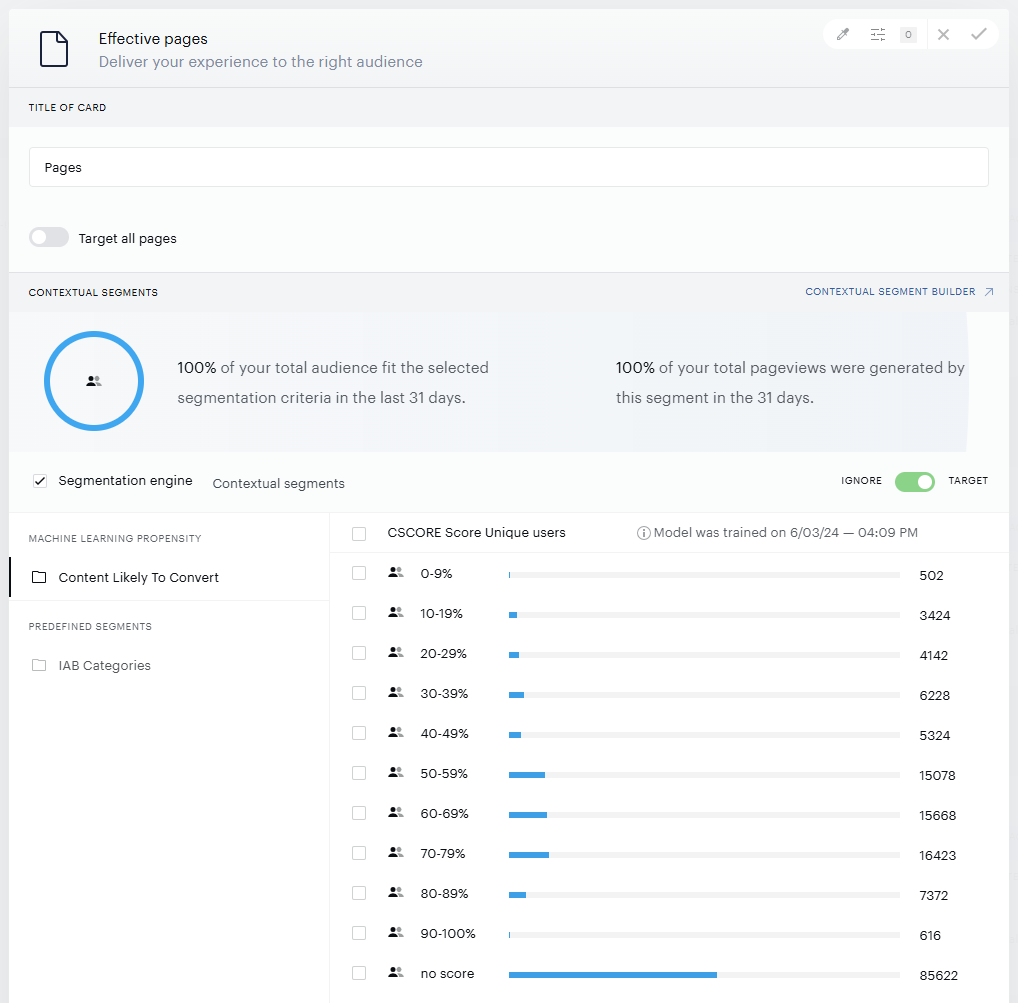
You can then select which segments you want to target individually or as groups of segments. You can also target articles that don't have propensity scores by selecting all propensity segments and moving the toggle to "ignore" rather than "target". Alternatively, select only the "No score" segment and choose the "target" option.
If you are utilizing the experienceExecute handler, the CLtC score is included in the array of segments available within the COMPOSER1X object as the CScore value.
ℹ️ Activating Propensity Scoring
Propensity scores are generated only when a model's segments are used in a live Composer experience. If the model isn't actively referenced, no scores will be produced.
To activate scoring without affecting users, create a monitoring experience using a Non-site action card (only if the model isn't already used in a live experience).
→ See Setting Up Monitoring Experiences for Propensity Model Scoring for step-by-step instructions.
Content Likely to Convert Deprecation in User Segment Card
IMPORTANT NOTICE: Composer no longer supports Content Likely to Convert (CLtC) as a targeting criterion in the User segment card. This targeting option is now available exclusively in the Segment pages card.
Impact on existing configurations
-
Existing User segments that already use Content Likely to Convert will continue to function as expected
-
Copying and pasting User segments with CLtC enabled is still supported
-
However, if CLtC is disabled in an existing User segment, it cannot be re-enabled in that segment
Impact on new configurations
-
CLtC can no longer be enabled as a targeting rule in new User segments
-
New User segments will no longer display Content Likely to Convert as an available rule category
How to configure Content Likely to Convert
-
Open your Composer experience
-
Add or select a Segment pages card
-
In the Contextual segments section, locate the Content Likely to Convert targeting options
-
Choose the segments you want to target, either individually or as grouped segments
To include articles without propensity scores:
-
Select all propensity segments and set the toggle to Ignore instead of Target, or
-
Select only the No score segment and set it to Target
To ensure consistency and avoid future limitations, we recommend migrating all CLtC targeting from User segment cards to Segment pages cards:
-
For existing setups: Recreate your current CLtC configuration from User segment cards in Segment pages cards
-
For new setups: Use the Segment pages card exclusively for CLtC-based targeting
If you have any questions about this change or need assistance, please contact the Piano Support team at support@piano.io.