
How does Piano's Dynamic Paywall work
Piano's dynamic paywall can be set up in Piano Composer. The dynamic paywall is an umbrella solution that intelligently leverages data from Piano's suite of propensity models, including the Likelihood to Subscribe, Likelihood to Return, and Content Likely to Convert models.
That range of propensity scores is combined within Piano Analytics with detailed ad data collected by Piano's Ad Revenue Insights product. This allows the solution to compare the expected subscription value and advertising value of a given page view and allows you to display various kinds of paywalls (or show no paywall) based on those computations.
Dynamic Paywall Details
RPM (ad revenue per 1000 pageviews) is a common metric in digital advertising. Thanks to Ad Revenue Insights, Piano can calculate RPM at a high level of granularity, detecting differences in ad revenue using attributes such as content section, browser, device, and a host of other data points natively collected by Piano Analytics.
Piano has the same level of detail on subscription conversions, allowing it to also calculate a "Subscription RPM" figure (defined as subscription revenue per 1000 pageviews) across thousands of segment combinations. By contrasting ad RPM and subscription RPM, Piano can ensure that you are targeting the right page views with your paywall and are free to maximize ad revenue and cultivate future subscribers on other page views.
For example, you may have a visitor with a subscription propensity score of 80-90, a return score of 50-40, on an article with moderate conversion likelihood, reading an article in the sports section, on Safari. Piano's dynamic paywall will automatically determine the ad and subscription RPM of this pageview.
Let's say the page view has a Subscription RPM of $15.32 and an ad RPM of $2.13. The solution would then look at the relative difference between ad and subscription RPM ( ($15.32-$2.13)/$2.13=619.25%). For this page view, the expected subscription RPM would therefore be 619.25% higher than ad revenue.
The dynamic paywall ranks all pageviews in this manner across thousands of possible segment combinations. If the same visitor moved to another article on the same website, say a technology article with a higher ad RPM, that page view would be ranked lower in relation to paid targeting because the higher ad RPM would narrow the gap between subscription and ad revenue potential of the pageview.
Using this logic, the dynamic paywall lets you optimize your paywall strategy to perform yield management across both ad and subscription revenue streams, optimizing for total revenue.
Dynamic Paywall Composer Setup
The dynamic paywall scores each page view on a scale of 0 to 100. These scores are then segmented into 20 ranges that can be targeted using Composer. The names of those 20 segments (21 including the no score segment):
-
0-4%
-
5-9%
-
10-14%
-
15-19%
-
20-24%
-
25-29%
-
30-34%
-
35-39%
-
40-44%
-
45-49%
-
50-54%
-
55-59%
-
60-64%
-
65-69%
-
70-74%
-
75-79%
-
80-84%
-
85-89%
-
90-94%
-
95-100%
-
No score
The segment ranging from 0 to 4% represents pageviews with the lowest predicted subscription revenue relative to ad revenue. Conversely, the 95 to 100% segment signifies pageviews with the highest predicted subscription revenue compared to ad revenue. Every segment holds approximately 5% of the total article pageviews.
These segments are directly visible within the Composer1x segmentation engine in the User Segment card:
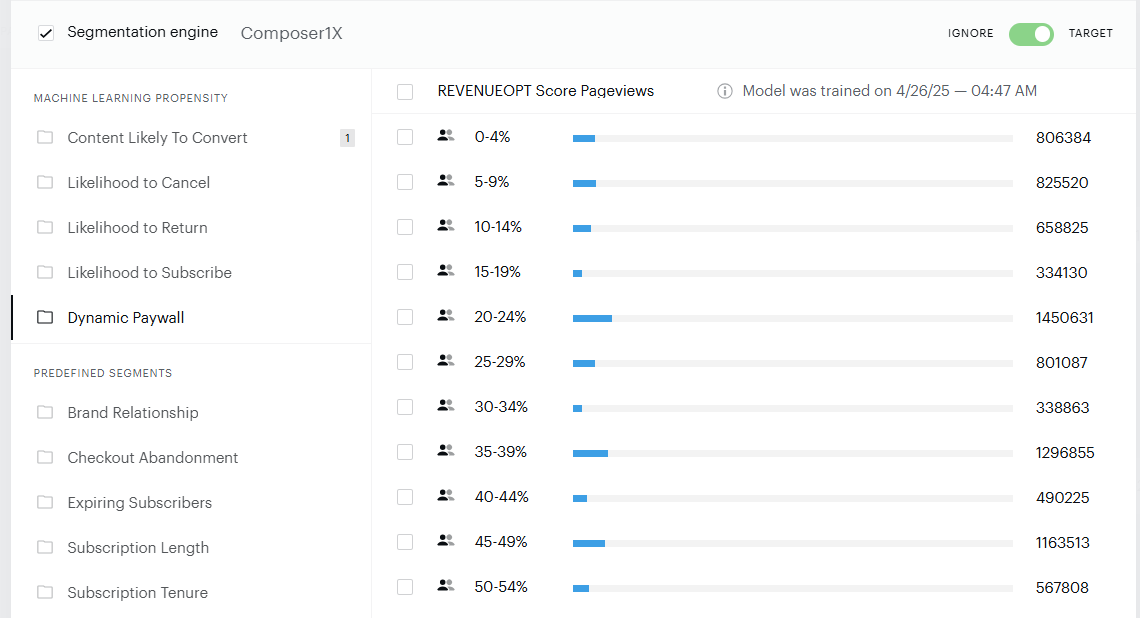
You can select the segments you want to target individually or as groups. To target visitors who do not have a propensity score, select all subscription propensity segments and move the toggle to "ignore" rather than "target". Alternatively, you can select only the "No score" segment and choose the option "target."
Because the dynamic paywall considers a wide range of data points (including when a visitor does not yet have a propensity score), the number of unscored page views is far lower than when using subscription propensity alone (for many dynamic paywall clients the share of unscored pageviews is below 1%).
Piano Analytics Reporting
Performance data for the dynamic paywall solution and all associated propensity solutions is automatically sent to Piano Analytics.
In addition to the standard Ad Revenue Insights workspaces, which are detailed here, workspaces specific to the performance of the dynamic paywall are made available to track the impact. Data points that can be tracked and analyzed include but are not limited to:
-
Paid Conversions
-
Conversion Rate (at page view level)
-
Conversion Rate (at unique visitor level)
-
Paid Revenue
-
Ad Revenue
-
RPM
-
Subscription RPM
-
Ad Impressions Per Page View
Prerequisites
To activate the dynamic paywall, there are a few prerequisites:
-
Ad Revenue Insights implementation
-
Piano Subscriptions of Piano's Likelihood to Subscribe propensity model
-
Piano Subscriptions of Piano's Content Likely to Convert model
-
Sending of section data
Piano also recommends activating the Likelihood to Return propensity model to improve performance.