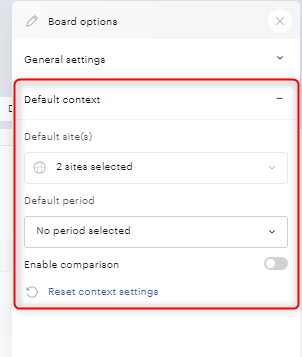
Open the Board settings menu in the board's toolbar and choose the default settings. These settings apply every time someone opens the board, so readers don't have to set them up themselves.
In the default context, you can add one or more default sites and a default period.
You can set these defaults:
-
Sites: the site or sites to display.
-
Time period: the period to apply, including custom relative periods.
-
Comparison: enabled or disabled.
-
Granularity: the granularity of evolution charts.
-
Eco mode: on, off.
For example, if your editorial team reviews a board every Monday, set the default period to "Last 7 days" and turn comparison on. The board then opens ready to read, with no setup.
Without default settings, a board opens with the user's default site, the Yesterday period, comparison disabled, granularity adjusted automatically to the period, and no eco mode preference.