
This API exposes operations to allow payments to be made against Accounts within the Cxense Advertising platform.
This API can be accessed by users with the appropriate permissions to make payments on Billing Accounts and supports the following operations:
|
Object |
Supported operation |
|---|---|
|
Payment |
POST |
|
Payment list |
GET |
Gateway Support
Cxense Advertising now supports the Nets and PayPal payment gateways. The broker is able to select which gateway is to be used by thier advertisers and this selection will also be used for REST API payments. See Payment Gateway configuration for more details.
Making a payment
For details on discovering Accounts in Cxense Advertising please refer to Account REST API.
Making a payment on an Account is a two step process, shown in the following figure.
This feature allows API Customers of Cxense Advertising to present their own user interface to an End User and make calls through to the Cxense Advertising system when the End User nominates that they wish to make a payment on an Account.
Figure 1: Process diagram - Making a payment
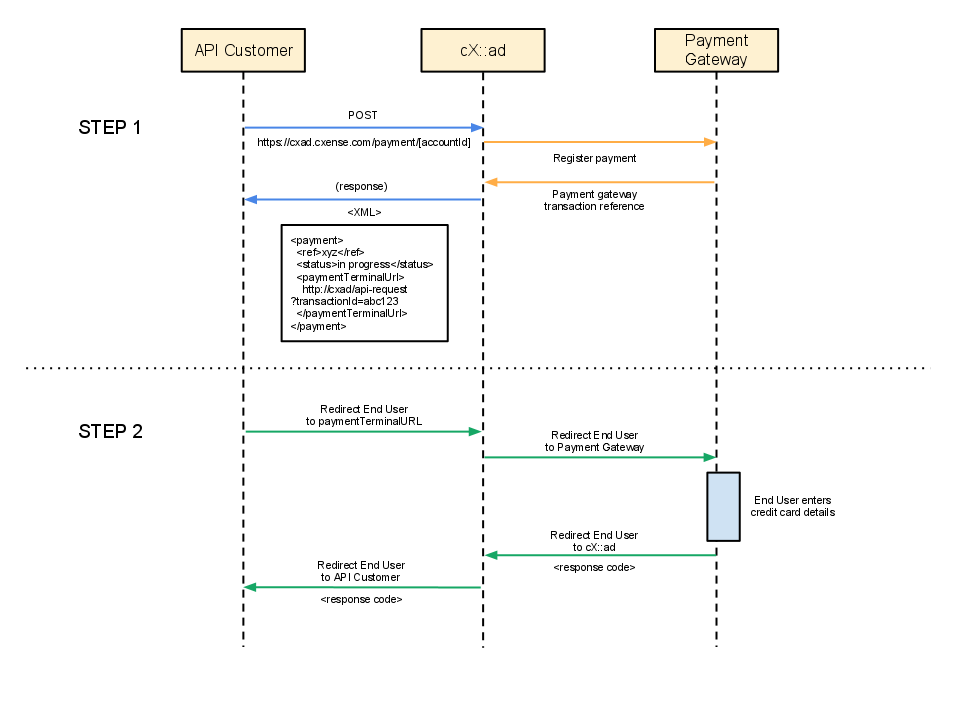
Step 1 - API Customer registers payment with Cxense Advertising
The End User has performed an action through the API Customer's user interface that nominates that they wish to make a payment on an Account. The API Customer then registers the payment with the Cxense Advertising system.
The POST operation is supported for making a payment on a specific Account. The Cxense Advertising system requires two peices of information be sent in the payload of this POST request, namely:
-
amount the magnitude and currency of the payment to be made
-
apiCustomerRedirectUrl the URL to which the End User will be redirected once they have completed the credit card form on the Payment Gateway
On completion of the payment the End User will be redirected to the apiCustomerRedirectUrl regardless of the status of the payment. A responseCode parameter will be added to the URL in order to communicate to the API Customer UI the success or failure of the End User's payment.
Make a payment to the Account with the given accountId
|
Parameters:
-
cxadbaseurl the base URL of the Cxense Advertising system
-
accountId the id of the Account to which the payment is to be made
This XML example shows the contents required to be POSTed when making a payment:
|
Example command:
|
This XML example shows the contents returned from the above POST call:
|
Step 2 - End User completes payment on the Payment Gateway
Once the payment has been registered with the Cxense Advertising system by the POST call above, the API Customer must then redirect their End User to the URL returned in the paymentTerminalUrl field in the XML response.
As shown in the example above the URL will be in the form:
|
The Cxense Advertising system will receive the End User and immediately and transparently redirect them to the Payment Gateway where they can enter their credit card details to complete the payment.
Once the End User has entered their Credit Card details they will be redirected by the Payment Gateway to the Cxense Advertising system where they will be, once again immediately and transparently, redirected to the URL provided by the API Customer in the apiCustomerRedirectUrl in the request payload when the payment was registered in Step 1.
The Cxense Advertising system will append a responseCode parameter to the apiCustomerRedirectUrl before redirecting to it to denote the success or failure of the End User's payment as returned from the Payment Gateway. The possible values and meanings of this responseCode parameter are as follows:
|
Response code |
Description |
|---|---|
|
ok |
The End User entered valid credit card details and the payment was successful |
|
cancel |
The End User chose to not enter their credit card details on the Payment Gateway and instead clicked 'Cancel' |
Retrieving the list of payments made to an Account
The GET operation is supported for listing existing payments for an Account.
GET
Retrieve the list of all payments made to a particular Billing Account.
|
Parameters:
-
cxadbaseurl the base URL of the Cxense Advertising system
-
accountId the id of the Billing Account for which the list of payments are to be retrieved
Example command:
|
This XML example shows the contents returned from a typical GET call:
|