Overview
Comparing experiences
With the development of our technology of handling a page before it's loaded in the user's browser, you now can choose between running Composer on one of your local servers or on an edge one. Both API interactions provide early access checks, i.e. prevent loading a page if the user doesn't have access to it. Both allow using their outcome in a subsequent client-side experience. With that said, the Edge experience is free from the latency caused by the server location and allows some extra actions (see the document and the table below). While the new local-server-based solution can ensure that contextual/c1x segmentation and A/B tests are executed before a client-side Site pageview experience starts.
API interaction on edge and API interaction on server are mutually exclusive: an application can use only one of them.
This table compares the client-side and server-side experiences.
|
Aspect |
Site Pageview |
API Interaction on Edge |
API Interaction on Server |
|
Content protection |
Visitor-dependent |
Full |
Full |
|
Dev resources |
Minimal setup |
Advanced setup |
Advanced setup |
|
Content latency |
None |
Low |
Low/Medium* |
|
Ease of use |
Intuitive |
More technical |
More technical |
|
ML Segments
|
Yes |
Yes** |
Yes |
|
A/B Testing
|
Yes |
TBD |
Yes |
*Varies by server locations.
**See here for further details on individual segment availability.
The functions available with the API interactions are compared below:
|
API interaction on edge |
API interaction on server |
|
Non-site action |
A/B testing |
|
Run JS |
Representation in A/B test report and Flow report |
|
Set cookie |
|
|
Set response value |
Benefits of API interaction on server
-
Access check before the content reaches the client browser.
-
Advanced segmentation/rules checking due to access to the same data as Site page view experiences.
-
No need for heavy cookies.
-
A well-defined and stable request/response schema (JSON is used by default).
-
API calls protected by your Piano API key (find it in your dashboard): you can trust passed raw IDs, and our server-side storage is protected from uncontrolled attacks/bursts.
-
Configuration within Composer's canvas.
Synergy with Piano's environment
You are free to use your server-side experiences with Auth sync/Identity Management and Management + Billing's Linked terms (data backfill may be recommended to enable functions like standard audience user profile fields and C1X segmentation).
Limitations
-
Mutual exclusivity with API interaction on edge: your application can support only one API interaction type.
-
No functionality based on user interaction: no on-page behaviour tracking (scroll depth, clicks, etc.); no server-side templates and related events.
Requirements
-
Since a raw registered user ID is provided to API on your side, it is on you to properly handle auth checks (e.g. with JWT verification). However, if you are using Identity Linking (or Identity Management) together with Piano Management + Billing, you should delegate authentication to us by forwarding the JWT cookies as they are and passing a user token instead of just a user ID. Without a user token, certain features will not function properly, including access- or term-based segmentation, custom fields, promo codes, and session count segmentation. In addition, we will not try to create a user asynchronously, as we do with Identity Linking for example.
-
The experience requires
tbc, a small static cookie used to preserve integrity between server-side and client-side experiences and avoid data collision on Composer’s server-side storage. -
If it is not possible or not desired to store
tbcin cookies or mobile app storage, then it is on you to store it on your server and provide it with each subsequent request. -
Server-side experiences can be called only from the secure context, i.e. within server-to-server communication.
-
To maintain integrity between your server-side experiences and all the Piano-driven functionality downstream, you need proper wiring of data points that will guarantee using the same user IDs, pageview IDs, etc. A server-side experience can drive the conversion KPI by providing a tracking ID that will subsequently pass conversion details to Piano. For example, if you use a third-party checkout, you can show a paywall based on your server-side experience and then pass the returned tracking ID to the external checkout. Another option (suitable for A/B tests) is to wait until the experience is completed and then call the Piano conversion API to log the event.
-
DynamoDB cookies storage should be enabled.
Consent management
-
The functionality is not subject to any explicit privacy compliance, and it's up to you to obtain any user consent.
-
At the same time, we guarantee that all user data collected in the scope of the execution of API interactions on server will be removed through regular GDPR-based inquiries provided by Piano.
API usage
Request
Request parameters
Transport: HTTPs 1.x/2/3
Host:
-
US (East Coast)
-
production:
c2.piano.io -
sandbox:
c2-sandbox.piano.io
-
-
Europe (Central)
-
production:
c2-eu.piano.io
-
-
Asian Pacific (North)
-
production:
c2-ap.piano.io
-
-
Asian Pacific (South)
-
production:
c2-au.piano.io
-
Path: /{aid}/execution/run/server where aid is Piano application ID.
Method: POST
Authorization: Authorization header with the static API key available in your Piano dashboard.
Content negotiation:application/json
Additional headers:
-
Composer-Protocol-Version: 1
Request body schema
{
  experience: {
    // optional, experience ids to execute;
    // if not provided we run all server-side experiences in a configured order (waterfall) -- recommended way;
    // if provided then we execute only these experiences in a provided order (also waterfall);
    // waterfall means as soon as particular condition/branch successed, we terminate execution and yield result
    // result always contain a single "result" object representing winning action card.
    ids: Array<String>?
  },
  linkage: {
    // (prnd) if not provided then generated and returned in the response
    pageviewId: String?,
    // internal id, if not provided then generated and returned in the response
    // should be provided with each subsequent call to maintain data integrity,
    // should be stored in cookies or other device storage
    tbc: String?,
    // anonymouse user id, browser id, cX_P, if not provided then generated and returned in the response
    // if tbc provided and valid, then this value ignored
    browserId: String?,
    // JWT, provided in case of AuthSync/ID integration
    userToken: String?,
    // registered persistent user id, if `userToken` provided then this value ignored
    userId: String?
  },
  context: {
    // valid url, including query, in case of SPA should be artificially assembled
    url: String,
    // http header, previous location
    referrer: String?,
    // end user IP address
    ipAddress: String,
    // end user agent (raw header)
    userAgent: String,
    // where Value is primitive or array of primitives, object is not supported
    customVariables: Map<String, Value>
  }
}
Smart custom variables (customVariables), are automatically recognized by Composer and utilized differently:
-
contentId - String
-
contentTags – Array, content tags
-
contentCreated – String representing ISO 8601 date or unix timestamp (epoch seconds)
-
contentAuthor – String
-
contentSection – String
-
contentZone – String
We may add new variables going further.
Request body examples
First request
{
    "linkage": {
        "pageviewId": "lz6zaihym6t076qq",
        "tbc": null,
        "browserId": "lo24apegvtjtgift",
        "userId": "PNI8hFCmPre85h6"
    },
    "context": {
        "url": "https://www.example.com/business/technology/innovative-tech-solutions-for-2025",
        "referrer": "https://www.google.com/",
        "ipAddress": "1.2.3.4",
        "userAgent": "User-Agent: Mozilla/5.0 (Macintosh; Intel Mac OS X 10_15_7) AppleWebKit/537.36 (KHTML, like Gecko) Chrome/106.0.0.0 Safari/537.36",
        "customVariables": {
            "region": "na",
            "userStatus": "subscriber",
            "device": "phone",
            "contentTags": ["premium", "2025"]
        }
    }
}
Subsequent requests
{
    "linkage": {
        "pageviewId": "lz6zllp63xv6d99v",
        "tbc": "{kpcd}ChBsbmJvODlnYjFpbnJ0eDk1EgpCNnNJWEtMaWluGjxrY0ZKTmNVU3VoMzhhejFBNk5YbnRiclVycGp4aEtJMVV0SWFuV0QzVVBsb09uczB4U1g3aFBxN3pJaTAgAA",
        "browserId": "lo24apegvtjtgift",
        "userId": "PNI8hFCmPre85h6"
    },
    "context": {
        "url": "https://www.example.com/business/technology/innovative-tech-solutions-for-2025",
        "referrer": "https://www.google.com/",
        "ipAddress": "1.2.3.4",
        "userAgent": "User-Agent: Mozilla/5.0 (Macintosh; Intel Mac OS X 10_15_7) AppleWebKit/537.36 (KHTML, like Gecko) Chrome/106.0.0.0 Safari/537.36",
        "customVariables": {
            "region": "na",
            "userStatus": "subscriber",
            "device": "phone",
            "contentTags": ["premium", "2025"]
        }
    }
}
First request with ID generation delegated to Composer
This example also shows an option to execute only particular experiences by ID.
{
    "experience": {
        "ids": ["EXQD5PQ67HBK"]
    },
    "linkage": {
        "tbc": null,
        "userId": "PNI8hFCmPre85h6"
    },
    "context": {
        "url": "https://www.example.com/business/technology/innovative-tech-solutions-for-2025",
        "referrer": "https://www.google.com/",
        "ipAddress": "1.2.3.4",
        "userAgent": "User-Agent: Mozilla/5.0 (Macintosh; Intel Mac OS X 10_15_7) AppleWebKit/537.36 (KHTML, like Gecko) Chrome/106.0.0.0 Safari/537.36",
        "customVariables": {
            "region": "na",
            "userStatus": "subscriber",
            "device": "phone",
            "contentTags": ["premium", "2025"]
        }
    }
}
cURL full example
curl --request POST 'https://$HOST.piano.io/$AID/execution/run/server' \
--header 'Content-Type: application/json' \
--header 'Authorization: $API_TOKEN' \
--header 'Composer-Protocol-Version: 1' \
--data '$BODY'
where:
-
request headers:
-
Composer-Protocol-Version: 1
-
-
$HOST – region-specific, for now these should be enough:
-
c2 for US clients;
-
c2-sandbox for sandbox environment;
-
-
$AID - should be replaced with application id (e.g. B6sIXKLiin);
-
$BODY – represents request payload.
Bridging API Interaction and On-Site Experiences
You can use the API interaction experience as a foundation for executing the On-Site Experience. To achieve this, you need to define two key parameters in the server-side request:
-
browserId -
pageViewId
These parameters are important because they will be reused to trigger the On-Site Experience.
Setting browserId and pageViewId parameters
You have two options for defining these parameters in the server-side request:
-
Manually set the parameters and their values yourself.
-
Let Piano automatically generate the parameters and their values.
Once set, these parameters become part of the server-side request, which triggers the server-side Composer experience (API interaction on the server).
To seamlessly connect the API interaction on the server and On-Site Composer experiences, you must ensure the On-Site Experience uses the same browserId and pageViewId values as the server-side API request. This helps to ensure that the On-Site Experience continues the execution flow initiated by the API interaction on the server.
To achieve this, you need to configure the Data Layer with the same parameter values. Please, refer to our documentation on consent management for client storage to find more information on how you can define the right setting inside the Data Layer configuration.
Response
Expected HTTP codes
-
200– success -
400- bad request, invalid input arguments -
401– unauthorized, missing or invalid authorization header -
403– forbidden, your application is not configured to use this API -
500– internal server error.
Response body schema
{
  linkage: {
    // from request or generated if wasn't passed
    pageviewId: String?,
    // internal Composer id, should be passed to subsequent Composer requests
    tbc: String,
    // from request or generated if wasn't passed
    browserId: String,
    // from request (raw or jwt)
    userId: String?
  },
  context: {
    // page/credit meter states related to result
    pageMeters: Array<PageMeterState>,
    creditMeters: Array<CreditMeterState>,
    // picked ab test variants related to result
    abTests: Array<ABTestState>,
    // user profile fields (if userId or userToken is provided)
    userProfile: {
      fields: Array<FieldState>
    },
    // segment ids user was assigned to
    userSegments: Array<String>,
    // segment ids relevant for a given url
    contentSegments: Array<String>,
  },
  result: {
    // to drive conversions [e.g. for AB tests], should be passed to Piano Conversion API
    trackingId: String,
    // experience id
    eid: String,
    // action card id
    id: String,
    // action card name
    name: String,
    // action card parameters
    params: {
      // 1 - content loaded (has access), 2 - content restricted (has no access)
      "outcome": Number,
      // custom payload,
      //  key - variable name,
      //  value - could be string, boolean, number (integer), object (json)
      "payload": Map<String, OutcomeVariable>
    }
  }
}
Response body example
{
    "linkage": {
        "pageviewId": "lz6zllp63xv6d99v",
        "tbc": "{kpcd}ChBsbmJvODlnYjFpbnJ0eDk1EgpCNnNJWEtMaWluGjxrY0ZKTmNVU3VoMzhhejFBNk5YbnRiclVycGp4aEtJMVV0SWFuV0QzVVBsb09uczB4U1g3aFBxN3pJaTAgAA",
        "browserId": "lo24apegvtjtgift",
        "userId": "PNI8hFCmPre85h6"
    },
    "context": {
        "pageMeters": [],
        "creditMeters": [],
        "abTests": [],
        "userProfile": {
            "fields": []
        },
        "userSegments": [],
        "contentSegments": []
    },
    "result": {
        "trackingId": "{kpdx}AAAAoiLwfU3wkwoKQk5HVng1c0twZRIQbHo3MjA5d2l0ajB4ajRweRoMRVhaWTJKU0hDREJWIiUxODIyM29vMGI4LTAwMDAzNDd1cDFrcXF0aWs4bGM0cDljZG9zKhtub25TaXRlQWN0aW9uMU9GQjZGNzJSUVNHMjVSEnYtbHo2emk4dnhsYWp4bmljNVoNNzguODUuMjA5LjIyMGIDZG1jaNnio7UGcAF4Bw",
        "eid": "EXQD5PQ67HBK",
        "id": "setExperienceOutcomeEWRC3SGQ5U4K231",
        "name": "Has access",
        "params": {
            "outcome": 1,
            "payload": {
                "someStringVariable": {
                    "type": 1,
                    "value": "text"
                },
                "someBooleanVariable": {
                    "type": 2,
                    "value": false
                },
                "someIntegerVariable": {
                    "type": 3,
                    "value": 12345
                }
            }
        }
    }
}
Creating API interaction on server
As API interaction on server is enabled for your application, you get a new icon in the Create a new experience window.
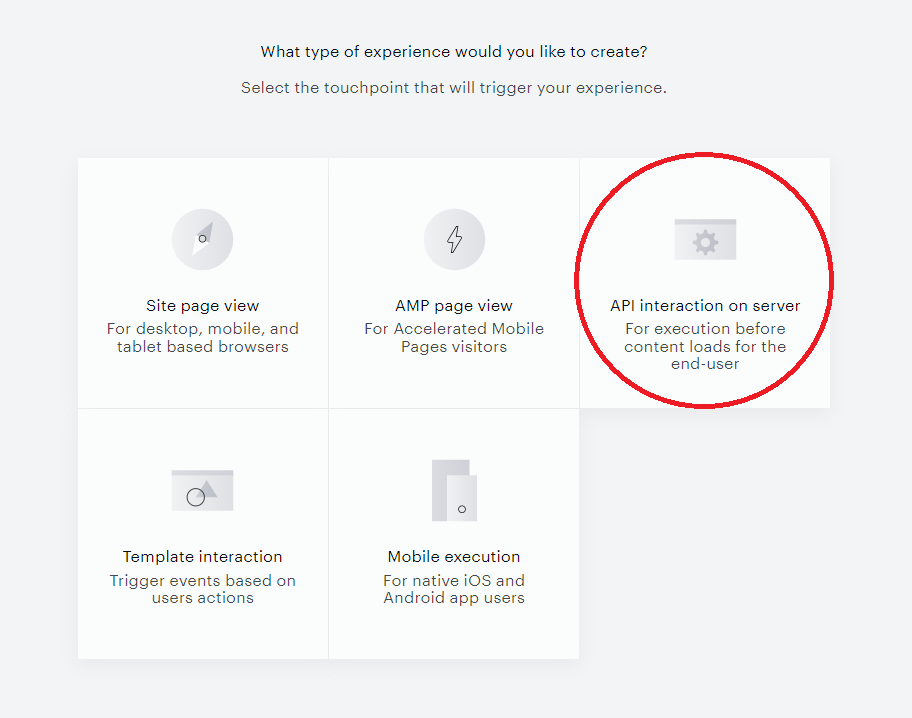
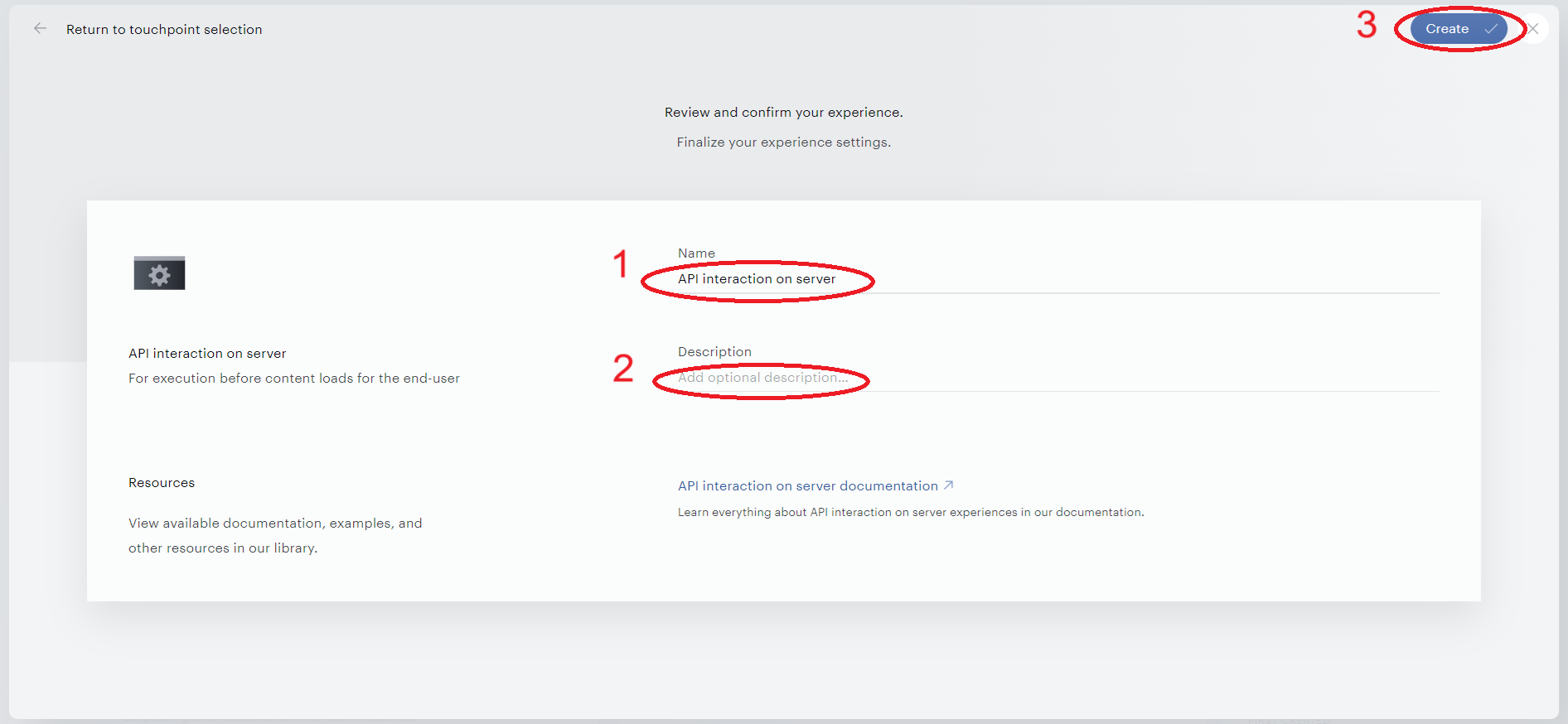
Select it, enter the name and the description of your experience, and click Create in the top right corner.
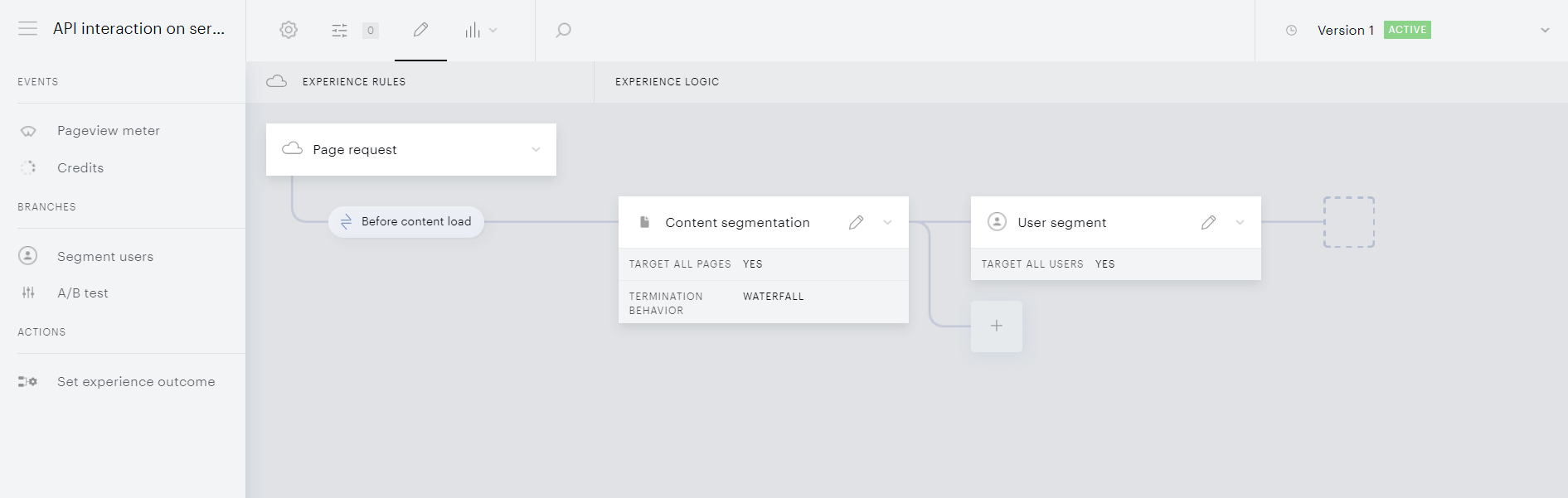
The canvas will open.
Configuring API interaction on server
The canvas resembles that of API interaction on edge, except that the tool panel features A/B test in Branches and there is only one Action, Set experience outcome.
Also, please note that you can enrich your Content segmentation with contextual segments (if enabled), as well as User segment with C1X segmentation (if enabled).
The experience follows the same principle of waterfall execution and its Set experience outcome card participates in Site pageview experiences in the same way as the Edge interaction does (including fallback options).
Prioritization view
The Prioritization view allows streamlining the execution of different Experiences within one application. Cross-experience relations for other experience types (at least, for their "Show" cards) can also be configured with the Action exclusivity feature.
Waterfall execution supposes that, if a given page request meets the segmentation criteria of multiple experience flows within a given API interaction, the system will take the flow located topmost on the canvas; the flows beneath will be ignored.
Canvas Restriction for Server Experiences
API Interaction on Server experiences enforce a waterfall termination behavior that allows only one end card (action card) per branch. The Composer canvas will prevent users from adding multiple end cards to the same branch to ensure proper experience execution.
This restriction ensures that when a user flow meets the criteria for a specific branch, the system executes only one outcome, maintaining the integrity of the waterfall execution logic where the topmost applicable flow is accepted and all others are ignored.
A similar principle is applied when defining which API interaction to execute within an application. When your application has more than one API interaction configured (on edge or on server - depending on your application settings), you can manage them with a special priority list. The system will then attempt to execute the topmost "Live" interaction on that list. If that interaction can't be executed because of user or content segmentation, the system will try the next API interaction on the list until success. The list can be managed in the following steps:
-
Click Products → Composer on the dashboard to open Experience Manager, the page storing all your experiences.
-
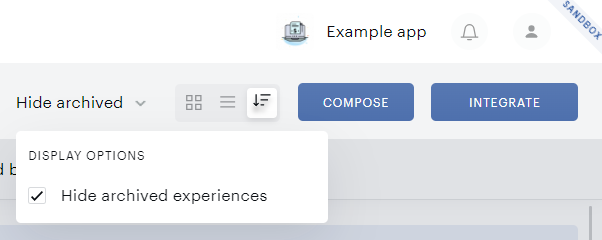
Hit the Prioritization view button in the toolbar.

-
Drag and drop experiences to rearrange the order of their execution attempt.
-
The list is saved automatically. No confirmation clicks are needed.
By default, your API interactions are sorted/prioritized by Last updated date, and the newest one will be taken first.
In managing the list, you can also show archived experiences by deselecting a designated checkbox (selected by default).