
Integration with the client side
There are two types of API interactions on edge based on the way you combine them with Composer's other features:
1. Client-side integrated. A natural component of Composer’s logic, the result of an API interaction on edge (loading/restricting content) can be treated as a new action (Experience outcome) for Site pageview experiences executed afterward, in the user’s browser.
Besides restricting access to a page, API interactions on edge can, optionally, set variables to be used in other processes. You can set a cookie, run a JS script or initiate a non-site action before the page is loaded to the user’s browser. API interactions on edge also allow to keep count of one user’s pageviews even if they log in from different devices.
2. Standalone. Even without passing on the outcomes of API interactions on edge to Composer’s Site pageview experiences, you can profit from the feature by setting intermediary actions (run JS, Set variable, etc.) or using the experience outcome in templates on your side.
Edge integration guide
API interactions on edge provide a way to integrate with a highly distributed Composer decision-making network which makes them suitable for serverside integration with the best performance possible.
A classic server-side integration implies an API request from the client’s origin to one of the Piano’s DCs. Such requests can’t be cached on CDN, since it has to do a dynamic response generation based on the user’s context. As a result, it has a dramatic impact on the page load time, since an end user’s request has to round trip to the client’s origin, then to Piano DC, and back to the browser.
Considering the growing presence of highly distributed serverless networks offered by modern CDNs, a new way of server-side integrations has emerged. Piano provides a new type of experience that leverages such capabilities relying on the effective peering between popular CDN networks and giving the shortest RTT time available.
Benefits
The list of benefits includes:
-
Fast page load time.
-
Scales seamlessly, you don’t have to worry about the load on your origin.
-
Write integration code once and then manage your content rules and paywalls dynamically through Composer without making additional changes to your application code.
Limitations
If you are using the Piano Dynamo DB as the storage for the xbc cookie - then API interactions on edge can’t be enabled on your application.
The current limitations are listed below:
-
A high distribution comes at the cost of data availability. API interactions on edge have less data available for segmentation, however, we are constantly working on pushing the boundaries.
-
At the moment you can leverage the following functionality:
-
Target by page metadata, such as: url, tags, authors, publication time etc.
-
Check access to Management + Billing resources / subscriptions.
-
Check login status: registered vs anonymous.
-
Target by geolocation and IP: country, postal code, white list networks, etc.
-
Target by custom variables, custom cookies, UTM tags, campaigns, and referrers.
-
Target by user device: platform, browser, operating system.
-
Target by user consent.
-
Pageview metering and credit metering.
-
-
-
The functionality we plan to add going further in some shape or form:
-
Target by Identity Management custom fields.
-
AB tests.
-
-
IP range site licensing contracts are not supported
Composer 1X segments are available for targeting in Edge experiences, just as they are in other experience types. On Edge, Composer 1X segmentation follows PV+1 logic, meaning segments become available starting from the second page view.
However, the following segments are not displayed as options in the User Segmentation card for API Interaction on Edge experiences. This is because the PV+1 logic may cause them to behave unpredictably, potentially leading to targeting failures:
-
Brand Relationship
-
User Recency
-
Contextual (e.g., IAB)
-
Dynamic Paywall Model
These segments remain fully available for targeting in Site page view experiences and are unaffected outside of Edge.
Requirements
-
A serverless platform that you use (i.e. CND) should have good coverage around the globe, especially within the territory where most of your audience is located. It would guarantee a fast response time from Composer edge.
-
The platform should allow you to make a custom HTTP sub-request to a remote host which is not part of your origin server on each incoming end user request. CDNs usually call such functionalities: workers, edge lambdas, or edge functions.
Going further we will refer to such functionality as edge worker or simply worker.
Integration recommendations
The goal of the integration process is to call a specific Piano API from your edge with a particular set of parameters and then process its response to return user-specific content and set the right cookies for the transparent context transfer back and forth.
General recommendations:
-
Usually, an edge worker can be configured to either run on every page or only if the client’s request has met certain conditions. Running workers only under particular circumstances may reduce usage costs. For example:
-
use a specific subdomain to serve premium content, e.g. setup worker to run only on
premium.publisher.com/* -
use a specific URL path to serve premium content, e.g. setup worker to run only on
*.publisher.com/premium/*
-
-
Edge worker runs before any content has been received by the client and before any Java script has a chance to run on the client’s device, therefore you should not rely on any state that’s not sent from the browser by default, in general, you would have requested a URL and a set of default HTTP headers (such as user agent and cookies).
-
In case of a paywall use-case, you need to have well-defined rules for the pages where access check logic should run, i.e. you have to understand which pages are not free to access.
-
The most straightforward and easy-to-implement option is to serve premium content from a specific subdomain or directory or have a well-defined naming pattern for article pages. If such granularity is not enough, and it is required to analyze the page metadata to get the answer, then you might look into storing this data within CDN Edge KV storage in case of a fully serverless implementation, and look it up each time a page is requested; or, if a remote origin is used, return and cache page meta using a preflight request header.
-
-
Premium pages or other dynamic pages should not be cached on the client for obvious reasons, but they still should be cached on CDN to prevent expensive and slow requests to origin (if one is used). Most modern CDNs provide such caching granularity via
max-ageands-maxagein thecache-controlheader. -
Make sure you request Composer Edge only once during the same pageview. In the case of SPA, you have to clearly define when the root page content has to be changed and a new request to Composer has to be emitted.
-
Make sure to use long-lived connections with keep-alive to make requests to Edge Composer.
-
Keep in mind that the
__taccookie is only updated after client-side Composer’s execution which may result in a one-page delay for access checks on Edge. This means that right after a purchase or login, a user might still be blocked from the content page despite having active access. To avoid this:-
Option 1: Redirect the user to a transit page after purchase or login. This page should run Composer, which will update the
__taccookie with the correct access state, and then you can redirect user back to target content page. -
Option 2: Call
tp.user.refreshAccessToken()after purchase or login, then refresh the page. This forces the__taccookie to update (requires Piano user token cookie__utpor*__ut*to be already set).
-
API Usage
In order to trigger Composer execution, an HTTP POST request should be sent to https://edge.piano.io/{aid}/edge/execute where {aid} has to be replaced with your Piano application ID.
Following request content-type(s) are supported:
-
multipart/form-data; boundary= -
application/x-www-form-urlencoded
The request should contain the right set of parameters and headers.
Request parameters
|
Headers |
||
|---|---|---|
|
Name |
Required |
Description |
|
|
✔️ |
The following cookies from the original client request should be proxied to Composer Edge through this header. Consider filtering out other non-Piano cookies for privacy reasons and to reduce egress traffic. Keep in mind the request size limit exists on Edge, you don’t want to bloat it with unrelated cookies.
|
|
|
✔️ |
The header should be taken from the original user request and proxied to Composer Edge. |
|
|
✔️ |
Should contain the end user's IP address. |
|
|
|
The location the end user came from, should be proxied from the original request. |
|
Form parameters |
|||
|---|---|---|---|
|
Segmentation |
|||
|
Name |
Required |
Value example |
Description |
|
|
|
|
JSON object: primitives and arrays of primitives are
|
|
|
✔️ |
https://premium.content.com/myarticle-1 |
Origin URL. Should be a valid URL. |
|
|
|
|
A string delimited by a comma. Tagging conventions,
|
|
|
|
|
If you are subject to Alliance for Audited Media reporting,
|
|
|
|
|
Unix timestamp in seconds, you can target pages by
|
|
|
|
|
Content author, you can target pages by their author. |
|
|
|
|
Content section, you can target pages by section. |
|
|
|
|
|
|
|
|
Overrides default cookie domain behavior, which is the top-level domain |
|
|
|
|
/news |
Overrides the default cookie path which is |
|
Form parameters |
|||
|---|---|---|---|
|
Diagnostic |
|||
|
Name |
Required |
Value example |
Description |
|
|
|
|
Extends response with debug messages. It should not be enabled on the production workload. |
|
|
|
|
Extends response with extra user context. It changes
|
Response processing
Response processing consists of two steps:
-
Cookie processing. Composer will return multiple
set-cookieresponse headers, one per cookie to set. Each such header should be proxied back to the client, so the actual cookies can be updated on the client’s device. At the moment we return theset-cookiefor the following cookies, however, we recommend to proxy all mentionedset-cookieheaders to automatically enable support of new
upcoming features:-
xbc– always returned; -
__tbc– returned if it was provided with request; -
__tac– returned if it was provided with request; -
_pcer– always returned, edge result to transfer; -
_pc_*– if any SetCookie action was successfully executed.
-
-
JSON processing. Composer will return the response body with
content-type:application/json. The structure would look like this:
{
    "result": {
        "id": "setResponseVariableR67WX480EIVD47",
        "name": "Set response variable 1",
        "type": 30,
        "params": {
            "desktop1": true
        }
    }
}
id – refers to a card id from Composer UI, which could be used for reporting.
name – human readable card name from Composer UI.
type – Composer card type enumeration, can be used to write custom processing logic based on executed card type, value never changes for the same type of Composer card.
params – card-specific parameters which could be used to customize processing logic.
cURL example
curl --location --request POST 'https://edge.piano.io/Y0ps2VUwOD/edge/execute' \
--header 'User-Agent: Mozilla/5.0 (Macintosh; Intel Mac OS X 10_15_7) AppleWebKit/537.36 (KHTML, like Gecko) Chro
--header 'Referer: https://www.google.com/' \
--header 'X-Forwarded-For: 1.1.1.1, 2.2.2.2, 3.3.3.3' \
--header 'Cookie: xbc={kpex}JU0QBk8xgLXmwHCbYCFHtO_GRWGfkQ6fuqLsM9BYQqM8_63ptY_FjFuwlG1MV-mw4EJlk-zzBTK95NxWS-i12
--form 'url="https://my.news.com/article"' \
--form 'tags="tag1,tag2"' \
--form 'contentCreated="1667260800"' \
--form 'customVariables="{\"var1\":[\"val1\", \"val2\"], \"var2\":[1,2,3]}"'
MODETWOAPP stands for your Piano application ID (AID).
A single xbc cookie is provided; in real life, it would be multiple Piano cookies.
Edge worker snippet
Here’s an example of implementation based on the CloudFlare worker API. Code is a generic JavaScript that can be adopted by any serverless
platform supporting v8 or NodeJS-based runtime.
The getContent function can be adjusted and extended to any use case.
// put your Piano app id here
const PIANO_APP_ID = "Your Piano AID";

const PianoCookiePrefixes = [
  "xbc",
  "__tbc",
  "__tac",
  "_pprv",
  "_pc",
  "_pcus",
  "_pcer",
  "__utp",
  "__ut",
  "tpcc_",
  "__adblocker"
];

const DynamicCookiePrefix = `${PIANO_APP_ID}__ut`;

export default {
  async fetch(request, env, ctx) {
    // Put your headers here
    const customHeaders = new Headers();
    return await getContent(request, customHeaders);
  },
};

async function executeComposer(request) {
  // consider to add a reasonable timeout, make sure connections are long-lived
  const response = await fetch(
    new Request(`https://edge.piano.io/${PIANO_APP_ID}/edge/execute`, {
      method: 'POST',
      headers: proxyHeaders(request.headers),
      body: prepareFormParameters(request).toString()
    })
  );

  return { data: await response.json(), headers: response.headers };
}

async function getContent(request, customHeaders) {
  let originResponse;
  let responseHeaders = new Headers(customHeaders);

  try {
    const composerResponse = await executeComposer(request);

    // extract set-cookie headers to proxy back to client
    composerResponse.headers.getAll("Set-Cookie").forEach(cookie => {
      responseHeaders.append("Set-Cookie", cookie);
    });

    // each card has unique set of parameters, so customise here based on your use case
    // here we return a version of truncated content in case of user having no access
    let hasAccess = composerResponse?.data?.result?.params?.hasAccess || false;

    if (hasAccess) {
      originResponse = fetchFullContent(request);
    } else {
      originResponse = fetchTruncatedContent(request);
    }
  } catch (e) {
    // be ready to handle API failure, in this case consider some fallback result
    console.log(e.message);
    originResponse = resolveFallBackContent(request);
  }

  return new Response(originResponse, {
    status: 200,
    headers: responseHeaders
  });
}

function fetchFullContent(request) {
  // fetch content from origin (CDN cache) or build dynamically
  return "<html lang='en-US'><body>full content</body></html>";
}

function fetchTruncatedContent(request) {
  // fetch truncated content from origin (CDN cache) using extra query param or build dynamically
  return "<html lang='en-US'><body>truncated content</body></html>";
}

function resolveFallBackContent(request) {
  // provide a fallback content, could be adjusted by available user state
  return "<html lang='en-US'><body>fallback content</body></html>";
}

function proxyHeaders(headers) {
  const headersObject = {};

  headersObject['User-Agent'] = headers.get('User-Agent') || null;
  headersObject['Referer'] = headers.get('Referer') || null;
  headersObject['X-Forwarded-For'] = headers.get('X-Forwarded-For') || null;

  headersObject['Cookie'] = headers.get('Cookie')
    ?.split(";")
    ?.map(pair => pair.trim())
    ?.filter(pair => {
      try {
        const [name, value] = pair.split("=");
        return (
          (PianoCookiePrefixes.some(prefix => name.startsWith(prefix)) ||
            name === DynamicCookiePrefix) &&
          value
        );
      } catch (ignored) {
        return false;
      }
    })
    ?.join(";") || "";

  headersObject['Content-Type'] = "application/x-www-form-urlencoded";

  for (const [key, value] of Object.entries(headersObject)) {
    if (value === null) throw new Error(`Required header ${key} is missing`);
  }

  return headersObject;
}

function prepareFormParameters(request) {
  const formParams = new URLSearchParams();
  formParams.set('url', request.url);

  // provide custom user state and page metadata, check documentation for the full parameter list
  // page meta can be fetched and cached on CDN via a preflight request or stored within Edge KV storage
  formParams.set('customVariables', '{"var1":"value"}');
  formParams.set('tags', 'tag1,tag2');

  return formParams.toString();
}
Altering Default Domain and Path of Cookies
Piano provides flexibility for publishers to customize the default domain and path of cookies set by Edge Experience. This feature allows for greater control and consistency in managing user data across different domains and paths.
To implement this customization, publishers can leverage the cookieDomain and cookiePath parameters in their requests for API interactions on edge. By default, the values for these parameters are set to the top-level domain and root path (/). However, adjusting these parameters enables publishers to tailor cookie settings according to their specific requirements.
For detailed instructions on utilizing these parameters and further customization options, refer to the Piano documentation here.
Consent management
To enhance your integration with edge, you can leverage consents and event segments based on products' modes. The Consents feature provides detailed information about managing user consents. When using the Consents feature, it's essential to include the requireConsent=true parameter in your edge request.
Data related to consent products, modes, and purposes can be transmitted in two ways:
-
Via _pprv Cookie:
-
Automatically generated on the Site integration by the DataLayer after user consent.
-
Added to the Cookie header of the edge request.
-
-
Via consentModes Parameter:
-
The value is a JSON object containing "product: mode" pairs, such as
{"0":0,"1":0,"2":0,"3":0,"4":0,"5":0,"6":0,"7":0}. -
Keys represent indexes of products, where
0- PA,1- DMP,2- COMPOSER,3- ID,4- Management + Billing,5- ESP,6- SOCIAL_FLOW,7- DL. -
Values represent indexes of modes, where
0- opt-in,1- essential,2- opt-out.
-
Segmentation functionalities align with the guidelines outlined in the Consent Management documentation.
If your site implements a consent/cookie banner and utilizes the "Consents" approach, we strongly recommend reloading the page after user consent is received. This ensures that users won't access free articles unintentionally.
Adblocker handling
Adblockers pose a challenge by potentially blocking Piano scripts. Various adblockers, which can completely block Piano scripts, are listed here.
To address this issue, the edge implementation empowers publishers to manage such scenarios effectively by delivering truncated content. In addition to the established methods for combatting hard-block adblockers (refer to Adblock detection documentation), publishers can configure an edge experience. This configuration aims to produce a "Consent restricted" outcome when the "User segment" branch with "Adblockers enabled" is executed. Consequently, publishers can display a banner encouraging users to disable their adblockers for an optimal experience.
Content Likely to Convert (CLtC)
Content Likely to Convert (CLtC) segmentation is fully supported for Edge-based targeting.
A content profile will be generated and delivered to Edge under the following conditions:
1. Scheduled refresh: 60 days have passed since the last crawl
2. Content update trigger: The modified date field has changed (e.g., updates to article content or metadata). See this article for details on how to set the modified date via HTML meta tags. For the full list of supported tags and conditions, see this documentation.
3. Manual API trigger: If immediate availability is required, clients can manually trigger content profile generation via API using the /profile/content/push endpoint. This allows bypassing the standard crawl cycle and ensures the content profile is available on Edge without delay.
4. New articles: All newly created articles will have their content profiles automatically generated and delivered to Edge if Edge Experiences are enabled and C1X is properly configured and active.
Configuring an API interaction on edge
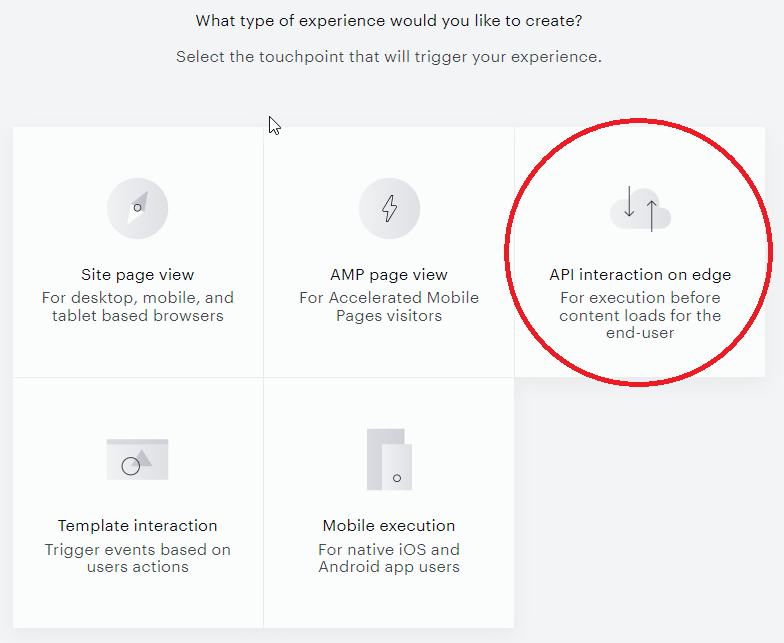
To create a new API interaction on edge, select the On Edge execution touchpoint:
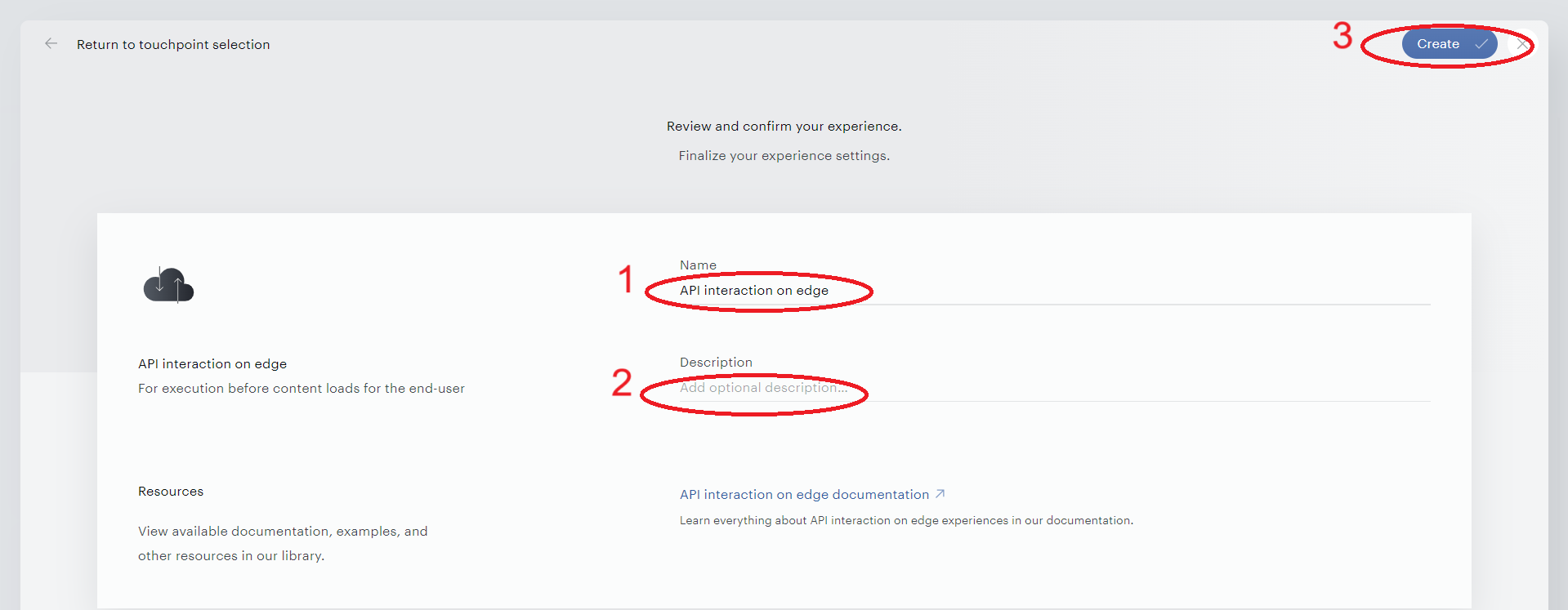
Enter the name and description of your interaction, hit "Create".
Once the interaction is created, you can configure it on the canvas with the following events, actions, and user segments.
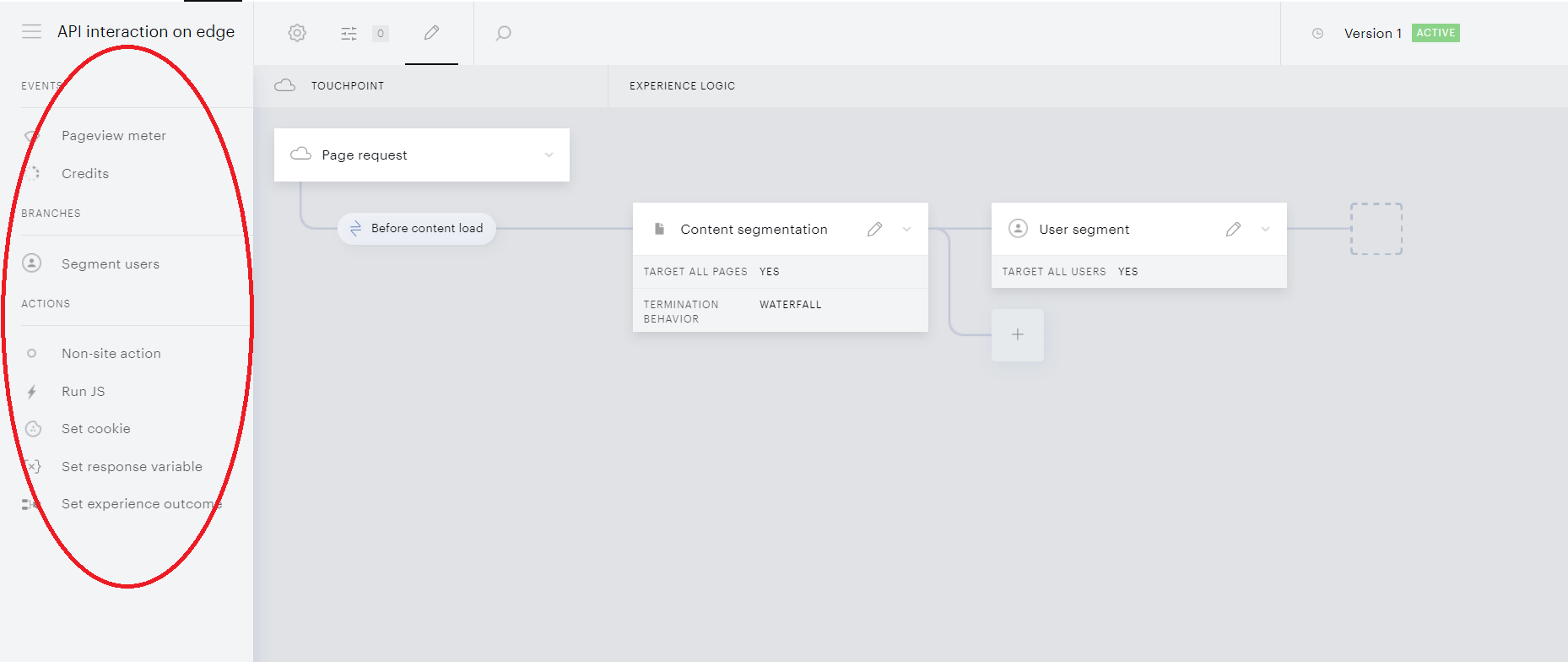
As in any regular site pageview experience, you can also use page metadata for Content segmentation, such as URL, tags, authors, publication time, etc.
User segment branches
The User segment card in Edge provides most of Composer’s standard user segmentation functionality and allows targeting users by:
-
Access to Management + Billing resources/subscriptions.
-
Login status: registered vs. anonymous.
-
Geolocation and IP: country, postal code, white-list networks, etc. By default, IP-based segmentation uses the IP address of the publisher's Edge PoP (point-of-presence) datacenter that processes the request, not the end user's IP, so IP and geolocation targeting will not work as expected out of the box. To enable accurate IP-based segmentation for Edge experiences, pass the end user's IP in the
X-Forwarded-FororCF-Connecting-IPrequest header. When either header is provided, IP and geolocation targeting will resolve against the end user's real IP. -
Custom variables, custom cookies, UTM tags, campaigns, and referrers.
-
Device: platform, browser, operating system.
-
Checked consents.
Actions
Set experience outcome, the final point of any branch in any API interaction on edge, allows or blocks loading a webpage to the user’s browser and optionally sets custom variables (Custom payload) that can be used in other processes.
Non-site action returns no parameters except for the action ID and name.
Run JS returns an extra JS string which you can either execute in the edge infrastructure or render in the page and subsequently run in the user's browser.
Set cookie adds the HTTP header of a relevant cookie to the response code. The cookie is set when the response reaches the user's browser (whether content is loaded or restricted).
Set response variable just returns the data set in the card.
Events
-
Pageview meter is triggered after a certain number of pageviews as described here. Server-side metering is also available. Note that Pageview metering (incrementation, expiration, or reset of the meter) in API interactions on edge can work separately from regular Site experiences. Credits metering works only along with Site Experience "Credits" event cards. Edge cannot initialize credits on the user's account, cannot redeem credits, etc.
-
Credits enable vouchers for end users to redeem and get access to locked article URLs as described here. Please reach out to your Piano Account Manager in case you are interested in utilizing this feature and to receive more details.
Waterfall execution of API interactions on edge
To ensure unambiguous interpretation of even the most branched user experiences and eliminate potential conflicts or overlapping rules, API interactions on edge apply the Waterfall execution logic.
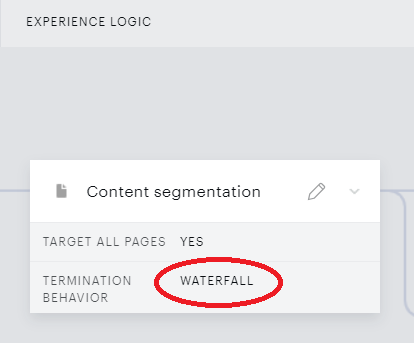
The point here is that when your Edge results in multiple possible Action cards and a given user might potentially follow more than one flow, the system will accept the outcome of the applicable flow located topmost on your canvas. All the below flows (even though they might be applicable too) will be ignored. More information about the Experience termination behavior is available here.
Canvas Restriction for Edge Experiences
API Interaction on Edge experiences enforce a waterfall termination behavior that allows only one end card (action card) per branch. The Composer canvas will prevent users from adding multiple end cards to the same branch to ensure proper experience execution.
This restriction ensures that when a user flow meets the criteria for a specific branch, the system executes only one outcome, maintaining the integrity of the waterfall execution logic where the topmost applicable flow is accepted and all others are ignored.
Experience prioritization
Experience prioritization allows to streamline the execution of different API interactions (on server or on edge - depending on your application settings) within one application. Cross-experience relations for other experience types (at least, for their "Show" cards) can be configured with the Action exclusivity feature.
Waterfall execution supposes that, if a given page request meets the segmentation criteria of multiple experience flows within a given API interaction, the system will take the flow located topmost on the canvas; the flows beneath will be ignored. A similar principle is applied when defining which API interaction to execute within an application. When your application has more than one API interaction configured (on edge or on server - depending on your application settings), you can manage them with a special priority list. The system will then attempt to execute the topmost "Live" interaction on that list. If that interaction can't be executed because of user or content segmentation, the system will try the next API interaction on the list until success. The list can be managed in the following steps:
-
Click Products→Composer on the dashboard to open Experience Manager, the page storing all your experiences.
-
Hit the Prioritization view button in the toolbar.

-
Drag and drop experiences to rearrange the order of their execution attempt.
-
The list is saved automatically. No confirmation clicks are needed.
By default, your API interactions are sorted/prioritized by the Last updated date, and the newest one will be taken first.
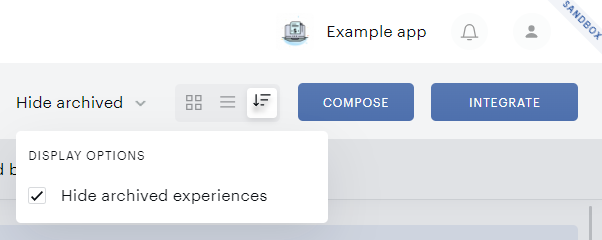
In managing the list, you can also show archived experiences by deselecting a designated checkbox (selected by default).
Using Experience outcome in site pageview experiences
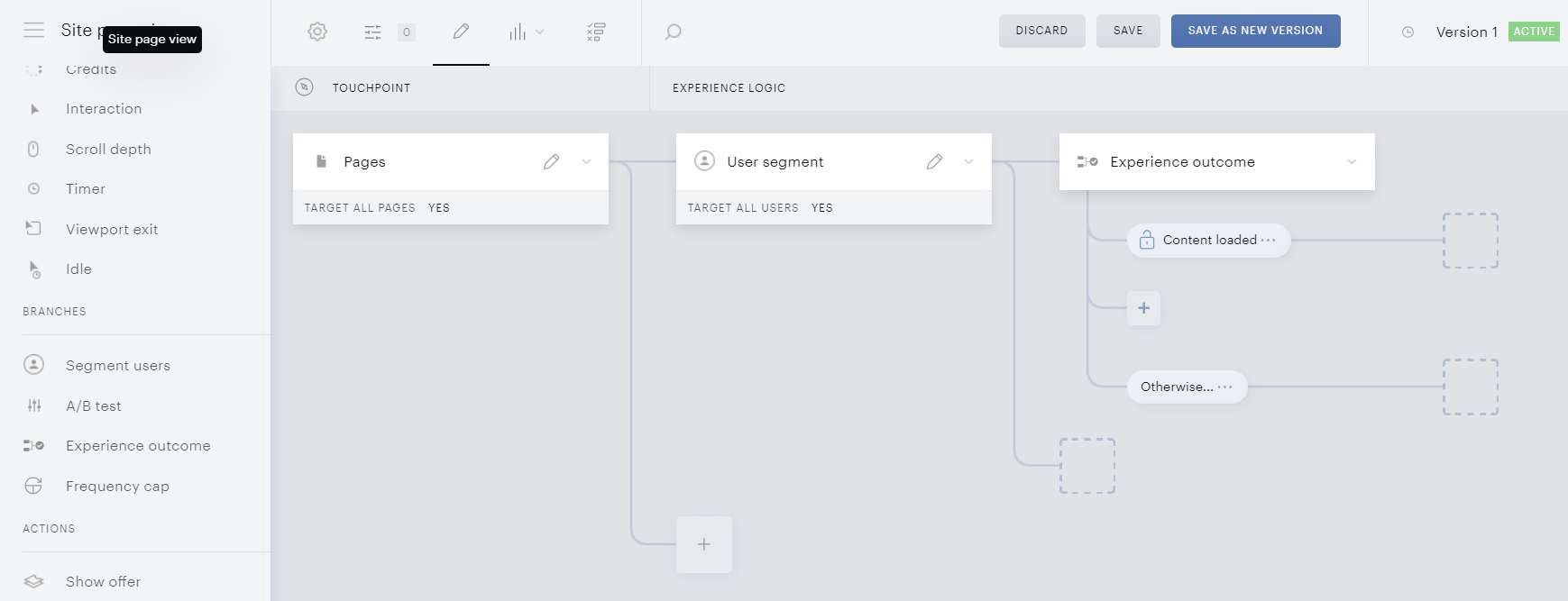
After your API interaction on edge is configured, you can start using its outcomes in Site pageview experiences where you decide what happens after the content was loaded or restricted. Drag-n-drop an Experience outcome action to your Site pageview experience canvas to open a modal, quite similar to the Set experience outcome. To connect to a specific Edge outcome, you need to reenter its properties in this window: decision on content loading, number of pageviews, custom payload etc. When saved, the card represents one of the experience outcomes.
To add more outcome variants, please use the “plus” sign below the Experience outcome card you have just configured. You will see the same modal where you can redefine another outcome. Please note that if the properties of your Experience outcome don’t correspond to any of the outcomes you have set in the API interaction on edge, this action won’t function.
After setting up the outcomes, don’t forget to set up the Otherwise flow to be used if none of your outcomes suits a given user flow.
We recommend finishing the Otherwise flow with a Show offer or Show template card to be sure that the user won’t find themselves in a content deadlock, no matter what the experience logic is.
Another layer of this safety net is an app-wide Fallback offer to be described in the next section.
Fallback offer (Management + Billing clients only)
A fallback offer is an offer template shown when the page content has been restricted, but the experience logic (including the Otherwise branch in Site pageview ones) doesn’t offer any action after the Experience outcome or Set experience outcome card. This default value is saved for all API interactions on edge app-wide.
Please note that the Fallback Offer feature is currently hidden under a feature flag and is set to OFF by default. Please reach out to your Piano representative to enable it. Be aware that enabling the Fallback Offer feature without the corresponding API interactions on edge implementation in place may not yield the expected results.
Use cases
The feature supposes two use cases:
1. An Edge flow when (all the below conditions are required):
-
The Edge content tent has been restricted.
-
The API interaction on edge is standalone, not connected to Site pageview experiences.
-
The external logic doesn’t show any template either.
2. A client-side flow when (all the below conditions are required):
-
The content has been restricted.
-
The available experience outcomes are not applicable to the flow.
-
The Otherwise flow doesn’t end up showing any template.
It's crucial to note that the Fallback Offer feature is triggered exclusively when a "Content restricted" outcome is returned. For instance, if a publisher configures the logic of their API interactions on edge as "Content loaded + Otherwise," the Fallback offer will not be executed. In this scenario, the "Otherwise" condition is not treated as "Content restricted." To ensure the Fallback Offer functions as intended, the publisher must explicitly set the outcome to "Content restricted."
Configuration
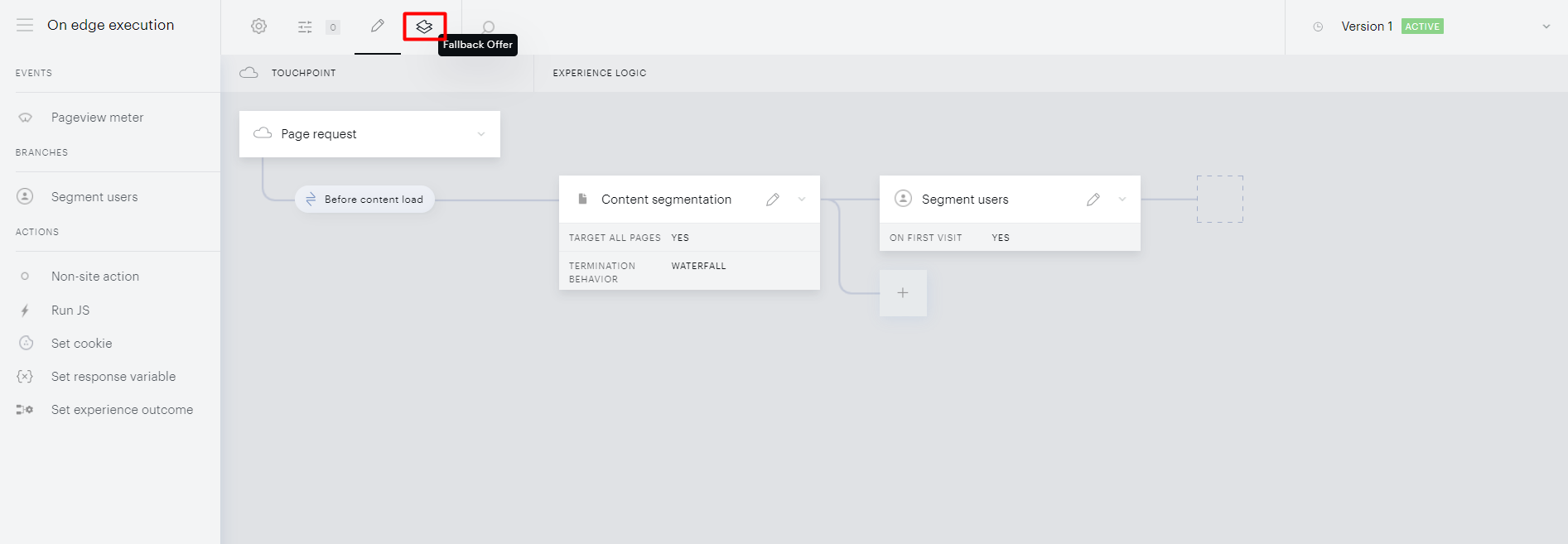
To configure the Fallback offer for your app:
-
Click on the "Fallback Offer" tab.
-
Select an offer using the "Select offer" option.
-
Select your checkout flow or create a new one.
-
Under the tab "Template" select your desired offer template.
Please note that if you choose an inline template option, you are required to properly define the container ID in the experience configuration window. It should work on all the pages targeted by the API interaction on edge to avoid leaving users with truncated content without an option to unlock it.
Fallback Offer limitations
While the Fallback offer repeats most configurations of a regular Show offer card, some options are absent for consistency:
-
No option “Don’t show to users with active access”.
-
Absence of Exclusivity options.
-
No option to close a modal offer.
-
No option to delay the offer display.
Fallback for restricted content (non-Management + Billing clients)
For non-Management + Billing clients (with their own external payment flows) or in instances where the "Fallback Offer" feature is deactivated in the publisher's application, the contentRestrictedFallback handler serves as an alternative mechanism to address scenarios where "Content restricted" is returned by the API interaction on edge. Publishers can implement a specific logic using the provided code snippet as an example:
tp.push(["addHandler", "contentRestrictedFallback", function() {
    // apply some logic, e.g. show restriction banner
}]);
Frequently asked questions
Q: How does the matching of custom payload logic work within the Experience outcome condition on the Site Pageview experience?
If multiple payload values are returned via Edge (see example below), is it expected that the Site Pageview experience executes the branch containing only one payload condition, such as "hasSubscription" equals "false"?
 "payload": {
        "hasSubscription": { "type": 2, "value": false },
        "segmentType": { "type": 1, "value": "utm" }
      }
A: It is not necessary to specify both payload values. You can return any number of payloads, but the execution will depend on the specific rule defined within the experience outcome. Similar to custom variables, you can pass multiple payloads (e.g., 10 variables), but the rule can choose to utilize just one in the matching process. Therefore, only the payload condition that is used in the rule will be matched and executed.
Q: Is there any reporting for Edge Experiences?
A: Yes, reporting is available in Subscription Insights. For more details, see here.