
Tracking Consent lets publishers respect each recipient's preference for email open and click tracking. When enabled, tracking for an email depends on the user's TRACKING_OPTIN merge field.
How it works
The feature is controlled by a per-publisher setting.
-
Disabled (default): nothing changes; every email is tracked as usual.
-
Enabled: tracking for each recipient is decided from their
TRACKING_OPTINvalue:
|
|
Open tracking (pixel) |
Click tracking (links) |
|---|---|---|
|
true |
✅ tracked |
✅ tracked |
|
no value set |
✅ tracked |
✅ tracked |
|
false |
❌ not tracked |
❌ not tracked |
Tracking is suppressed only when the value is explicitly false. A user with no value set is still tracked, so enabling the feature never silently stops tracking your existing audience. Emails still deliver and all links keep working when tracking is off, only the open pixel and click-tracking redirects are omitted.
This behavior applies everywhere emails are sent: regular list campaigns, trigger emails, and the "view in browser" version.
Setup via the Dashboard
Enable the feature
Go to Dashboard → Site Settings in the top right corner:
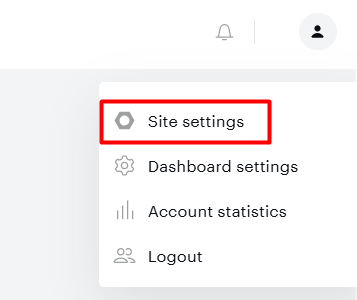
And turn on Tracking Consent Management and click Save:

Enabling it automatically creates a system merge field named TRACKING_OPTIN (boolean) for the publisher. If it already exists, it is reused. Turning the feature off later does not delete the field or its stored values.
The TRACKING_OPTIN merge field
Under Setup → Merge Fields, the TRACKING_OPTIN field is shown separately from your own merge fields.

It is read-only and cannot be deleted or renamed; it is managed by the system. You also cannot create your own merge field with that name.
Configure the opt-in form checkbox
In the Opt-in wizard → Content step, a Tracking Consent Checkbox section appears (visible only while the feature is enabled).
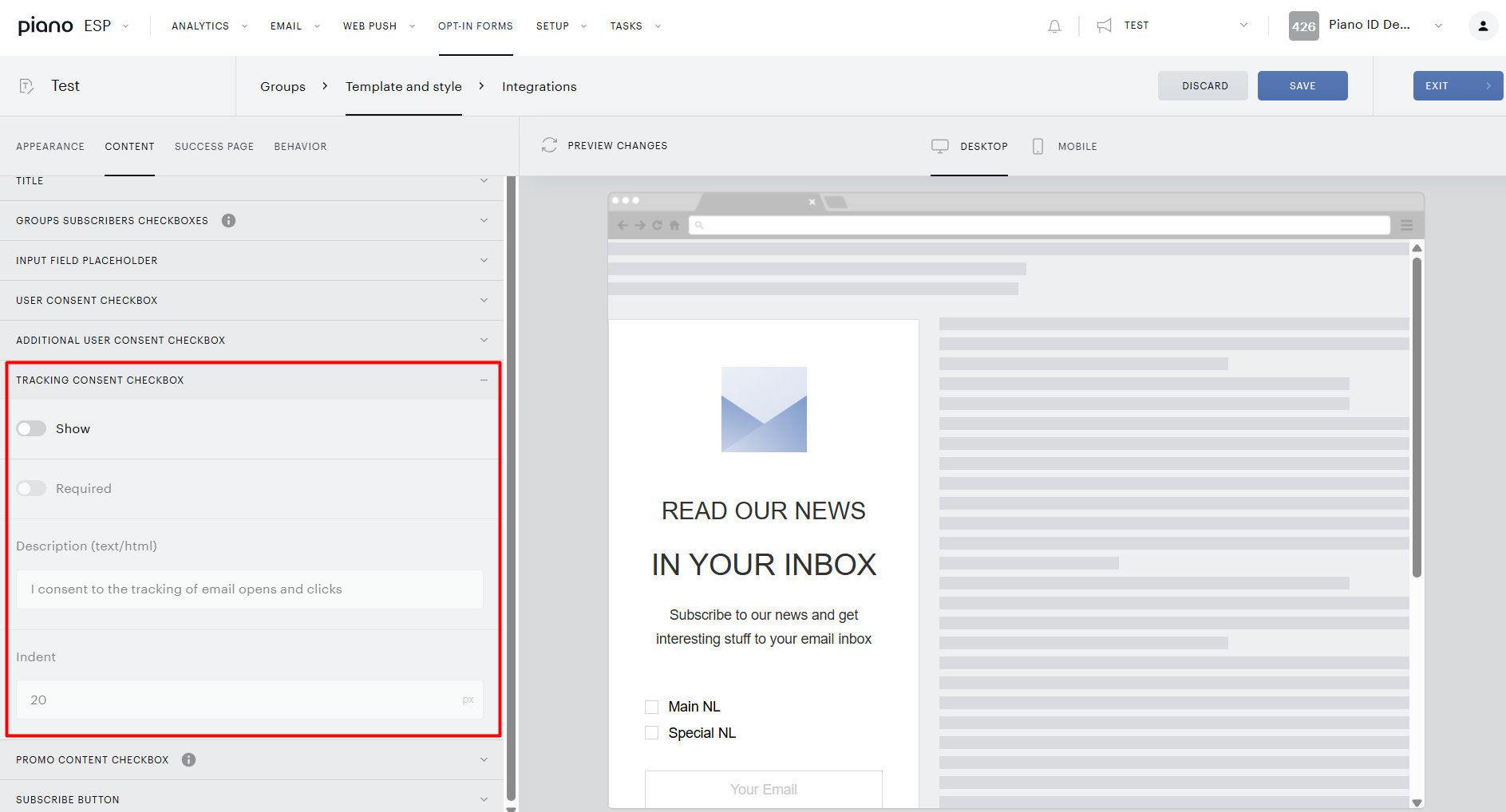
It offers the same options as the existing User Consent checkbox:
|
Option |
What it does |
|---|---|
|
Show |
Displays the tracking-consent checkbox on the subscription form. |
|
Required |
Requires the reader to tick the checkbox before submitting. |
|
Indent |
Left indentation of the checkbox block. |
|
Description (text/html) |
The wording shown next to the checkbox (e.g. “I agree to email open and click tracking”). |
When a reader submits the form, the checkbox state is saved to their TRACKING_OPTIN value automatically.
Managing a user's consent value via API
Besides the opt-in form, you can set or update TRACKING_OPTIN for users directly. These require the feature to be enabled (otherwise the merge field does not exist). Authenticate either as a user with access to the publisher, or with a valid ?api_key for that publisher.
Capture consent when a reader subscribes
The opt-in / subscription API accepts an optional trackingConsent flag; when provided, it stores the value for the subscribing user.
POST {HOST}/tracker/lucid/sub/{pubid}
{
  "email": "reader@example.com",
  "sqids": [1, 2, 3],
  "trackingConsent": false
}
Set the value for one or many users
Update the value for a batch of users in a single call (up to 16 users per request). Users can be referenced by email or id.
POST {HOST}/userdata/umfval/pub/{pubid}/set
[
  { "umf": "TRACKING_OPTIN", "user": "reader1@example.com", "value": false },
  { "umf": "TRACKING_OPTIN", "user": "reader2@example.com", "value": true }
]
Import values for a large audience (CSV)
To update many users at once, upload a CSV and import the TRACKING_OPTIN column against a user key (e.g. email).
POST {HOST}/userdata/umfval/import/pub/{pubid}/assid/{assid}
{
  "columns": { "email": 0, "TRACKING_OPTIN": 1 },
  "csv_settings": { }
}
{assid} is the id of the previously uploaded CSV asset.
To stop tracking a user, set the value to false; do not delete it. Deleting the value returns the user to the “no value set” state, which means tracking is on again.
Quick reference
|
Action |
Where |
|---|---|
|
Enable / disable the feature |
Dashboard → Site Settings → Tracking Consent Management |
|
See the consent merge field |
Dashboard → Setup → Merge Fields (TRACKING_OPTIN, read-only) |
|
Show a consent checkbox on the form |
Opt-in wizard → Content step → Tracking Consent Checkbox |
|
Capture consent at subscribe time |
|
|
Set consent for specific users |
|
|
Bulk import consent from CSV |
|