
Overview
Navigate to the Audience→Reporting→External user IDs to get access to the report.

This report allows you to understand how many different (external) IDs are linked to the users of a specific segment. External IDs mean identifiers with customers’ prefixes.
Having information about the amount of users per prefixes should help you to understand how many users can be reached within a marketing campaign with the respective SSP/DSP. In other words with the External ID information that is shown in the report, you can review how many actual users are linked to a given segment.
Report features
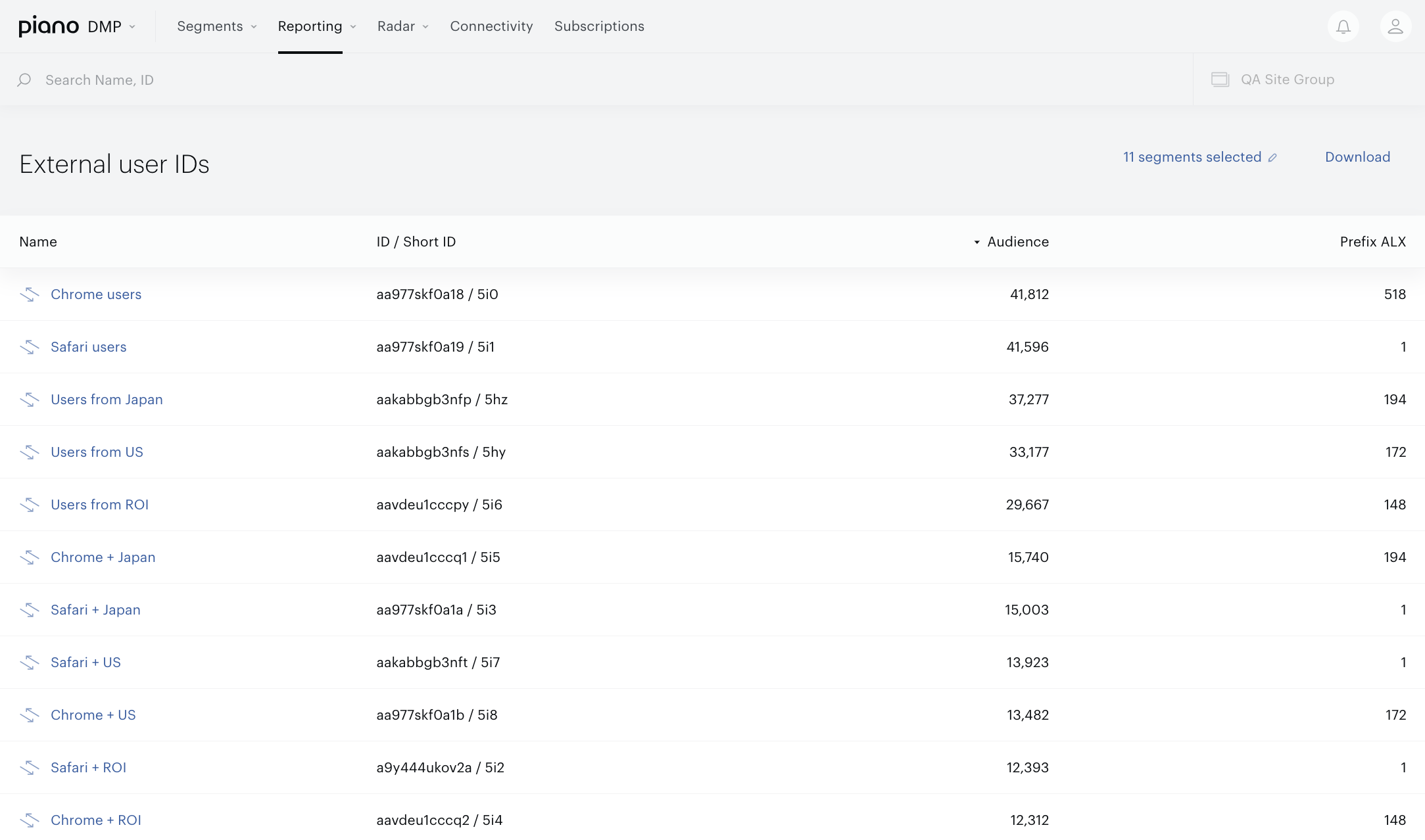
Table view with the following columns:
-
Name. Segment name, clicking on the segment name you will be redirected to the Segment builder.
-
ID/Short ID. Segment identifiers.
-
Audience. The segments memberships; the amount of users of the specific segment.
-
One, two or more columns with names equal customer’s prefixes names. The amount of columns depends on the customer’s site group and the mapped user IDs.

Search bar that allow you to find segments by segment name or identifiers.
All segments selector allows you to select specific segments that will be shown in the table. This report supports User segments only.
Download button allows you to download the data from the table view into the XLS file.