
The Cxense platform keeps a user profile for each unique user, which is continuously updated as the user navigates your site. Such updates may happen in real-time, or through periodic updates.
Logically, a user profile can be thought of as being comprised of data originating from four main sources:
-
The content profiles for the pages that the user consumes. For example, if a user tends to read pages about technology, that will be reflected in that user's profile.
-
Search queries submitted by the user.
-
Data inferred from the requests made by the user. For example, from the IP address and User-Agent string one can infer a lot about the location and device usage for that user.
-
Externally supplied user data. This could be non-public data about the user that the publisher somehow knows and has shared with cXense. For example, perhaps the publisher knows that the user has pets. Such data is stored separately from other data and might not be visible or applicable in all applications.
User profiles are used in a number of settings and applications in the Cxense platform, e.g.:
-
As a component for building personalized third-party applications.
-
As a foundation for producing user-specific content recommendations.
-
As a foundation for behavioral ad matching.
Different elements in a user profile can be used for different things. I.e., in general their use is application-specific, and not all elements in a profile are used for all applications.
Keyword Groups
Since sections from the content profiles consumed by the user are copied over into the user's interest profile, all group names found in content profiles may also occur in user profiles. Additionally, user profiles may contain group names that are associated with the individual user. Such additional groups are listed in the tables below, together with a description of how to interpret items belonging to these groups.
Device information
Keyword groups describing the device of the user.
|
Group |
Description |
|---|---|
|
|
Identifies the brand of the handset of the user, if the user is using a mobile phone or a tablet or some other type of wireless device. E.g., |
|
|
Identifies the make of the user's browser. E.g., |
|
|
Identifies the operating system the user is running, including both ordinary PCs as well as mobile phone and tablets. E.g., |
|
|
Identifies the type of device. E.g., desktop, mobile, tablet |
Other keys might also occur. E.g., mechanisms exist for including customer-defined group names having customer-defined semantics. Such data can be explicitly supplied, or be retargeting markers.
Decay and weight settings
As the user interacts with your site and consumes pages, his/her interest profile will be updated. This happens by factoring in a suitably weighted version of the content item that was consumed, where "suitably weighted" takes into account several issues. E.g., on a general basis the following holds:
-
Recently consumed items account for more than content items consumed a long time ago.
-
Content items that are generally popular and consumed by "everybody" accounts for less than content items that are consumed by fewer people.
-
The time spent on consuming a content item may influence the weighting.
-
Different profile groups carry different weights, e.g., some profile elements are forgotten quickly whereas others have a longer lifespan.
Real-Time updates
The user profile will dynamically evolve for each user action. In simple words this means that if a user reads a page on Tour de France, this will immediately be reflected in his or her user profile. There is one sub-set of the user profile which is updated periodically, rather than dynamically for each user action. This is User Interests, which will be explained below.
Long term User Interests
As mentioned, the content of a user profile evolves dynamically as the user is navigating the site. However, for a range of use cases it may be beneficial to have a framework which takes the entire browsing history of the user into account, without a heavy bias towards the latest pages browsed by the user. For this purpose, we have introduced *User Interests. *This framework maintains a slowly evolving record of the long-term user interests which aims to condense all browsing history and user interaction for a user, and present this as a user-friendly tree structure of user interests where each user interest category is scored by importance based on the entire browsing history and user actions of the user.
Long-term user interests will appear in the user profiles with the group name "<prefix>-categories", where prefix is the registered Customer Prefix.
As the user interest tree will evolve based on the user's browsing actions, this feature must be initialized with a mapping that triggers a boost for a given user interest based on the nature of the pages visited by the user. This is handled through the use of Custom taxonomies, allowing premium Cxense customers to upload and deploy a taxonomy that will be used to maintain individual user interest tree for each user that navigates the site.
Weighting scheme
At fixed intervals, typically once a day, the interest tree of a user is updated based on the user actions which occurred since last update. This implies that if a user has read about cell phones, this may be reflected in his or her user interest tree, as this specific node in the tree will be boosted. Simultaneously, none-related nodes will be down-weighted. A well-formed interest tree associated with a user will abide to the following three principles:
Balance Principle
-
If a node has ancestors, the weight of the node equals the sum of the weight if its ancestors.
-
The sum of the top node is 1.0
-
When the weight of a node is increased or decreased, the weight of all other nodes in the tree must be re-computed in order to not violate principle 1.
A visualization of a user interest tree is presented below:
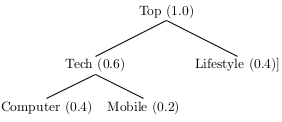
-
tech, <prefix>-categories, 0.6 -
tech/computer, <prefix>-categories, 0.4 -
tech/mobile, <prefix>-categories, 0.2 -
lifestyle, <prefix>-categories, 0.4
Undefined node weights
As stated as the first rule in the *Balance Principle, *the weights of the ancestors equal the weight of the parent node. However, we often encounter scenarios such as:
-
A user visits a page which triggers a boost of the node
Tech -
Later, the user visits a page which triggers a boost of the node
Tech/Mobile.This would implicitly boost the nodeTech,being the parent ofTech/Mobile.
If Tech was boosted twice, and Tech/Mobile was boosted once, the weights of the ancestors ofTechwould no longer equal the weight of Tech. Hence, in this scenario we could include a node Tech/Undefined which would convey the intuition that while we have certain weights for the Tech/Computer and Tech/Mobile, the user has also shown general interest for a Tech category, without further specification with respect to sub-categories. Since computing such a Undefined/Other can be done deterministically by simply including this node if there is a discrepancy between the parent weight and the combined ancestor weights, we have opted to not overtly display this implicit Undefined/Other category in the interest tree.