
If you'd like to target users who have disabled their auto-renewal "X" days prior to their subscriptions expiring, you can do so by following the steps outlined below:
-
Open your Piano dashboard
-
Go to Products and open Composer
-
Open Integrate → Edit source (top right corner) and add this code at the bottom of the existing code, and save the changes. In case of any questions about the placement, please reach out to Piano Support at support@piano.io
function onLoginSuccess() {
    var params = {
        rid: < resource id >
    };
    var callback = function(response) {
        if (response.access && response.access.granted) {
            var expDate = response.access.expire_date;
            var curDate = Date.now() / 1000;
            var termId = response.access.term.term_id;
            var daysLeft = Math.floor((expDate - curDate) / 86400) + 1;
            //console.log('Your sub will expire in ', daysLeft, ' day(s)');
            if (daysLeft == 1) {
                var formData = {
                    'uid': tp.pianoId.getUser()
                        .uid,
                    'form_name': 'sub_expired_soon'
                };
                var array = [];
                array.push({
                    "field_name": "sub_expires_today",
                    "value": "True"
                });
                formData['custom_field_values'] = array;
                fetch('https://sandbox.tinypass.com/id/api/v1/identity/userinfo?aid=<aid>&access_token=' + tp.pianoId.getToken() + '&lang=en_UK', {
                    method: 'PUT',
                    headers: {
                        'Content-Type': 'application/json; charset=UTF-8'
                    },
                    body: JSON.stringify(formData)
                });
            }
        } else {
            var formData = {
                'uid': tp.pianoId.getUser()
                    .uid,
                'form_name': 'sub_expired_soon'
            };
            var array = [];
            array.push({
                "field_name": "sub_expires_today",
                "value": "False"
            });
            formData['custom_field_values'] = array;
            fetch('https://sandbox.tinypass.com/id/api/v1/identity/userinfo?aid=<aid>&access_token=' + tp.pianoId.getToken() + '&lang=en_UK', {
                method: 'PUT',
                headers: {
                    'Content-Type': 'application/json; charset=UTF-8'
                },
                body: JSON.stringify(formData)
            });
        }
    }
    tp.api.callApi("/access/check", params, callback);
}
And edit the variables below as needed:
<resource id>- the Resource ID that should be targeted
daysLeft == 1- with the value set to1, the users will be targeted 1 day before their subscription ends. Replace1with an "X" day value of your choice
sub_expires_today- the Custom field ID used
sub_expired_soon- the Custom field form ID used
<aid>- the Application ID (AID) from your Piano dashboard
https://sandbox.tinypass.com/- this is the base URL for Sandbox. For Production, this should be substituted with one of the options listed hereNote, that if you need to check access to multiple resources, you should include several iterations of the same code (with different Resource IDs), as we cannot check access to multiple resources with a single request.
-
Go to Manage → Custom Fields and create a custom form. In the above example code, the form ID should be
sub_expires_soon -
Create a new Custom field and change the field ID to
sub_expires_today -
Allow the Custom field to be updated by the user (checkbox should be selected)
-
The newly created Custom field should be added to the form from point 4. (and not to other forms)
-
Create a Composer Experience for this use case
-
Open the Initial user segment card, go to Custom fields
-
Add the created Custom field to the targeting (Matches → True)
-
Don’t forget to add user targeting (access to specific resources) and add a Show Offer or Show Template card
With a setup like this, you will be able to target Subscribers 1 day before the subscription ends. If you want to change the logic about days, you simply need to change this value in the code. You can then target users "X" days before the subscription ends.
The Custom field ID or Custom form ID can also be modified or created with a different name, but the field ID needs to match the ID in the code.
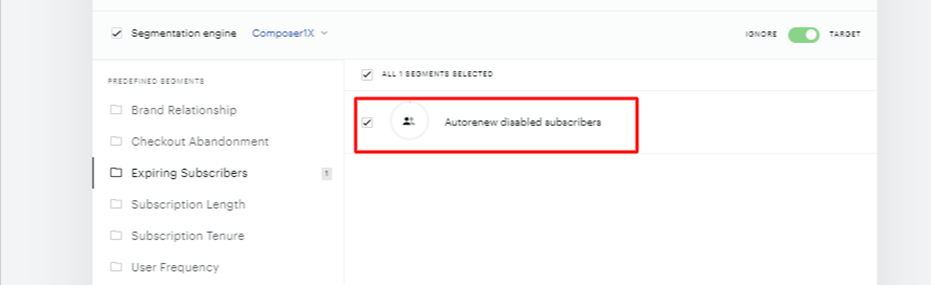
In combination with Composer 1x segment Autorenew disabled subscribers, you can target subscribers with auto-renewal off "X" days before expiration.
What can you do?
You can simply remind them that their subscription is going to expire soon and they should turn on the auto-renewal. You can show them all the great subscriber benefits. Or you can offer them an upgrade/downgrade depending on the use case.
Caveats
Note that the Custom field value gets outdated if a user does not log in again. This approach is also only applicable to Subscriptions, and can't be used for fixed time terms or granted access.
The Custom field itself with the days value is now shown to the user in My Account.