
Overview
Comparing entities between the external subscription management system and Piano
In Management + Billing’s most basic flow, the user purchases a "term" to get access to a piece of content called “resource”.
-
For the external subscription management system (or "external system" for short), we will designate the entity comparable to Piano's resource as an “external product”.
-
The external system's entity defining the conditions of access to your product will be called "external term" (not to be confused with Piano's external service term).
-
A subscription to the external term bound to the Linked term is an "external subscription".
Technically, Piano will automatically create a standard resource for each "external product" you define in creating a Linked term. If your Linked term is to work with multiple products, Piano will additionally create a bundled resource to group all the involved standard resources.
You can find the standard and bundled resources created in this way on the Resources page (Publisher dashboard->Manage->Resources page). Please note that we do not recommend editing them manually, as it might cause unpredictable behavior of Composer’s segmentation and other access-related features.
Using Subscription Linking
Synchronizing your external subscriptions with your Linked term can be charted as follows:
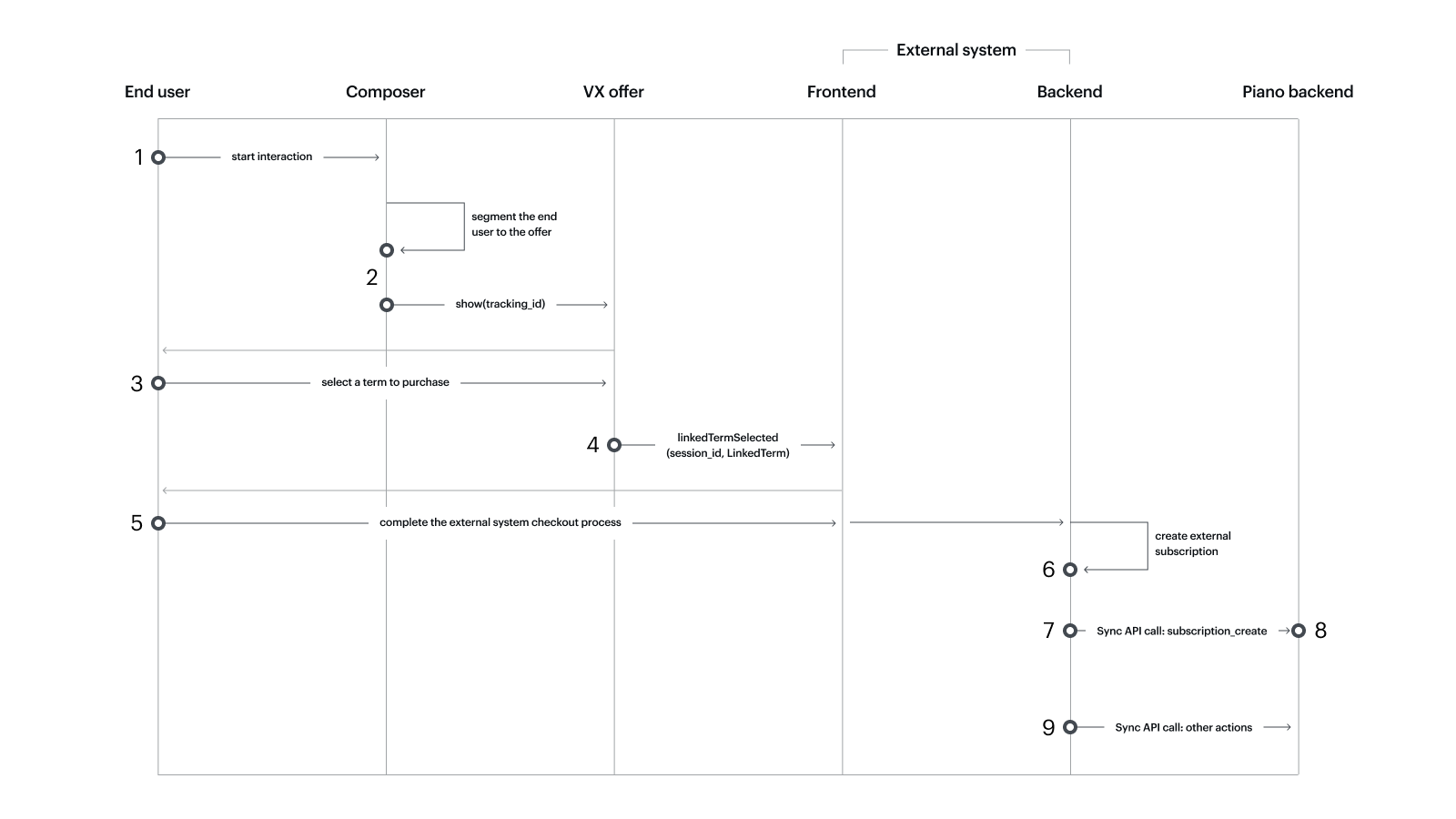
Main scenario
1. The end user explores the client's website integrated with Composer.
2. Composer shows an offer at a certain step of the experience.
3. The end user selects the Linked term in the offer.
4. Piano's frontend sends a JS SDK callback (linkedTermSelected) to a dedicated callback function on the external frontend. The callback contains info about the Linked term and Piano user session that will be used to initiate external checkout for the associated external term.
5. The end user is forwarded to the external system's checkout where they complete their purchase.
6. The external system's backend creates a new subscription to the just-purchased external term.
7. Creating a subscription to the external term triggers sending a call to Piano's Sync API endpoint. The call body specifies the Linked term ID, the action performed with the subscription (this time it is subscription_create) and other information.
8. Piano's backend uses the received call data to create a new subscription to the relevant Linked term.
9. From now on, the external backend will use this endpoint to communicate every action it performs on the external subscription for Piano to do the same with its Linked term subscription. The available actions/events and their use cases are described below.
The end user can see their new Linked term subscription in MyAccount. Clicking Manage will forward them to the relevant subscription management URL which gets exSubId as a mandatory parameter.
Short scenario
There may be situations where you do not use Composer to start the flow: when creating an external subscription yourself or leading end users to checkout without using the Piano offer. For such cases, you can observe your interaction with Piano starting from step 5 of the Main scenario. However, we don't recommend altering the main flow as it affects data exchange and, therefore, restricts the benefits you can get from using the Subscription Linking feature.
Subscription Linking feature integration
Integration overview
The first thing you need to do is create an auxiliary "zero" Linked term to test your frontend and backend configurations in their interaction with Piano. So term creation becomes the first element of feature integration. Your zero term may exist only in your sandbox or be a functional production-env term, either migrated within a catalog or created individually. After the integration is complete, you can create or import Linked terms without configuring any extra settings.
Therefore, your Subscription linking integration includes the following steps:
-
In your Piano app: Create a "zero" Linked term.
-
On the frontend: 1) Set up showing the Piano offer on your webpage (with Composer's Show offer action). 2) Implement a callback function handling the
linkedTermSelectedPiano callback event triggered when an end user selects the Linked term in the Piano offer. -
On the backend: Configure calls to publisher/linkedTerm/event updating your Piano Linked term according to the end user's actions with the external subscription.
-
With Piano support: If you have users already subscribed to your external term, get their subscriptions migrated to Piano (please do it before turning to the Linked term API).
Creating a Linked term
You can create a new Linked term:
In Publisher Dashboard
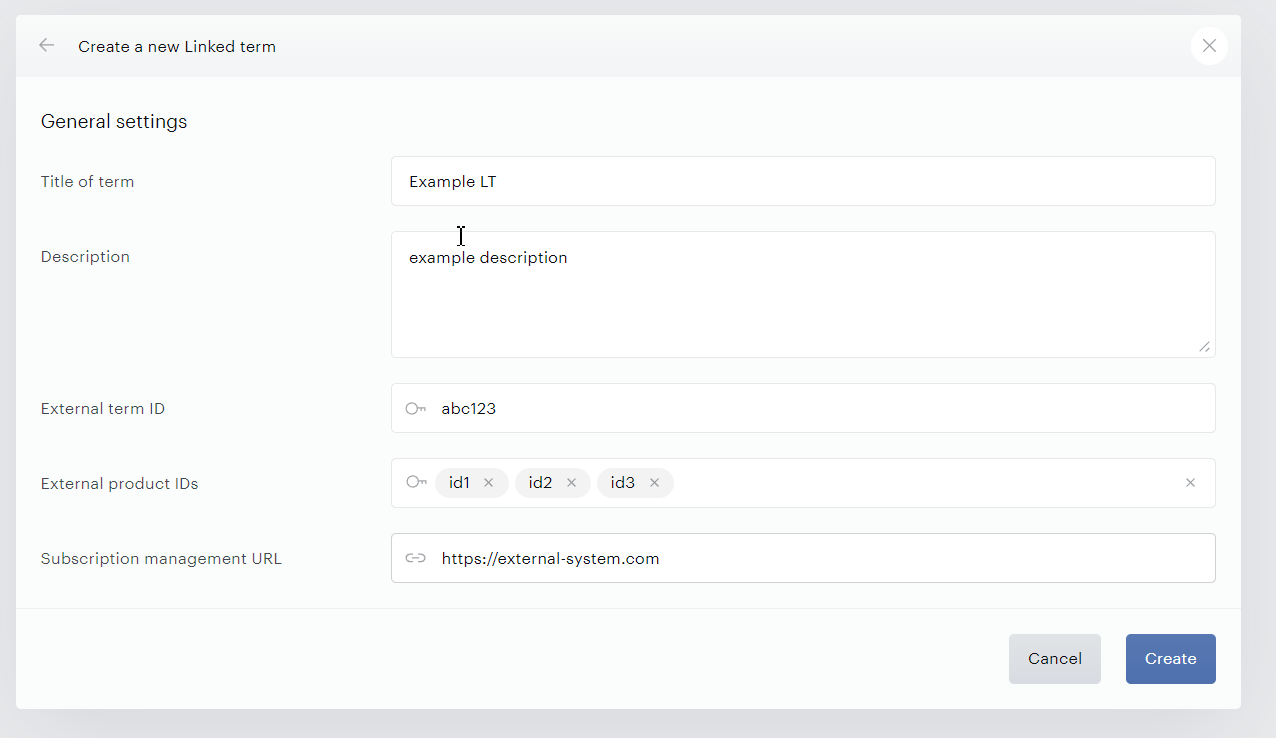
If the feature is activated for your app, you can create a linked term in your Publisher Dashboard by following Manage > Terms > New > Linked term. You will get to the General settings window where you can define:
-
Title of term: the name of your Linked term.
Term names can contain up to 100 characters. If you enter a name longer than 100 characters, the term is still created, but the name is automatically truncated to the first 100 characters.
-
Description: an optional description of your Linked term.
-
External term ID: the ID you use to address the Linked term in the external system (used to map the Linked term with a term analog in the external system).*
-
External product IDs: “External products" are entities of the external system accessed by users. If you enter multiple values in this field (hit Enter after each), Piano will create a standard resource for each product and also a bundled resource that will group them.
-
Subscription management URL: a link to the external system where users can manage their subscriptions (similar to Piano’s MyAccount).
Create when ready.
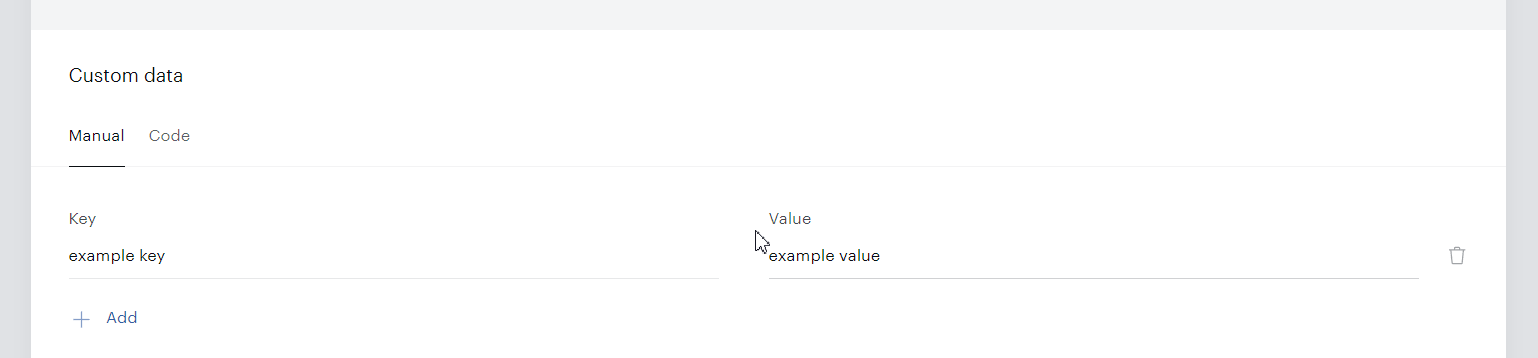
You will see the term menu with all the term details editable and a Custom data field where you can add extra properties of your term. In the UI of the Manual tab, you set them as key-value pairs (Value accepts String, including JSON string). To manage your custom data in JSON format, you can switch to the Code mode. Please note that the Manual editor supports up to 12 entries, after which you can go on adding custom parameters as Code.
Please note that our system considers all new Linked term subscriptions to be shared subscriptions with 0 child accounts.
Via Piano API
Linked term configuration endpoint
To create or update a Linked term via API, you can send a call to publisher/linkedTerm/configuration containing:
1) your AID added to the URL and
2) the term settings defined in the JSON-string body.
The properties sent in the call body are as follows:
|
Field name |
Type |
Required/Optional |
Description |
|
external_term_id |
String |
Required |
The ID you use to address the Linked term in the external system (used to map the Linked term with a term analog in the external system)* |
|
term_name |
String |
Required |
The name of your Linked term. |
|
description |
String |
Optional |
An optional description of your Linked term. |
|
external_product_ids |
String |
Required |
“External products" are entities of the external system accessed by users. If you enter multiple values (separated by a comma), Piano will create a standard resource for each product and also a bundled resource that will group them. Example: "digital_prod,print_sub_access,main_articles". |
|
subscription_management_url |
String |
Optional |
A link to the external system where users can manage their subscriptions (similar to Piano’s MyAccount). |
|
custom_data |
JSON object |
Optional |
The custom data similar to that entered in PD on Linked term creation. |
You can find the JSON schema and API call examples for creating/updating a Linked term here.
With term catalog migration
Piano requires a .csv file with the settings of your new Linked terms. The values you need to specify for each Linked term are similar to those passed in the API call body when creating/updating a Linked term (see the table above).
Example of a migration file
external_term_id,term_name,description,external_product_ids,subscription_management_url,custom_data
my_term1,"My first LT term 1","Description,I,want","ltprod1,ltprod2",,"{""my_data"":""my_value""}"
my_term2,"My second LT term","Another description","digital312,pro_pass",,"{""sub_number"":""44574""}"
my_term3,"My third LT term",,"sale_access,ltprod3",,
*If you delete a Linked Term, the same External term ID cannot be used again.
Updating a Linked term
You can update an existing Linked term from the Term menu of your Piano Dashboard or via the API endpoint you used to create your Linked term: publisher/linkedTerm/configuration.
You can find the JSON schema and API call examples for creating/updating a Linked term here.
Please note that you can update the External term ID or the External product IDs of your Linked term only if this term doesn't yet have conversions.
Creating/updating custom fields and their values
When your Linked term is created, you can additionally set up custom fields for its forms using a special endpoint: /publisher/linkedTerm/customField/configuration.
The structure of the request body is:
|
Field name |
Type |
Required/Optional |
Description |
|---|---|---|---|
|
custom_fields |
Array |
Required |
An array containing the configurations (lists of properties as below) of the custom fields for the Linked term. |
|
custom_fields.name |
String |
Required |
The ID of the field. |
|
custom_fields.title |
String |
Required |
The title of the field. |
|
custom_fields.type |
String |
Required |
The type of the field. Allowed values: “text”, “number”. |
Find the JSON schema and a request example here.
To update the user's custom field values, include them in the optional user_custom_fields field of your request to the Sync API endpoint (we currently support the subscription_create, subscription_renew, and subscription_terminate events). Received by Piano, such values can subsequently be sent to Piano Audience for user segmentation.
Custom fields are user-level, not subscription-level, data. So, if the same custom field is sent to Piano from two subscriptions of the same user, the latter value overrides the former one.
Please also note that if user_custom_fields contains new values for multiple custom fields and one of them is invalid, other values won't be updated either.
Frontend integration
In configuring your integration, you want to use JS SDK to register a special callback function. It will handle the linkedTermSelected callback event triggered on Piano's side every time an authenticated end user selects your Linked term in the Piano offer.
This callback function (named onLinkedTermSelected in our code examples) accepts two parameters: session_id and LinkedTerm.
Session ID
|
Name |
Type |
Required/Optional |
Description |
||
|
session_id |
String |
Required |
Identifies the user session and, when subsequently passed to Piano with every subscription synchronization API call, will be used to identify this user session in Piano reports and Piano's other systems (Analytics, Audience, Composer C1X). This kind of "session" is not related to user tracking or SSO session handling but exists only in the context of the Linked term. The session ID is valid for 3 days after it is generated. Example: S0ghJ6IRyFVIZqz2rK5OSpi0GN82RIZo |
||
LinkedTerm object
The JSON schema and an example of this object are given here.
|
Name |
Type |
Required/Optional |
Description |
||
|
linkedTerm |
Object |
Required |
Contains the data required for the initiation of checkout in the external system. |
||
|
linkedTerm.name |
String |
Required |
The name of the Linked term. |
||
|
linkedTerm.description |
String |
Optional |
An optional description of the Linked term. |
||
|
linkedTerm.linkedTermData |
Object |
Required |
The data object of the Linked term. |
||
|
linkedTerm.linkedTermData.
|
String |
Required |
A unique combination of the product IDs for the Linked term. |
||
|
linkedTerm.linkedTermData.
|
String |
Optional |
A link to the external system where the end user can manage their associated external subscription. |
||
|
linkedTerm.linkedTermData.
|
Object |
Optional |
Custom data of the Linked term. |
||
|
linkedTerm.linkedTermData.
|
String |
Required |
The ID of the Linked term in the external system. |
||
|
linkedTerm.linkedTermData.
|
Boolean |
Required |
Indicates whether the end user already has a subscription to this Linked term. If TRUE, you can inform the user that a subscription is already purchased and forward them to another offer. |
||
You can find an example of the callback function for handling the selectedLinkedTerm callback on the external frontend here.
To call an external checkout manually, use the tp.offer.startLinkedTermCheckout(termId, offerId) method.
Where:
-
TermID is the Linked term ID for which you want to start a purchase process.
-
OfferId: The ID of the offer to which the Linked term belongs. An optional parameter.
Subscription synchronization: Sync API endpoint
Events sent with publisher/linkedTerm/event can be divided into three groups according to the action causing the event:
-
Subscription-related events where the event action creates, updates, or terminates a subscription.
-
Shared-access-related events where the event action shares or unshares access to a subscription.
-
Subscription-import event where the event action creates a subscription as a part of import.
While being just variants of the same LT event, they considerably differ in terms of parameters passed, so we describe them separately.
Please note that the endpoint /publisher/linkedTerm/event does not provide details about your Piano subscription. To access subscription details, we recommend using /publisher/linkedTerm/subscription.
Subscription-related events
The synchronization between subscriptions to terms in external systems and Linked term subscriptions is maintained via Piano API. Every new event in the external subscription is passed to Piano in the body of a call to the Sync API endpoint (publisher/linkedTerm/event) that updates your Linked term subscription correspondingly (starting from the event that creates this very Linked term subscription).
Every subscription-related event passed in the Sync API endpoint specifies:
-
The action to be performed on the Linked term subscription (in this doc and on the examples page, we will distinguish events by their action name, e.g. "
subscription_createevent") -
The current state of a subscription (presented as an object)
-
The data of the new conversion (if any)
-
The session ID for Piano's statistics: you get the user session ID by handling the linkedTermSelected callback sent when the end user selects your Linked term in the Piano offer.
For subscription-related events (unlike shared-access ones), our system expects to get the full current state of your subscription rather than just recent changes. So even if you don't need to upgrade certain optional parameters of your subscription, we strongly recommend including such unchanged values in the JSON of your Sync API call. Otherwise, the Piano system would reset such skipped parameters to default.
The subscription-related actions/events include:
-
subscription_create: Creating a subscription and a conversion. -
subscription_import: Creating a subscription and a conversion without segmentation and reporting -
subscription_upgrade: Creating a subscription and a conversion as a result of an upgrade from another subscription. -
subscription_renew: Updating an existing subscription with creating a conversion. -
subscription_update: Updating an existing subscription without creating a conversion. This usually reflects minor changes to the subscription, such as updates tostate,valid_to,auto_renew,purchase,trial,access_custom_data, orperiod. -
subscription_terminate: Permanently deactivating a subscription as a result of active (the end user's cancellation) or passive (subscription expiration) churn from the external system. The churn type is defined in the "event.subscription.churn.type" parameter of the event (see the table below). Regardless of the external churn type, in Management + Billing such terminated subscriptions will be labelled "cancelled".
subscription_terminate must always be the final event in any Linked Term subscription lifecycle.
Please also note that the subscription_terminate event permanently deactivates a subscription, preventing it from receiving synchronization events or being reactivated. For temporary deactivation or reactivation of your subscription, you can send a subscription_update event to the Sync API with an updated "state" parameter of the "subscription".
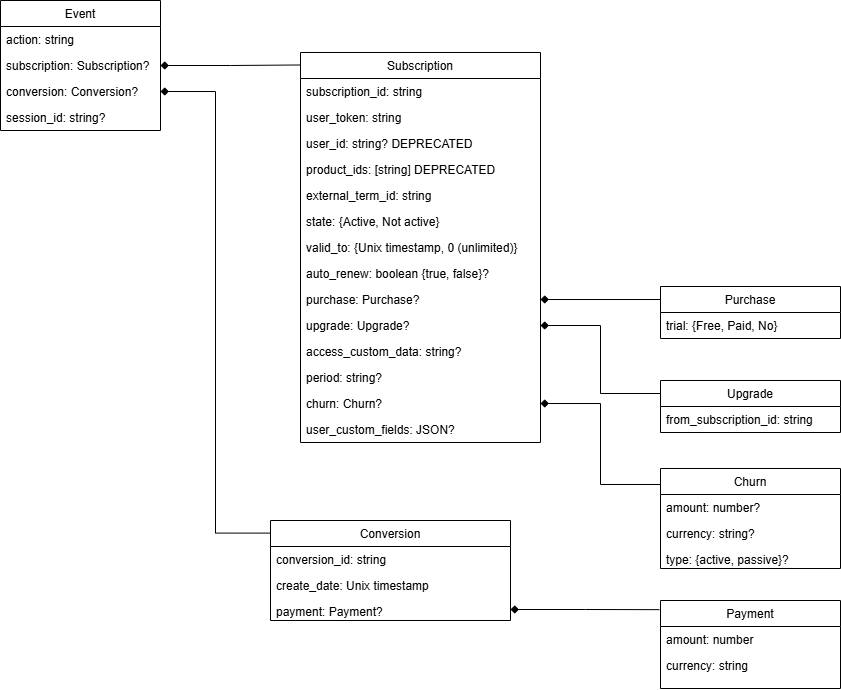
Below is the structure of the event represented as a diagram and a table:
|
Field name |
Type |
Required/Optional |
Description |
||||||
|
event |
Object |
Required |
The external event passed to the Linked term synchronization endpoint. |
||||||
|
event.action |
String |
Required |
The action the end user or the external system takes on the external subscription. (shared_access_grant and shared_access_revoke are described separately) |
||||||
|
event.subscription |
Object |
Required/
|
The new external subscription. |
||||||
|
event.subscription.subscription_id |
String |
Required |
The ID of the new external subscription. Set by the client in the external system. |
||||||
|
event.subscription.user_token |
String |
Required/
|
The JWT token of the end user the subscription belongs to.
|
||||||
|
event.subscription.user_id
|
String |
Optional |
The ID of the end user (Piano UID) the subscription belongs to. |
||||||
|
event.subscription.product_ids
|
Array |
Required |
The IDs of the external products the end user is subscribed to. Provided by the external system. |
||||||
|
event.subscription.external_term_id |
String |
Required |
The ID of the term in the external system. Provided by the external system. |
||||||
|
event.subscription.state |
String |
Required |
The state of the subscription: "Active" or "Not active". |
||||||
|
event.subscription.valid_to |
Integer |
Required |
The expiry moment of the subscription. Equals zero for unlimited access. |
||||||
|
event.subscription.auto_renew |
Boolean |
Optional |
Whether auto renewal for the subscription is enabled. "true" or "false" (case sensitive). If not defined, reset to "false". |
||||||
|
event.subscription.purchase |
Object |
Optional |
The purchase data of the subscription. Applicable when the end user acquired the subscription by making a purchase. If not defined, keeps the previous purchase trial state. |
||||||
|
event.subscription.purchase.trial |
String |
Required |
The kind of trial applied to the subscription. The allowed values are "Free", "Paid", and "No". |
||||||
|
event.subscription.upgrade |
Object |
Optional/
|
The upgrade data of the subscription. Applicable when the end user created it via an upgrade from another subscription.
|
||||||
|
event.subscription.
|
String |
Required |
The ID of the external subscription the end user upgraded from. Set by the client in the external system. |
||||||
|
event.
|
String |
Optional |
Any custom data that should be linked with the subscription (not to be confused with |
||||||
|
event.subscription.period |
String |
Optional |
The billing (or renewal) period of the subscription. Allowed values: 1 week, 4 weeks, 1 month, 1 quarter, bi-annual, annual. If not defined, considered empty. |
||||||
|
event.subscription.churn |
Object |
Optional |
Revenue lost because of user churn. |
||||||
|
event.subscription.churn.amount |
Number |
Optional |
The amount of the loss caused by the churn. Estimated by the client. If defined, also requires "currency". |
||||||
|
event.subscription.churn.currency |
String |
Optional |
The payment currency. Currency code defined by ISO 4217. If defined, also requires "amount". |
||||||
|
event.subscription.churn.type |
String |
Optional |
Can be either "active" (when the user cancels the subscription) or "passive" (when the subscription expires). |
||||||
|
event.subscription.user_custom_fields |
JSON |
Optional |
A list of the end user custom fields. Example: |
||||||
|
event.conversion |
Object |
Required/
|
The conversion data in the external system to synchronize with.
|
||||||
|
event.conversion.conversion_id |
String |
Required |
The ID of the conversion to be created. Provided by the external system. |
||||||
|
event.conversion.create_date |
Integer |
Required |
The conversion creation date. |
||||||
|
event.conversion.payment |
Object |
Optional |
The payment data (if the conversion requires payment). |
||||||
|
event.conversion.payment.amount |
Number |
Required |
The payment amount. |
||||||
|
event.conversion.payment.currency |
String |
Required |
The payment currency. Currency code defined by ISO 4217. |
||||||
|
event.session_id |
String |
Optional |
The ID of the user session associated with this event, valid for 3 days after it is generated. Passed in the "linkedTermSelected" JS callback (at Step 4 of the Main scenario). Required for Composer conversion report. |
||||||
You can find the JSON schemas and API call examples for subscription-related events here.
Shared-access-related events
Every time the end user shares (or unshares) their subscription, the external system sends a Sync API event with "shared_access_grant" (or "shared_access_revoke") as an action. One Linked term subscription can be shared with 100 child users max.
A shared-access-related event can be represented as:
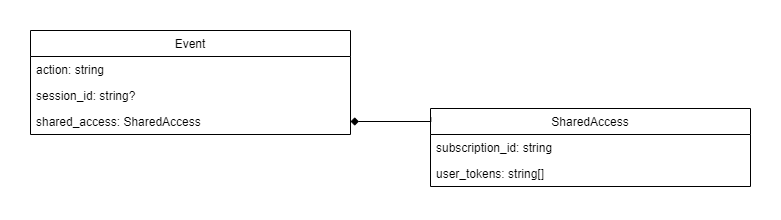
Child accesses within a shared subscription cannot be updated individually and only mimic the state of the parent access.
|
Field name |
Type |
Required/Optional |
Description |
||
|
Event |
Object |
Required |
The external event passed to the Linked term synchronization endpoint. |
||
|
event.action |
String |
Required |
The action the end user or the external system takes on the external subscription:
|
||
|
event.session_id |
String |
Optional |
The ID of the user session associated with this event. Valid for 3 days after it is generated. Passed in the "linkedTermSelected" JS callback (at Step 4 of the Main scenario). |
||
|
event.shared_access |
Object |
Required |
The (un)shared access data. |
||
|
event.shared_access.subscription_id |
String |
Required |
The ID of the subscription which access will be shared or revoked. Set by the client in the external system. |
||
|
event.shared_access.user_tokens |
Array of strings |
Required |
The JWT tokens of the users getting or losing the status of a child account of the subscription. |
||
You can find the JSON schema and API call examples for shared-access-related events here.
Subscription-import event
To facilitate the import of Linked term subscriptions from external systems, we have introduced a special event, subscription_import. The API call includes the same parameters as that for subscription_create but does not affect segmentation and reporting. We strictly recommend importing Linked term subscriptions via this endpoint instead of subscription_create.
You can find the JSON schemas and API call examples for subscription-import events here.
Sync API calls for Piano features
Audience segmentation by custom fields
Linked terms allow the collection of the user's custom fields and use them for segmentation in Piano Audience.
There should be a preconfigured set of custom fields.
Custom field values should be sent within subscription events.
Linked terms in Reports
-
The New Activity report, Revenue report, Subscription Log report, Subscription Visual report, and VX conversion report include Linked term conversions by default.
-
To include Linked term conversions in a Composer conversion report, make sure that the corresponding
createevent specifiessession_id.
Information about Exposures for Linked terms will appear in conversion reports only if the Linked term has been shown in a Management + Billing offer.
Composer segmentation by "Users with access"
This feature depends on the availability of an active subscription registered in Management + Billing with a Sync API event. The end user has active access from a subscription_create event till some subscription_terminate event.
C1X segmentation by “Brand Relationship”
Free trial users and Paid trial users
This feature works with subscription_create, subscription_upgrade, subscription_renew, and subscription_update events.
The subscription object in these events should include the optional purchase object to indicate whether your subscription has a free trial or paid trial period. Example:
"purchase": {
    "trial": "Free"/"Paid"
}
Subscribed users
This feature depends on the availability of an active subscription registered in Management + Billing with a Sync API event. The end user has active access from a subscription_create event till some subscription_terminate event.
Churned users
Likehood-to-Cancel user segmentation requires that, after the termination of a linked term subscription, the type of churn (active or passive) be specified among the parameters of the subscription_terminate event (path: event/subscription/churn/type).
C1X segmentation by "Expiring Subscribers"
The user has disabled auto renew
This feature works with subscription_create, subscription_upgrade, subscription_update, and subscription_renew events.
The subscription object in these events should include the optional auto_renew property: first, with a True value and later with a False value - to indicate that subscription auto-renewal is disabled.
Example:
"subscription": {
    "auto_renew": false
}
C1X segmentation by "Subscription Length"
Weekly-, 4-week-, monthly-, quarterly-, bi-annually- and annually-subscribed users
This feature works with subscription_create, subscription_upgrade, subscription_update, and subscription_renewevents.
The subscription object in these events should include the optional period object to indicate which period the subscription has been converted for. Example:
"period": {
    "length": "1 week"/"4 weeks"/"1 month"/"1 quarter"/"bi-annual"/"annual"
}
C1X segmentation by "Subscription Tenure"
First-24-hour, week-1, week-2, week-3, week-4, month-1-2, month-3-6, and month-6+ subscribers
This feature works with subscription_create and subscription_upgrade events.
The conversion object in this event should include the create_date property to indicate the date the subscription has been converted for the first time. Example:
"conversion": {
    "create_date": <the unix timestamp>
}
C1X segmentation by "Checkout Abandonment"
You can track end users that haven't completed the checkout flow to give them a special offer, collect statistics, or perform other business actions.
By default, Management + Billing tracks a checkout start when the end user clicks your Linked term, and the linkedTermSelected callback is sent. If needed, you can manually configure checkout start tracking using the /publisher/linkedTerm/checkout/trackStart endpoint. Please contact Piano Support to have this endpoint enabled.
Enabling this manual tracking disables the automatic external_checkout_start event triggered by the linkedTermSelected callback.
If a publisher wants to leverage Checkout Abandonment C1X segmentation, they should ensure checkout start is tracked using the /publisher/linkedTerm/checkout endpoint.
List of parameters and attributes:
|
Field name |
Type |
Required/Optional |
Description |
||
|
aid |
String |
Required |
The application ID. |
||
|
external_term_id |
String |
Required |
The ID of the term in the external system. Provided by the external system. |
||
|
browser_id |
String |
Required |
The unique ID of the browser. |
||
|
checkout_start_date |
Integer positive number |
Required |
The Unix timestamp of the moment when the end user started the checkout. |
||
Sample request:
curl --location 'https://api.piano.io/api/v3/publisher/linkedTerm/checkout/trackStart?api_token=***' \
--header 'Content-Type: application/json' \
--data '{
  "aid": "your_app_id",
  "browser_id": "lzgmjp72ip97ddry",
  "external_term_id" : "term_name_id",
  "checkout_start_date" : 1744049700
}'
Emails and webhooks
Linked Term Sync API events update the subscription record, write a history entry, and send Piano Analytics events. They do not send webhooks or emails, with one exception: the subscription_import event fires the subscription_created and access_granted webhooks.
User provider integrations
In terms of user management, the Subscription linking feature can be used in applications with:
-
a direct Identity Management integration
-
Identity Linking with some external user provider (external SSO)
-
Identity Linking and Identity Management as an external user provider
The Linked term API identifies users using JWT tokens.
Identity Linking + External SSO
End users can either be imported by client users or automatically created during the subscription creation process. A JWT token for the Linked term Sync API is taken from an external SSO or generated by user_id and email from an external SSO. See the detailed process here.
Identity Management
Since the Linked term Sync API can only process existing users, client users have to import or create users in advance. Piano does not support JWT tokens generated by external SSO or other tools.
The client can create new Management + Billing users via publisher/identity/register (with publisher/register as a deprecated option). The JWT token is returned in the access_token field of the response.
If the user is already logged in, their JWT token can be obtained via a tp.pianoId.getToken() JS call on the frontend. Alternatively, a new JWT token for any existing user can be generated with a publisher/token API call. Please note that the allowGenerateToken Identity Management setting must be enabled for the app.
Subscription linking can be used with Identity Management apps united with Global Mode.
Skipping user auth check when starting external checkout
If you prefer a custom flow, where the user does not have to log in immediately after selecting a term, you can disable user authentication with Identity Linking and PianoID so that the linkedTermSelected callback can be triggered even if the user is not logged in. In this case, you need to add:
tp.push(["setRequestUserAuthForLinkedTerm", false]);
before the Management + Billing offer on your integration page.