
The Set cookie card makes it easy to create cookies on select users' browsers based on those users' behaviors and actions. After a readable cookie has been set, you can target or ignore those users by specifying cookies on the User Segment card. All cookie fields are detailed below.
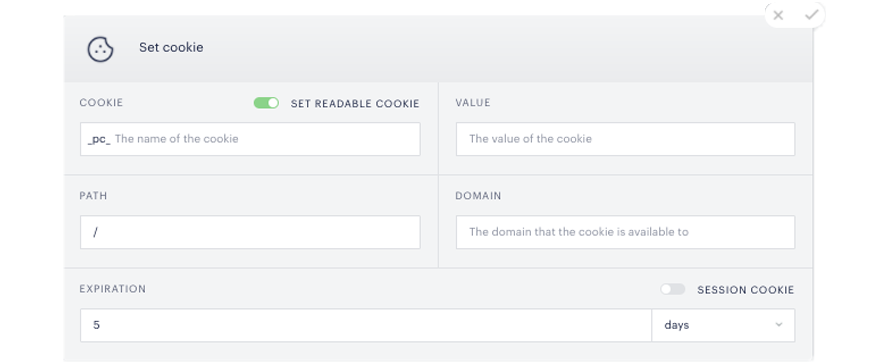
Set readable cookie: The toggle determines whether or not Piano can read the cookie. If the cookie is set to readable, Composer will read its value on the next page execution and you will be able to target users by specifying the cookie and value in the User Segment card. If a cookie is set to non-readable, you will not be able to target based on this cookie because Composer will not read the cookie. A non-readable cookie is a regular browser cookie that you can use in whatever manner you see fit using your own page code.
_pc_: This prefix is only shown for readable cookies. The "pc" prefix stands for "piano cookie" and Composer only reads cookies that include this prefix. For example, if you were to enter a cookie name of "mycookie", Composer would set a cookie with the name "mycookie" in case of a non-readable cookie and "_pc_mycookie" in case of a readable cookie.
Value: The value of the cookie.
Path: Tells the browser the scope of the cookie. By default it's "/", which means the cookie will be available on any page on your domain.
Session cookie: If this setting is toggled on, the cookie will expire at the end of the session.
Domain: Tells the browser the scope of the cookie. You could, for example, specify a sub-domain and only have the cookie available within that scope.
Expiration: When the cookie expires (if Session cookie is toggled off). Value can be set in seconds, minutes, hours, days, months, or years.