
POSTMAN is an excellent tool for testing HTTP-request - for example our REST API.
It is possible use a pre-request script in POSTMAN to create the Cxense authentication header.
Step-by-step guide
-
Create two global variables in POSTMAN, cx-username and cx-api-key, containing your user details:
-
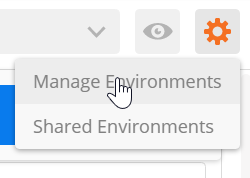
Click on manage Environment in the top right corner:
-
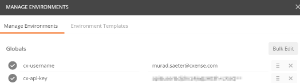
Click on "Globals" (or if you'd prefer, use an Environment):

-
Add cx-username and cx-api-key:
-
-
On the POSTMAN request, on "Headers" add a header with name "X-cXense-Authentication" with value "{{cx-authentication}}"

-
In the "Pre-request script" add the following code:
// first look in the current Environment
var username = postman.getEnvironmentVariable('cx-username');
var apiKey  = postman.getEnvironmentVariable('cx-api-key');
if (!username) {
    // otherwise fallback to Globals
    username = postman.getGlobalVariable('cx-username');
    apiKey = postman.getGlobalVariable('cx-api-key');
}
// Sign the date with our api key
var date = new Date().toISOString();
var signature = CryptoJS.HmacSHA256(enc(date), enc(apiKey));
// Slap together the header value
var value = "username="+enc(username)+" date="+date+" hmac-sha256-base64="+CryptoJS.enc.Base64.stringify(signature);
// Put it in a global for later use
postman.setGlobalVariable('cx-authentication', value);

// UTF-8 encoding might be overkill but doesn't hurt
function enc(s) { return unescape(encodeURIComponent(s)); }
-
On the body insert your API request, e.g. {"siteGroupId":"12345"}
-
The URL will go to the endpoint for the API call, e.g.: https://api.cxense.com/site/group
-
The first request might fail, try it twice and it will work. POSTMAN uses for some reason the header from the last request, so you will get the occasional "Request expired". Just retry the request and it will work.