Overview
The "Share with a Friend" functionality enables paid subscribers to share articles/content with a friend, colleague, etc. When the article is shared by a subscriber, the friend is able to bypass a
paywall or registration wall and read the article for free.
The templates involved in this setup include:
1. "Share with a Friend" template - this customized Offer template includes the URL link that can be copied by the subscriber and shared (via email, in a social post, etc.).
Below you can find a basic version of this offer template's code:
<div class="article-share-container">
  <p class="pn-article-share-header" style="font-size: large;">
    Share with a friend free access to this article
  </p>
  <div class="article-share-url-wrapper">
    <input id="article-share-url" readonly style="width: 90%">
  </div>
  <button class="article-share-btn" id="article-share-btn" style="margin: 20px 0;">Copy Link</button>
</div>
<p style="display:none" id="article-share-url-parameters">{{params.url}}?utm_campaign={{user.uid}}</p>

<div custom-script>
  	var utm_source = 1234567;

    var button = document.getElementById('article-share-btn');
    var sharedLink = document.getElementById("article-share-url");
    setTimeout(function() {
    	var url = document.getElementById('article-share-url-parameters').innerHTML;
        sharedLink.value = url + "&utm_source=" + utm_source;
    }, 500);
    button.addEventListener('click', () => {
  		sharedLink.select();
        document.execCommand('copy');
  		button.innerText = "Copied";
  		button.disabled = true;
  		setTimeout(function() {
  			button.innerText = "Copy Link";
  			button.disabled = false;
  			}, 2000)
    });
</div>
You may want to replace the values for article-share-url (link URL), article-share-btn (button class), 1234567 (value of UTM source) based on your requirements or needs in both the HMTL and JavaScript part of the code.
2. "Friend Free Look" template - this is a customized Offer template that the friend sees when they go to access that piece of content and bypass a paywall/regwall.
For example, it may contain just a line of code (in HTML format) and some custom CSS based on your website's design:
<p>You can read this article for free thanks to your friend who is a subscriber of this site</p>
Considerations
Consider the user flow for both the subscriber and the friend. For example, you may want to utilize a Pageview Meter experience for any user that is recognized as a "friend", so that if they access 3 pieces of content in a month, they are hit with a registration wall. This ensures that no paid subscriber is abusing the "Share with a Friend" functionality and letting their friends continue to get free articles.
For the subscriber that has the ability to share articles, consider what level of tracking you would like to have on sharing. For example, in the use case displayed below, the client wanted to be able to track the subscribers who use the functionality, so we included a userId in the URL for them to track in Google Analytics.
Use Cases
Below you can view an example of 2 Experiences that can be set up in order to accommodate the "Share with a Friend" functionality.
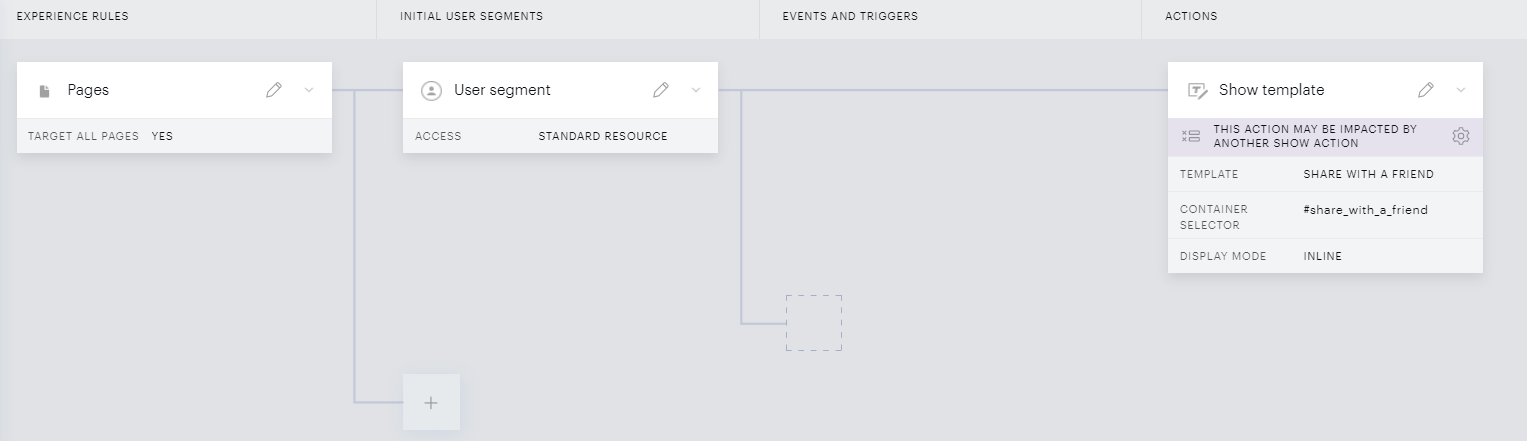
Share with a Friend Experience
-
User Segment: Members (that have access to a membership/subscription resource)
-
Show Template: Share with Friend Inline template/ribbon*
-
Include a template, inline at the bottom or inside of the article, that allows the user to share this article. This template should include the script from the example code above
Basic Experience example:
-
Friend "Free Look" Experience
-
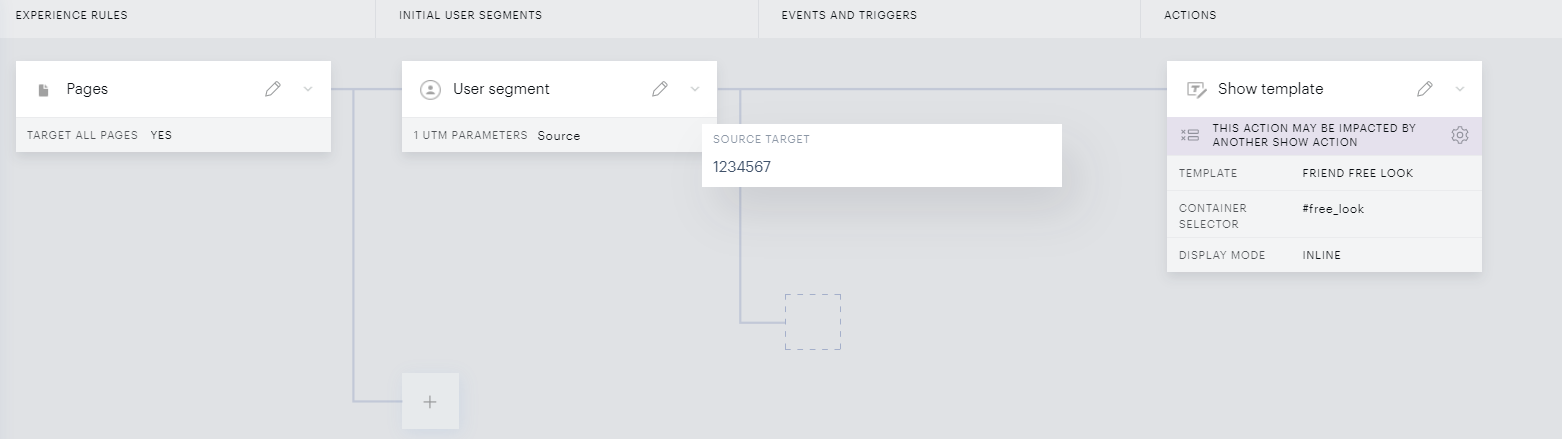
User Segment: Include the UTM key-value pair which gets automatically appended (via the template's script provided above) to each URL when the member clicks the button to copy the URL & share, for example
utm_source=1234567, in the User Segment card of your ExperienceDoing this will trigger this Experience only for users accessing your website with the UTM parameter in the URL
-
Show Template: Friend Free Look Inline template/ribbon*
-
Show a bottom inline template that shows the user a message, such as: "This article has been shared by a Member".
Basic Experience example:
-
* These templates ("Friend Free Look" and "Share with Friend") would need to be created and customized by you using the example code provided above. The 2 templates are not available in our Boilerplate library of out-of-the-box templates.
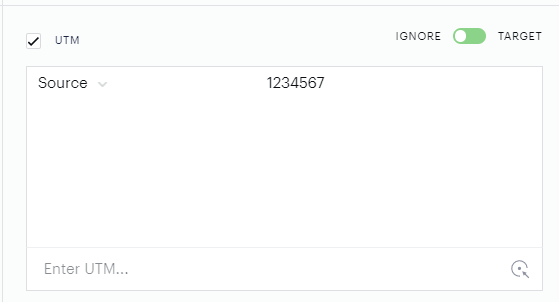
If you have one or multiple Experiences that are gating access to your website, you would also need to exclude users accessing your website with a link including the UTM parameter you defined, for example, https://website.com/?utm_source=1234567 (where 1234567 would be the value of the UTM parameter defined in the "Share with a friend" template you've created). This can be done by excluding the UTM in the User segment card as follows: