
To share a Data Query template, first save your project. You can then share it in two ways.
Built-in sharing
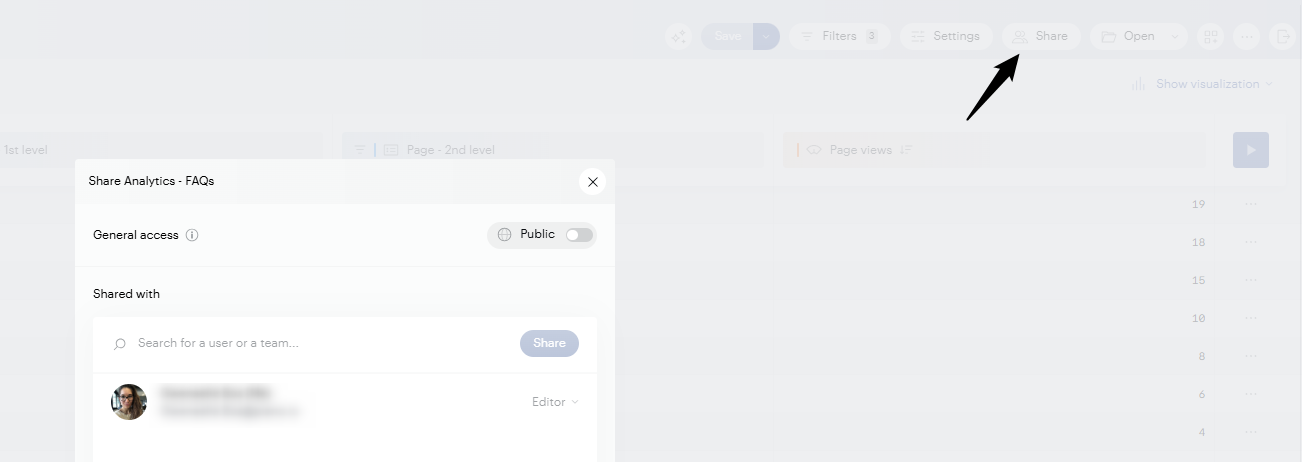
Once your project is saved, click Share in the top toolbar. From the Share panel, you can:
-
Search for a user or a team and give them access, then set their role (Viewer or Editor).
-
Turn on General access and set it to Public to make the project available to anyone in your organization.
API request
You can also copy the API request (GET URL) of your query and send it to a colleague, who imports it into Data Query. The URL is encoded by default, so:
-
Decode the URL.
-
Keep only what comes after
?param=. -
In Data Query, go to Project > Import and paste it.
Code to import, after decoding:
{"space":{"s":[123456]},"options":{"eco_mode":false,"ignore_null_properties":false},"period":{"p1":[{"type":"D","start":"2026-08-25","end":"2026-08-25"}]},"sort":["-m_events"],"columns":["page","m_events"],"max-results":20,"page-num":1}
With this method, later changes the original owner makes to the template are not applied to the imported copy.