
The Effective Pages card is the place where you can configure in which parts of your site Composer should perform an action, such as showing a subscription offer.
To keep Composer as flexible as possible, there are multiple ways you can configure it, such as fragments of your URL or article tags. Boolean logic is applied here, and to prevent configuration errors, it is important to understand how the Boolean AND/OR logic in the Effective Pages card works.
Two layers of AND/OR logic
There are two layers of AND/OR logic – between the input sections and within the input sections.
The logic between the input sections
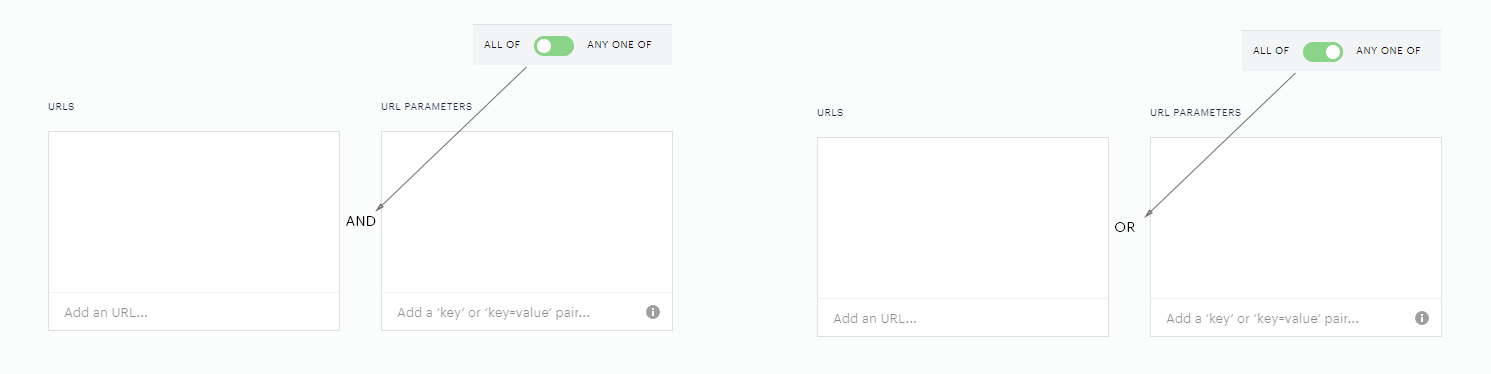
The logic between the input sections is given by the position of the ALL OF/ANY ONE OF toggle in the top right corner of the respective Effective Pages card section. This toggle:

"All of" means, that all input sections with a configured rule must be matched for the Experience to continue in execution. When the toggle is switched to "All of" (All of the input sections), the logic between the input sections is AND.
"Any one of" means, that at least one input section with a configured rule must be matched for the Experience to continue in execution. When the toggle is switched to "Any one of" (Any one of the input sections), the logic between the input sections is OR.
The logic within the input sections
Within the input sections, you can configure includes and excludes.
An include means to include a parameter, e.g., a URL fragment or an article tag, into the targeting criteria. If an include is matched, it is a signal that the Experience will continue executing the next configured rule.
An exclude means the exact opposite. If an exclude is matched, it is a signal that the Experience will not continue executing.
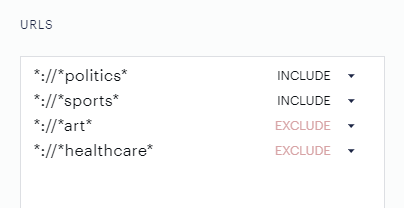
Let's say we want the Experience to continue and perform an action on articles in the politics and sports sections, and not perform an action in the art and healthcare sections.
Such a setting would look like this:
The logic here is:
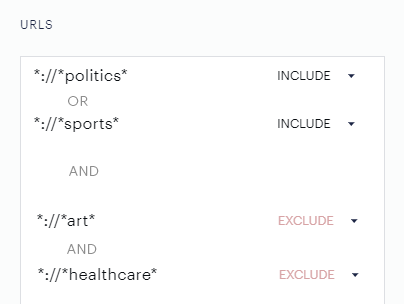
Between the INCLUDES the OR logic is applied. In our example, it means that the Experience must continue when the visitor in the current pageview is either in the Politics OR in Sports sections defined as URL fragments *politics* OR *sports*.
The includes and excludes are forming two groups. The logic between INCLUDES and EXCLUDES is AND. In our example, it means that the Experience must continue when the visitor in the current pageview is in the Politics or Sports sections AND not in the Art or the Healthcare sections.
So, with the applied Boolean logic, our example configuration is this:
Such logic is applied in all other input sections, except tags, where you can configure the AND or OR logic for included tags. For example, if you are setting content sections (also sometimes called "section tags") to Composer, instead of defining the sections in the URL input section, which anticipates a certain URL structure, you can set it up in the Content section input section. The exact same Boolean logic is applied.
Now let us extend our example:
The Experience must continue in the Politics or Sports sections and not continue in the Art or Healthcare sections, but only on articles that have the article tag "premium".
From the Boolean logic perspective, the "All of"/"Any one of" toggle is important.
Correct configuration:
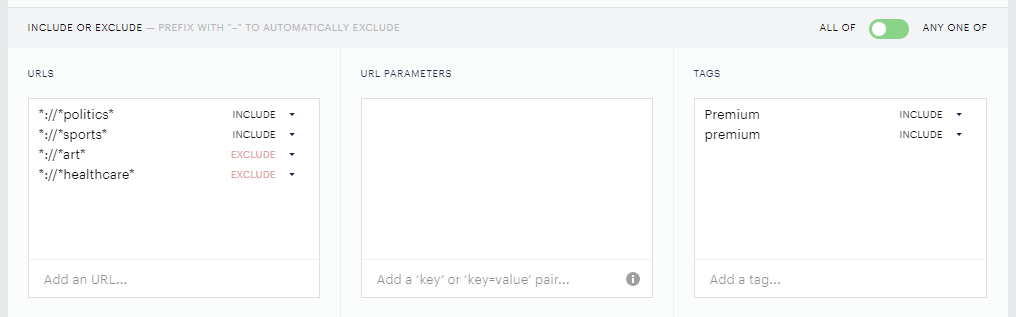
The "All of" position of the toggle indicates that rules in all input sections must match for the Experience to continue. So, URLs AND Tags.
If the toggle were switched to the "Any one of" position, the logic between the input sections would be OR, so the Experience would continue if one of the input sections would match the rules. Such an incorrect configuration would look like this:
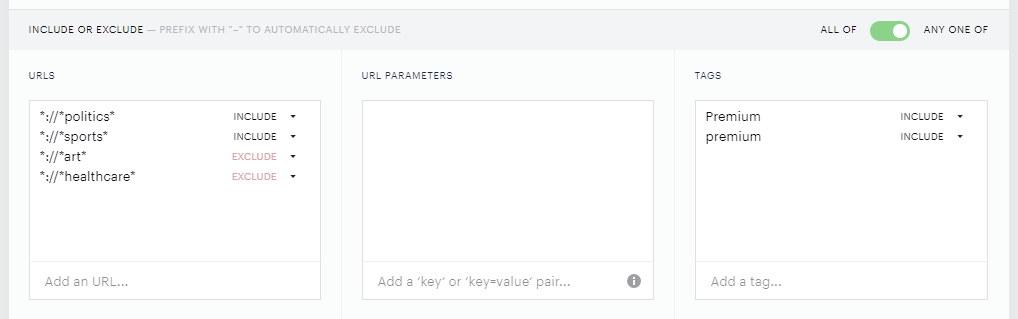
Such a setup would cause the Experience to continue executing on all articles with the tag "premium", disregarding the URL input section setup.
There are scenarios where the "Any one of" logic is beneficial, but in general, "All of" is used much more frequently; that is why when creating a new Effective Pages card, the default position is on "All of".
The "Premium" OR "premium" article tags are set up to demonstrate the prevention of typical errors when tagging articles in your CMS, as all the settings in the Effective Pages card are case-sensitive.
By using this logic, you can configure most of the rules you wish to. We rarely see all input sections used, the most frequent input sections are URLs and Tags, as outlined in the example.
If you are not sure if your configuration is correct, test it either in Sandbox or create a couple of testing articles with testing tags in the Piano Dashboard and try the logic there.
Common scenarios and recommended configurations
"My Experience still runs on pages I excluded"
This is most often caused by using Any one of at the card level.
Example:
-
URL category: Include
/news/*(matches) -
Tags category: Exclude
Free(page hasFree, so the Tags category is false)
If the card is set to Any one of, the URL include being true can allow the page to qualify even though the excluded tag matches.
Fix: Switch the Effective Pages toggle to All of when exclusions must always apply alongside other conditions.
"I want to target multiple content sections without listing every URL"
If your goal is "Run on any page that belongs to one of these content sections," then Any one of can be appropriate—as long as you are not also depending on other categories to restrict the experience.
If you also have exclusions (tags, authors, etc.) that must always be honored, prefer All of and keep your logic explicit across categories.
Excluding specific URLs (including pages with redirects or parameters)
If certain URLs should never qualify (e.g., login/registration pages), exclude them by URL rather than relying only on tags, especially when tags may not be present or consistent.
If URL parameters are involved, target them explicitly as key/value pairs (for example, test=true). Be cautious: excluding one parameter pattern doesn't necessarily exclude the same path with different parameters.
Recommendation:
-
Use URL exclusions for "hard" pages (login, checkout, account).
-
Use tags for more editorial/content-based suppression, when reliably set.
This logic also applies to Segment pages cards, which use the same All of / Any one of toggle and category-level include/exclude evaluation as the Effective Pages card.
Tags and timing: ensure targeting data is set before execution
Composer evaluates Effective Pages conditions using values available at runtime (for example, tags coming from your data layer or content tracking).
If you set tags programmatically, make sure they are set before running the experience, such as before calling:
-
tp.experience.init() -
tp.experience.execute()
If tags (e.g., isPaidContent) are added after execution begins, the experience may qualify incorrectly because the exclusion condition wasn't available yet.
Troubleshooting checklist
If an experience is triggering unexpectedly (or not triggering):
-
Confirm the Effective Pages toggle. Need combined requirements / reliable exclusions → use
All of. Want broad matching across categories → considerAny one of, but validate exclusions carefully. -
Review which categories are populated. Blank/unused categories generally don't help constrain targeting. Ensure you're not mixing broad includes with narrow excludes under
Any one of. -
Validate tag and content metadata availability. Confirm tags/sections/authors are present on the page when Composer evaluates, and that data is set before
tp.experience.init()/tp.experience.execute(). -
Check URL parameter matching. Use exact
key=valuetargeting when needed, and avoid conflicting include/exclude rules that cancel each other out. -
Verify you're testing the correct published version. Ensure changes are saved and the intended version is live during testing.
Best-practice guidance
-
Use
All ofwhen you have more than one requirement (URL + tags + section) or when any exclusion must always be honored. -
Use
Any one ofwhen you intentionally want broad OR targeting, such as "any of these sections," and you are not relying on other categories to block execution. -
Prefer URL exclusions for "never run here" pages; use tag exclusions when tags are reliably present and set early.