
A registration term grants resource access when a reader creates an account through the checkout flow instead of the standard Piano account signup. Users who convert on a registration term can be targeted in Composer separately from paid subscribers.
This guide covers the required changes to migrate an existing experience. Before launch, update and QA the offer templates, system templates, notification emails, action cards, and user segmentation.
Registration term checkout lets publishers collect registration data while granting access through an offer-based flow.
Follow these steps to configure a registration term–based experience:
-
Create a new registration resource and registration term
-
Update the offer templates with the registration offer CTA
-
Review the system templates that use the registration term
-
Review the system emails specific to the registration term
-
Switch action cards from showTemplate to showOffer in the Composer experience(s)
-
Update the user segmentation cards in all Composer experience(s) for registration resource targeting
-
Assign registration terms retroactively for users who already created accounts
Step 1: Create a new registration resource and registration term
-
Create a new resource linked only with a registration term, as described here.
-
Create a new registration term.
Important note: Users who convert on a registration term will see an entry in the Subscriptions tab of the My Account section. Use an appropriate registration resource name and registration term name/description.
Step 2: Update the offer templates with the registration offer CTA
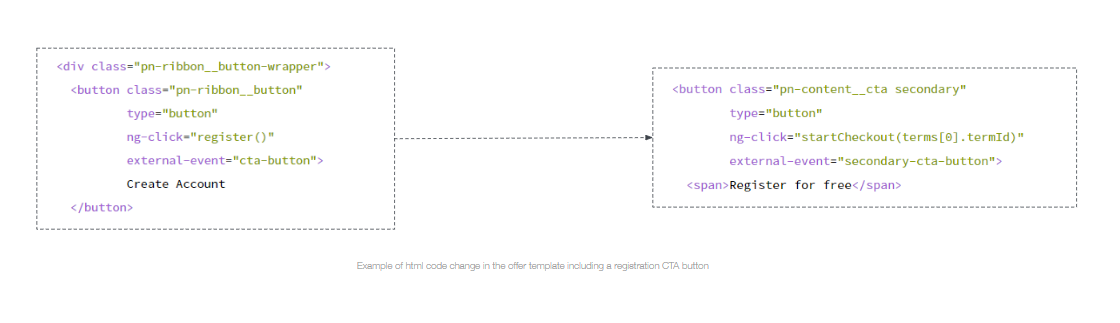
To start a registration checkout instead of a standard Piano account creation signup flow, update all offer templates that use the registration offer CTA, such as ribbons and regwalls.
-
Replace
ng-click="register()"withng-click="startCheckout()".
Step 3: Review the system templates using the registration term
Review and QA the system templates that use registration term or resource elements before launching registration term checkout on the site:
Step 4: Review the system emails specific to the registration term
Registration terms can trigger several system emails depending on the user action and configured notification rules.
User registration — sent at the general level, not the term level; optional.
-
When it is sent: To users when they create a new account through Piano Identity Management.
-
When it is sent: To consumers when they convert on a registration term in return for access.
-
When it is sent: To consumers X days after their access to a resource ended.
-
When it is sent: To consumers X days after their access to a resource began.
-
When it is sent: To consumers X days before their access to a resource ends.
Important note: If both “User registration” and “Completed registration” are enabled, both emails will be sent when the user completes registration term conversion.
Step 5: Switch action cards from showTemplate to showOffer in the Composer experience(s)
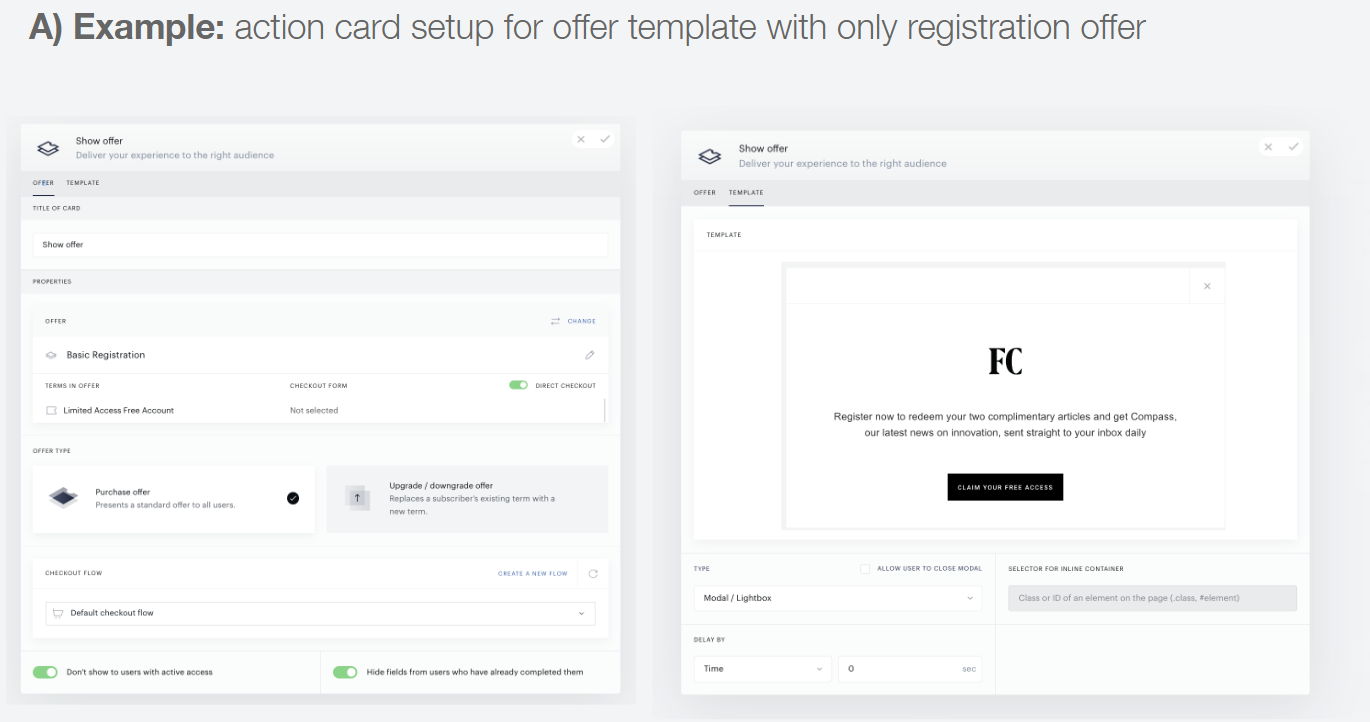
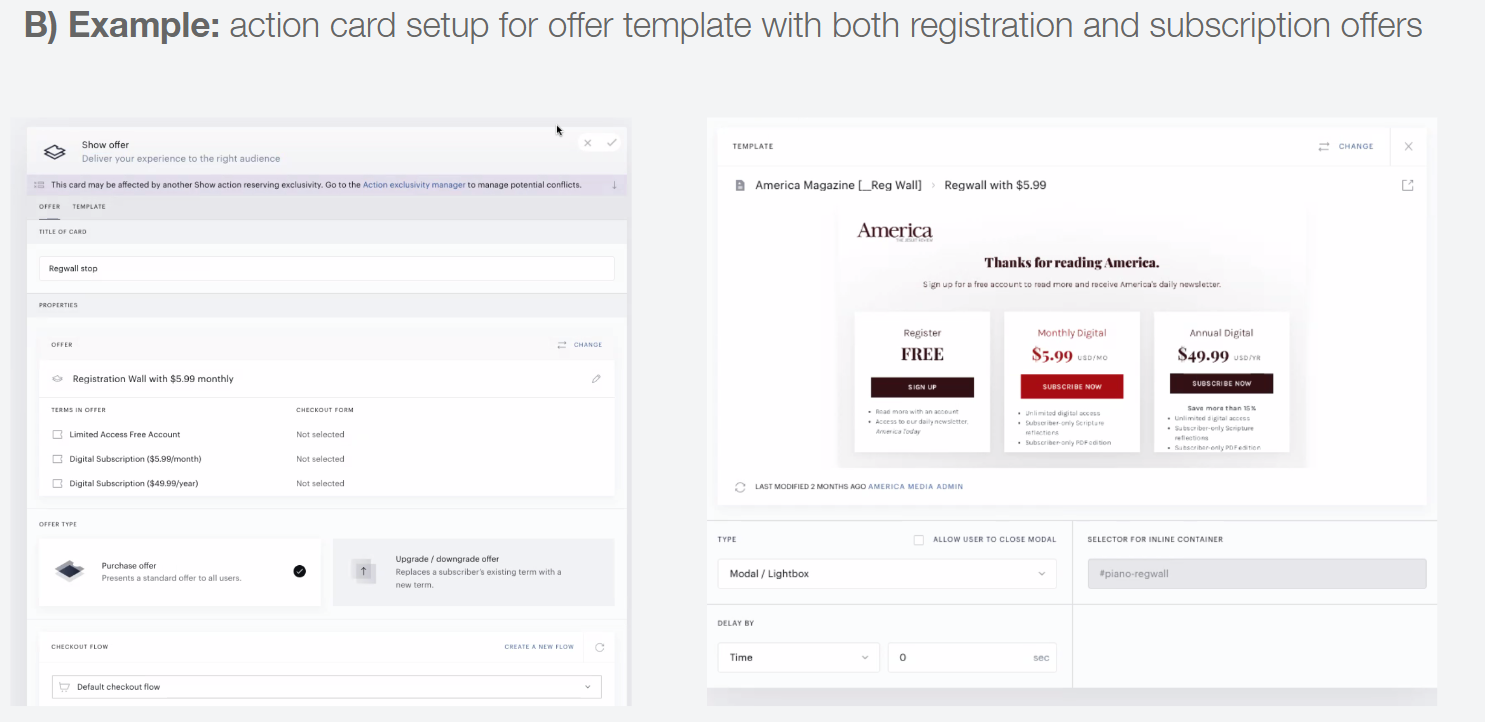
To enable users to convert on the registration term, use showOffer cards that include both of the following:
-
A template with the
startCheckoutfunction mentioned in Step 2 -
A linked offer that contains a registration term
Select the appropriate template and offer for each Composer experience branch based on the offer template type, including the number of CTA buttons and the offers available for conversion.
Step 6: Update the user segmentation cards in all Composer experience(s)
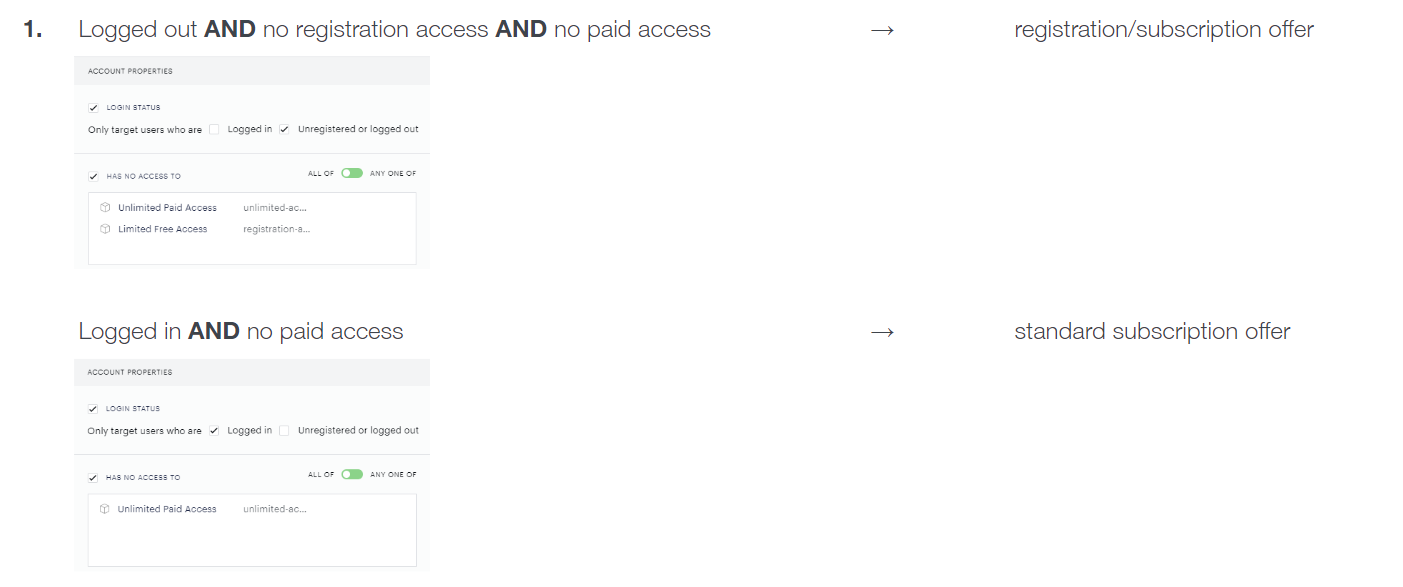
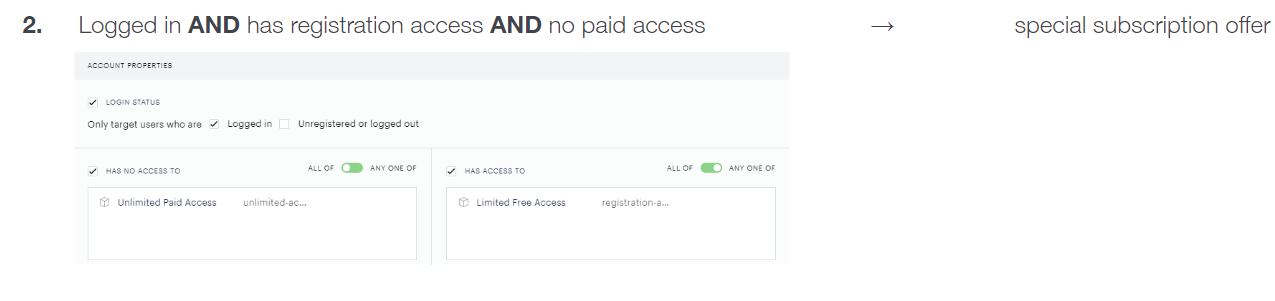
Once a registration term is planned for use, adjust user targeting so anonymous users and logged-in users with no paid access are targeted appropriately.
Review the most common user segmentation setup use cases below:
Step 7: Assign registration terms retroactively for users who already created accounts
Registration terms are powerful tools for publishers, but they can create a common segmentation problem.
The issue arises when registration terms are incorrectly used for segmentation to mean “all logged-in users.”
-
It is not possible to completely disable all user registration paths that do not grant a resource.
-
This often leads publishers to implement workarounds that manually assign the registration resource to all users, which requires development and maintenance.
-
Changing segmentation while retaining the terms for user flows and analytics is almost always the appropriate fix.
There are valid reasons to segment using registration terms only, including:
-
Special event registration
-
Time-limited access
-
Using the term to incentivize first-party data collection
If preferred, a publisher can add a registration term for users who created an account before the registration term and related experiences launched. This allows those users to be included in advanced custom registered-user behavior reports.
It is possible to programmatically assign a registration term to a user who is logged in.
Frequently Asked Questions
Should a registration term be linked to a new separate resource?
Yes. It is recommended to use a separate resource for the registration use case so registered users can be targeted specifically in the User Segmentation card and are not given the same access as users who converted on payment-based subscription terms.
Can the registration term checkout be used with social login options?
Yes. It works the same way as the Piano account creation flow.
Is it possible to use passwordless checkout for a registration term?
Yes. Passwordless checkout can be used when a registration term is included in the offer template.
Which system templates are used to run the registration term checkout flow?
The registration term checkout flow uses Term Components, Already has access, Checkout, Checkout Components, and Receipt.
Can the receipt screen at the end of the registration checkout flow be customized?
Yes. Receipts can be customized on a per-term basis, but there is not currently a default receipt configured for registration terms. The standard payment term receipt is used instead.
Can direct checkout be used with a registration term?
Yes. The Direct checkout option is available when an offer has both of these conditions:
-
A single registration term
-
Display type set to “Modal / Lightbox”
Enabling this option allows the user to skip the offer modal display and go directly into checkout through the Piano ID registration form.