
The meter name is the identifier of a Pageview meter which counts pageviews, sessions or visit days. When you give a name to the Pageview meter in Piano Composer, a meter with the same name will be created in the visitor's browser.
If you have multiple Pageview meters with different (unique) names in your setup, multiple meters with the given names will be created in the visitor's browser.
If the multiple Pageview meters have the same (non-unique) name, only one meter with that given name will be created in the visitor's browser.
Deciding if the Pageview meter names must be the same (non-unique) or different (unique) is critical. There are scenarios for both situations outlined in this article.
To make a good decision, first let us understand how Pageview meter naming works.
Pageview meter card vs visitor's browser
The following two examples below illustrate how the meter names influence metering in the visitor's browser.
Imagine you want to set up a paywall with 3 free articles per month and show a newsletter offer on every second pageview at the same time for the same visitors. For this, you need two different Pageview meters. Which names should you give them?
Example 1: the same name - two Pageview meters with a non-unique meter name "Defaultmeter” will be shown as a single meter for the visitors who match the criteria in the same pageview.
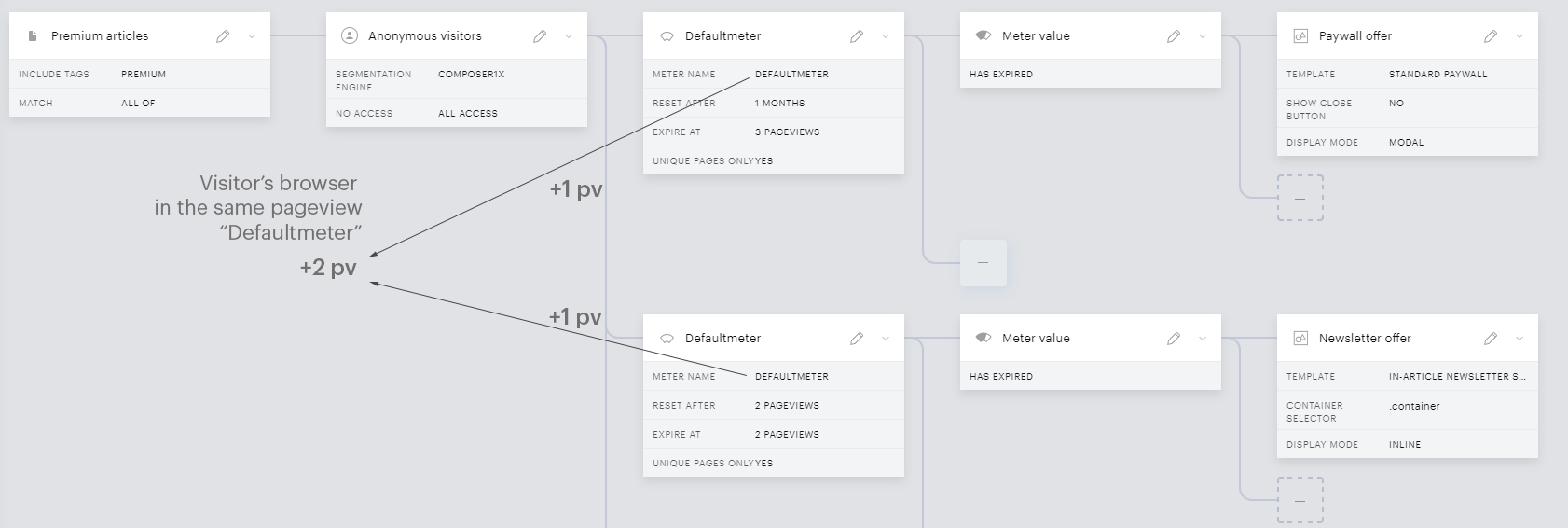
When using the same name for both meters, only one meter will be created in the visitor's browser. But when the user is targeted by both meters (1 for offer, 1 for newsletter), each of them counts +1 pageview, so the single meter in the visitor's browser would get +2 pageviews in total. But in reality, the visitor did only one pageview. So, the metering does not reflect reality. On the next pageview the "Defaultmeter" would again count +2 into the visitor's browser and so on.
Example 2: different names - two Pageview meters with unique meter names "Paywall_meter” and “NL_meter” will be shown as two separate meters for the visitors who match the criteria in the same pageview.
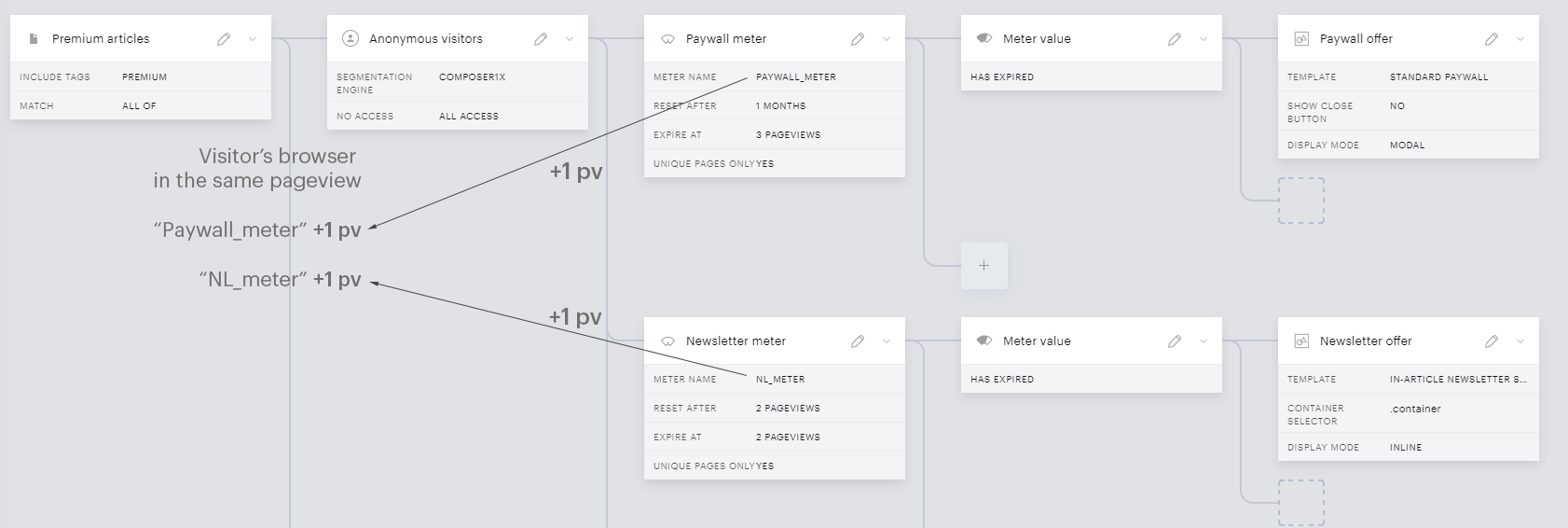
With two unique meter names the visitor gets two meters into the browser, each counting +1, so with this meter naming the metering does reflect the reality. In such a scenario, example 2 is the correct setup.
When creating a new meter, we suggest that you realize the above and that you always go through your existing meters and think through whether to give or not to give a meter a unique name. From real life experience, most multiple-meter setups have unique meter names, so they work independently of each other.
If you need multiple meter names the best practice is to give a descriptive meter name. Such as in Example 2, “Paywall_meter” or something similar. With such a meter name everybody involved in your Composer setup and reporting will understand it. The simpler the meter name the better and less error-prone.
Important: The meter names are case sensitive. Also, if you copy & paste meter names, please do the copy from inside the meter card, not from the Experience view in the Composer canvas.
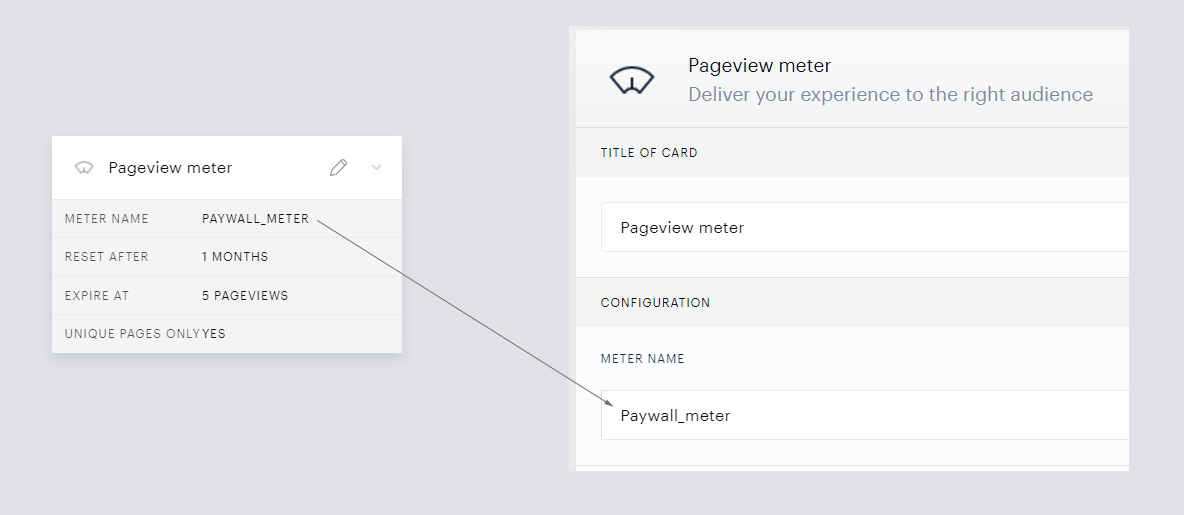
Using unique meter names
Keep in mind that all this is relevant when multiple meters are counting for the same visitors in the same pageview (or session or visit day). So, in most cases, we speak about static segments, such as anonymous visitors or subscribers.
However, there are scenarios where you want the user to be kept on the same meter. For example, dynamic segments such as LtS (Likelihood to Subscribe) are such cases.
Imagine having 5 free articles for LtS low and 4 free articles for LtS high, both for one month. Keep in mind that the visitors may move from LtS low to LtS high within the month when the visitor's loyalty improves. Once that move happens, different targeting criteria may be applied.
Let's say we have a single meter called “LtS_meter". A visitor moves from LtS low to LtS high after the 3rd pageview. Then:
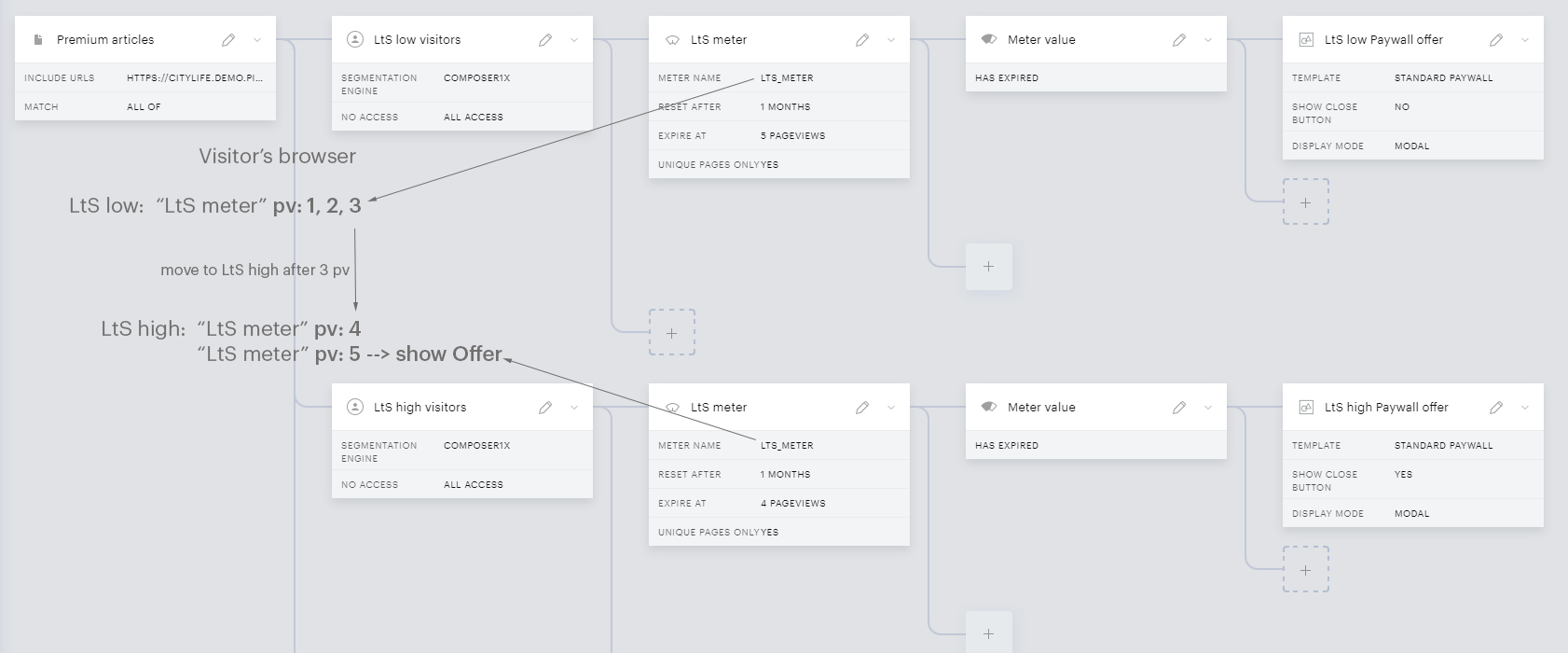
The rules for both LtS segments are working as expected.
Also, as you can see, you can configure the same meter name with different expirations (4 and 5 pageviews in our case). Once the visitor moves to the “second” meter, the already counted pageviews remain counted, but the meter expiration (limit) will change in the visitor's browser.
In the same 4 / 5 free articles scenario if you would have two differently named meters, such as “LtS_low_meter” and “LtS_high_meter”, the pageview count would look like this:
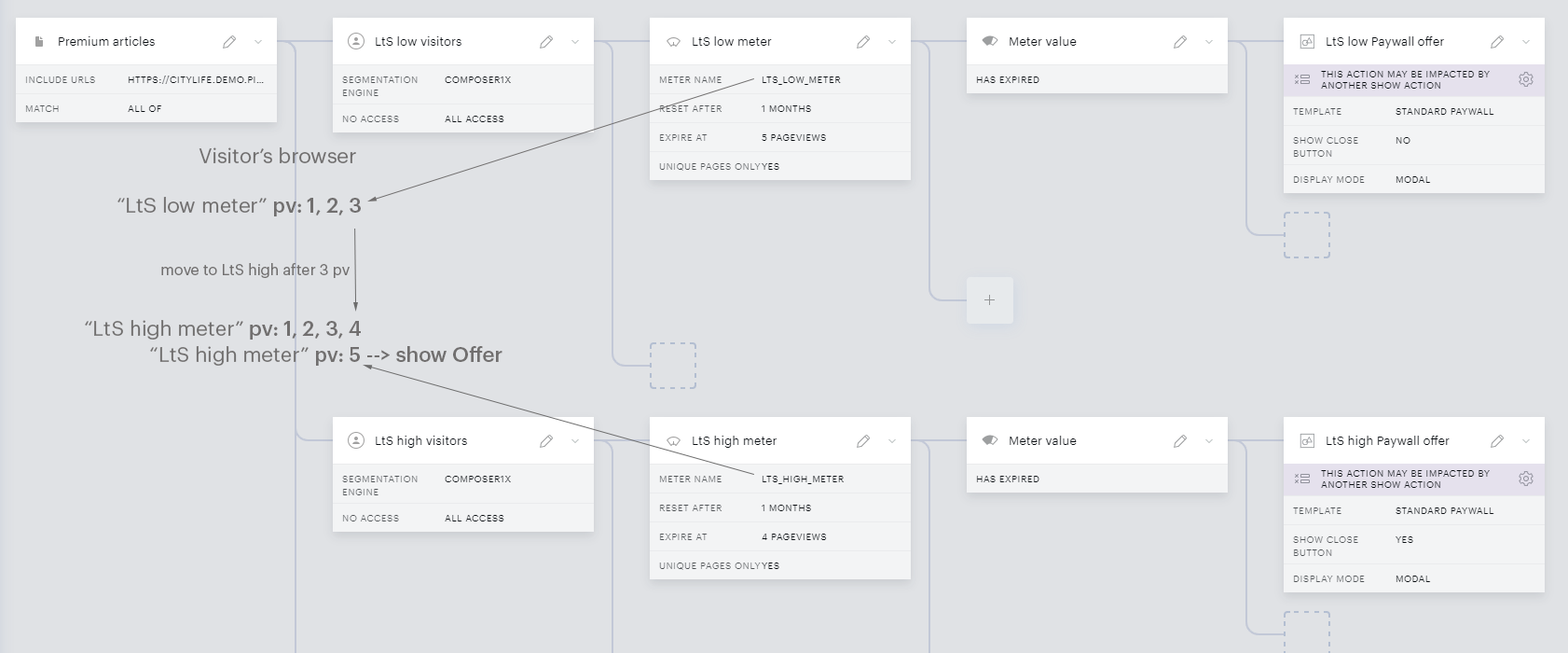
After the move to the LtS high segment, the different (unique) meter name “LtS_high_meter" would start to count from zero (because it is a different meter) and the visitor would get 7 free articles (3 from LtS low meter and 4 from LtS high meter) instead of 4. This is in most cases not what you want.
Most LtX segments, when multiple meters are configured, are handled the above way – with a non-unique meter. When you think about targeting smaller LtX subsegments, always consider if the user might migrate from one segment to another. If that is the case (usually it is), then keep the user on the same meter (non-unique).
Consider placement on the site
If you have Pageview meters which are counting on separate places on the site, the decision to keep them unique or non-unique depends fully on your rules and expectations. For example, homepage and article pages. If you wish to count articles separately from the homepage, use different Pageview names for articles and the homepage. If you wish to count articles and the homepage together, use a single Pageview meter name.
Also, it is important to understand that the placement of the meters in different experiences does not influence the metering behavior. If both of your experiences are targeting the visitor at the same place in the site in the same pageview, they behave the same as if the Pageview meters would be placed within a single experience.
Non-unique (single) meter name is correct when:
-
you have a single meter in the whole setup
-
your meters are targeting mutually exclusive or dynamic user segments where users might move between them (e.g., LtS)
Non-unique (single) meter name is not correct when:
-
multiple meters are targeting the same user segments in the same pageview (e.g., anonymous users)
-
multiple meters targeting the same user segments in the same parts of the site (e.g., articles)
Out of experience the approach “give the meter a unique name(s) unless you really need a single name” tends to be the least error-prone.
It is important to be clear about the meter naming at the beginning of your setup. Once you change the meter name to something unique after discovering this aspect, the new Pageview meter will start to count from zero, which is not what you necessarily want.