
LtS Model Details
Piano's LtS (Likelihood to Subscribe) model uses machine learning to detect patterns of behavior among subscribers in order to create propensity scores for non-subscribers. These scores indicate how likely a visitor is to pay for a subscription on a scale from 0 to 100, with a higher score indicating a higher likelihood to pay. In practice, the model segments your audience by conversion rate — there can be orders of magnitude difference in conversion rate between visitors at the high end of the spectrum compared to the low end.
The LtS model learns by taking samples of both non-subscribing visitors and recent subscribers, and then computes various behavioral characteristics over different time periods. It then uses mathematics to quickly find the best metrics to predict if a visitor with a particular history will subscribe.
Examples of behavioral characteristics used include:
-
Contextual data like referrer and device
-
Behavioral data like article consumption, time of day, active days
-
Preference data like content categories of articles consumed
The total number of features considered in the model is around 100. During the learning phase, the most informative features for your website are selected to avoid highly correlated features and thereby make the model more robust. Every time a visitor on the site is targeted by a campaign that involves the propensity score, their propensity score is computed in real-time, based on the latest trained model.
While there are commonalities, the most important features vary from site to site. For some sites, time of day, device, and referrer may be particularly powerful predictors. For other sites, active days, visit frequency, and breadth of sections read may be most important. No matter which metrics are most highly correlated with conversion, the model will automatically determine and act on them.
Model Requirements
Before real-time subscription propensity can be enabled, there are a few prerequisites:
-
Composer 1X implementation
-
At least 31 days of page view events sent to Piano
-
At least 100 subscription payment events tracked in the last 31 days
For clients who are using Management + Billing for payment processing, conversion events for LtS are tracked automatically.
For clients who are not using Management + Billing or payment processing, there are three options.
The recommended option is to use Subscription linking (Linked Terms), which is described in more detail here. Subscription linking is recommended because it consolidates the sending of conversion data for targeting, machine learning, and reporting.
The second option is to use custom terms in order for Piano to receive the necessary conversion events. Note that, by default, Piano will consider all custom term conversions as subscription conversions for the purposes of training LtS. If you need Piano to only include specific custom terms in model training, Piano's data science team will need to implement this customization, which can be requested through your account manager or the Piano support team.
The final option is to send conversion events using JavaScript, in which case you would first need to create one or more products with the /conversion/product/create API. Once this is done, you will need to deploy the conversion event script tag. The product conversion event should be implemented per product on the final "transaction complete" step for your product funnel. Send the order event along with the confirmation to the user. Whenever the user converts on your product, the conversion event must be sent using a special script tag found here in the Examples section.
Sample code:
<!-- Product Conversion Start -->
<script>
cX.CCE.callQueue.push(['sendConversionEvent', {
    'productId': 'cce-conv-test',
    'funnelStep': 'convertProduct'
}, {
    'callback': function(result) {
        console.log(result.httpStatus); // 200
        console.log(result.response); // {}
    }
}]);
</script>
<!-- Product Conversion End -->
If you need any help with implementing the above, please reach out to your Piano representative. With the second two methods, associated reporting on conversions will need to be implemented separately, as documented here. This double-sending of conversions is one of the reasons that Subscription linking is recommended to streamline implementation.
More information about monitoring conversions for Piano LtS can be found here.
Audience Scoring Triggers
In order to compute and act on propensity scores, the model uses behaviors and characteristics from visitors' prior page views. The model calculates in real time the propensity score for a visitor after the first pageview in the last 31 days — meaning that segmentation based upon propensity score can begin as of a visitors' second pageview in the past 31 days. Propensity is then re-calculated on each page view. One-off visitors (often ~70% of the audience), those visitors who did not provide GDPR consent, and existing subscribers are not scored. For visitors without propensity scores, experiences can be configured using Composer's standard drag-and-drop logic.
Propensity Score Ranges
After Piano's LtS model creates scores for visitors on a 0 to 100 scale, those scores are then broken into 10 segments that can be targeted using Composer 1x. The names of those ten segments:
-
0-9
-
10-19
-
20-29
-
30-39
-
40-49
-
50-59
-
60-69
-
70-79
-
80-89
-
90-100
-
No score
Visitors in the 0-9 range have the lowest likelihood to subscribe. Visitors in the 90-100 range have the highest likelihood to subscribe. The distribution of visitors between the groups isn't equal — there are generally more visitors in the low and moderately likely to subscribe segments of the distribution than at the very high end of subscription likelihood. The exact distribution varies from site to site, which is why Piano has a model based on each website's traffic and conversion data.
The No score segment shows users whom we do not expect to score (those with less than 2 pageviews in the last 30 days).
Composer Setup
Once LtS is enabled on your site and there is sufficient conversion data, you will be able to select LtS segments using the Composer 1x segmentation engine in the user segmentation card:
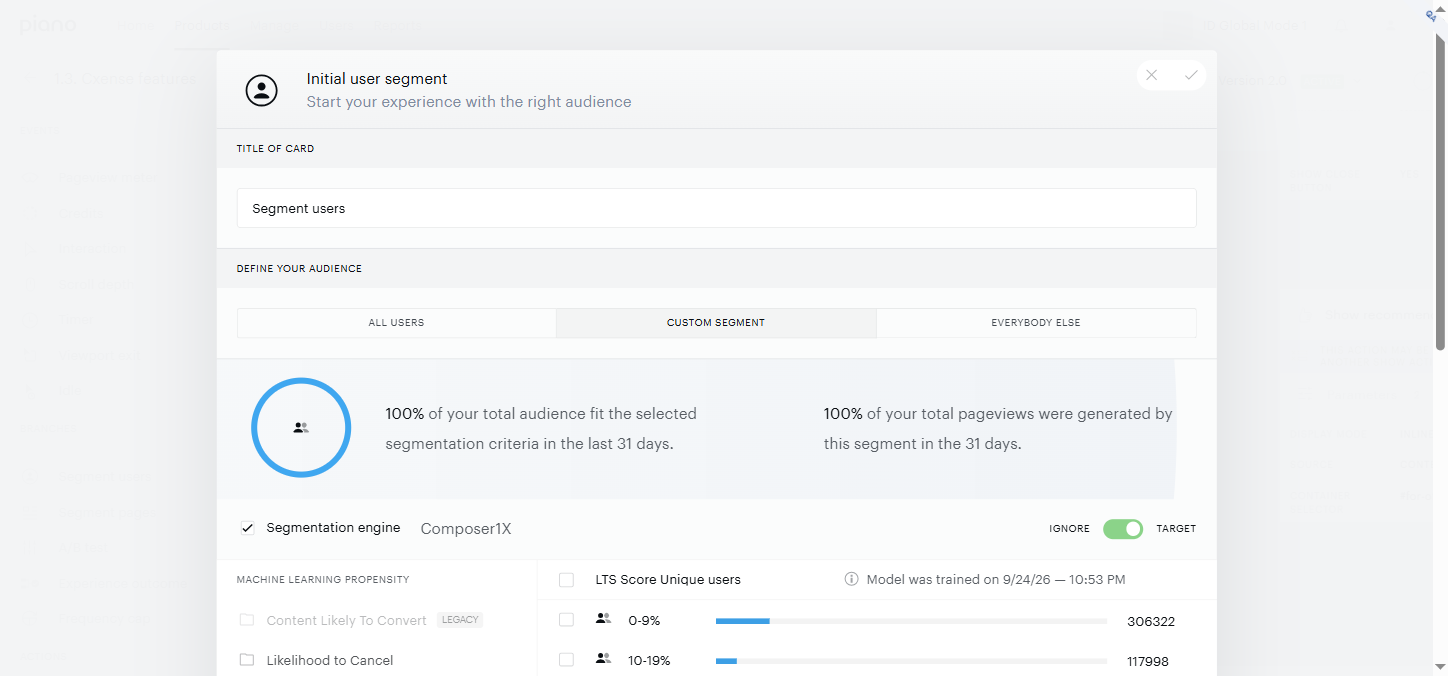
You can then select which segments you want to target individually, or as groups of segments. You can also target visitors who don't have propensity scores by selecting all subscription propensity segments and moving the toggle to "ignore" rather than "target". Or alternatively, by selecting only the No score segment and choosing the option "target".
After the LtS model is activated in your application, we recommend waiting at least 2-3 days to give the model time to assign scores to your site's visitors before using it to target experiences. When setting up experiences, Composer 1x reporting will show you an estimation of the number of visitors expected on each segment to help you decide which segments are best to select for each campaign. If there is not enough conversion data, no visitors will be shown within the segments.
ℹ️ Activating Propensity Scoring
Propensity scores are generated only when a model's segments are used in a live Composer experience. If the model isn't actively referenced, no scores will be produced.
To activate scoring without affecting users, create a monitoring experience using a Non-site action card (only if the model isn't already used in a live experience).
→ See Setting Up Monitoring Experiences for Propensity Model Scoring for step-by-step instructions.
FAQ
Is the model specific to my site?
Yes. Models are trained individually for each site that has enough conversions attributed to it.
How often is the model trained?
The model is trained every day. Prediction is real-time. So each prediction is based on the visitor's history up until the most recent pageview while the statistical model that visitors are scored against is no older than a day.
How accurate is the model?
The quality of your propensity scores depends on a variety of factors. Conversion volume is a major one, as it determines the number of success events the model has to learn from, with more events producing better predictions.
Can LtS scores be exported?
Yes. This document provides more details on how to export LtS scores. For offsite targeting, clients have also passed scores through Composer using the Run JS card.
Why do some visitors not get a score?
Visitors don't get a score if we don't have any events from them (due to lack of consent or fewer than 2 pageviews), or if they have so many events that they're identified as a bot. Typically between 10-35% of the visitors are scored, depending on the level of engagement among visitors. The rest are either low-engagement visitors or ad blockers, since certain ad blockers can interfere with scoring. While performance varies by client, for the median Piano client 71% of converters are scored prior to conversion.
Do known users get a score?
Yes, they do as long as they are not already a subscriber and have more than 2 page views in the last 31 days. If those conditions are met, they will be scored whether or not they are logged in. Non-subscribers who are logged in across multiple devices will receive a single score.