
Publishers can block specific Ads from appearing in their Ad Spaces.
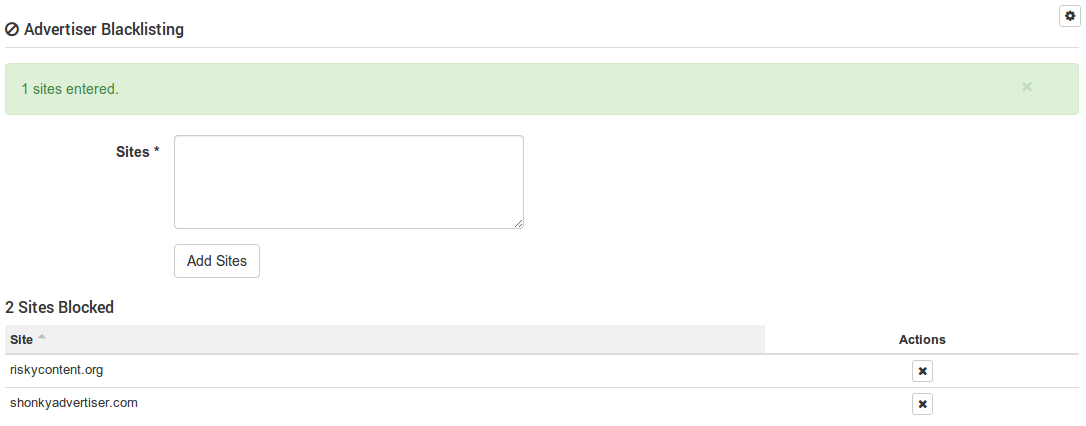
Publishers are able to prevent certain Creatives from being shown on their Ad Spaces with the Advertiser Blacklisting feature. Advertiser Blacklisting is available on the Publisher Tab, in each Publisher Folder and on each Ad Space. Simply add URLs you wish to block to the Advertiser Blacklist section on these screens, and Ads that contain any of these URLs in their Destination URL will be blocked from the associated Ad Spaces.
The Destination URL does not need to match exactly. For example, if an Ad has a Destination URL of 'http://www.shonkyadvertiser.com/buymythings/', then this will be blocked by adding 'shonkyadvertiser.com' to your Blacklist. cX::ad gives you flexibility here, as you are able to enter one word URLs. Be aware that doing so may serverely limit the number of Ads shown in your Ad Spaces. For example, adding the URL 'com' could lead to most Ads being blocked.
If you specify an Advertiser Blacklist directly on an Ad Space, then only that Ad Space is affected. If you add a Blacklist to a Publishing Folder, then all Ad Spaces under that Folder will be affected. If you add a Blacklist directly to the Publisher Tab, then all Ad Spaces in the Tab will be affected, including all the Ad Spaces in Publishing Folders in that Publishing Tab. Blacklisting is cumulative, so if you add a Blacklist to a Publishing Folder and another Blacklist to an Ad Space under that Publishing Folder, both Blacklists will be used when blocking Ads.
Here's an example scenario of advertiser blacklisting in action:
A) creative with destination url = http://yahoo.com
B) creative with destination url = http://google.com
C) ad space with advertiser blacklisting of http://yahoo.com
D) ad space with no advertiser blacklisting
For ad space D, creatives A and B will be shown.
For ad space C, only creative B will be shown.
Also, the publisher sites themselves are irrelevant in determining whether or not a creative is blocked. The publisher site could be anywhere -- http://google.com , http://pengos.se , http://yahoo.com . The only thing that's used to determine what's blocked is the ad space. This means that ad spaces C and D could both be on http://yahoo.com , but only ad space C will block creative A from showing.