
Piano uses Zendesk as a support tool. To submit an issue or question to the Piano support team, you can send an email to support@piano.io, which will automatically create a ticket.
Feel free to put your Piano Account representative on the email copy. You will receive an automatic reply with your ticket ID. When providing updates to the ticket, please include the ticket number in the email subject or simply reply to that email.
If you don't have an account in our support tool yet, you will also receive a separate email with the subject Welcome to Piano Support asking you to create an account via a link included in the message.
Alternatively, you can create an account in the Piano Support tool. This account is separate from your Piano account. Just head to https://support.piano.io/ and click “New to Piano Support? Sign up”. Once you have your account created, you can create and comment on your tickets, see their status and responses from Piano Support agents.
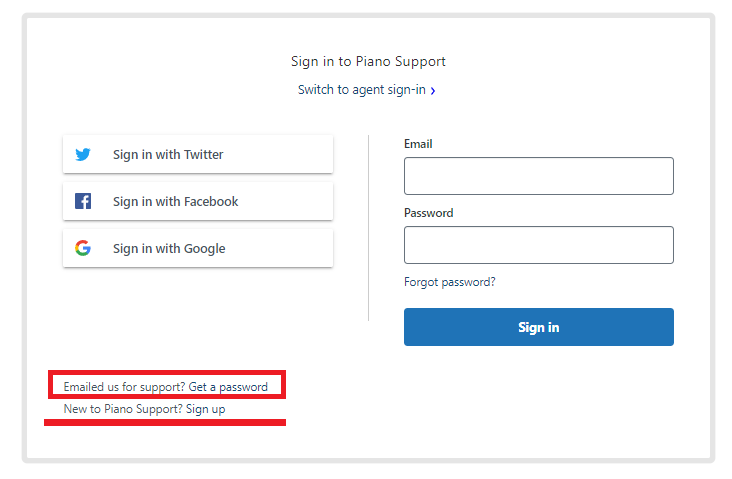
If you have previously submitted tickets by sending an email, you can still create an account, and you will see all past tickets that were created using the same email as in your account. Please note that it's not necessary to create such an account, as you will be receiving any responses to your tickets via email directly and can respond to them via email as well.
If you'd like to have access also to other tickets from your organization (not only tickets you've submitted and are cc'ed on), please reach out to our support team as well.
If you need to reset your password, you can go to this link, click on the button Sign in, and then select Forgot my password.
What information should a ticket contain?
When creating a ticket, please include:
-
Client identifier: AID of your application (for Identity Management, Management + Billing, Composer), ESP Site ID (for Piano ESP), Customer/Account/Group ID (for Piano Audience, Insight), or Site ID (for Piano Analytics).
Here you can find detailed instructions on how to obtain this information. -
Environment: If the problem is in Production or Sandbox, i.e. Staging or Live environment
-
If Staging, please include the steps to access the dev environment for testing.
-
-
Product: Indicate which Product your question or issue is related to (Identity Management, Management + Billing, Composer, ESP, Piano Analytics, Audience, Insight, etc.)
-
If the problem is in the Piano dashboard, please clarify which account/login was used when the problem occurred
-
Specify the experience, template, offer, site, mailing list, etc. if applicable
-
Description of the problem: what is the behavior that you see, the expected behavior and where or when do you see it
-
Please include information such as device, browser, operating system, URL of the site, etc.
-
If several steps are needed to reproduce the problem, please describe each step clearly
Below you can find an example of a few simple steps to reproduce an issue:
1. Go to https://www.piano.io/
2. Click on the article https://www.piano.io/article1/ 3. Then click on the article https://www.piano.io/article2/ 4. Then click the Login button in the upper right corner
5. Try to log in using the email piano123@piano.io and password Piano and click Login 6. There is an error message that says “xxxxxxx” -
Please include screenshots of pages, buttons, or error messages, if any, and highlight the relevant parts. Please make sure to include the URL in your screenshot and also, include developer tools, if necessary and custom variables served when a problem occurs.
-
You can also include a HAR file if you're encountering an error message so that any browser requests can be debugged.
-
For API calls that are not working, you can include the x-request-id from the headers of the request.
Example-of-a-Composer-related-support-ticket.pdf Here you can find an example email with all the necessary information to provide regarding a Composer-related issue when an Experience is not firing as expected.