
The x-request-id is a unique identifier that helps track and diagnose failed transactions or errors on a client's website, API requests or within Piano's dashboard. It is especially useful for troubleshooting issues by providing a specific reference to a particular request that can be investigated further by Piano's support.
How to Search for x-request-id in the Browser
If you encounter an issue or error on the website or in the Piano dashboard, follow these steps to retrieve the x-request-id using your browser’s developer tools:
-
Navigate to the Network tab.
-
Locate a request that failed or returned an error, and click on it.
-
Scroll down within the request parameters to find the
x-request-id.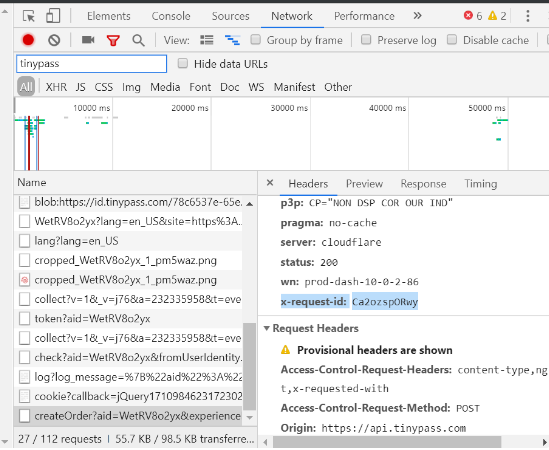
This identifier is essential when reporting failed transactions or errors to support@piano.io, allowing the support team to track down the issue quickly.
How to Retrieve x-request-id from a cURL Request
If you’re working with cURL and need the x-request-id, you can retrieve it by adding the --verbose flag to your cURL command. This will print out the headers, including the x-request-id.
curl --verbose http://example.com
By using --verbose, the response will display detailed information, including the x-request-id, which can then be shared for further troubleshooting.
Difference Between a HAR File and an x-request-id
-
HAR File (HTTP Archive File): A HAR file is a log of network requests and responses generated by a web browser. It contains detailed information about each request made during a browsing session, including headers, timings, payloads, and responses. It’s commonly used to debug performance issues, failed requests, and page loading times. A HAR file provides a broad picture of everything happening during a user’s session.
-
X-Request-ID: The
x-request-idis a unique identifier generated by a web application for a single request. This ID is often returned in the headers of a response, allowing developers to trace that specific request through logs on the backend. It's particularly useful when identifying and debugging issues related to individual requests.