
Changing your domain doesn't change your tagging, your tagging plan, or your historical data, as long as you keep the same site (level 1 site). Two things need attention: the cookie domain, which can reset your visitor IDs, and the URLs declared in the Data Collection Portal, which drive traffic source detection.
For example, if you move from www.old-example.com to www.new-example.com, events keep flowing under the same site ID. But visitors who return after the switch get a new ID, and visits coming from the old domain may appear as external referrals if you don't update the portal.
Cookies and visitor identification
Tagging relies on your site ID, not on the domain, so event volumes stay consistent. Cookies, however, are tied to a domain.
-
First-party cookies deposited on a forced domain: update the domain and redeploy the file containing your _pac.cookieDomain method. Use the format ".new-example.com" to cover the main domain and all its subdomains.
-
Default cookie settings: no action is needed. The SDK adapts to the new domain.
-
Third-party cookies: no action is needed on the tagging side.
Cookies set on the old domain can't be read on the new one, so returning visitors get a new visitor ID. Expect a temporary increase in "New visitors" and a decrease in "Returning visitors" from the day of the switch. Preferences stored in cookies, such as consent choices, are lost too: make sure your consent management platform can set and read its cookie on the new domain.
To keep the same visitor ID across the old and new domains, you can pass it from one to the other with pa.getVisitorId() and pa.setVisitorId(). This only applies to opt-in visitors (Hybrid measurement).
Custom data collection domain
If you use a custom data collection domain and its subdomain changes, update the collectDomain value in your tagging. Check the DNS (CNAME) record and the TLS certificate before the switch to avoid data loss. If you use the default collection domain, no action is needed.
Data Collection Portal
Update the site URLs so Piano Analytics recognizes the new domain as part of your site.
-
Go to the Data Collection Portal.
-
From the Dashboard, click on your site and Edit.
-
Change the Main URL of the site, or add the new domain to the list of additional URLs.
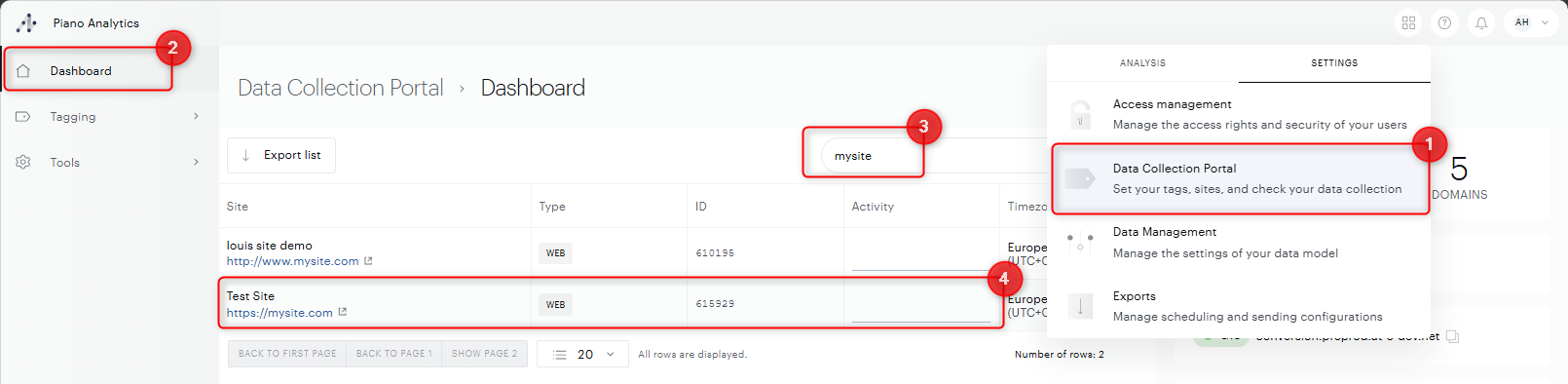
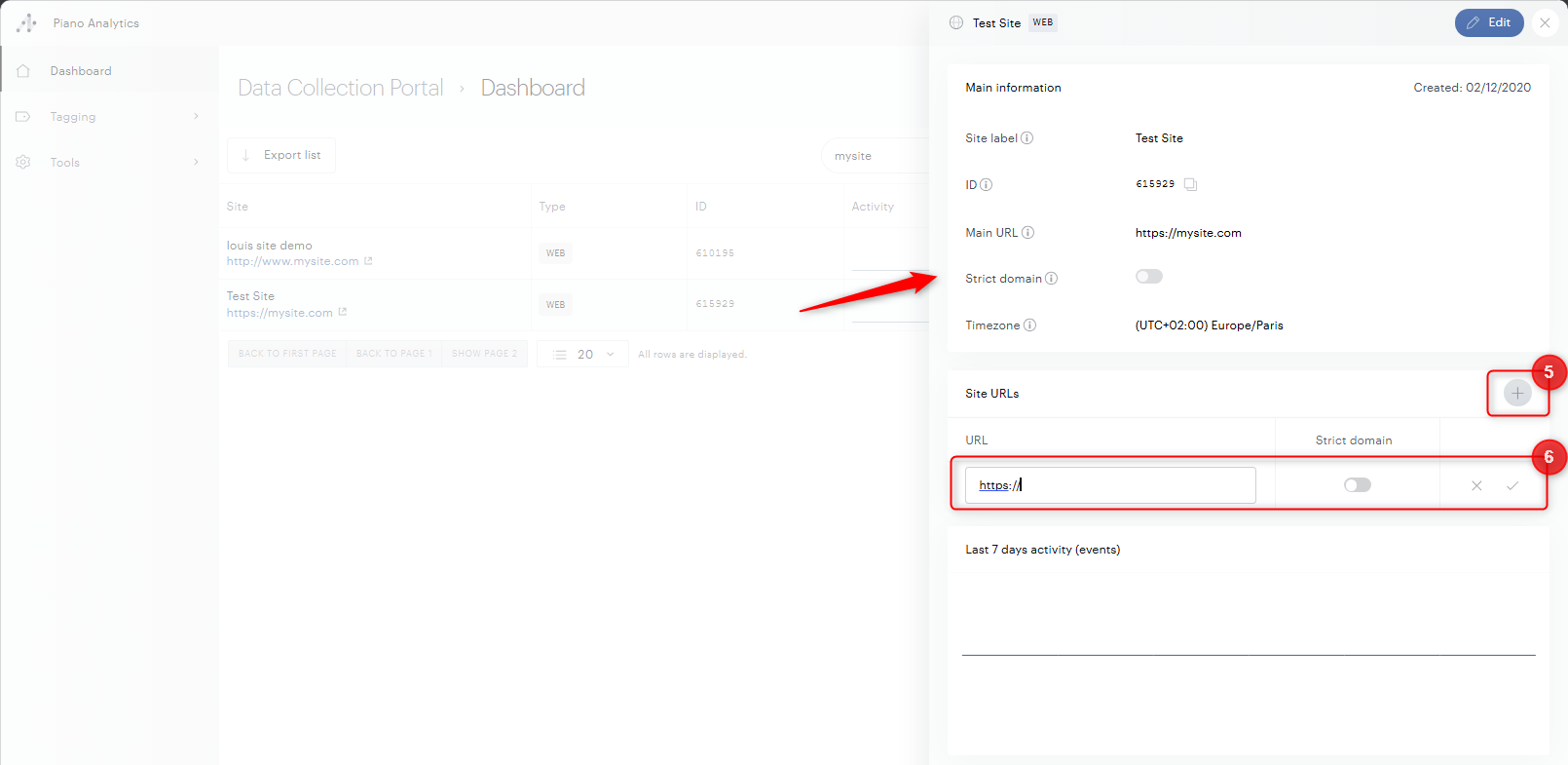
These URLs affect the detection of the "Portal sites" and "Direct access (continuation of visit)" traffic sources. For example, if the old domain redirects to the new one and the old URL is declared, those visits appear under "Direct access (continuation of visit)". If it isn't declared, they appear as referral traffic.
Add the new URL as an additional URL before the switch, then set it as the main URL on the day of the change.
This update is not retroactive. Data collected before the change keeps its original traffic source.
Reports, segments, and rules
Properties based on the URL, such as the event URL and its domain, start showing the new domain after the switch, which creates a visible break in trend analyses. Update any board, segment, or data management rule that filters on the old domain (event_url or event_url_domain) so it includes the new one.
ACPM-certified sites
If your site has ACPM certification (French customers), update the DSH linked to these perimeters with the new domains.
Verification
After the switch, open Explorer and filter on event_url_domain to confirm events are received from the new domain.