
Piano Analytics compares the referrer of each visit with its list of search engine URLs.
The referrer is the URL of the page the visitor was on just before arriving on your site, and the browser sends it. When the referrer matches an entry in the list, the visit is assigned to Search engines. Piano maintains this list and updates it when new search engines appear.
Search engine list
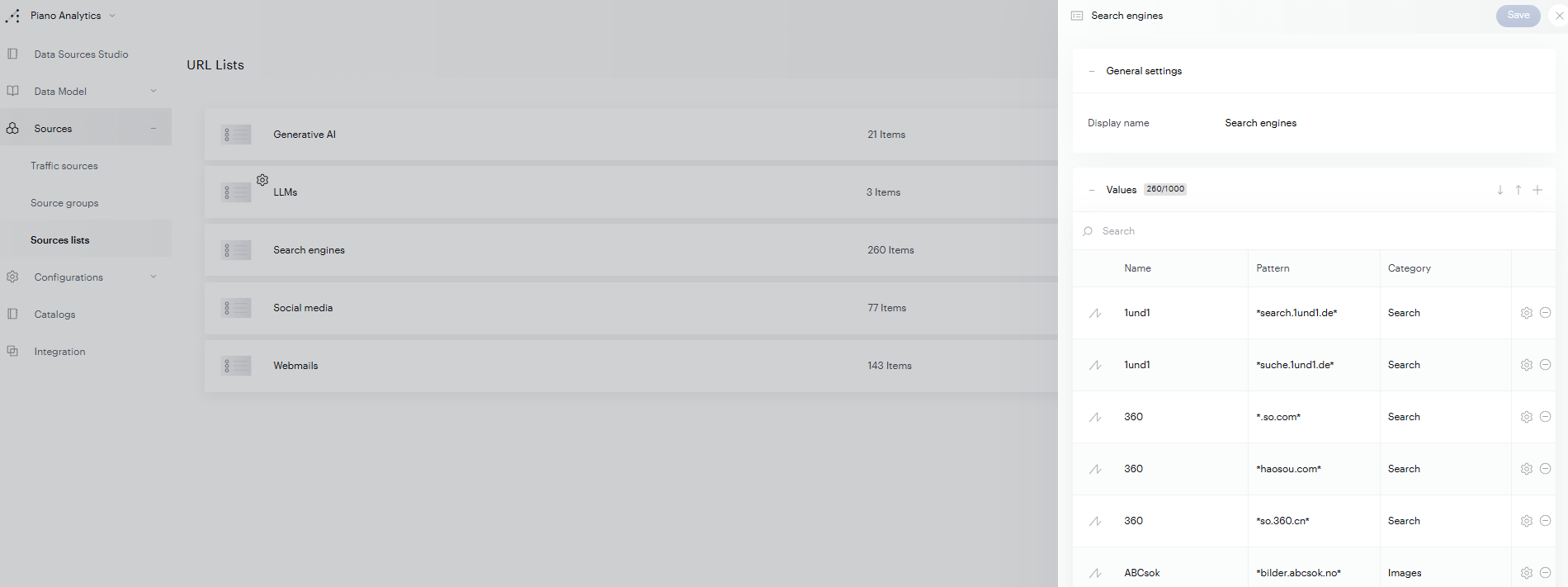
To see every URL Piano Analytics recognizes as a search engine, go to Data Management > Sources > Sources lists, then click Search engines. Each entry has three columns:
-
Name: the search engine shown in your reports (for example, "1und1").
-
Pattern: the referrer URL to match. An asterisk (*) stands for any characters, so
*search.1und1.de*matches any referrer that containssearch.1und1.de. -
Category: the type of search (for example, "Search" or "Images").
Add your own entries
If a search engine you use isn't recognized, for example a regional engine or the internal search of a partner portal, you can add it to the list:
-
In the Search engines panel, click the + icon next to Values.
-
Enter the Name, Pattern and Category.
-
Click Save.